 +91 981-810-8884, 0114-214-3250
| Technical Name | knk_frappe_pos_product_sequence |
| License | OPL-1 |
| Also available in version | v 15.0 |
ERPNext POS Product Sequence
Organize POS products with custom sequence numbers and color indicators
ERPNext POS Product Sequence is an ERPNext app that allows users to assign sequence numbers to products directly from the Item Master. The same sequence is reflected on the POS screen, helping cashiers locate products faster during billing.
The app improves product organization in Point of Sale by displaying items according to their assigned sequence numbers. It also supports item-specific colors, making selected products easier to identify and enhancing the overall POS user experience.
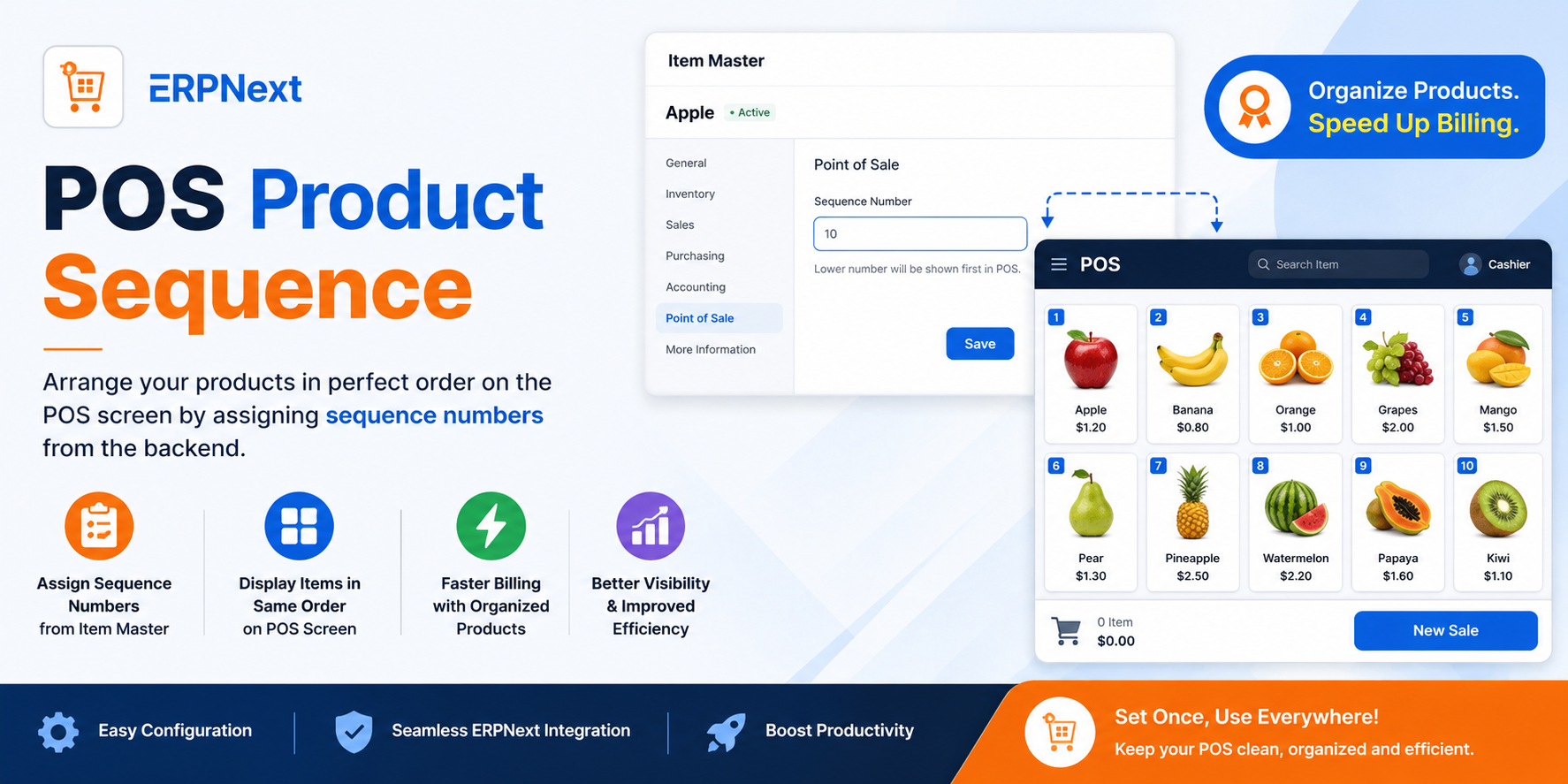
🚀 ERPNext POS Product Sequence Features
Control product display order and improve visibility inside ERPNext POS.
Assign Sequence Numbers
Define custom sequence numbers for items directly from the Item Master.
Ordered POS Display
Products appear on the POS screen according to the assigned sequence numbers.
Faster Billing
Reduce search time and speed up checkout operations at the POS counter.
Item Master Integration
Manage sequence settings directly from the existing Item Master form.
Better Product Visibility
Colored product tiles help staff quickly identify items while billing.
Automatic Synchronization
Changes made in Item Master are automatically reflected on the POS screen.
Simple Configuration
No complex setup required—configure sequence and color in a few clicks.
Enhanced POS Experience
Improve usability and efficiency for cashiers during busy billing sessions.
How to Use ERPNext POS Product Sequence
1.
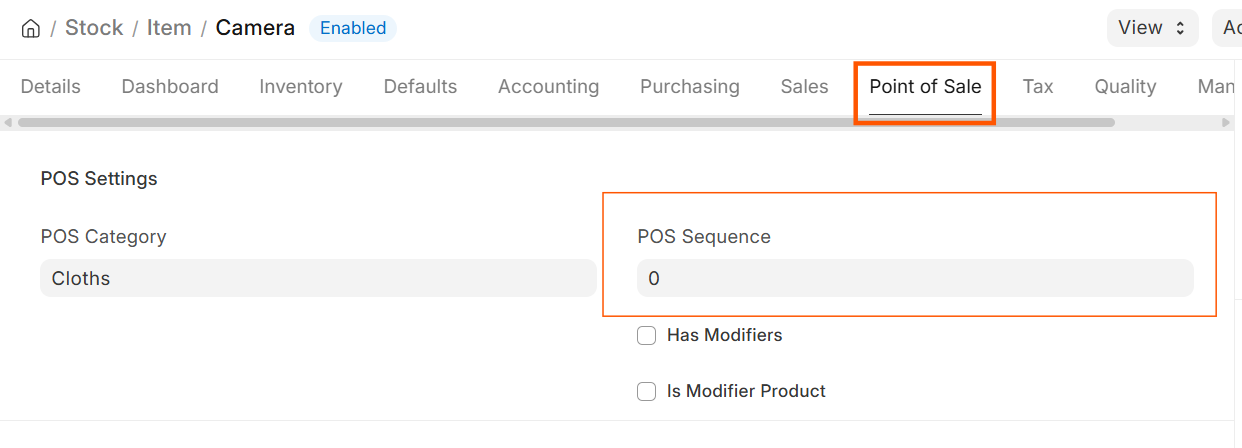
Open the Item Master Point of Sale Tab
:-
Navigate to the Item Master and open the item for which you want to configure the POS display sequence. Inside the Item Master, navigate to the Point of Sale tab where POS-specific settings are available.
2.
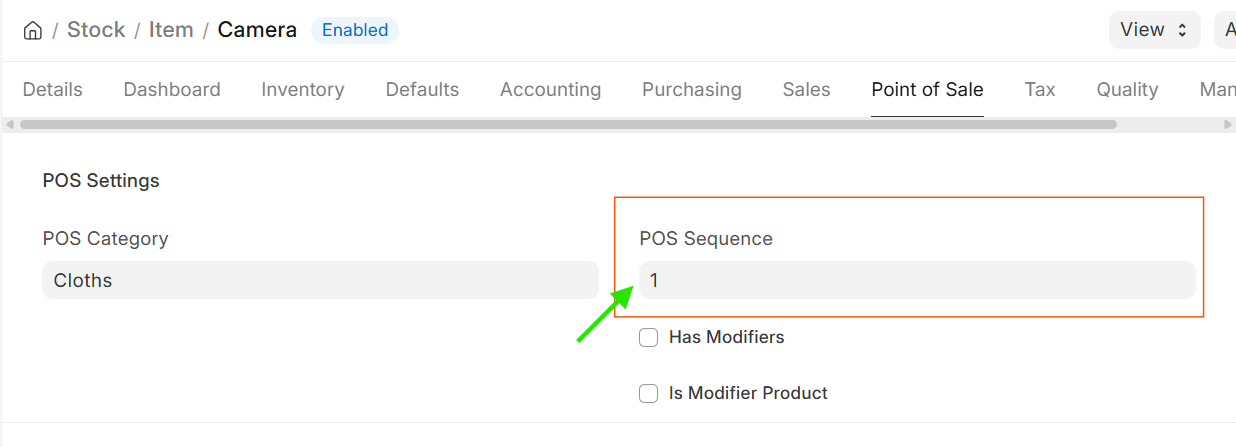
Set Sequence Number :-
Enter the desired Sequence Number for the item. The sequence number determines the product position on the POS screen.
3.
Save the Item and Open POS
:-
Save the item after configuring the sequence and color. Return to the POS screen to view the changes.
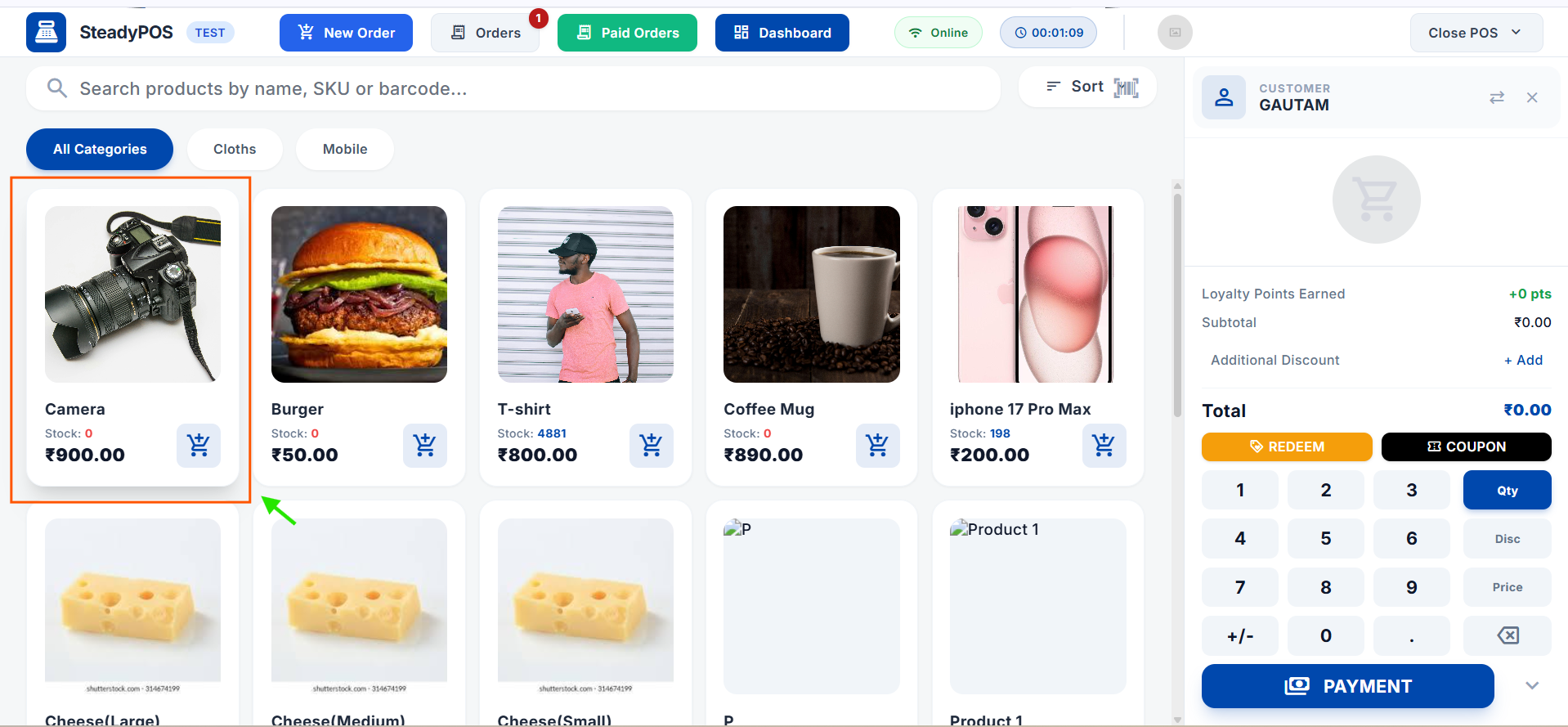
Result :-
The item will appear on the POS screen according to the assigned sequence number. The selected color will also be displayed, helping users quickly identify products and making the billing process faster and more organized.
Note :-
1. Lower sequence numbers appear first on the POS screen.
2. Any changes made in the Item Master are automatically reflected in the POS interface after saving.
ERPNext POS Product Sequence Support
- Installation & Setup Assistance
- POS Product Sequence Configuration
- Item Master Integration Support
- POS Product Display Order Management
- ERPNext Version Upgrade Assistance
- Bug Fixes & Customization Support
Version 16 (Latest Release)
- POS Product Sequence Management
- Assign Sequence Numbers from Item Master
- Automatic POS Product Ordering
- Improved Product Visibility During Billing
- Faster Product Selection in POS
- Seamless ERPNext POS Integration
- Lightweight & User-Friendly Interface
- Compatible with ERPNext v15
- Easy Configuration & Maintenance
Our Frappe Apps








Frappe Proprietary License v1.0

This software and associated files (the "Software") may only be used (executed,
modified, executed after modifications) if you have purchased a valid license
from the authors, typically via Frappe Apps, or if you have received a written
agreement from the authors of the Software (see the COPYRIGHT file).

You may develop Frappe apps that use the Software as a library (typically
by depending on it, importing it and using its resources), but without copying
any source code or material from the Software. You may distribute those
apps under the license of your choice, provided that this license is
compatible with the terms of the Frappe Proprietary License (For example:
LGPL, MIT, or proprietary licenses similar to this one).

It is forbidden to publish, distribute, sublicense, or sell copies of the Software
or modified copies of the Software.

The above copyright notice and this permission notice must be included in all
copies or substantial portions of the Software.

THE SOFTWARE IS PROVIDED "AS IS", WITHOUT WARRANTY OF ANY KIND, EXPRESS OR
IMPLIED, INCLUDING BUT NOT LIMITED TO THE WARRANTIES OF MERCHANTABILITY,
FITNESS FOR A PARTICULAR PURPOSE AND NONINFRINGEMENT.
IN NO EVENT SHALL THE AUTHORS OR COPYRIGHT HOLDERS BE LIABLE FOR ANY CLAIM,
DAMAGES OR OTHER LIABILITY, WHETHER IN AN ACTION OF CONTRACT, TORT OR OTHERWISE,
ARISING FROM, OUT OF OR IN CONNECTION WITH THE SOFTWARE OR THE USE OR OTHER
DEALINGS IN THE SOFTWARE.

Comment on this module. Please Login