 +91 981-810-8884, 0114-214-3250
| Technical Name | paneview |
| License | OPL-1 |
| Also available in version | v 16.0 |
Pane View App
Smart Split-Screen Experience for Frappe & ERPNext
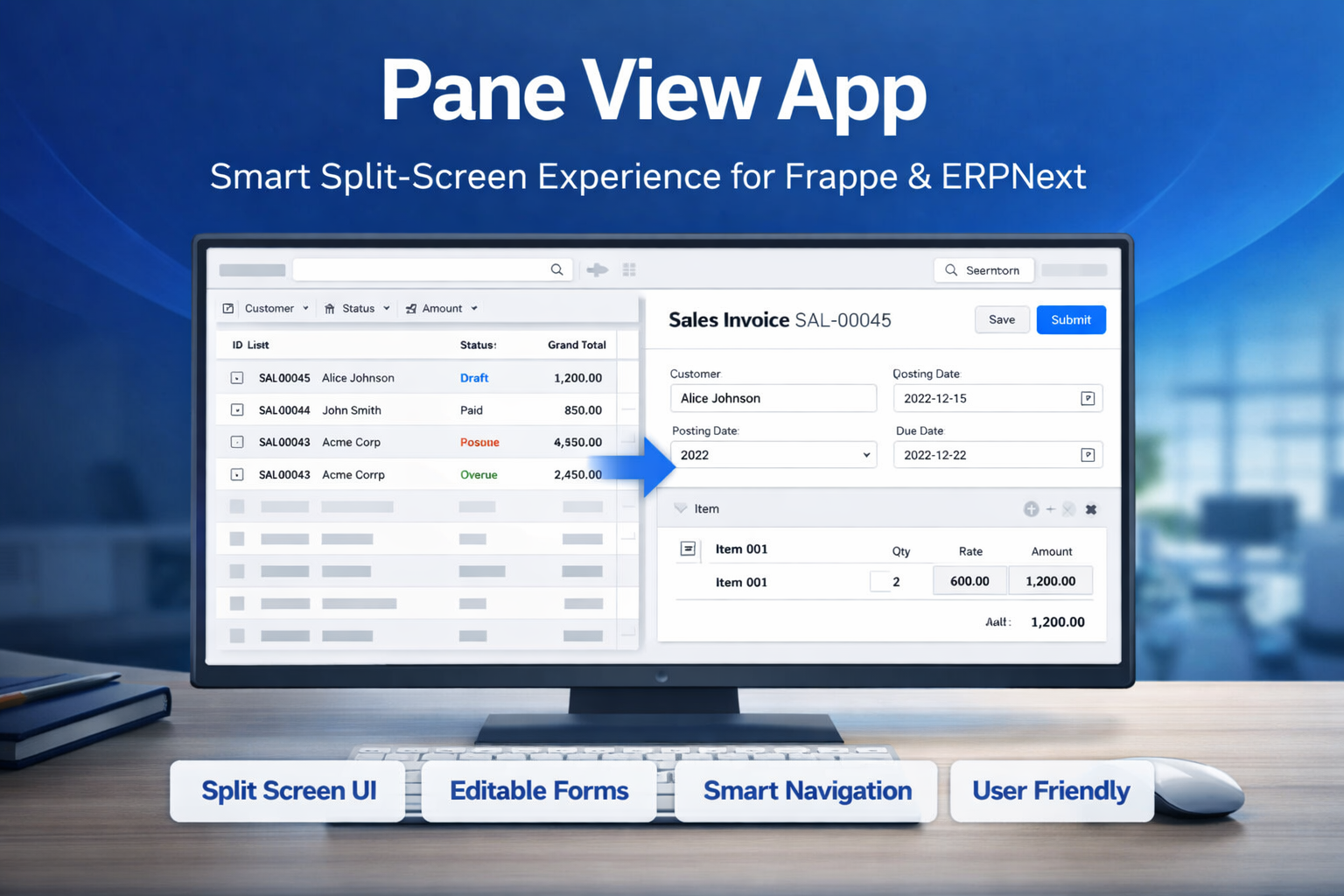
Pane View App is specially designed for Frappe users to enhance ERPNext dashboards with an efficient split-screen interface.
It combines List View and Form View in a single screen, enabling users to navigate, view, and edit records seamlessly without switching between pages.
🚀 Key Features
Improve productivity with a smarter and faster record management interface.
Split Screen UI
Displays list view on one side and detailed form view on the other for seamless workflow.
Easy Navigation
Instantly open any record from the list into the form view without page switching.
Editable Form View
Fully editable form interface allowing users to update and save records directly.
Bespoke Layout
Adjustable split ratio between list and form views with simple toggle control.
Search & Filter
Advanced search and filtering options in list view for quick record access.
Toggle View Mode
Switch easily between Pane View and Normal View with a single click.
🎥 Watch How Pane View Works
Wonder how Pane View App works? Watch the demo video to see it in action.
Our Frappe Apps







Frappe Proprietary License v1.0

This software and associated files (the "Software") may only be used (executed,
modified, executed after modifications) if you have purchased a valid license
from the authors, typically via Frappe Apps, or if you have received a written
agreement from the authors of the Software (see the COPYRIGHT file).

You may develop Frappe apps that use the Software as a library (typically
by depending on it, importing it and using its resources), but without copying
any source code or material from the Software. You may distribute those
apps under the license of your choice, provided that this license is
compatible with the terms of the Frappe Proprietary License (For example:
LGPL, MIT, or proprietary licenses similar to this one).

It is forbidden to publish, distribute, sublicense, or sell copies of the Software
or modified copies of the Software.

The above copyright notice and this permission notice must be included in all
copies or substantial portions of the Software.

THE SOFTWARE IS PROVIDED "AS IS", WITHOUT WARRANTY OF ANY KIND, EXPRESS OR
IMPLIED, INCLUDING BUT NOT LIMITED TO THE WARRANTIES OF MERCHANTABILITY,
FITNESS FOR A PARTICULAR PURPOSE AND NONINFRINGEMENT.
IN NO EVENT SHALL THE AUTHORS OR COPYRIGHT HOLDERS BE LIABLE FOR ANY CLAIM,
DAMAGES OR OTHER LIABILITY, WHETHER IN AN ACTION OF CONTRACT, TORT OR OTHERWISE,
ARISING FROM, OUT OF OR IN CONNECTION WITH THE SOFTWARE OR THE USE OR OTHER
DEALINGS IN THE SOFTWARE.

Comment on this module. Please Login