 +91 981-810-8884, 0114-214-3250
| Technical Name | knk_frappe_shipstation_connector |
| License | OPL-1 |
| Technical Name | knk_frappe_shipstation_connector |
| License | OPL-1 |
ERPNext ShipStation Integration for Shipping & Fulfillment Automation
Automate Order Sync, Shipping Labels, Tracking Updates and Multi-Carrier Fulfillment in ERPNext
ERPNext ShipStation Fulfillment Bridge enables automated shipping workflows by connecting ERPNext with ShipStation for order synchronization, shipment processing, label generation, and fulfillment updates.
Sync Sales Orders and Delivery Notes from ERPNext to ShipStation, manage multi-carrier shipping, receive tracking numbers in real time, automate fulfillment updates, reduce shipping errors, and cancel shipments directly from ERPNext.
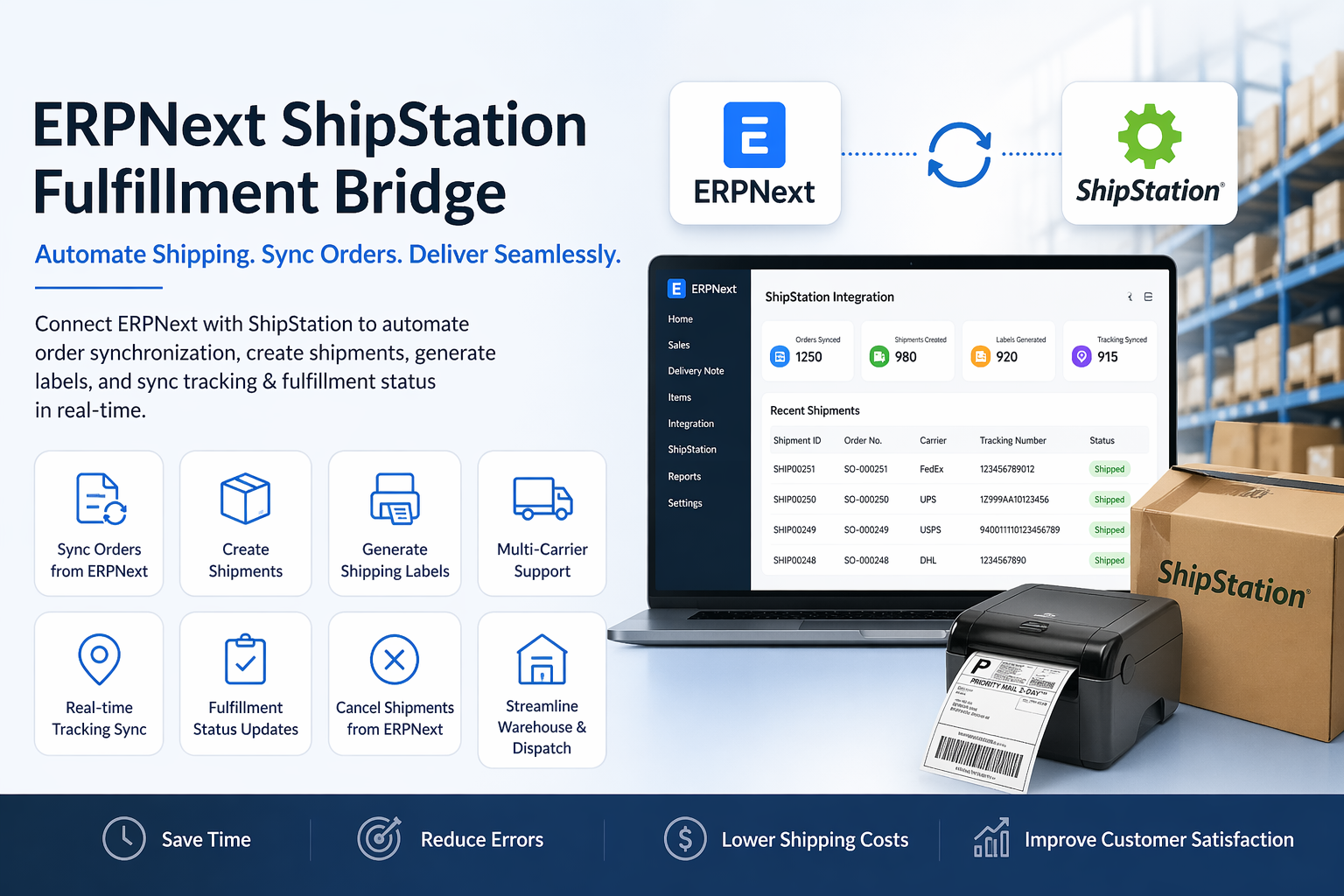
🚀 ERPNext ShipStation Integration Features
Advanced shipping automation, order fulfillment synchronization and tracking management for ERPNext.
Sync Sales Orders from ERPNext to ShipStation
Automatically synchronize Sales Orders and Delivery Notes for faster fulfillment processing.
Automated Shipment Creation
Create shipments automatically from ERPNext orders to streamline dispatch operations.
Shipping Label Printing Integration
Generate shipping labels directly through ShipStation for automated fulfillment.
Multi-Carrier Shipping Support
Support multiple carriers through ShipStation for flexible shipping operations.
Real-Time Shipment Tracking Sync
Push tracking numbers back into ERPNext automatically for complete visibility.
Fulfillment Status Updates in ERPNext
Synchronize shipping and fulfillment statuses automatically between both systems.
Reduce Manual Shipping Errors
Improve order accuracy and eliminate repetitive shipping data entry.
Warehouse Dispatch Automation
Streamline warehouse picking, packing and dispatch workflows.
Cancel Shipments Directly from ERPNext
Cancel shipments and synchronize cancellation status automatically.
Shipping Workflow Automation
Automate shipping processes from order creation through delivery confirmation.
eCommerce Order Fulfillment Integration
Designed for high-volume eCommerce and distribution shipping operations.
Faster Shipping and Delivery Processing
Accelerate fulfillment turnaround and improve shipping efficiency.
How to Use ERPNext ShipStation Fulfillment Bridge
Configure ShipStation API Credentials :-
Go to the ShipStation integration settings in ERPNext and configure your API Key, API Secret, store details, and default shipping preferences to establish the connection.
Enable Sales Order / Delivery Note Synchronization :-
Map Sales Orders or Delivery Notes for automatic synchronization from ERPNext to ShipStation for fulfillment processing.
Create Shipments and Generate Shipping Labels :-
Once orders are synced, generate shipments, choose carriers, shipping methods, and print labels directly through ShipStation.
Sync Tracking Numbers Back to ERPNext :-
After shipment creation, tracking numbers are automatically pushed back into ERPNext for real-time shipment visibility.
Monitor Fulfillment and Shipping Status :-
Track shipment progress, delivery status, and fulfillment updates automatically inside ERPNext.
Cancel Shipments from ERPNext :-
Cancel shipments directly from ERPNext and synchronize cancellation status back to ShipStation when required.
Streamline Warehouse Dispatch Workflow :-
Use the integration to automate picking, packing, dispatch, and reduce manual shipping errors across warehouse operations.
ERPNext ShipStation Integration Support
- ShipStation API Configuration & Setup Assistance
- Sales Order & Delivery Note Sync Support
- Shipment Label Generation & Carrier Mapping Guidance
- Tracking Synchronization & Fulfillment Status Support
- Shipment Cancellation Workflow Assistance
- Bug Fixes, Optimization & Upgrade Support
Version 16 (Latest Release)
- ERPNext to ShipStation Order Synchronization
- Automated Shipment Creation & Label Generation
- Multi-Carrier Shipping Support
- Real-Time Tracking Number Sync
- Fulfillment Status Updates in ERPNext
- Shipment Cancellation from ERPNext
- Warehouse Dispatch Workflow Automation
- Reduced Manual Shipping Errors
Our Frappe Apps








Frappe Proprietary License v1.0

This software and associated files (the "Software") may only be used (executed,
modified, executed after modifications) if you have purchased a valid license
from the authors, typically via Frappe Apps, or if you have received a written
agreement from the authors of the Software (see the COPYRIGHT file).

You may develop Frappe apps that use the Software as a library (typically
by depending on it, importing it and using its resources), but without copying
any source code or material from the Software. You may distribute those
apps under the license of your choice, provided that this license is
compatible with the terms of the Frappe Proprietary License (For example:
LGPL, MIT, or proprietary licenses similar to this one).

It is forbidden to publish, distribute, sublicense, or sell copies of the Software
or modified copies of the Software.

The above copyright notice and this permission notice must be included in all
copies or substantial portions of the Software.

THE SOFTWARE IS PROVIDED "AS IS", WITHOUT WARRANTY OF ANY KIND, EXPRESS OR
IMPLIED, INCLUDING BUT NOT LIMITED TO THE WARRANTIES OF MERCHANTABILITY,
FITNESS FOR A PARTICULAR PURPOSE AND NONINFRINGEMENT.
IN NO EVENT SHALL THE AUTHORS OR COPYRIGHT HOLDERS BE LIABLE FOR ANY CLAIM,
DAMAGES OR OTHER LIABILITY, WHETHER IN AN ACTION OF CONTRACT, TORT OR OTHERWISE,
ARISING FROM, OUT OF OR IN CONNECTION WITH THE SOFTWARE OR THE USE OR OTHER
DEALINGS IN THE SOFTWARE.

Comment on this module. Please Login