 +91 981-810-8884, 0114-214-3250
| Technical Name | knk_frappe_distance_shipping_rule |
| License | OPL-1 |
| Technical Name | knk_frappe_distance_shipping_rule |
| License | OPL-1 |
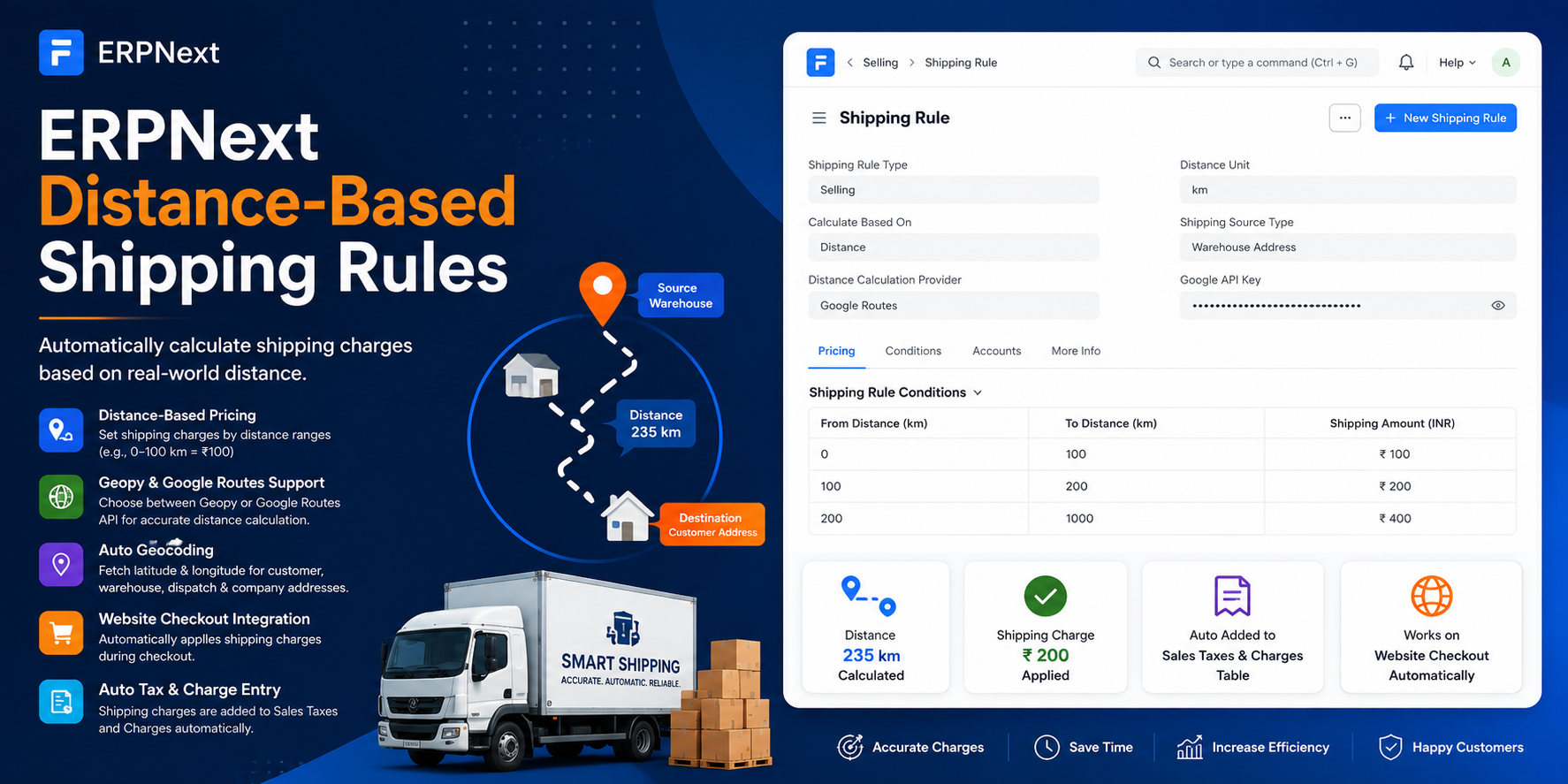
ERPNext Distance-Based Shipping Rules
Automatic Distance-Based Shipping Cost Calculation
Distance-Based Shipping Rules automatically calculate shipping charges based on the geographical distance between the selected source location and the customer's delivery address. The module supports both Geopy and Google Routes API for distance calculation and automatically adds shipping charges to the Sales Taxes and Charges table in Sales Orders. With built-in geocoding for addresses and warehouses, businesses can implement accurate distance-driven shipping costs without any manual intervention.
🚚 Key Features
Automate shipping charges based on real-world delivery distance.
Distance-Based Pricing
Automatically calculates shipping charges based on delivery distance ranges configured in Shipping Rules.
Geopy & Google Routes Support
Choose between Geopy or Google Routes API for accurate distance calculations.
Automatic Geocoding
Fetch latitude and longitude automatically for customer, warehouse, dispatch, and company addresses.
Multiple Source Types
Calculate shipping from Warehouse Address, Dispatch Address, or Company Address based on business needs.
Auto Tax & Charge Entry
Shipping charges are automatically added to the Sales Taxes and Charges table in Sales Orders.
Website Checkout Integration
Automatically applies distance-based shipping charges during ERPNext website checkout.
Real-Time Recalculation
Shipping costs are instantly recalculated whenever the source address, shipping address, or shipping rule changes.
Flexible Distance Slabs
Configure custom distance ranges such as 0–100 km, 100–200 km, and assign different shipping charges.
Fully Automated Process
Eliminates manual shipping calculations and ensures accurate, consistent pricing across all sales channels.
How to Use Distance-Based Shipping Rules
1. Configure the Distance-Based Shipping Rule :-
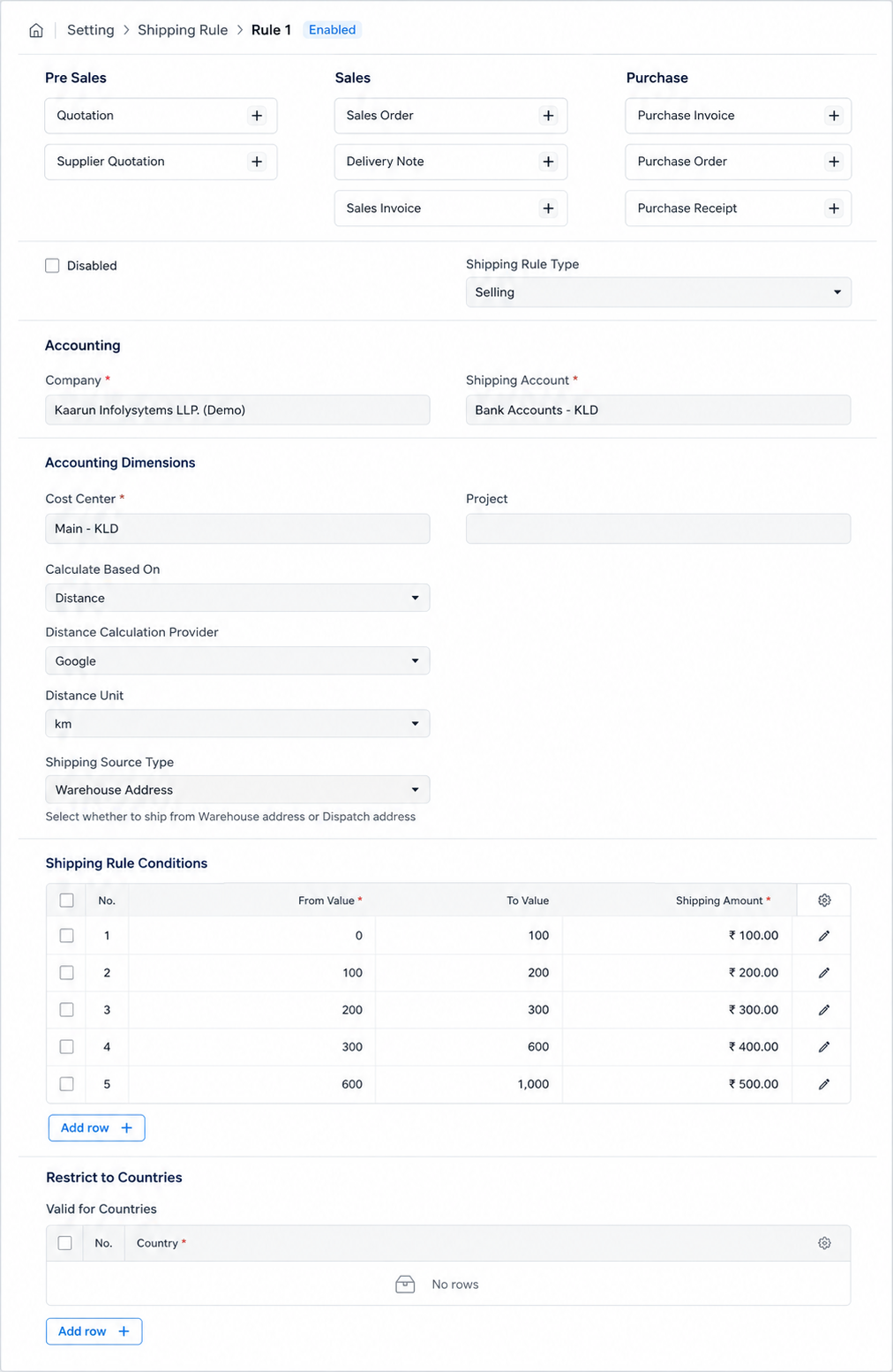
Go to Shipping Rule > New and create a new Shipping Rule. Set the Shipping Rule Type to "Selling", select the Company, Shipping Account, and Cost Center.
Under Calculate Based On, select "Distance". Choose the Distance Calculation Provider (Geopy or Google Routes), select the Distance Unit (km or miles), and choose the Shipping Source Type (Warehouse Address, Dispatch Address, or Company Address).
Under the Pricing section, configure distance ranges and their corresponding shipping charges.
2. Configure Shipping Rule Conditions :-
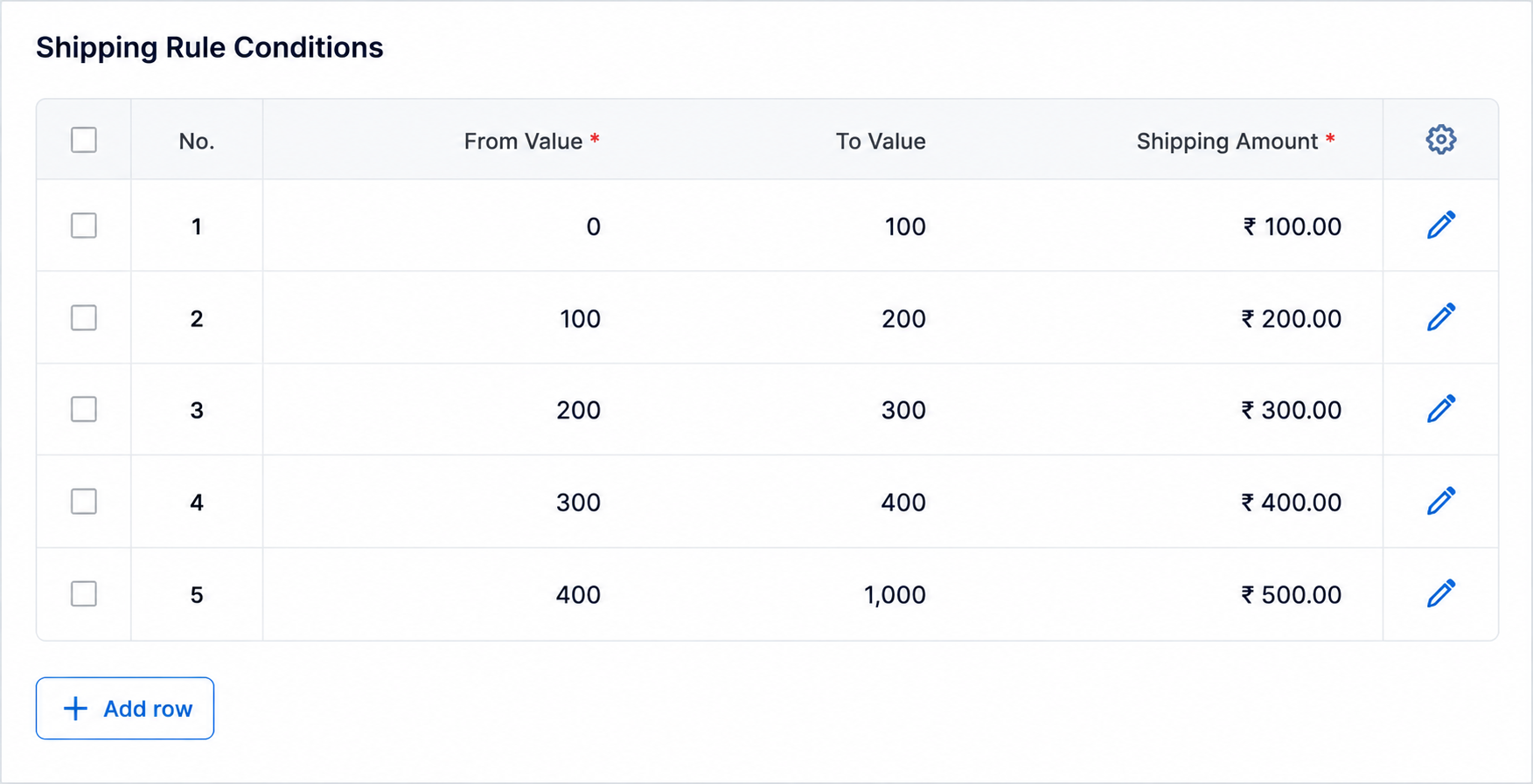
Add distance ranges and shipping amounts in the Shipping Rule Conditions table.
For example:
0–100 km = ₹100
100–200 km = ₹200
200–1000 km = ₹400
During transaction processing, the system calculates the delivery distance and automatically applies the matching shipping charge to the Sales Taxes and Charges section.
3. Setup Customer Delivery Addresses :-
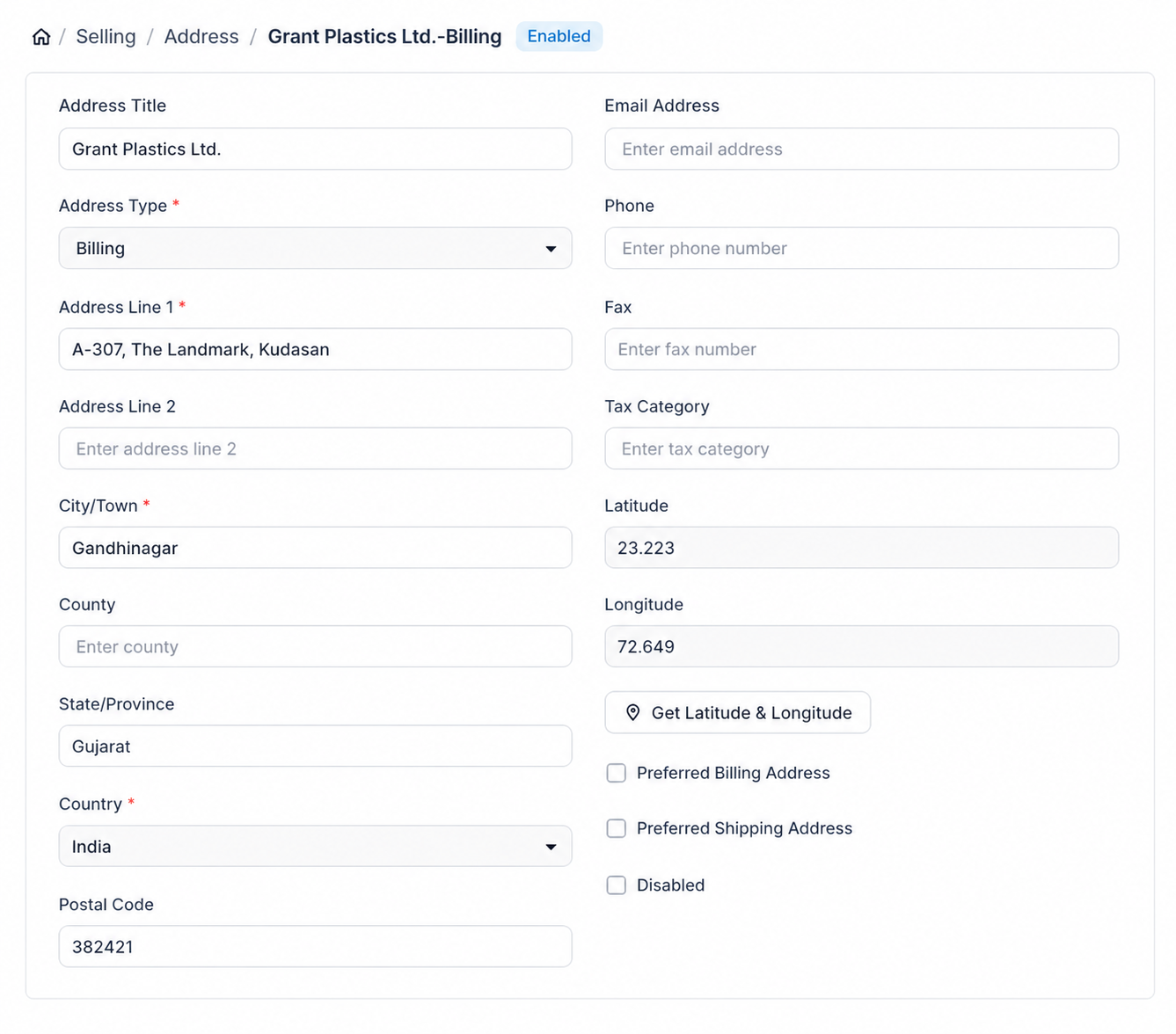
Customer addresses must contain latitude and longitude coordinates for destination distance calculation.
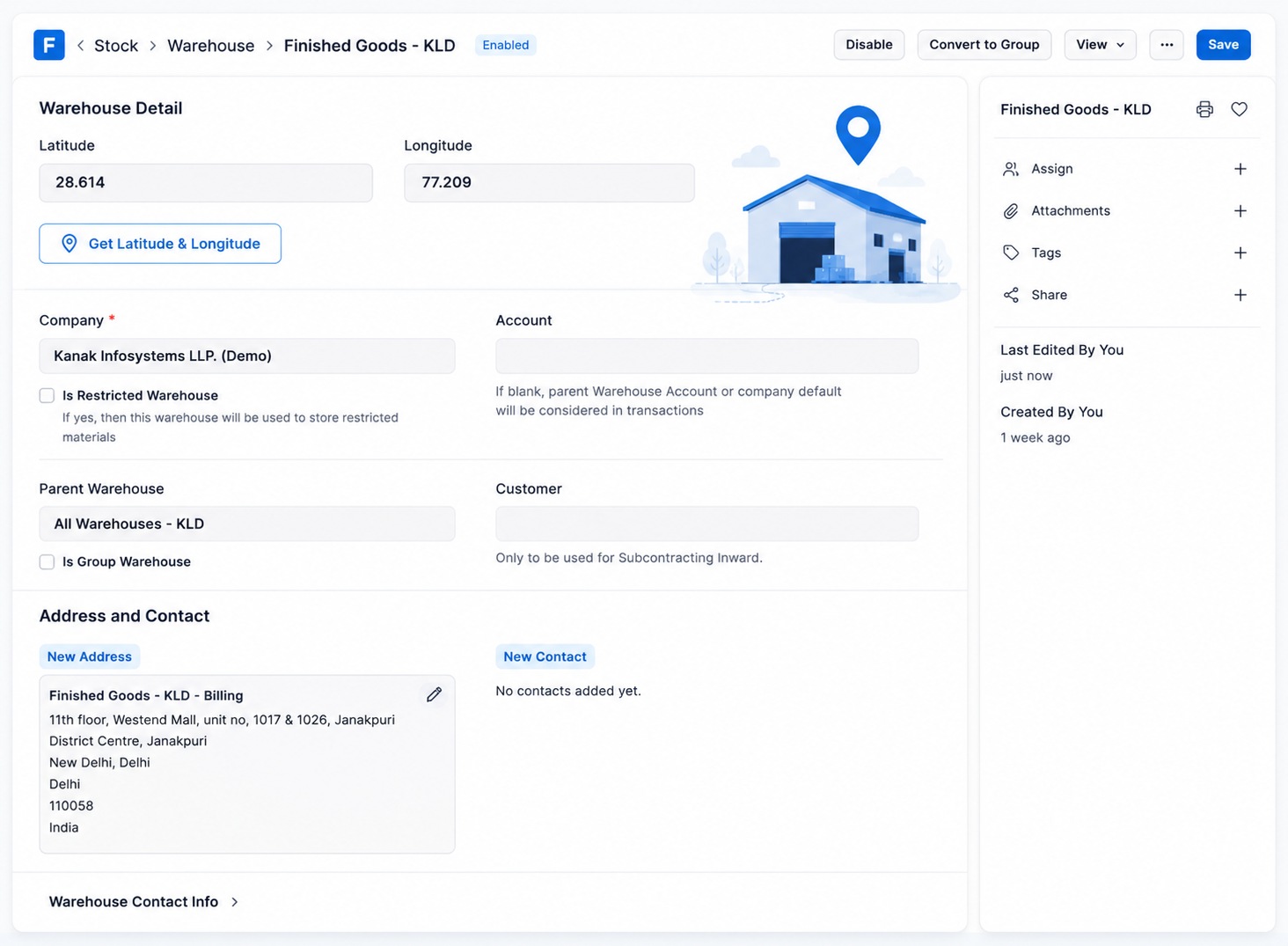
Open the Address record and click the "Get Latitude & Longitude" button to automatically fetch location coordinates. The system stores the latitude and longitude for future shipping calculations.
4. Configure Source Addresses :-
The module supports multiple source address types:
Warehouse Address
Go to Stock > Warehouse, open a warehouse, assign an address, and click "Get Latitude & Longitude". Coordinates are automatically synced to the warehouse.
Dispatch Address
Create an Address linked to your Company and fetch coordinates using the geocoding button.
Company Address
Ensure your Company has a linked address and fetch latitude/longitude from the Address record. Coordinates are automatically synchronized with the Company.
5. Apply Distance-Based Shipping Rule in Sales Order :-
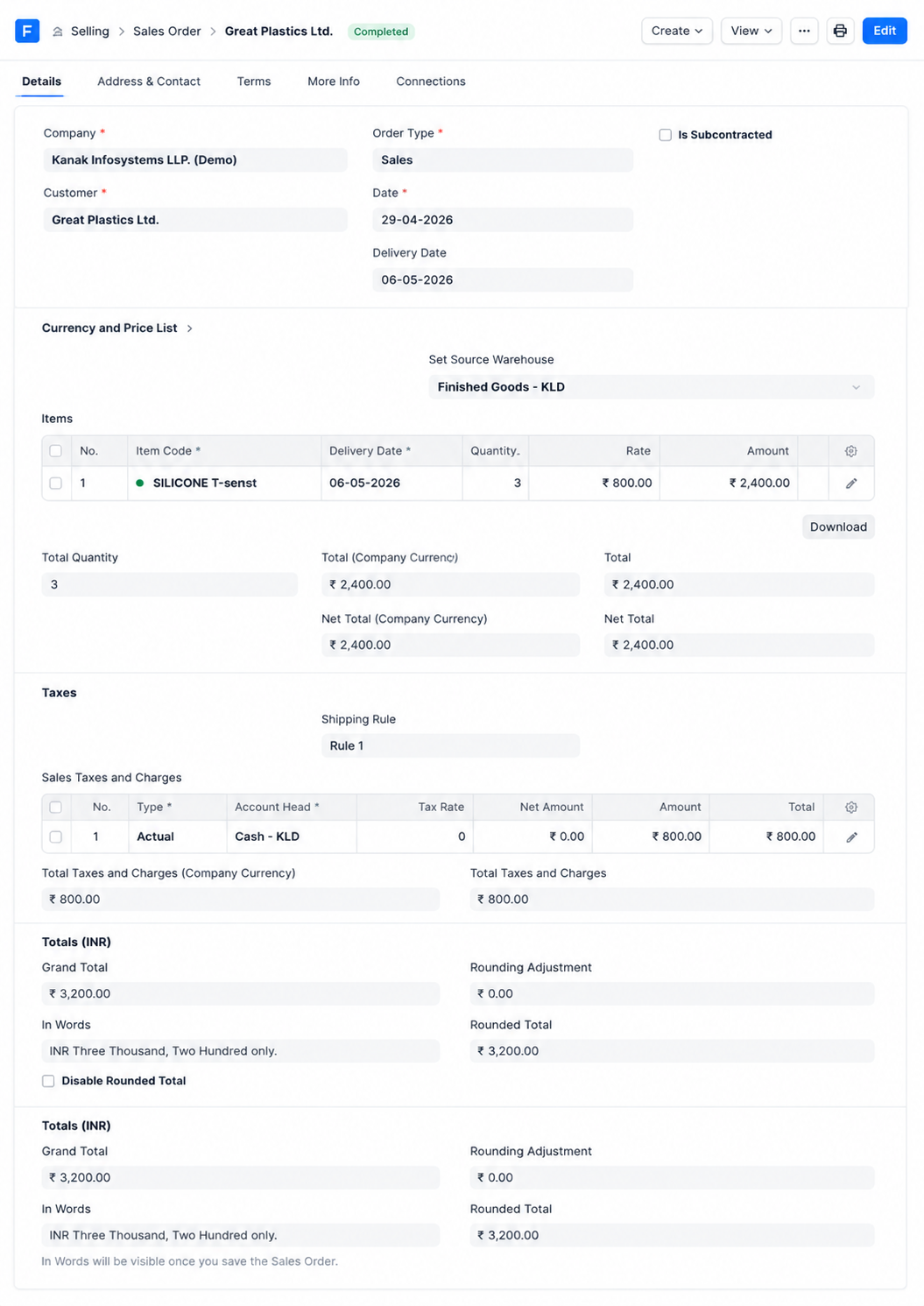
Create a new Sales Order and select the customer.
Choose the appropriate source address according to the configured Shipping Source Type:
• Warehouse Address → Select a Warehouse
• Dispatch Address → Select a Dispatch Address
• Company Address → Select a Company
Add items and select the Distance-Based Shipping Rule. The system automatically calculates the delivery distance, finds the matching distance slab, and adds the shipping charge to the Sales Taxes and Charges table. The Grand Total is updated automatically.
Note: Shipping charges are automatically recalculated whenever the source address, destination address, or shipping rule is changed.
6. Apply Distance-Based Shipping During Website Checkout :-
Customers can automatically receive distance-based shipping charges while placing orders through the website.
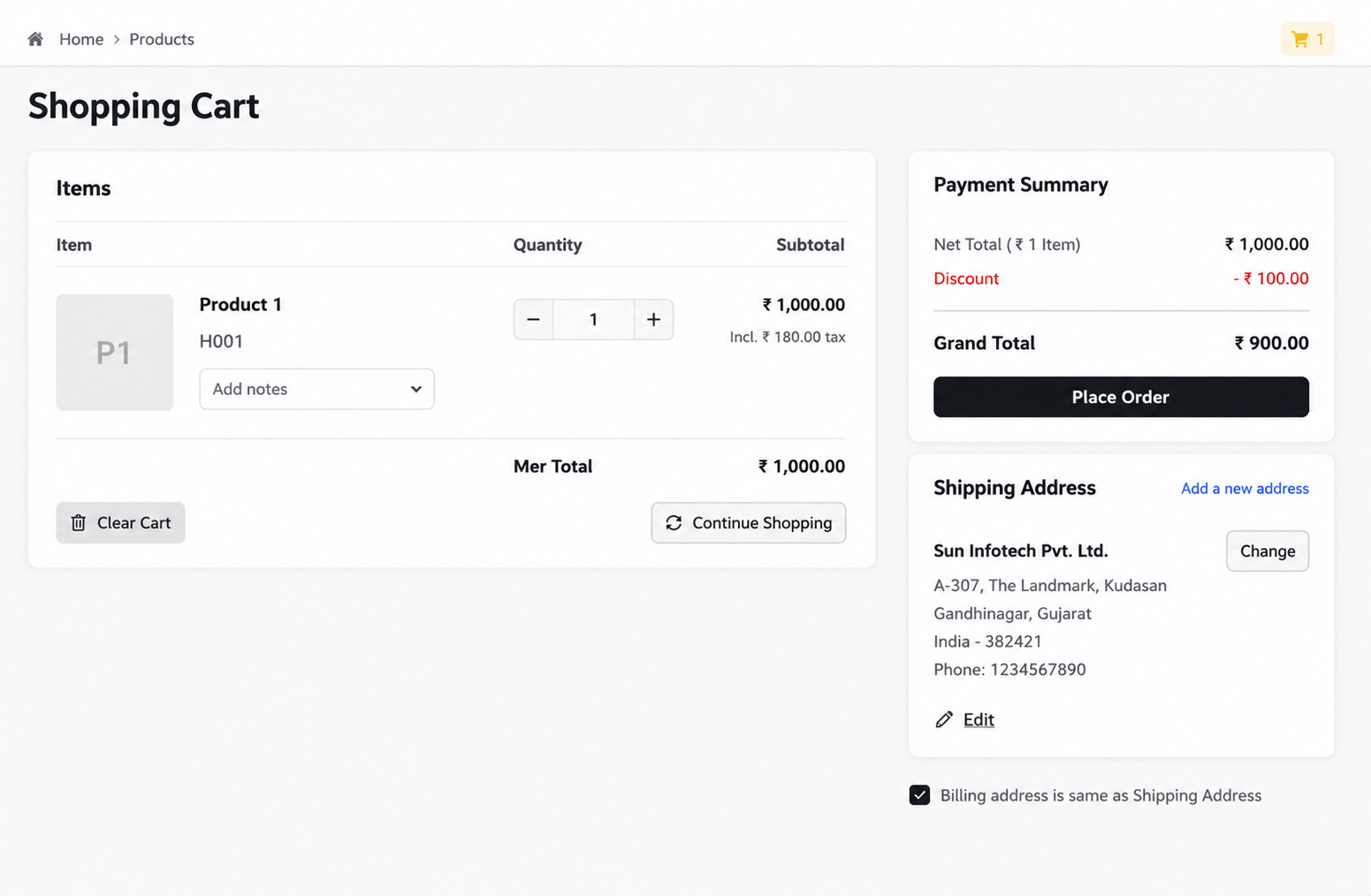
Step 1: Customer adds products to the cart and proceeds to checkout.
Step 2: Customer enters or selects a Shipping Address.
Step 3: The system automatically geocodes the address.
Step 4: Distance is calculated based on the configured source location.
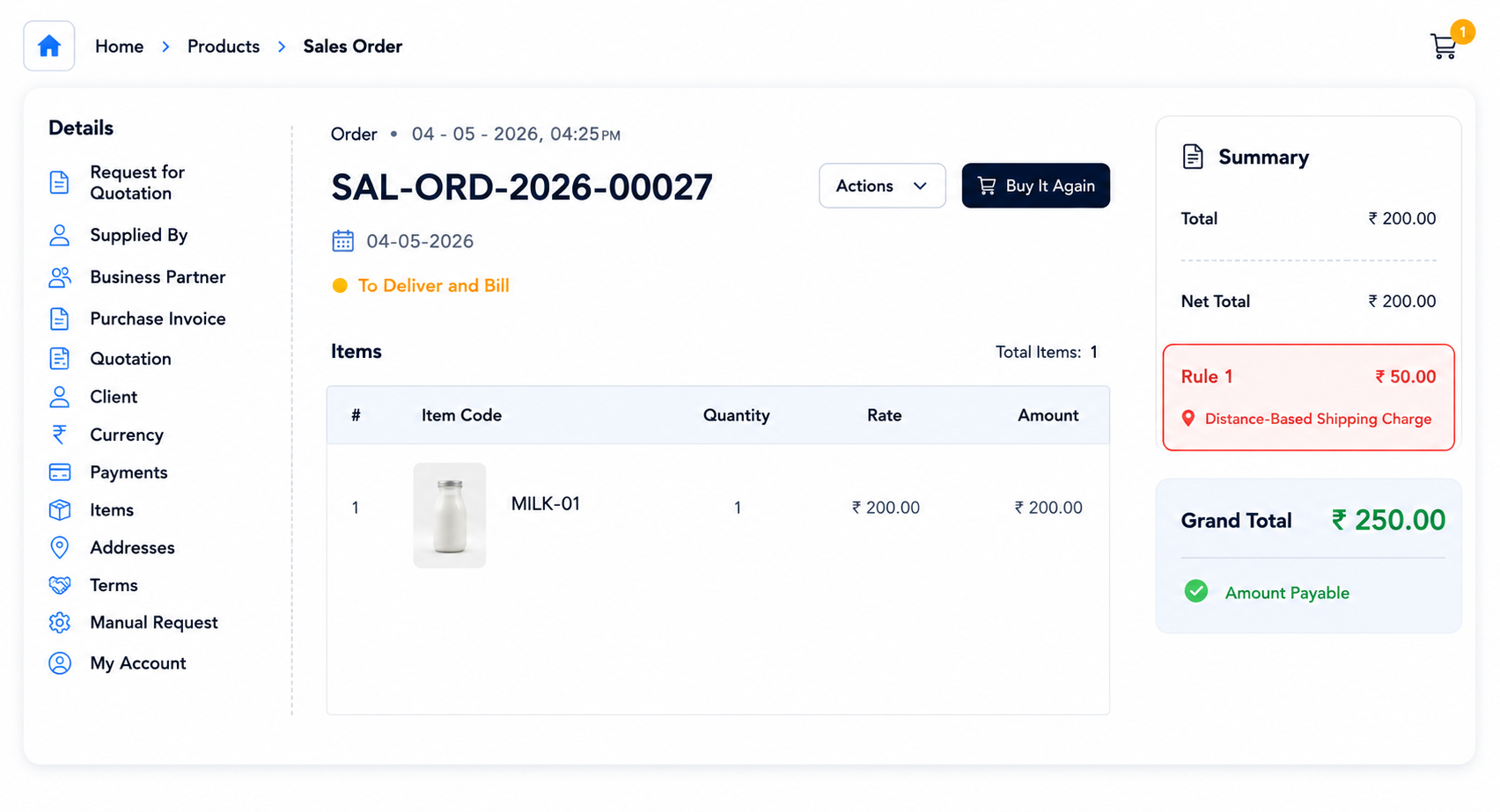
Step 5: The applicable shipping charge is added to the Payment Summary and Grand Total automatically.
Distance-Based Shipping Rules Support
- Shipping Rule Configuration Assistance
- Google Routes API & Geopy Setup Guidance
- Address Geocoding Support
- Issue Resolution & Performance Optimization
Version 16 (Latest Release)
- Distance-Based Shipping Charges Automatically calculates shipping costs based on configured distance ranges.
- Google Routes & Geopy Integration Supports multiple distance calculation providers for accurate results.
- Automatic Address Geocoding Fetch latitude and longitude for customer, warehouse, dispatch, and company addresses.
- Website Checkout Support Automatically applies shipping charges during eCommerce checkout.
- Native ERPNext Integration Seamlessly works with Sales Orders and Sales Taxes & Charges without additional processes.
Our Frappe Apps








Frappe Proprietary License v1.0

This software and associated files (the "Software") may only be used (executed,
modified, executed after modifications) if you have purchased a valid license
from the authors, typically via Frappe Apps, or if you have received a written
agreement from the authors of the Software (see the COPYRIGHT file).

You may develop Frappe apps that use the Software as a library (typically
by depending on it, importing it and using its resources), but without copying
any source code or material from the Software. You may distribute those
apps under the license of your choice, provided that this license is
compatible with the terms of the Frappe Proprietary License (For example:
LGPL, MIT, or proprietary licenses similar to this one).

It is forbidden to publish, distribute, sublicense, or sell copies of the Software
or modified copies of the Software.

The above copyright notice and this permission notice must be included in all
copies or substantial portions of the Software.

THE SOFTWARE IS PROVIDED "AS IS", WITHOUT WARRANTY OF ANY KIND, EXPRESS OR
IMPLIED, INCLUDING BUT NOT LIMITED TO THE WARRANTIES OF MERCHANTABILITY,
FITNESS FOR A PARTICULAR PURPOSE AND NONINFRINGEMENT.
IN NO EVENT SHALL THE AUTHORS OR COPYRIGHT HOLDERS BE LIABLE FOR ANY CLAIM,
DAMAGES OR OTHER LIABILITY, WHETHER IN AN ACTION OF CONTRACT, TORT OR OTHERWISE,
ARISING FROM, OUT OF OR IN CONNECTION WITH THE SOFTWARE OR THE USE OR OTHER
DEALINGS IN THE SOFTWARE.

Comment on this module. Please Login