 +91 981-810-8884, 0114-214-3250
| Technical Name | knk_frappe_website_variant_grid |
| License | OPL-1 |
| Technical Name | knk_frappe_website_variant_grid |
| License | OPL-1 |
ERPNext Website Variant Matrix & Table View
Smart Product Variant Selection, Comparison & Bulk Ordering Experience
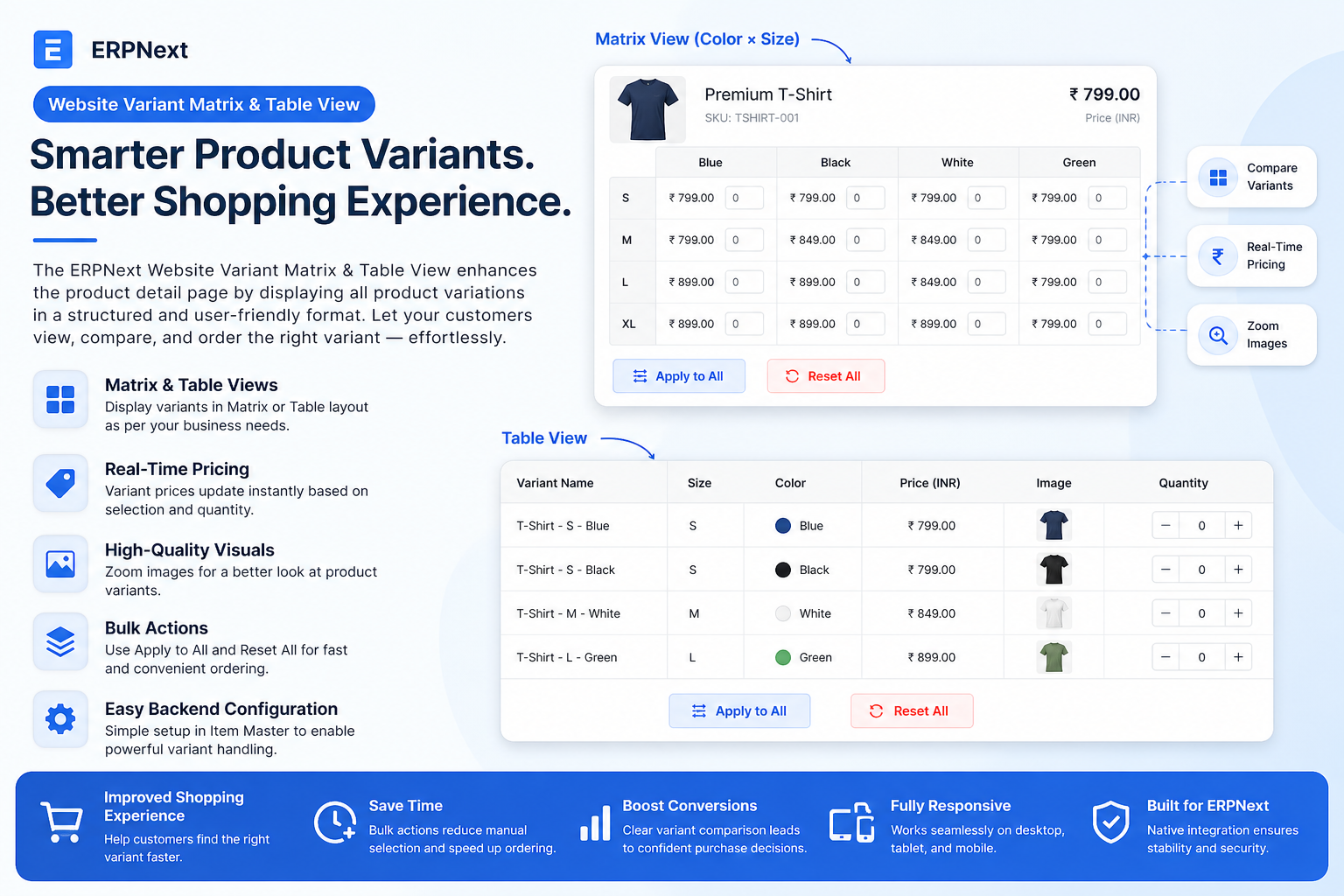
Website Variant Matrix & Table View improves the ERPNext product page by presenting all product variants in an intuitive Matrix or Table layout for faster selection and comparison.
Customers can compare attributes like size, color, style, pricing and place quantities in bulk, while backend users control the layout directly from the Item Master configuration.
🚀 Key Features
Advanced product variant browsing and ordering for B2B and eCommerce stores.
Variant Matrix View
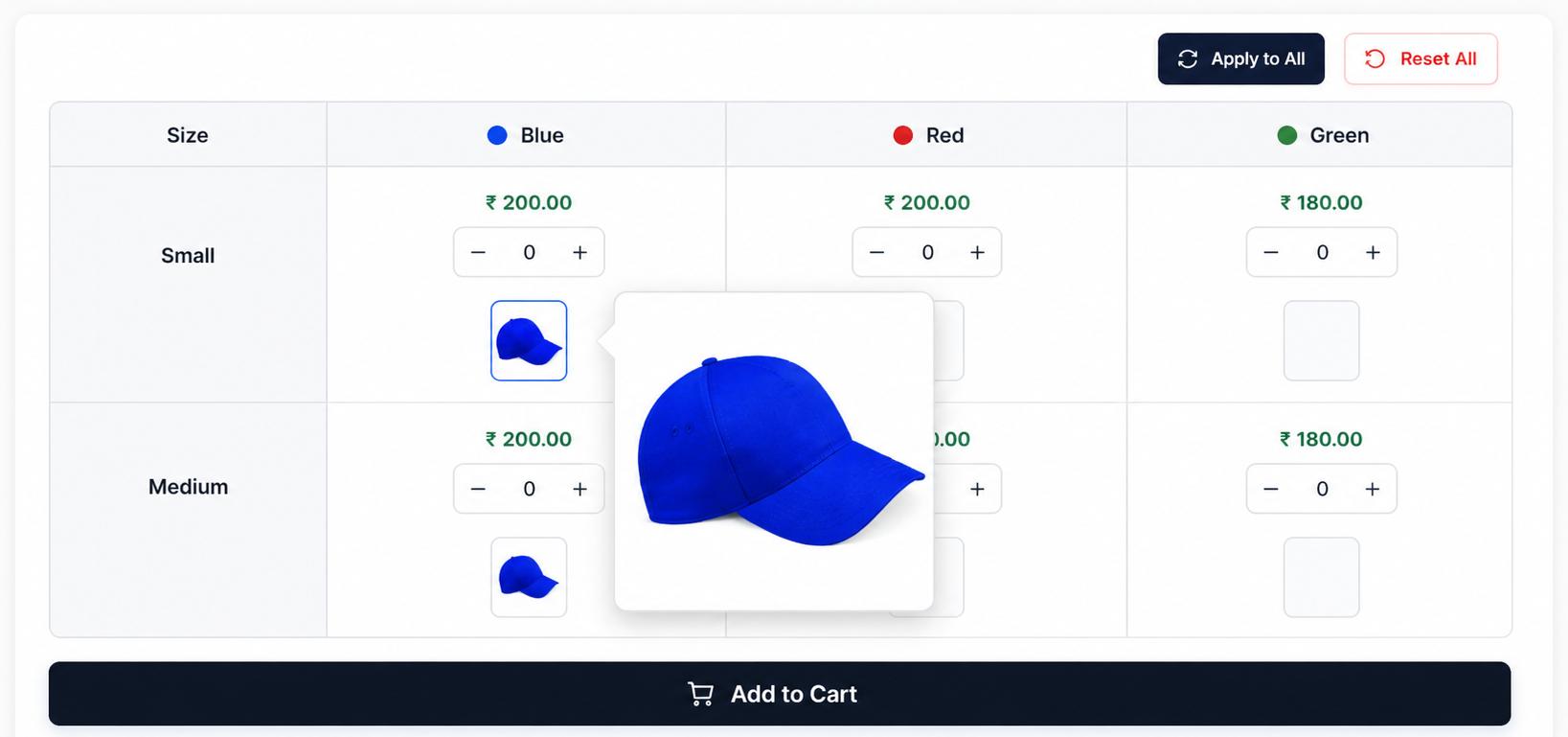
Compare combinations like Size × Color in a structured matrix for faster selection.
Variant Table View
Display variant name, price, size, color and attributes in a clean tabular layout.
Real-Time Pricing
Prices update instantly as customers select or highlight different product variants.
Bulk Quantity Actions
Use Apply to All and Reset All controls to manage quantities across multiple variants.
Zoom Product Visuals
High-quality zoom view allows close inspection of product images for each variant.
Backend Variant Configuration
Configure variant attributes, matrix axes, and auto-generate variants from Item Master.
Workflow
1. Create Template Item :-
Go to Stock → Item and create a product template.
Enable "Has Variant" to activate variant management for the item.
2. Define Variant Attributes :-
Add attributes like Size, Color, Style inside the
Variant Attributes table.
3. Select View Type (Matrix or Table) :-
Choose whether the website product page should display in
Matrix View or Table View.
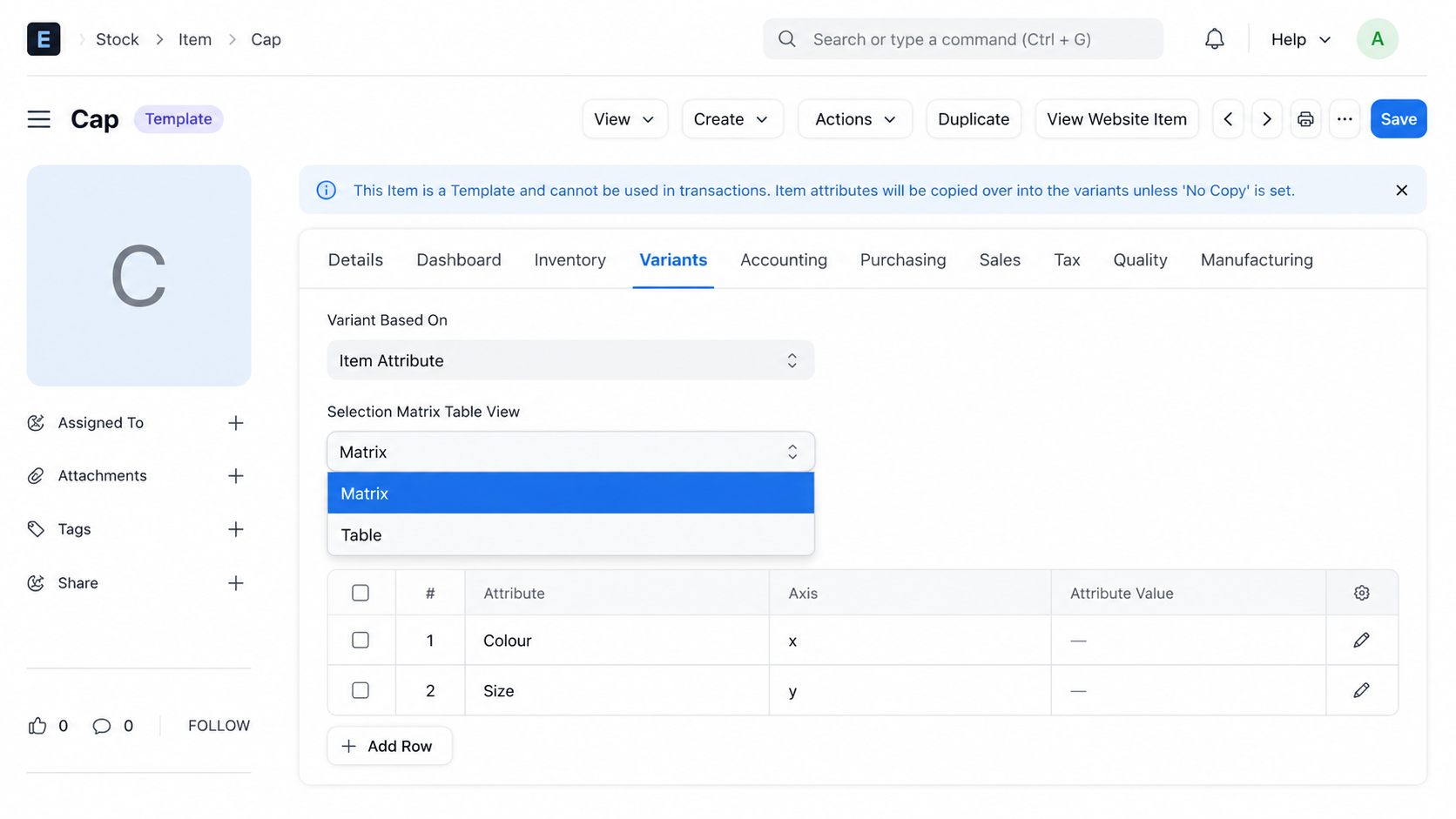
4. Configure Matrix Axis :-
If Matrix View is selected, assign attributes to
X-Axis and Y-Axis
(Example: Color × Size).
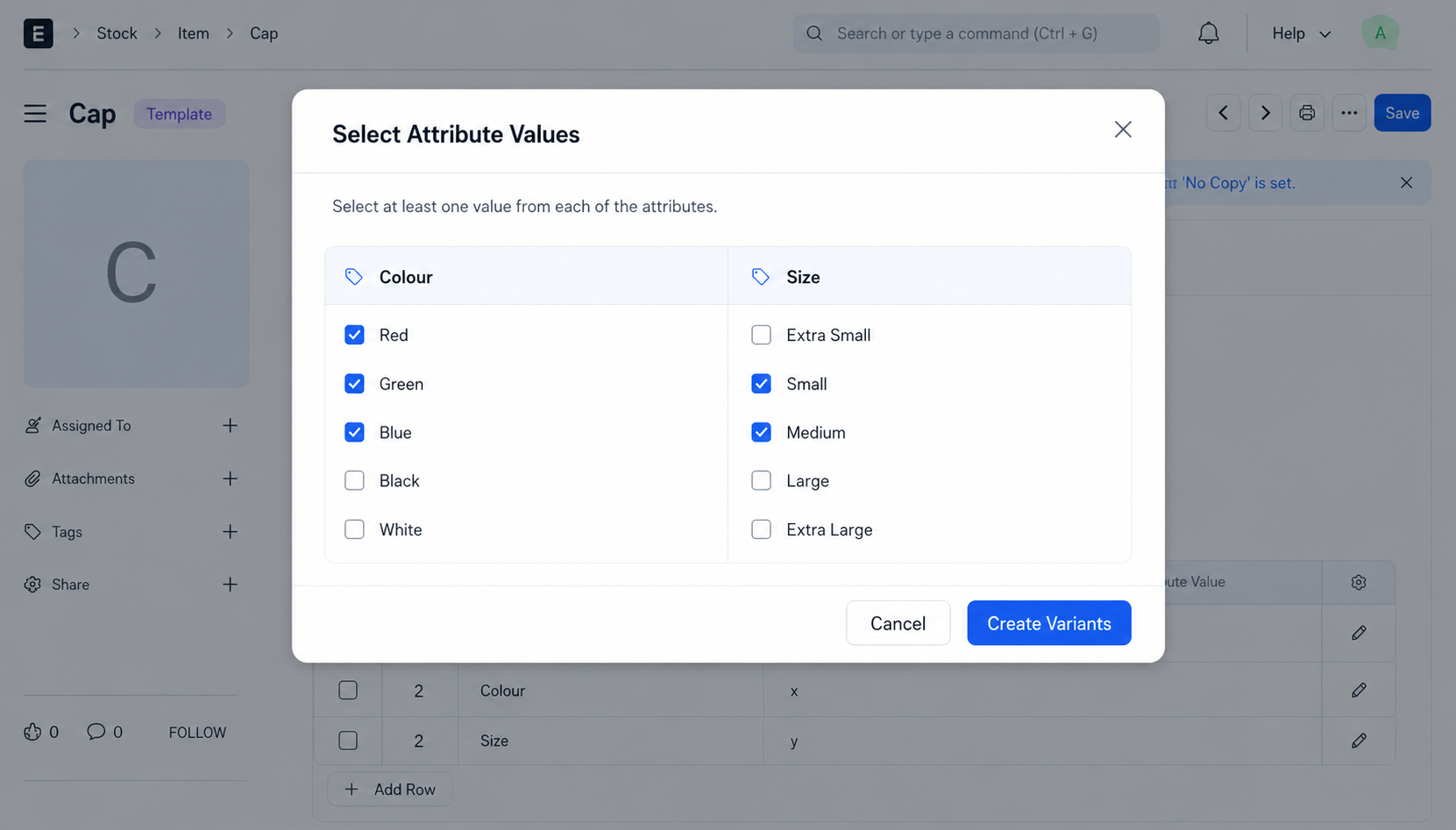
6. Publish Product on Website :-
Publish the template item on the website so customers can access the variant matrix or table layout.
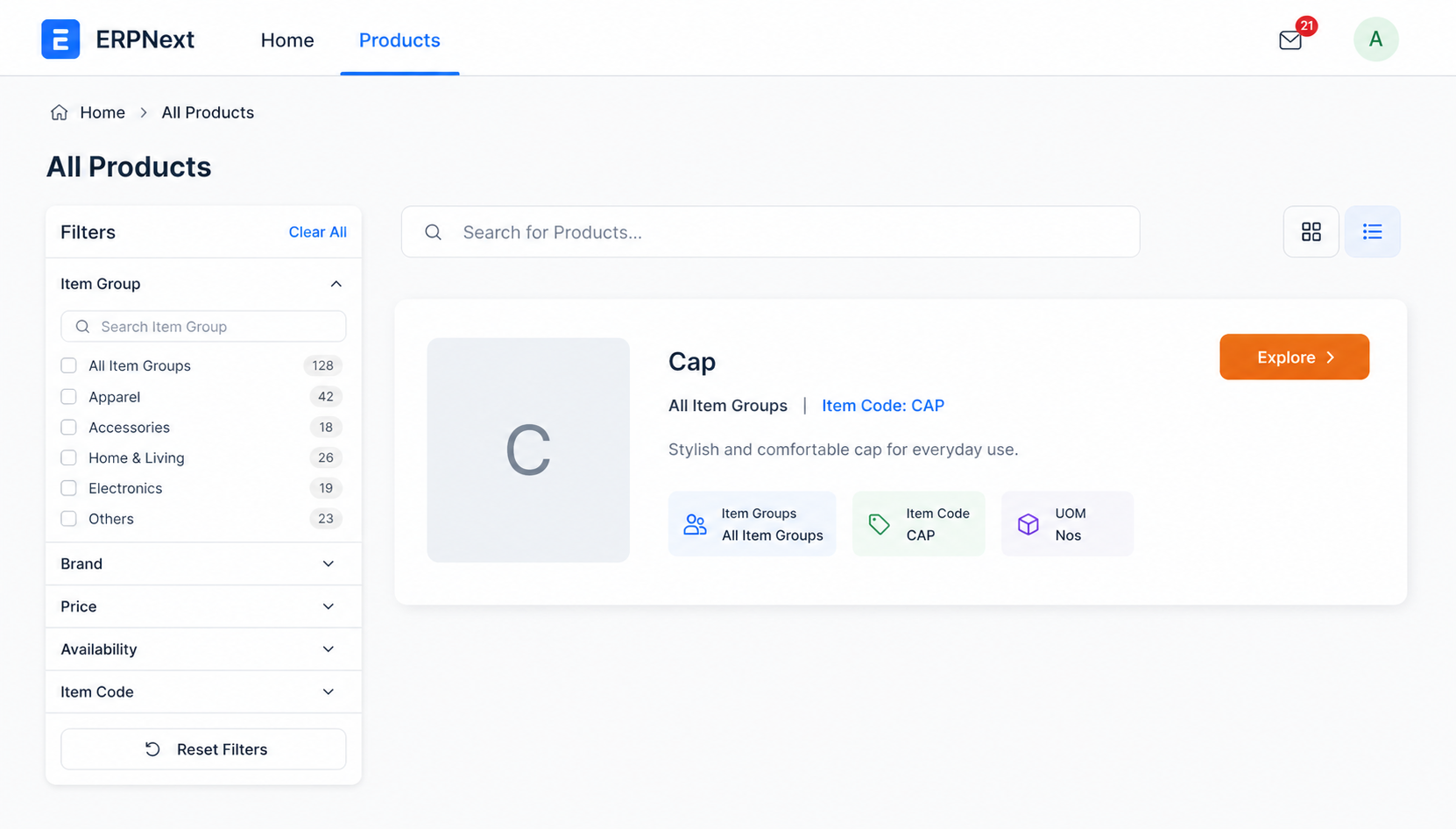
7. Customer Opens Explore View :-
On the product detail page, customers click Explore to open the configured Matrix or Table view.
8. Use Bulk Ordering Controls :-
Customers can use Apply to All, Reset All,
real-time pricing, and quantity inputs for fast bulk ordering.

Quick Checklist :-
| Field | Location | Purpose |
|---|---|---|
| Has Variant | Item Master | Enable variant product setup |
| View Type | Item Master | Select Matrix or Table layout |
| Axis Mapping | Variant Attributes | Build matrix combinations |
| Create Variants | Item Master | Generate variant records |
ERPNext Website Variant Matrix Support
- Variant Item & Attribute Configuration Assistance
- Matrix and Table View Setup Guidance
- Axis Mapping (Color × Size) Configuration Support
- Bulk Ordering & Apply-to-All Controls Assistance
- Bug Fixes, Enhancements & Performance Optimization
Version 15 (Latest Release)
- Matrix View for multi-attribute product selection
- Table View Layout with price and variant details
- Real-Time Variant Pricing updates
- Apply to All & Reset All bulk quantity actions
- Zoom Product Images for variant visuals
- Backend Axis Configuration for matrix setup
- Improved Website PDP Variant Experience
- Matrix View is ideal for attribute combinations
- Table View shows variants in row-based listing
- Both support pricing and bulk ordering
Our Frappe Apps








Frappe Proprietary License v1.0

This software and associated files (the "Software") may only be used (executed,
modified, executed after modifications) if you have purchased a valid license
from the authors, typically via Frappe Apps, or if you have received a written
agreement from the authors of the Software (see the COPYRIGHT file).

You may develop Frappe apps that use the Software as a library (typically
by depending on it, importing it and using its resources), but without copying
any source code or material from the Software. You may distribute those
apps under the license of your choice, provided that this license is
compatible with the terms of the Frappe Proprietary License (For example:
LGPL, MIT, or proprietary licenses similar to this one).

It is forbidden to publish, distribute, sublicense, or sell copies of the Software
or modified copies of the Software.

The above copyright notice and this permission notice must be included in all
copies or substantial portions of the Software.

THE SOFTWARE IS PROVIDED "AS IS", WITHOUT WARRANTY OF ANY KIND, EXPRESS OR
IMPLIED, INCLUDING BUT NOT LIMITED TO THE WARRANTIES OF MERCHANTABILITY,
FITNESS FOR A PARTICULAR PURPOSE AND NONINFRINGEMENT.
IN NO EVENT SHALL THE AUTHORS OR COPYRIGHT HOLDERS BE LIABLE FOR ANY CLAIM,
DAMAGES OR OTHER LIABILITY, WHETHER IN AN ACTION OF CONTRACT, TORT OR OTHERWISE,
ARISING FROM, OUT OF OR IN CONNECTION WITH THE SOFTWARE OR THE USE OR OTHER
DEALINGS IN THE SOFTWARE.

Comment on this module. Please Login