Skip to Content
Home Blog How to Manage or Setup Kiosk In Odoo 17 POS
How to Manage or Setup Kiosk In Odoo 17 POS How to Manage or Setup Kiosk In Odoo 17 POS

How To Manage Kiosk In Odoo 17 POS

Odoo17 allows a kiosk mode at the Point of Sale. Kiosk mode is for self-service. It is mainly helpful to restaurants and other businesses where a customer directly manages the self-orders. The Odoo POS kiosk feature allows the customer to place their orders on their own without any employee's help.


Let’s see how we can manage or setup the kiosk mode in Odoo POS.


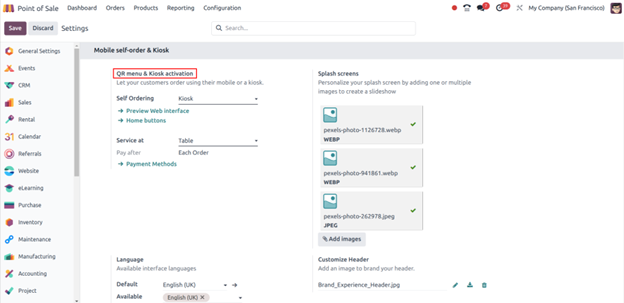
To do so navigate to POS application > configuration > settings > QR menu & kiosk activation > select self-ordering “Kiosk”.
Kiosk Management Mode In Odoo17 Point of Sale

For the kiosk, we need to select the self-ordering method as a “kiosk”, we can also select the service at “table”. We can personalize the splash screen by adding multiple images for the slideshow. A default language and available languages can be mentioned in the languages section. We can use the header image in the customize header section to customize the header.

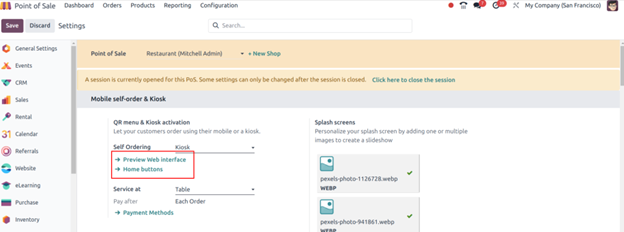
To have a web preview we can click on “view web interface” and to add a home button we can click on “home buttons”.
Kiosk Management Mode In Odoo17 Point of Sale

When we click on the home buttons, Odoo redirects us to the buttons page, where we can manage and create the home buttons by defining the label for the button, URL, and specific POS restaurants if we have configured and style for the buttons.

Kiosk Management Mode In Odoo17 Point of Sale

After that, we can manage tax rates by using “Fiscal positions” in “Eat in/Take out”.

Kiosk Management Mode In Odoo17 Point of Sale

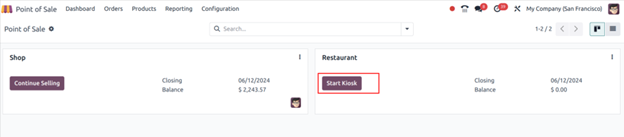
Now, once we are done with all the configuration, we will have an option of “start a kiosk” on the POS shop or restaurant.
Kiosk Management Mode In Odoo17 Point of Sale

Odoo will ask us to open the kiosk in either a new window or close the current window.
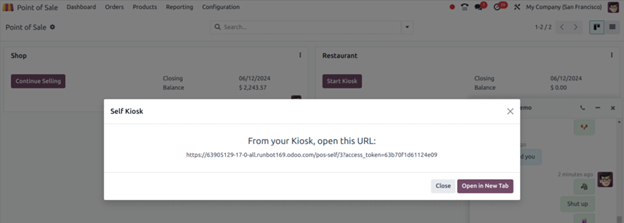
Kiosk Management Mode In Odoo17 Point of Sale

The system will redirect us to a new kiosk window showing the flash images we have uploaded in the general settings and a home button we have created.
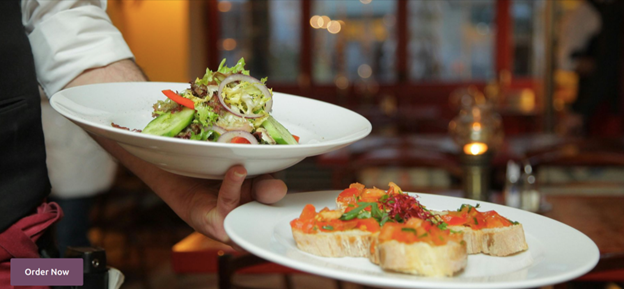
Kiosk Management Mode In Odoo17 Point of Sale

We can order by clicking on the “order now” button. By clicking on it, it will ask you to choose the method such as “eat in or take out”.
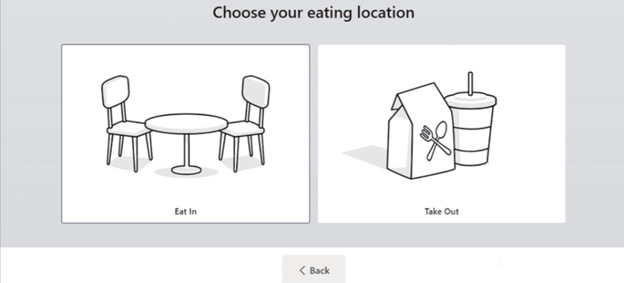
Kiosk Management Mode In Odoo17 Point of Sale

After selecting any one of the methods it will redirect us to the product catalogue. The product category will be shown here, we can add a product by clicking on the product and we can see the total amount of orders and number of items placed in the “your order”. By clicking on the cancel button, we can cancel the order. To proceed with the order we can click on the order button.
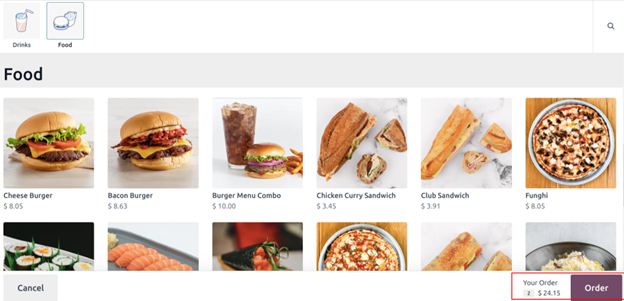
Kiosk Management Mode In Odoo17 Point of Sale

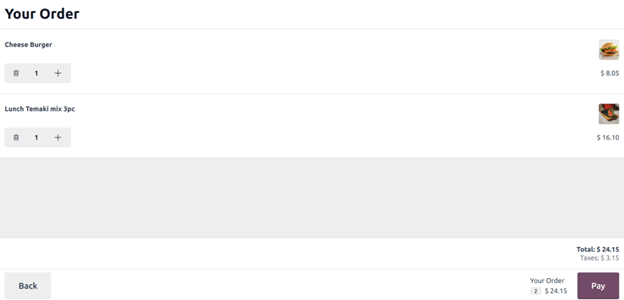
This view is for the pay to order, we can see the items ordered and the price of that, to pay we can click on the pay icon.
Kiosk Management Mode In Odoo17 Point of Sale

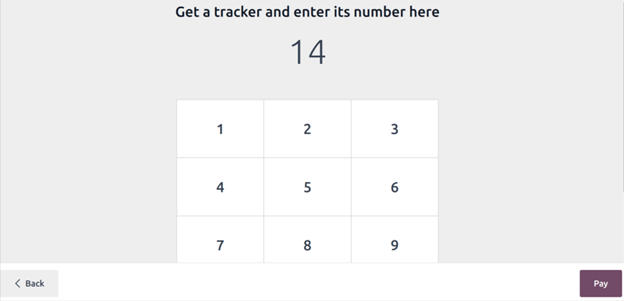
Once we confirm the order, we must click on the pay button, which will redirect us to a new window where we need to define the table number for the tracking of the order to serve.
Kiosk Management Mode In Odoo17 Point of Sale

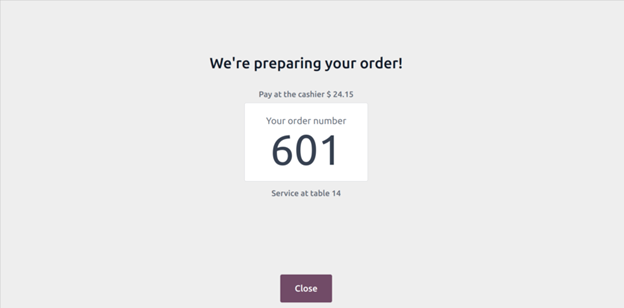
Then we can click on pay. It will finalize the order and we can have a notification that shows the order number, table number, and order amount.
Kiosk Management Mode In Odoo17 Point of Sale

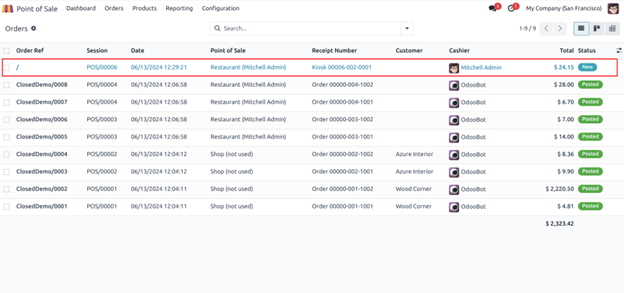
In the POS backend, we can place these orders in the orders menu. Navigate to POS > orders > orders. If the orders list view we can have all the order details such as order reference number, session, date, point of sale, order receipt number, customer, cashier, and total amount of order and status.
Kiosk Management Mode In Odoo17 Point of Sale

To proceed with the payment of the order, we can open a particular order, and add a customer name, if any fiscal positions are applied, we can add that and can proceed with a payment by clicking on the button “payment”.
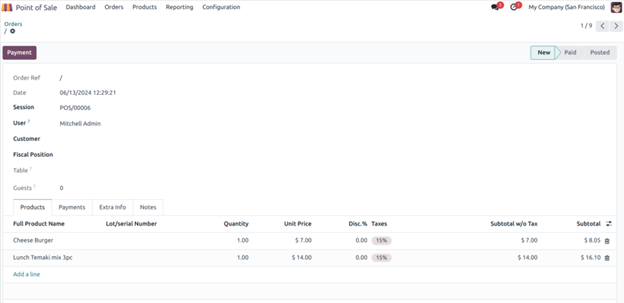
Kiosk Management Mode In Odoo17 Point of Sale

We can select a payment method and payment reference and click on make payment. After that will have an invoice button.
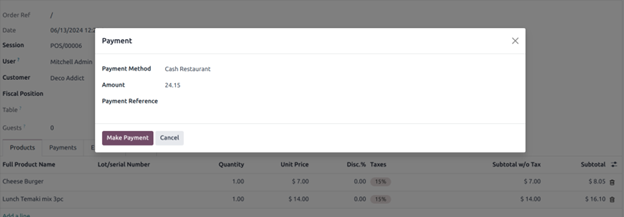
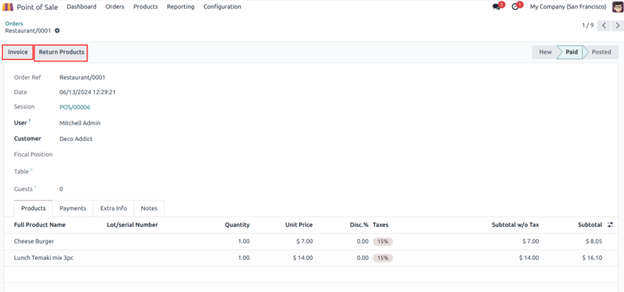
 Kiosk Management Mode In Odoo17 Point of Sale

Kiosk Management Mode In Odoo17 Point of Sale

We can generate an invoice by clicking on the invoice button. Then we can proceed to post the invoice and on the POS order, we see the linked invoice and picking of it. The status of the order would be moved to invoiced.
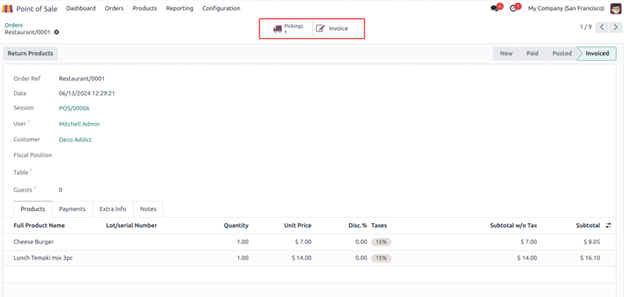
Kiosk Management Mode In Odoo17 Point of Sale

 Subscribe our newsletter to learn more about odoo!

Conclusion:


To conclude, Odoo Point of sale allows a kiosk mode for self-service for the industries where a customer can avail themselves of the shopping experience on their own such as in restaurants and cafes. This would enhance the procedure of the businesses and will offer a user-friendly experience in terms of dining.

Frequently Asked Questions

Kiosk Mode in Odoo is a feature that allows users to restrict the access to specific applications, typically to be used in self-service environments.

An Odoo POS Kiosk is a self-service terminal that would allow customers to process transactions and payments independently.

Kiosks could be used in various settings like restaurants, retail stores, airports, hotels, and hospitals to facilitate self-service and information dissemination.

A Kiosk is a self-service terminal used for information access, transactions, and various interactive services, to further enhance the customer convenience and operational efficiency.

Yes, Odoo has a Point-of-Sale (POS) module to support restaurant and retail operations.

To make products available in Odoo POS, you need to ensure that they are marked as available in the POS section of the product configuration settings.

An example of a Kiosk is an airport self-check-in terminal where passengers can print their boarding passes. It can also be used at restaurants wherein you can place your order and pay and wait for the food to be prepared.

Kiosks are typically needed to enhance customer service, streamline processes, and reduce operational costs by enabling self-service options.

Manufacturing (MRP, production planning)
Hospitality & restaurants
Education & LMS
Retail & eCommerce
Healthcare
Logistics & 3PL
Distribution & trading
NGOs & non-profits
Export-import businesses
Strong Integration Expertise

Modern ERP systems require seamless connectivity. Kanak specializes in integrations with payment gateways, banking reconciliation systems, eCommerce marketplaces, logistics APIs, HRMS & biometric devices, and CRM and communication tools.

Standard-First ERP Philosophy

One major reason businesses prefer Kanak is its "standard-first" implementation approach. Instead of over-customizing Odoo unnecessarily, Kanak focuses on upgrade-friendly implementations, lower technical debt, better system performance, faster deployment cycles, and long-term scalability.

Global ERP Experience

Kanak serves clients across USA, Middle East, Europe, Australia, Singapore, Malaysia, and 50+ countries - enabling them to handle multi-company setups, multi-currency operations, localization & compliance, and cross-border business workflows.

Best for: Any business requiring deep customization, complex integrations, industry-specific Odoo expertise, or a long-term ERP partner with proven global experience.

Banibro IT Solutions ​
Official Odoo PartnerChennai BasedSME Focused

Banibro IT Solutions is known for its structured implementation methodology and business-focused ERP consulting approach. The company focuses on requirement analysis, workflow optimization, ROI-driven ERP planning, and seamless user adoption for SMEs and growing enterprises. 

Key Strengths
  • Business-centric consulting approach
  • ERP process alignment
  • Odoo customization for SMEs
  • Third-party integrations
  • Long-term support services

Best for: Small to mid-sized businesses in South India looking for practical and cost-effective Odoo implementations.

Serpent Consulting Services
Odoo Gold PartnerAhmedabad Based 10+ Years

Serpent Consulting Services has maintained a strong presence within the Odoo ecosystem for many years. The company specializes in Odoo consultation, migration services, custom development, integration support, and mid-sized enterprise deployments.

Key Strengths
  • Stable and structured implementation methodology
  • Strong upgrade compatibility focus
  • Long-term ERP maintainability
  • Reliable technical consulting

Best for: Mid-market companies needing structured Odoo consulting with long-term upgrade planning.

BrowseInfo
Odoo Best Partner India 20241200+ App Store Apps Ahmedabad Based

BrowseInfo is recognized for handling complex Odoo customization projects and enterprise-grade ERP deployments. The company works with businesses requiring multi-location operations, complex approval workflows, enterprise automation, and high-volume ERP environments.

Key Strengths
  • Large-scale implementation capabilities
  • Enterprise workflow customization
  • Odoo performance optimization
  • Scalable architecture support
  • Largest App Store module volume

Best for: Healthcare, retail, and businesses needing quick module deployment from the App Store.

Cybrosys Technologies
Official Odoo Partner​Kerala BasedTechnical Specialists

Cybrosys Technologies is widely known for its strong technical capabilities in the Odoo ecosystem. The company has extensive experience in module development, Odoo migrations, backend customization, technical optimization, and performance enhancement.

Key Strengths
  • Strong engineering and development capabilities
  • Odoo app and module development
  • Technical troubleshooting expertise
  • Version migration experience

Best for: Businesses needing heavy backend customization, complex module development, or technically intensive implementations.

Side-by-Side Comparison

How to Choose the Right Odoo Implementation Partner

Choosing the right Odoo consulting company is one of the most important decisions for ERP success. Here are the key factors every business should evaluate before signing a contract:


Odoo Experience

Choose a partner with proven implementation experience and long-term Odoo expertise. Look for 10+ years minimum for complex projects.


Industry Understanding

Industry-specific experience reduces implementation time and improves process alignment. Ask for case studies in your exact sector.


Certified Odoo Experts

Certified functional consultants and developers ensure better implementation quality. Ask how many team members hold current Odoo certifications.


Structured Methodology

A reliable partner provides requirement gathering, gap analysis, milestone planning, UAT, training, and go-live support as standard.


Integration Capabilities

Modern ERP needs connections with banking systems, logistics providers, HRMS, payment gateways, and eCommerce. Ask for live demos of past integrations.


Post-Go-Live Support

ERP implementation is not a one-time project. Get SLA response times in writing. Ask about AMC pricing and how version upgrades are handled.


Upgrade-Friendly Development

Excessive customization blocks future Odoo version upgrades. Good partners follow a standard-first approach — customizing only where it creates genuine value.


Scalability

Your ERP should grow with your business. Choose a partner who can support future module expansions, upgrades, and process improvements over 5–10 years.


⚠ Red flag: Any partner who gives a fixed-price quote without a discovery or requirements phase is underscoping your project. This almost always leads to scope creep, delays, and budget overruns. A serious partner insists on a requirements phase before quoting.

Odoo Community vs Enterprise — What's the Difference?

One of the most common questions businesses ask when evaluating Odoo is: What is the difference between Odoo Community and Odoo Enterprise?

For businesses planning long-term ERP scalability, Odoo Enterprise is usually the preferred choice. The added cost is offset by official support, automatic upgrades, and significantly more powerful modules.

How Much Does Odoo Implementation Cost in India?

Odoo implementation cost in India depends on multiple factors including number of users, modules required, customization complexity, integrations, data migration, industry workflows, and training requirements.

Partner hourly rates in India typically range from ₹1,500 to ₹4,500 per hour depending on seniority and firm. Budget an additional 10–20% contingency for data cleanup and integration complexity. Note: Odoo Enterprise license costs (approximately ₹2,000–4,000 per user per month) are separate from implementation fees.

⚠ Important: Businesses should focus on implementation quality and long-term ROI — not just the lowest upfront pricing. A cheaper implementation that fails costs significantly more than a quality one done right the first time.

How Long Does Odoo Implementation Take?


Timeline depends on customization level, data migration complexity, user training, integration requirements, and internal approvals. An experienced Odoo partner significantly reduces delays and implementation risks through structured methodology and reusable configurations.

Why India Is a Global Leader in Odoo Consulting ?

India has become one of the world's strongest destinations for Odoo consulting and ERP implementation because of:

  • Highly skilled Odoo developers and consultants — India produces more Odoo-certified professionals than almost any other country
  • Competitive pricing with global service quality — Indian partners deliver enterprise-grade implementations at a fraction of Western market costs
  • Global delivery experience — top Indian partners have successfully delivered ERP projects across USA, Europe, Middle East, and Asia
  • Strong offshore support models — time zone coverage allows near-24/7 support for international clients
  • Large technical talent pool — continuous pipeline of Odoo-trained engineers and functional consultants
  • Enterprise implementation expertise — experience across manufacturing, retail, healthcare, logistics, and finance industries

Final Verdict — Which Odoo Partner Should You Choose?

The best Odoo implementation partner is not simply the company with the lowest pricing or biggest team. The right partner should understand your business processes, recommend scalable ERP strategies, minimize unnecessary customization, ensure smooth user adoption, provide long-term support, and deliver measurable ROI.

For businesses looking for a highly experienced, globally trusted, and scalable ERP consulting company, Kanak Infosystems LLP remains one of the strongest choices for Odoo implementation in India in 2026 — backed by 14+ years of experience, 500+ successful implementations, and one of India's largest Odoo App Store portfolios.

Frequently Asked Questions (FAQs)

Kanak Infosystems LLP. is considered one of the leading Odoo implementation partners in India due to its 14+ years of experience, 500+ implementations, 500+ apps on the Odoo App Store, global presence across 50+ countries, and a 95% client retention rate. Active since the TinyERP era, Kanak is among India's earliest Odoo partners.

Odoo implementation cost in India typically ranges from ₹3 lakh to ₹30 lakh+ depending on business size, modules, customization, and integrations. Small businesses (5–15 users) can expect ₹3–8 lakh. Mid-sized companies typically spend ₹10–25 lakh. Large enterprises may need ₹30 lakh or more. Odoo Enterprise license costs (approximately ₹1,000–2,000/user/month) are separate from implementation fees.

Basic implementations take 4–8 weeks. Mid-sized ERP deployments take 2–5 months. Enterprise-level implementations take 6–12 months. An experienced partner significantly reduces delays through structured methodology and reusable configurations.

Odoo Community is free and open-source with basic ERP functionality and community support. Odoo Enterprise is a paid subscription that includes advanced modules, official Odoo support, mobile app support, better UI/UX, Studio customization tools, and advanced accounting and reporting. For businesses planning long-term scalability, Odoo Enterprise is usually the preferred choice.

Evaluate: years of Odoo-specific experience, number of completed implementations, industry expertise relevant to your sector, certified developers, App Store contributions, client references in your industry, post-go-live support SLA, and customization philosophy. Good partners follow a standard-first approach to keep systems upgrade-friendly.

Yes. Odoo offers strong manufacturing capabilities including MRP, production planning, quality management, inventory tracking, barcode integration, and maintenance management. Kanak Infosystems has implemented Odoo for dozens of manufacturing companies across India and internationally.

Yes. Odoo is highly modular and scalable, making it suitable for startups, SMEs, and enterprises alike. Small businesses can start with just 1–2 apps and add more as they grow. With the right implementation partner, small businesses can go live in 4–6 weeks.

Businesses globally prefer Indian Odoo consulting companies because they offer highly skilled developers, competitive pricing with global service quality, extensive international ERP experience, strong offshore support models, and deep expertise across manufacturing, retail, healthcare, logistics, and finance industries.

Leave a Comment

Your email address will not be published.

Submit
Your comment is under review by our moderation team.