 +91 981-810-8884, 0114-214-3250


Community
Enterprise
Odoo.sh

Quotation / Sale Order Revisions
The Quotation / Sale Order Revisions module allows users to create and manage multiple revisions of quotations and sale orders in Odoo, with a clear revision history and easy access to both the latest and all previous versions.

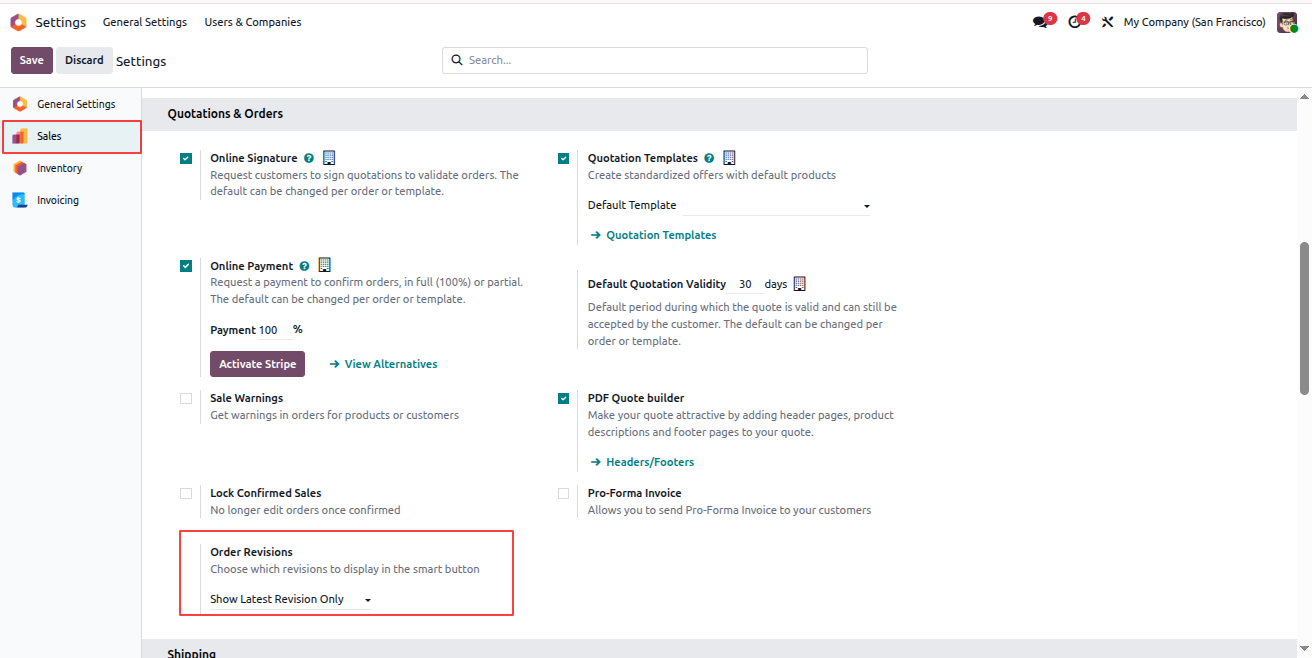
You can control whether all revisions or only the latest revision of a quotation or sale order are displayed in the quotation list view by enabling a system setting.
- Go to Settings.
- Navigate to the Sales section.
- Under the Quotations & Orders section, locate the Order Revisions option.
- Enable Show Latest Revision Only.
- Click Save to apply the settings.
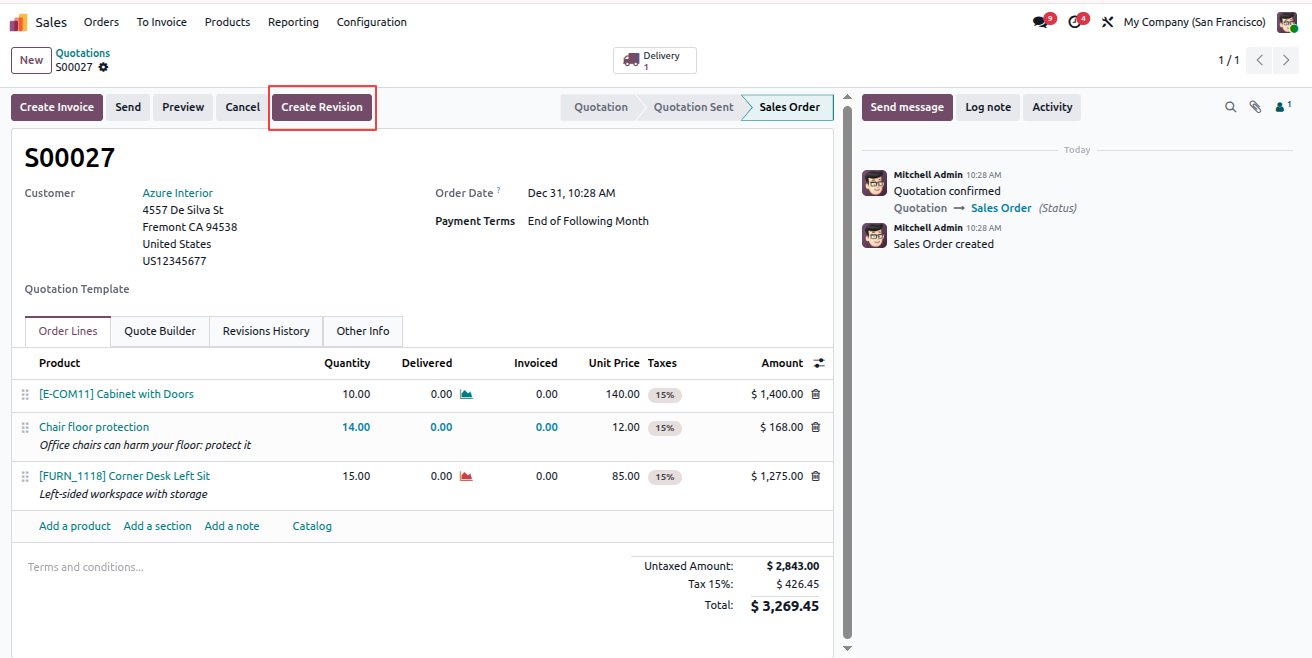
The system allows you to create and manage multiple revisions for a quotation or sale order directly from the sales order form.
- Go to Sales.
- Click New to create a new quotation.
- Enter the required details and click the Confirm button in the header.
- Once confirmed, you will see the Create Revision button in the form header.
- Click Create Revision to generate a new revision of the quotation or sale order.
- You can repeat this process to create multiple revisions as needed.
Each revision preserves the original information while maintaining a clear and structured revision history for reference and tracking.
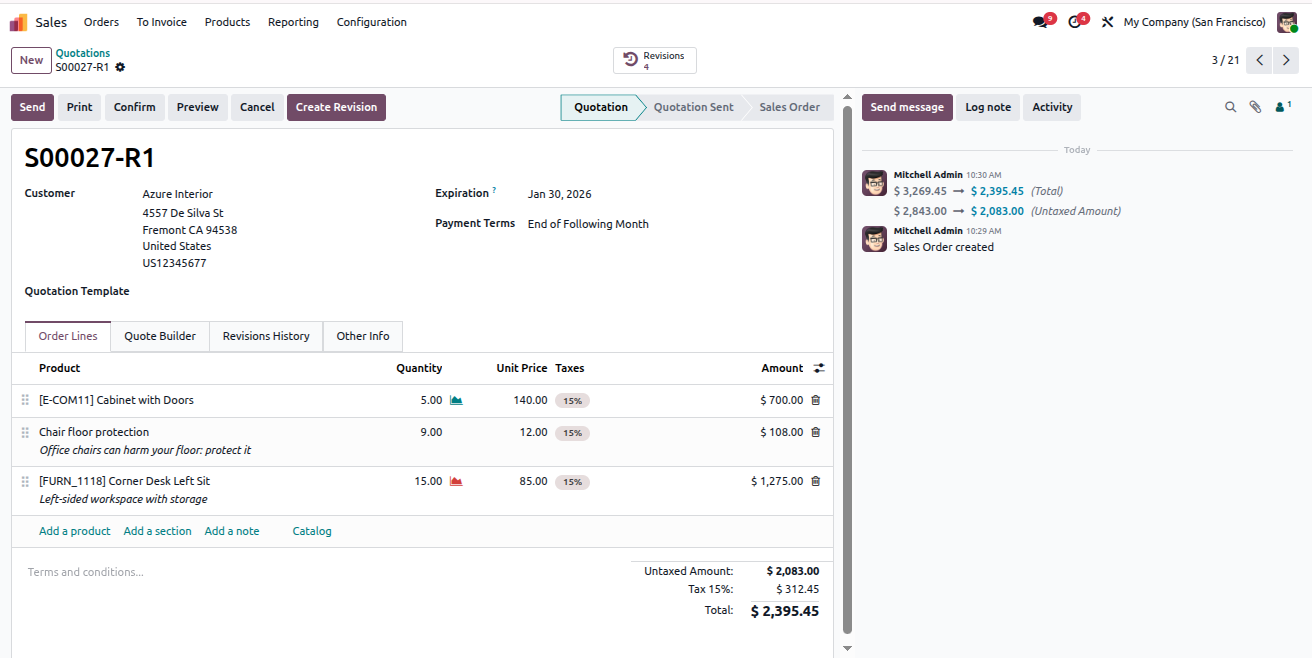
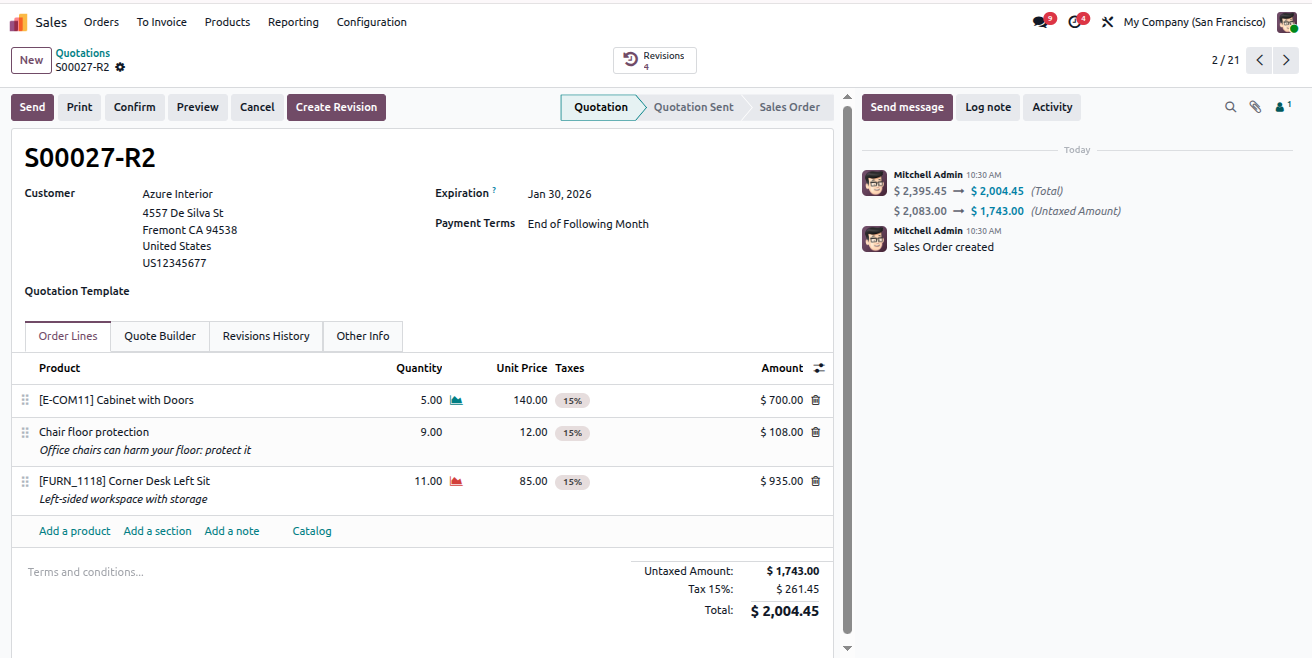
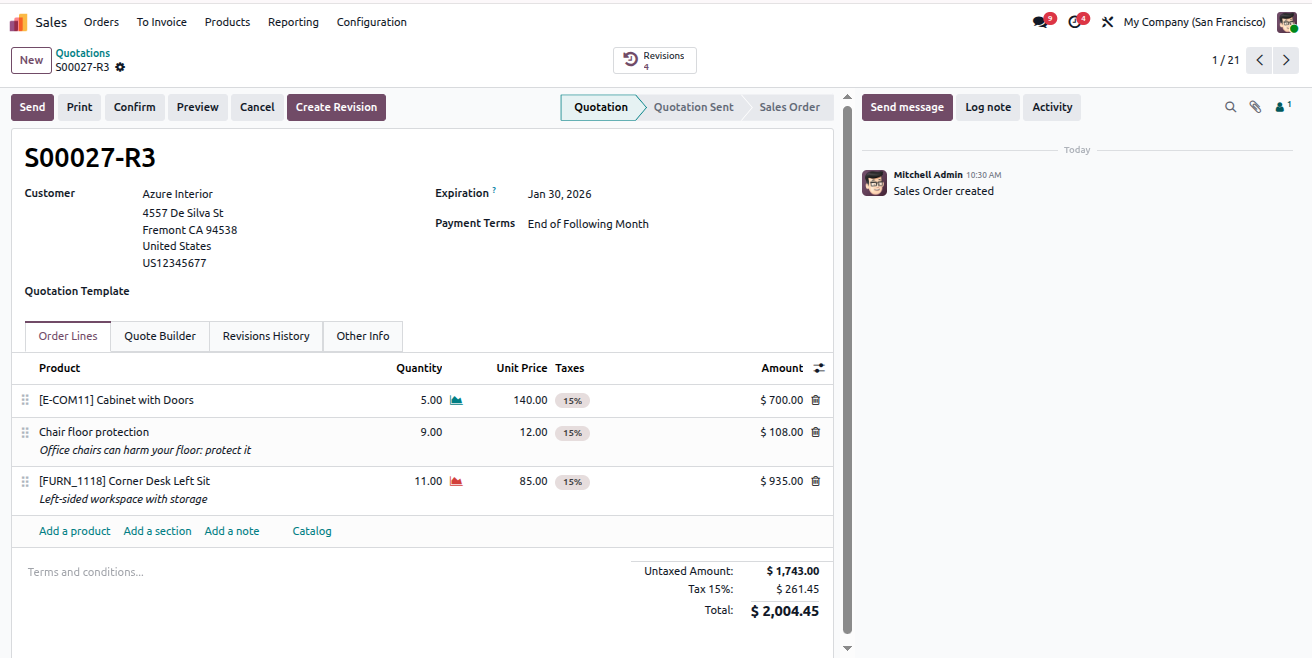
All quotations and their related revisions are available directly in the quotation list view for easy access and tracking.
- Go to Sales > Orders > Quotations.
- In the list view, you will see the original quotation along with all its revisions.
- Click on any quotation or revision record to open and review its details.
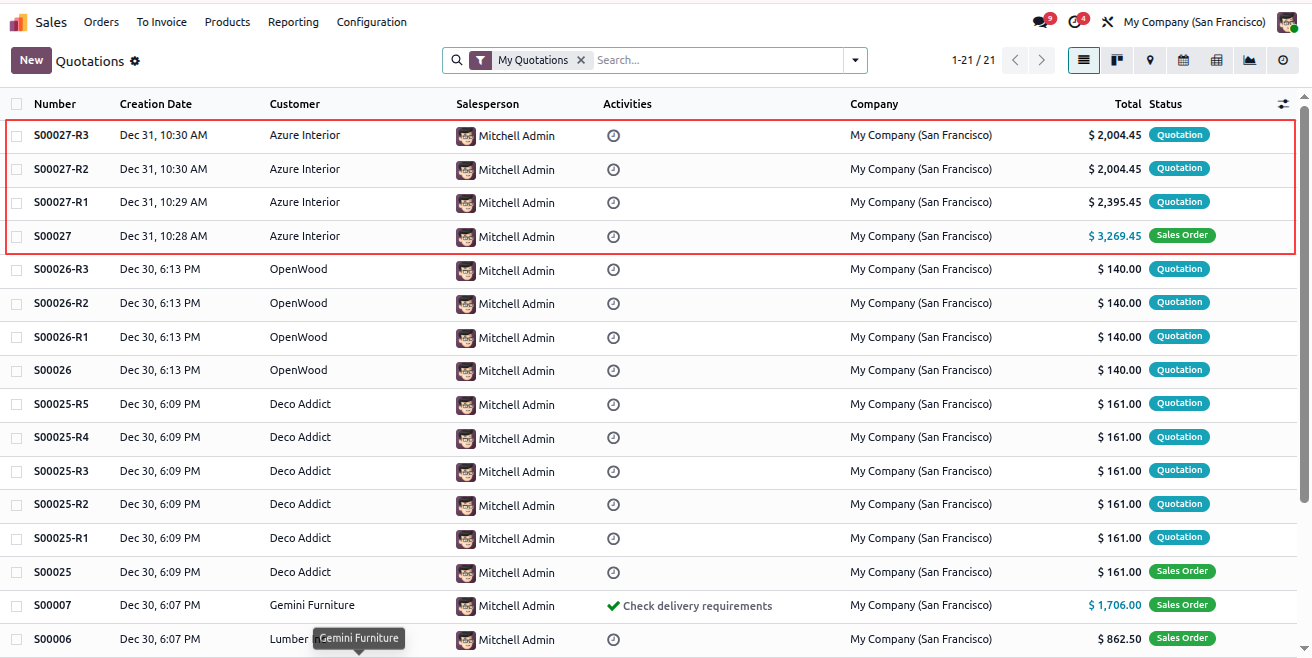
All quotations and their related revisions are available directly in the quotation list view for easy access and tracking.
- Go to Sales > Orders > Quotations.
- In the list view, you will see the original quotation along with all its revisions.
- Click on any quotation or revision record to open and review its details.
You can configure the system to display all quotation and sale order revisions in the quotation list view by updating the sales settings.
- Go to Settings.
- Navigate to the Sales section.
- Under Quotations & Orders, locate the Order Revisions option.
- Select Show All Revisions.
- Click Save to apply the changes.
Once enabled, the quotation list view will display the original quotation along with all its related revisions.
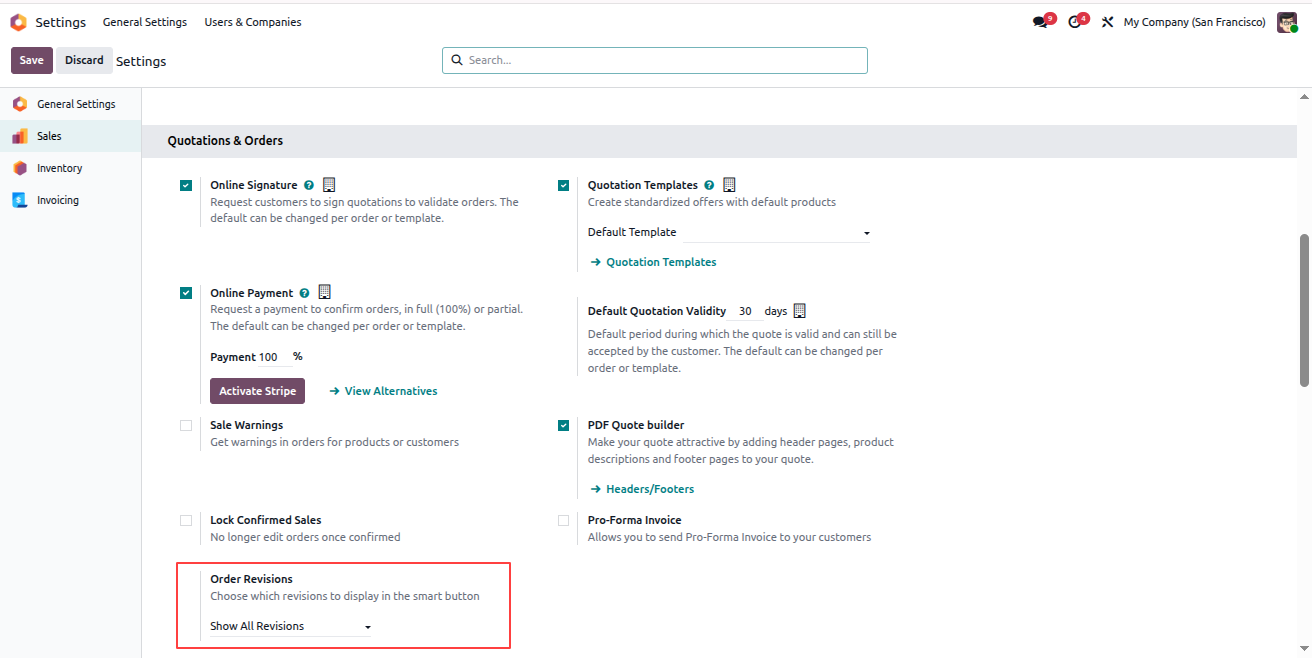
You can configure the system to display all quotation and sale order revisions in the quotation list view by updating the sales settings.
- Go to Settings.
- Navigate to the Sales section.
- Under Quotations & Orders, locate the Order Revisions option.
- Select Show All Revisions.
- Click Save to apply the changes.
Free 3 Months Support
Need help or any technical support ?
Kanak Infosystems LLP. will provide free 3 months support for bug fixes, any doubts or queries, installation, configuration support or any types of issues related to this module.
At our company, we take pride in providing exceptional help and technical support to our valued customers.
Our team of dedicated experts is well-versed in the intricacies of the Odoo platform.




Our Services

Hire Odoo Developer

Odoo Customization

Odoo Development

Odoo Installation

Odoo Integration

Odoo Resource

Odoo Themes

Odoo Training

Important Notice
All applications are developed within the default, up-to-date Odoo environment, and as such, we cannot guarantee flawless compatibility with third-party apps. While we strive to ensure smooth integration, any conflicts or issues that arise due to third-party applications will require additional support services, which can be provided at an extra cost. Kindly contact our support team for more information or to arrange paid support.
Reach out to us at our offices for any inquiries or collaboration.
Delhi Office
Unit no. 1017 & 1026, 11th Floor, Westend Mall,
Janak Puri, New Delhi,
Delhi, India - 110058
Gujarat Office
Unit no. 307, The Landmark, Urjanagar 1, Kudasan,
Gandhinagar, Gujarat, India - 382421
Kanak Infosystems LLP. Proprietary License v1.0

This software and associated files (the "Software") may only be used (executed,
modified, executed after modifications) if you have purchased a valid license
from the authors, typically via Odoo Apps, or if you have received a written
agreement from the authors of the Software (see the COPYRIGHT file).

You may develop Odoo modules that use the Software as a library (typically
by depending on it, importing it and using its resources), but without copying
any source code or material from the Software. You may distribute those
modules under the license of your choice, provided that this license is
compatible with the terms of the Kanak Infosystems LLP. Proprietary License (For example:
LGPL, MIT, or proprietary licenses similar to this one).

It is forbidden to publish, distribute, sublicense, or sell copies of the Software
or modified copies of the Software.

The above copyright notice and this permission notice must be included in all
copies or substantial portions of the Software.

THE SOFTWARE IS PROVIDED "AS IS", WITHOUT WARRANTY OF ANY KIND, EXPRESS OR
IMPLIED, INCLUDING BUT NOT LIMITED TO THE WARRANTIES OF MERCHANTABILITY,
FITNESS FOR A PARTICULAR PURPOSE AND NONINFRINGEMENT.
IN NO EVENT SHALL THE AUTHORS OR COPYRIGHT HOLDERS BE LIABLE FOR ANY CLAIM,
DAMAGES OR OTHER LIABILITY, WHETHER IN AN ACTION OF CONTRACT, TORT OR OTHERWISE,
ARISING FROM, OUT OF OR IN CONNECTION WITH THE SOFTWARE OR THE USE OR OTHER
DEALINGS IN THE SOFTWARE.

Comment on this module. Please Login