






Kanak infosystems LLP.
Unit no.307, The landmark, Urjanagar 1, Kudasan, Gandhinagar, Gujarat - 382421, India
 +91 981-810-8884, 0114-214-3250


The Disable Debug Mode (User Wise) module allows administrators to restrict access to debug mode in Odoo on a per-user basis. It ensures that only authorized users can access technical settings and developer tools, improving system security and preventing unintended changes.

Disable debug mode
The admin user can disable Odoo debug mode for selected users.
Users with this restriction will not be able to activate debug mode.
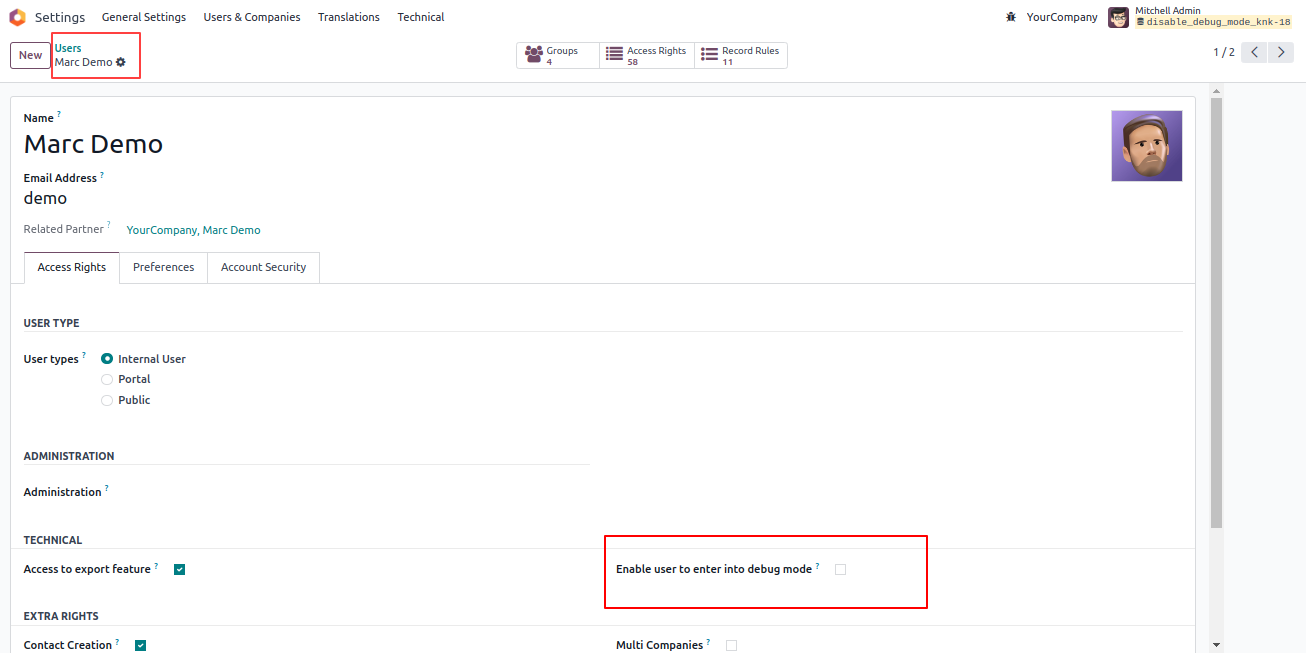

Admin can disable debug mode for selected users.
Only authorized users can access debug mode.
Debug tools are shown based on user groups.
Control visibility of debug options for specific users based on group permissions.
Kanak Infosystems LLP. will provide free 3 months support for bug fixes, any doubts or queries, installation, configuration support or any types of issues related to this module.
At our company, we take pride in providing exceptional help and technical support to our valued customers.
Our team of dedicated experts is well-versed in the intricacies of the Odoo platform.



Hire Odoo Developer

Odoo Customization

Odoo Development

Odoo Installation

Odoo Integration

Odoo Resource

Odoo Themes

Odoo Training

All applications are developed within the default, up-to-date Odoo environment, and as such, we cannot guarantee flawless compatibility with third-party apps. While we strive to ensure smooth integration, any conflicts or issues that arise due to third-party applications will require additional support services, which can be provided at an extra cost. Kindly contact our support team for more information or to arrange paid support.
OPL-1

Comment on this module. Please Login