Skip to Content
Job Application

Job Application

86.30   86.30
v 14.0 24
Required Apps hr
hr_recruitment
website_hr_recruitment
Technical Name job_portal_kanak
License OPL-1
Also available in version v 12.0 v 13.0 v 15.0 v 16.0 v 17.0 v 18.0 v 19.0
You bought this module and need support? Click here!
Technical Name job_portal_kanak
License OPL-1
Also available in version v 12.0 v 13.0 v 14.0 v 15.0 v 16.0 v 17.0 v 18.0 v 19.0

Job Application

Supported Editions
Community
Enterprise
Odoo.sh

Job Application module allows to user/candidate and employee to fill the job application in details from portal.

Key Features

You can add some details in job application :-

Applicant Information.

Applicant Address.

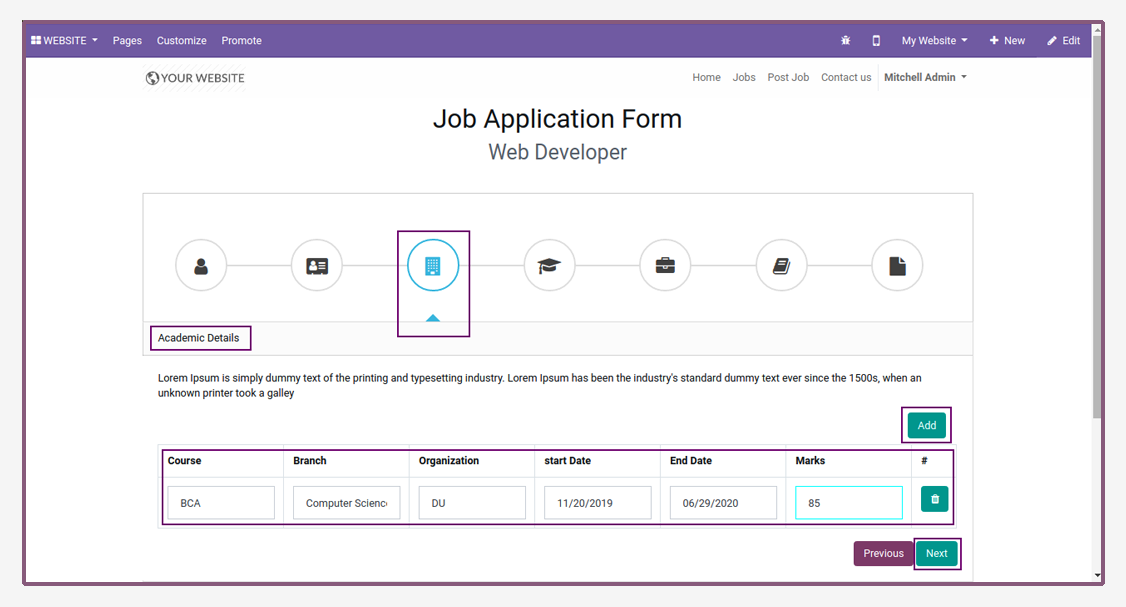
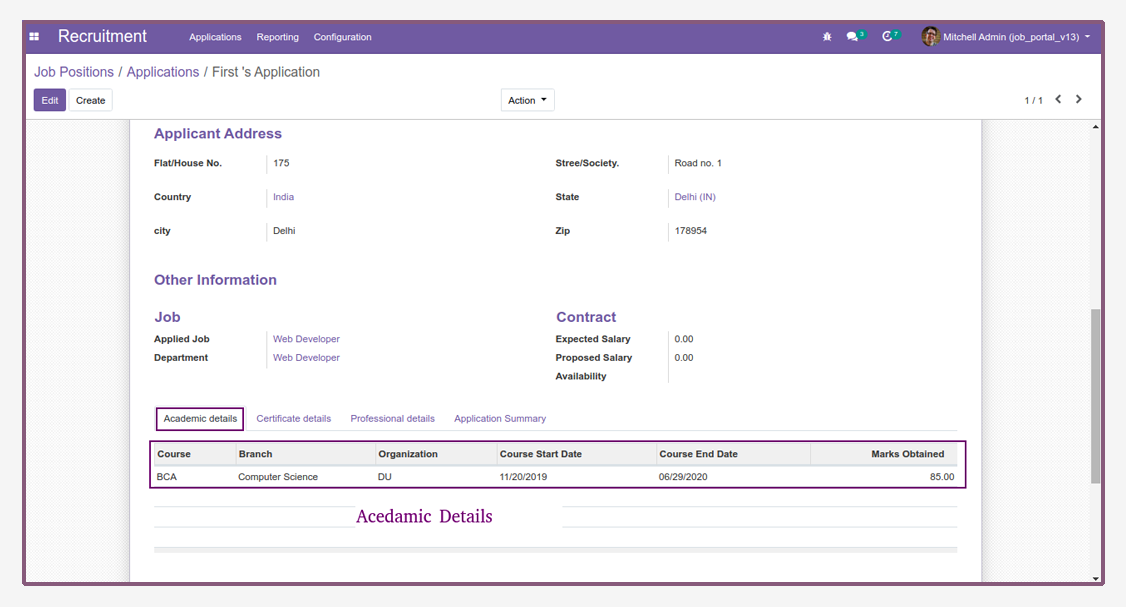
Academic Details.

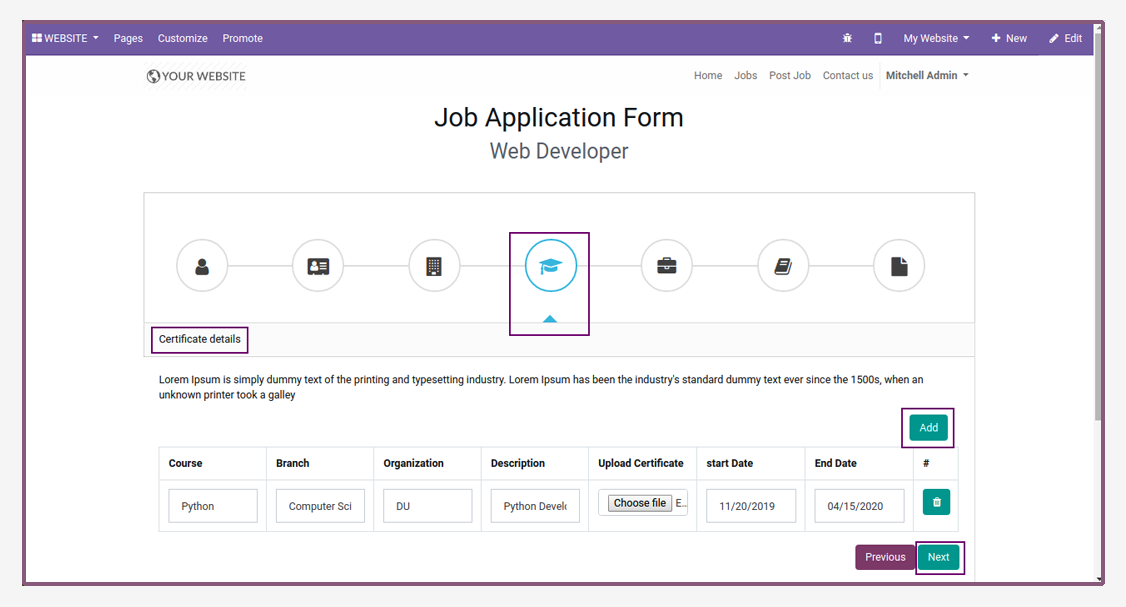
Certificate Details.

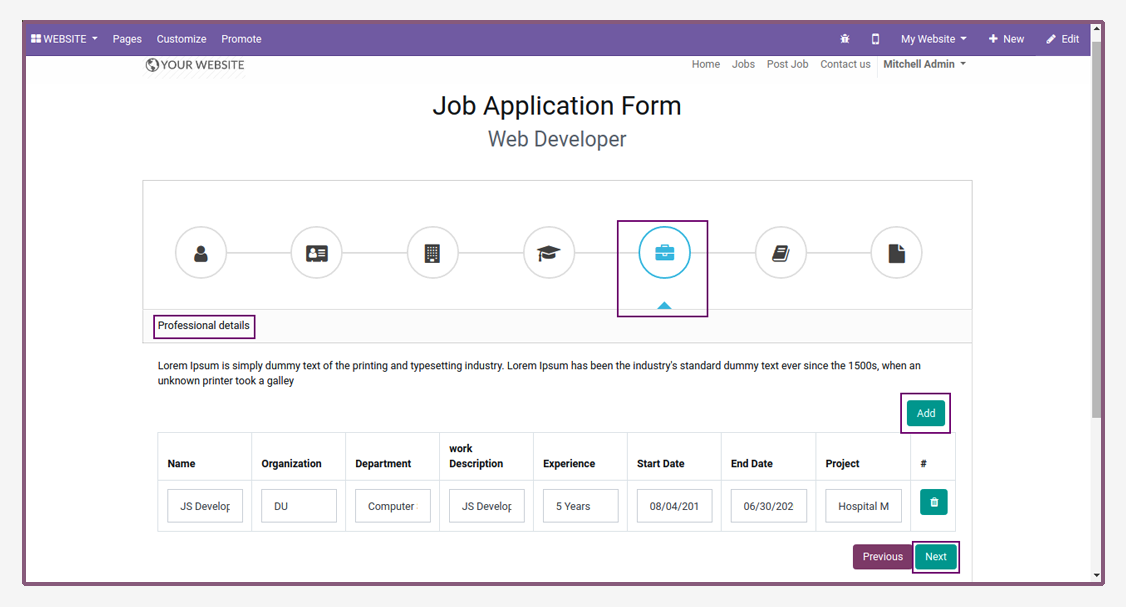
Professional Details.

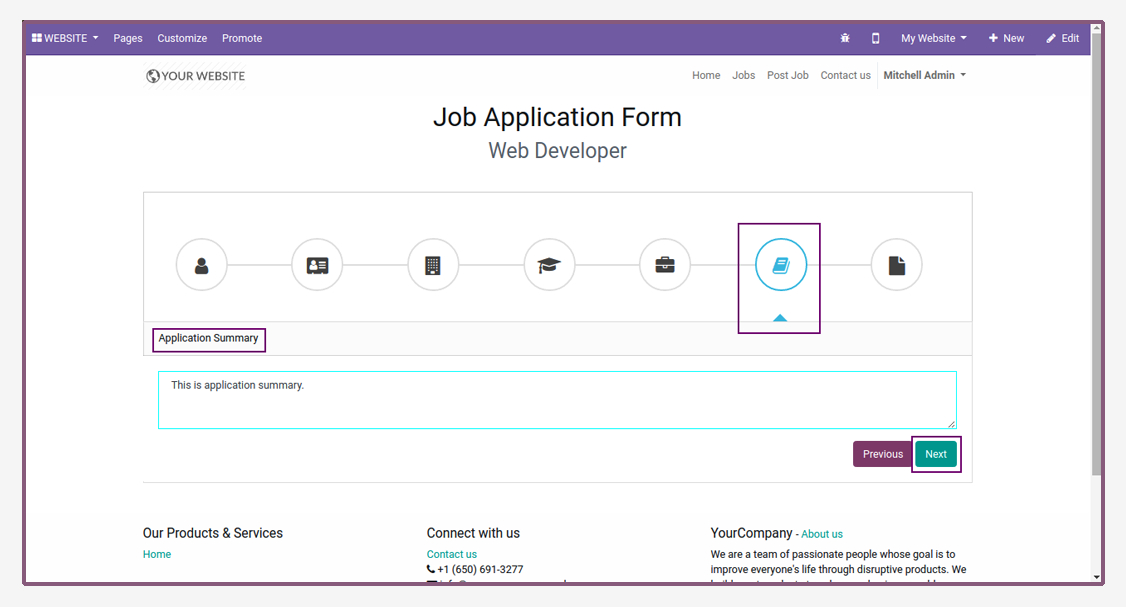
Application Summary.

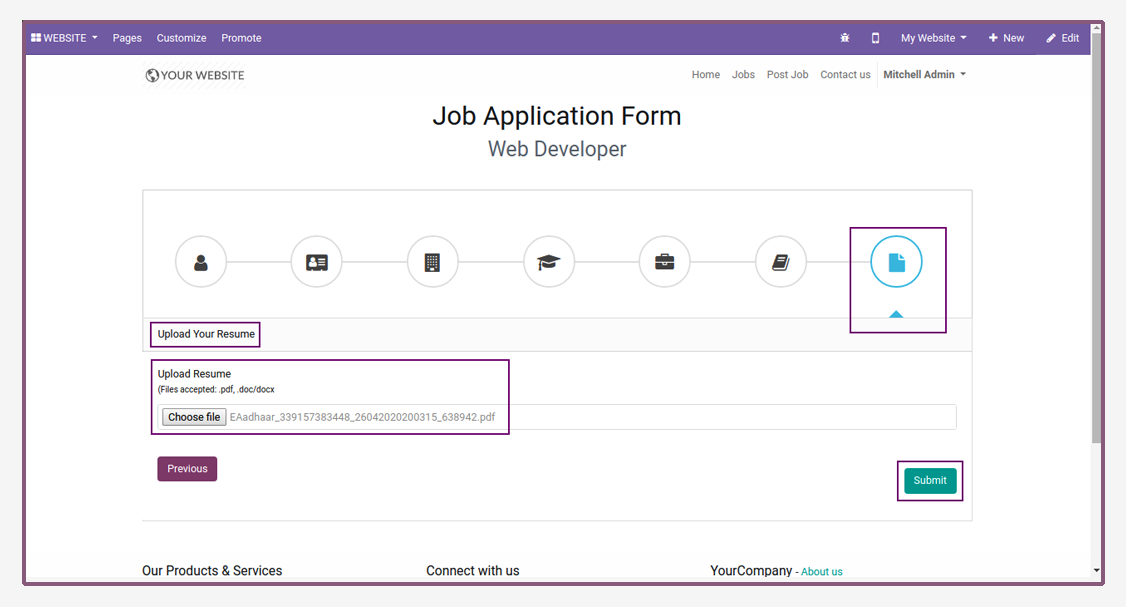
Upload Your Resume.

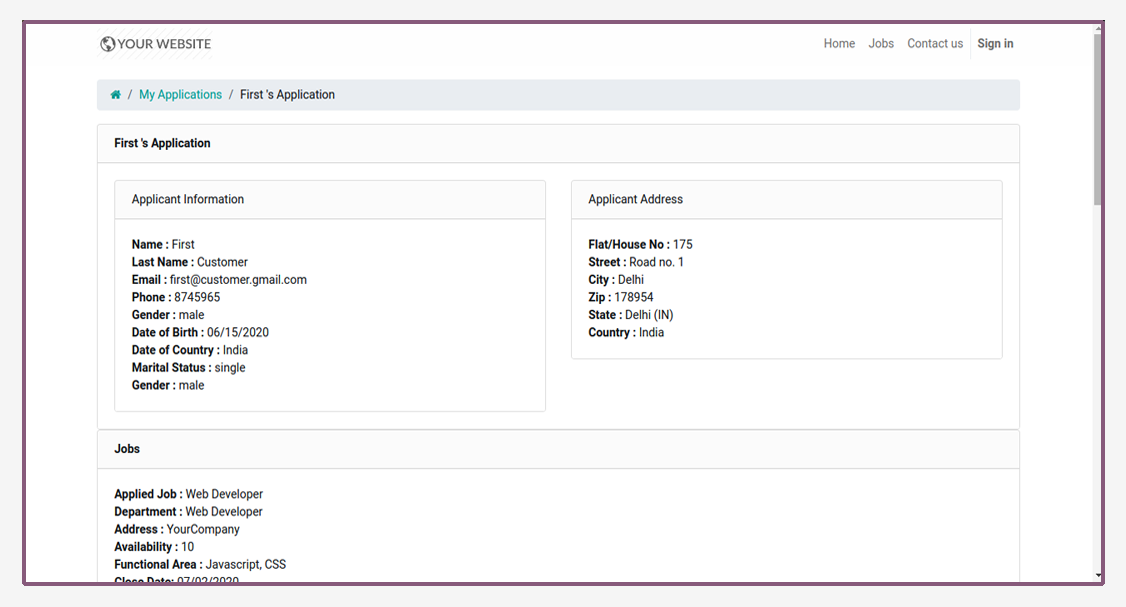
Generate token to check application details.

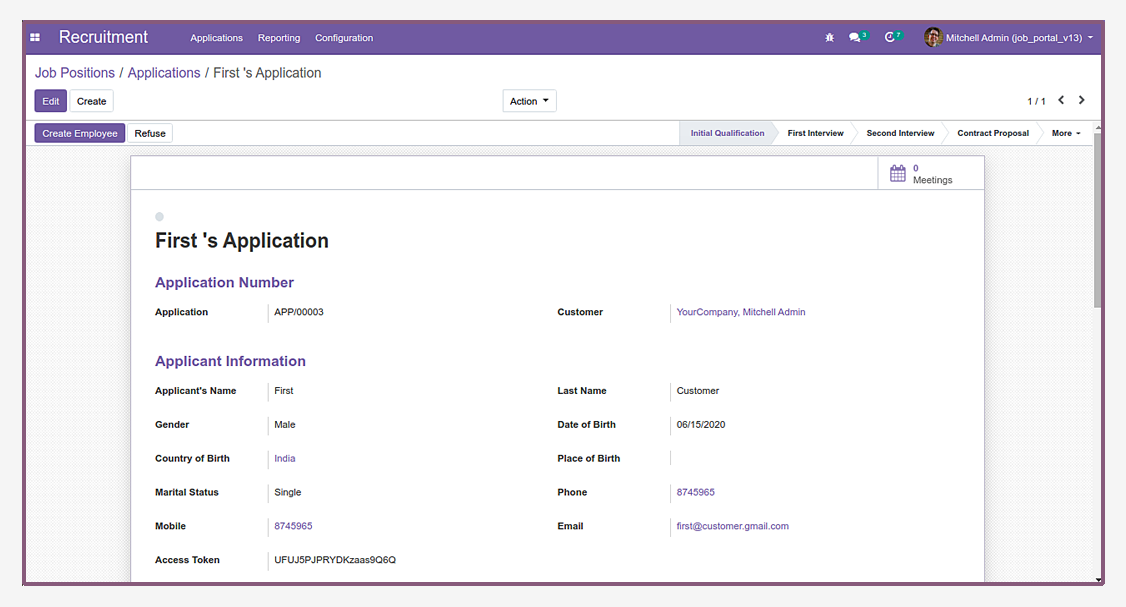
Check all application details from backend.

Admin create new job from website.


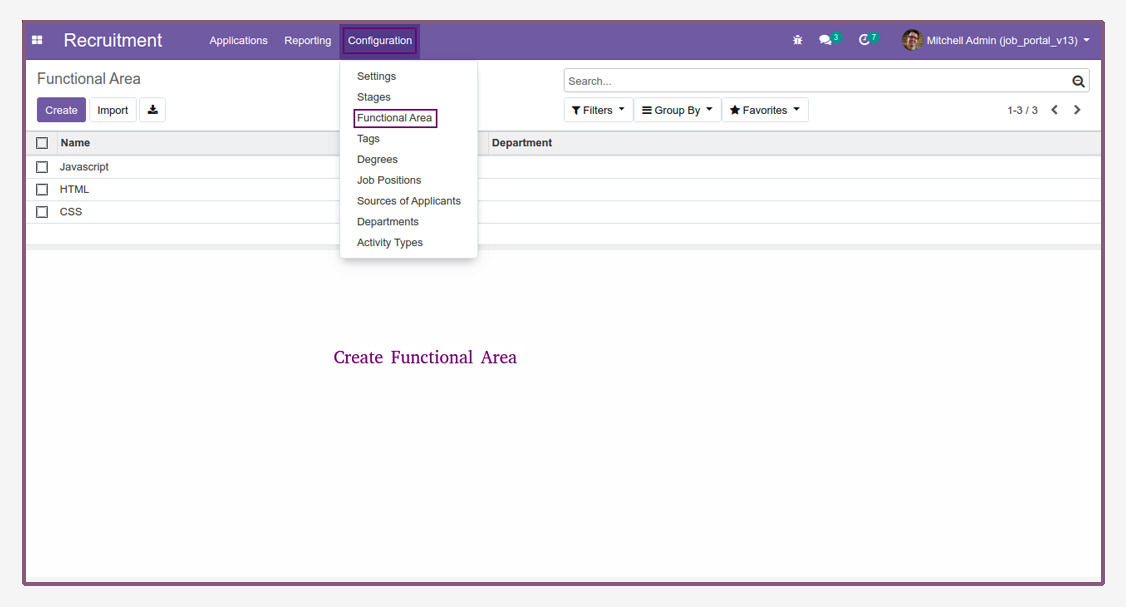
Create Functional Area

  • Navigate to Recruitment and then configuration.
  • Open Functional area.
Job Application - This module allows to user/candidate and employee to fill the job application in details from portal. | Job Applicant | Job Portal | Submit Job Application | HR Job Application | HR Recruitment | Job Recruitment
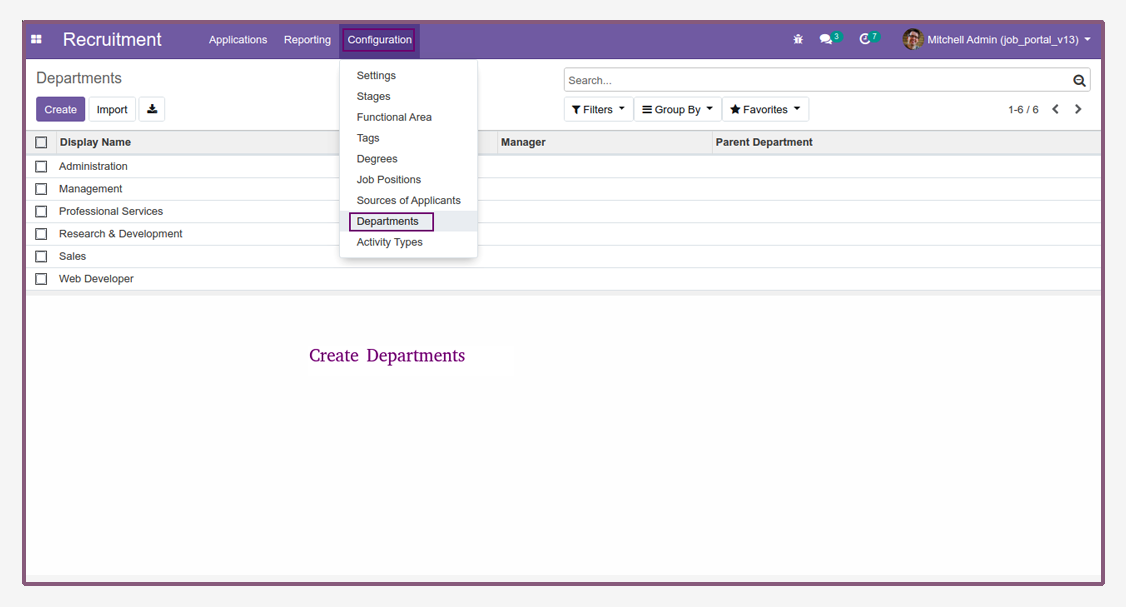
Create Departments

  • Navigate to Recruitment and then configuration.
  • Open Departments.
Job Application - This module allows to user/candidate and employee to fill the job application in details from portal. | Job Applicant | Job Portal | Submit Job Application | HR Job Application | HR Recruitment | Job Recruitment
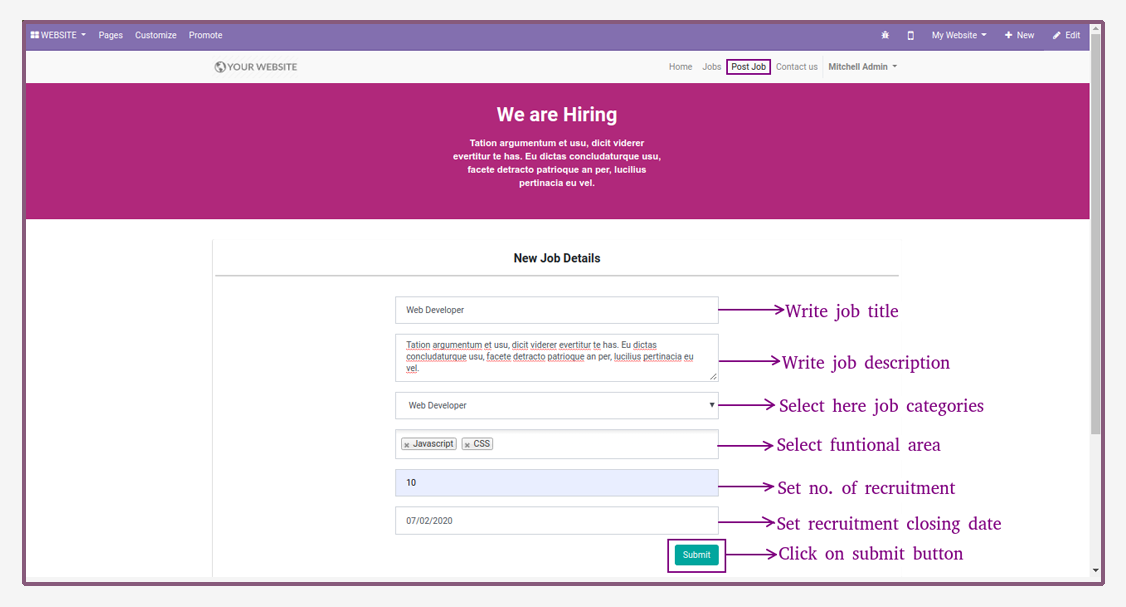
Create New Job

  • Now, open website and click on post job menu.
  • Then, enter job details and click on submit button to create new job.
Job Application - This module allows to user/candidate and employee to fill the job application in details from portal. | Job Applicant | Job Portal | Submit Job Application | HR Job Application | HR Recruitment | Job Recruitment
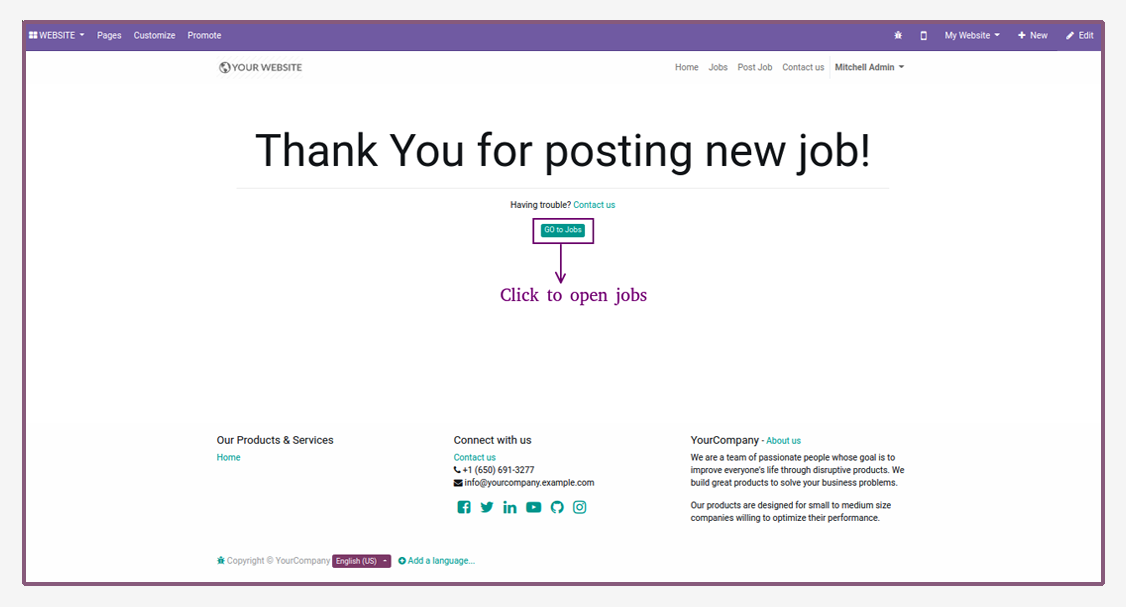
Confirmation Message

  • Confirmation message after creating new job.
  • Then, click on go to jobs button to open job list.
Job Application - This module allows to user/candidate and employee to fill the job application in details from portal. | Job Applicant | Job Portal | Submit Job Application | HR Job Application | HR Recruitment | Job Recruitment
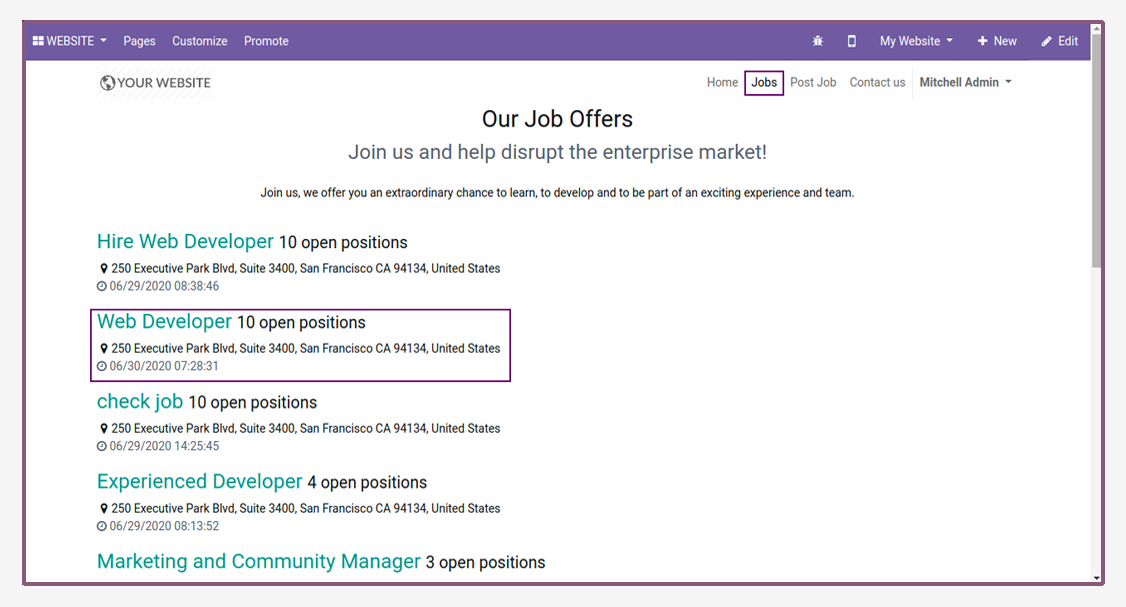
Job List

  • Job Lists are shown on the website.
Job Application - This module allows to user/candidate and employee to fill the job application in details from portal. | Job Applicant | Job Portal | Submit Job Application | HR Job Application | HR Recruitment | Job Recruitment
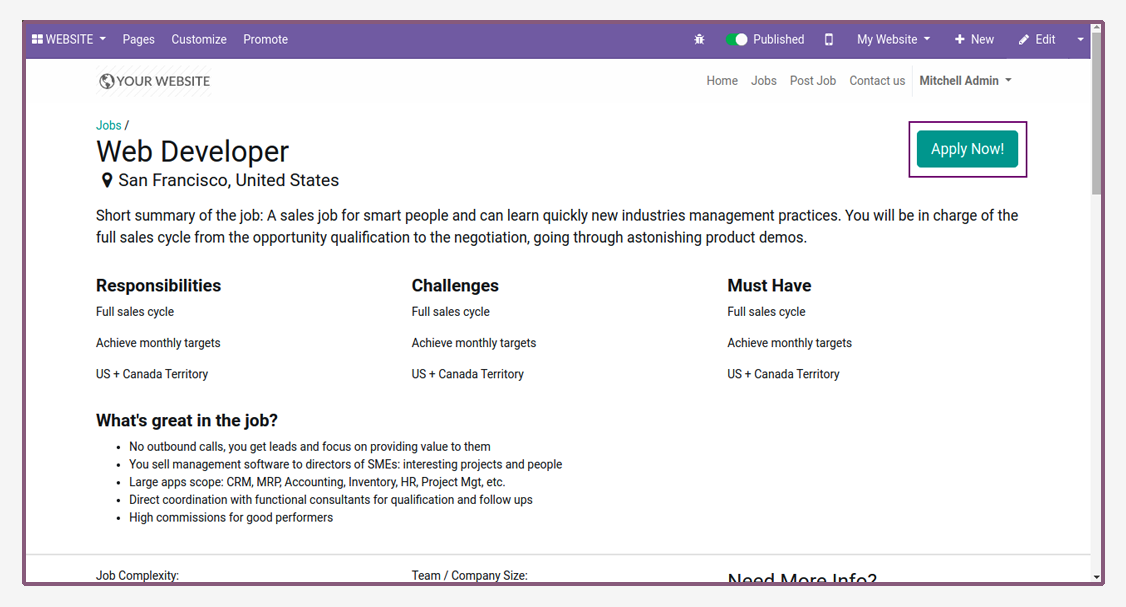
Apply Job

  • User can apply for this job by clicking on apply now button.
Job Application - This module allows to user/candidate and employee to fill the job application in details from portal. | Job Applicant | Job Portal | Submit Job Application | HR Job Application | HR Recruitment | Job Recruitment
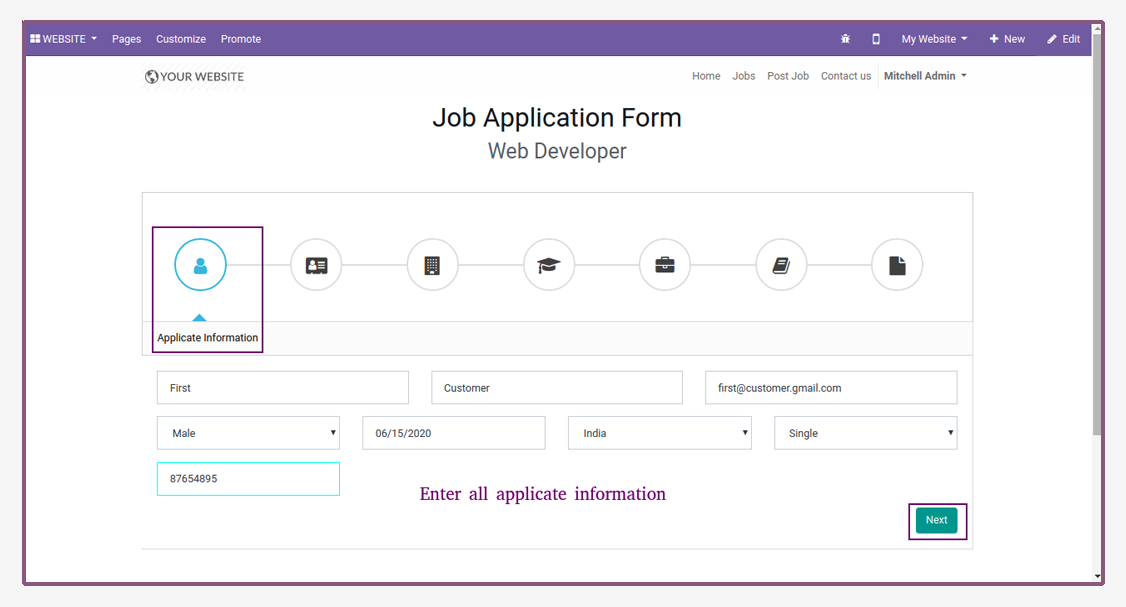
Enter Applicate Information

  • Here applicate write their Personal Details.
Job Application - This module allows to user/candidate and employee to fill the job application in details from portal. | Job Applicant | Job Portal | Submit Job Application | HR Job Application | HR Recruitment | Job Recruitment
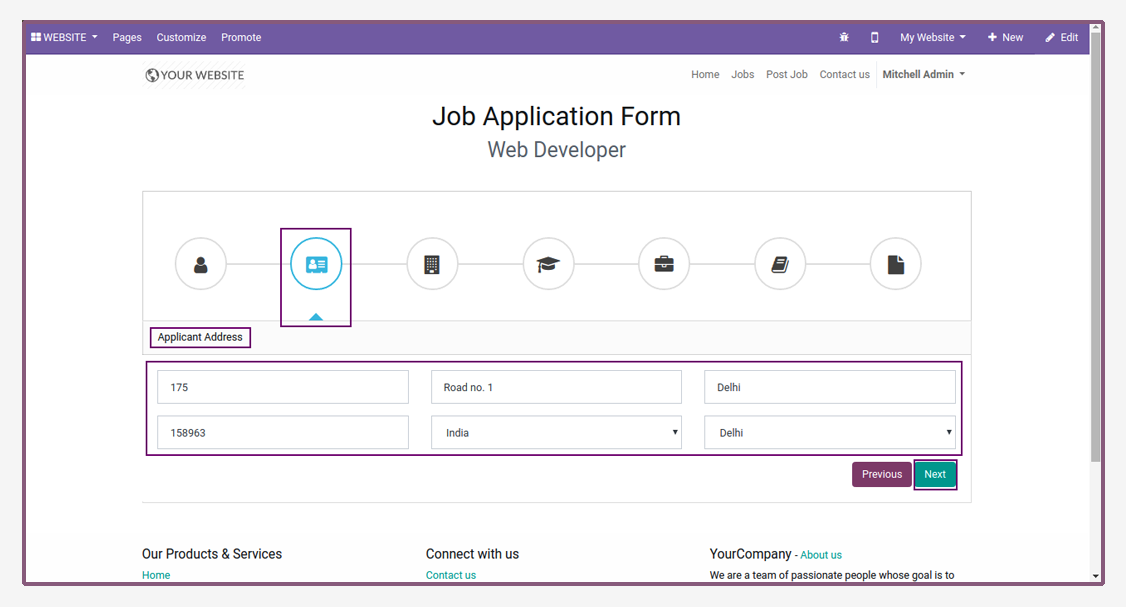
Enter Applicant Address

  • Applicant write their address.
Job Application - This module allows to user/candidate and employee to fill the job application in details from portal. | Job Applicant | Job Portal | Submit Job Application | HR Job Application | HR Recruitment | Job Recruitment
Enter Academic Details

Job Application - This module allows to user/candidate and employee to fill the job application in details from portal. | Job Applicant | Job Portal | Submit Job Application | HR Job Application | HR Recruitment | Job Recruitment
Enter Certificate Details

Job Application - This module allows to user/candidate and employee to fill the job application in details from portal. | Job Applicant | Job Portal | Submit Job Application | HR Job Application | HR Recruitment | Job Recruitment
Enter Professional Details

Job Application - This module allows to user/candidate and employee to fill the job application in details from portal. | Job Applicant | Job Portal | Submit Job Application | HR Job Application | HR Recruitment | Job Recruitment
Enter Application Summary

Job Application - This module allows to user/candidate and employee to fill the job application in details from portal. | Job Applicant | Job Portal | Submit Job Application | HR Job Application | HR Recruitment | Job Recruitment
Upload Your Resume

Job Application - This module allows to user/candidate and employee to fill the job application in details from portal. | Job Applicant | Job Portal | Submit Job Application | HR Job Application | HR Recruitment | Job Recruitment
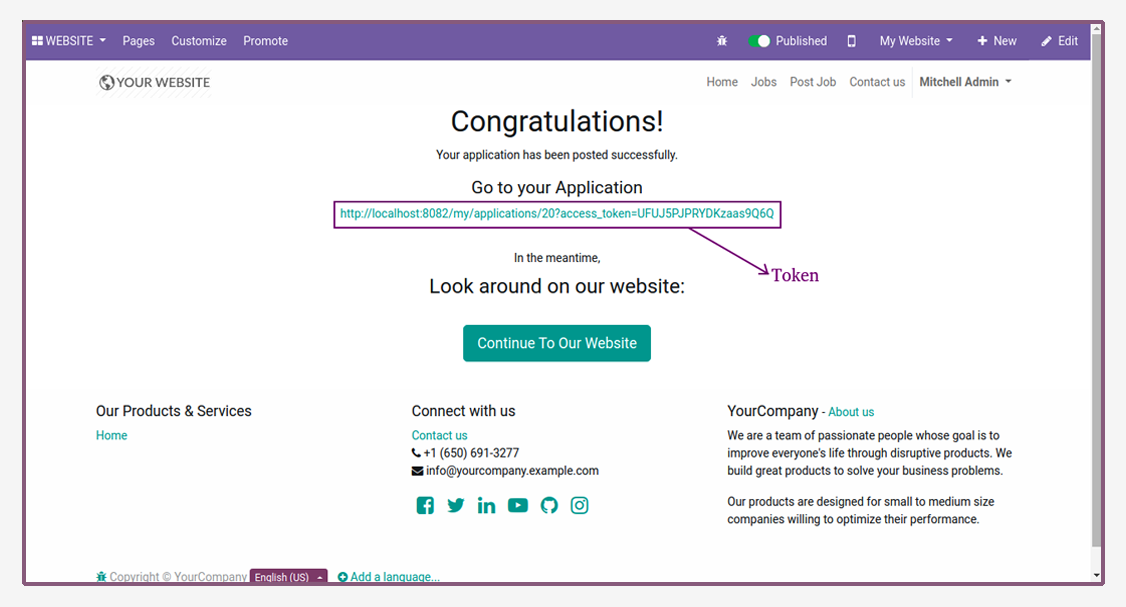
Generate Token

  • When submit application, token will be automatically generated.
  • Then, copy token and paste another window.
Job Application - This module allows to user/candidate and employee to fill the job application in details from portal. | Job Applicant | Job Portal | Submit Job Application | HR Job Application | HR Recruitment | Job Recruitment
Application Details

Job Application - This module allows to user/candidate and employee to fill the job application in details from portal. | Job Applicant | Job Portal | Submit Job Application | HR Job Application | HR Recruitment | Job Recruitment
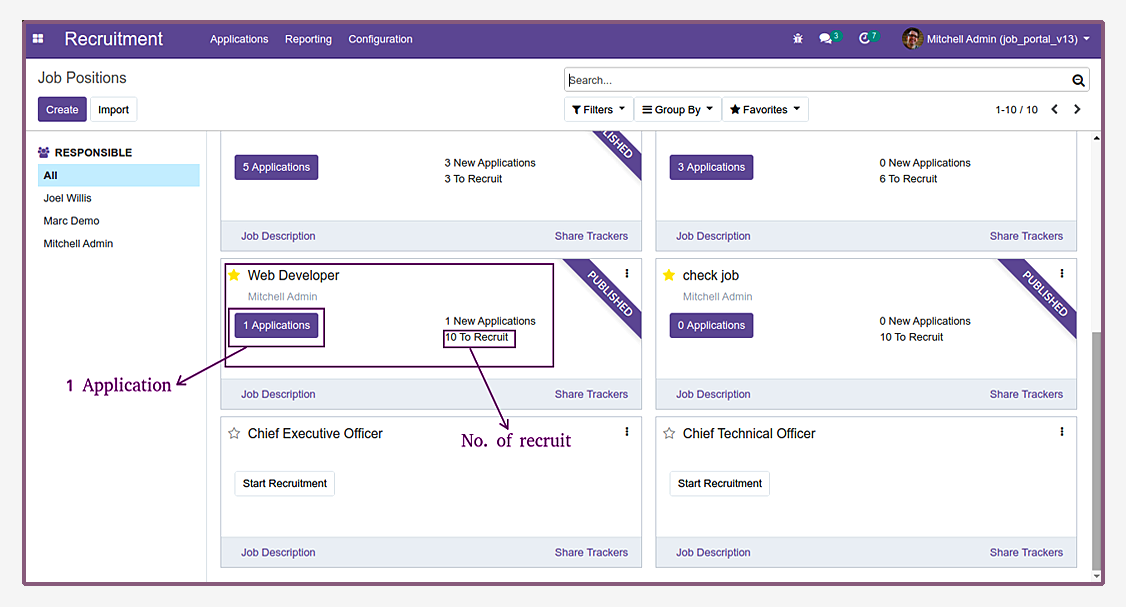
Job Positions

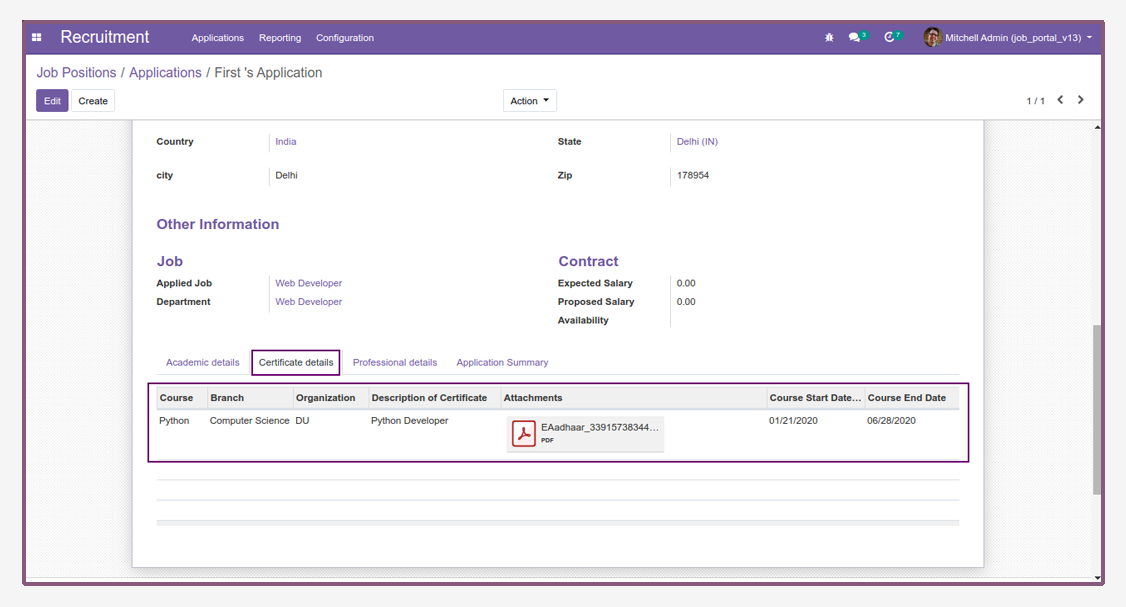
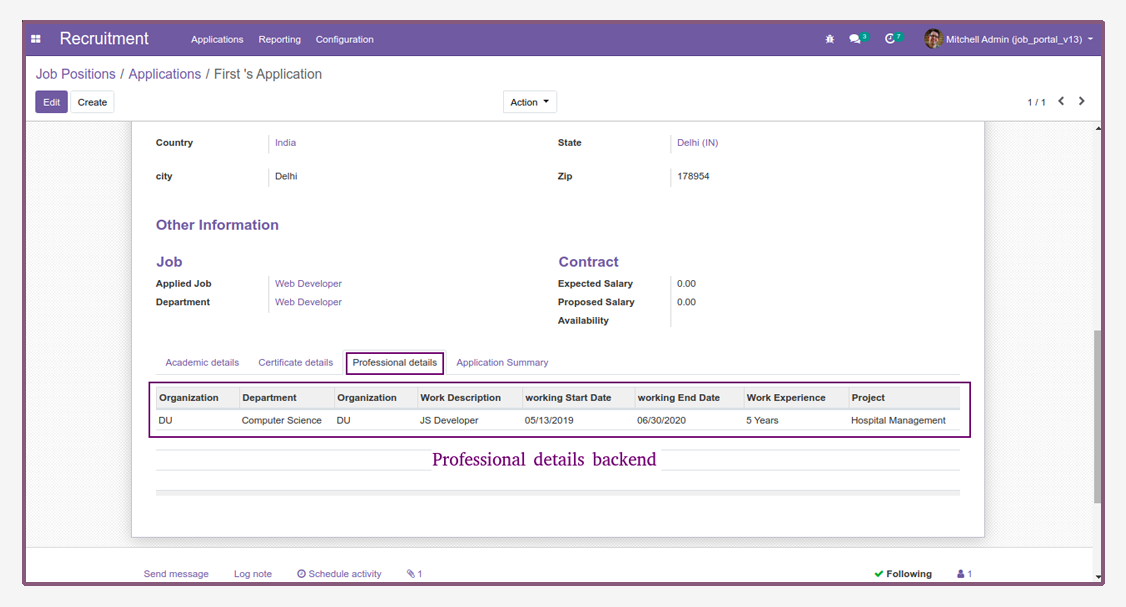
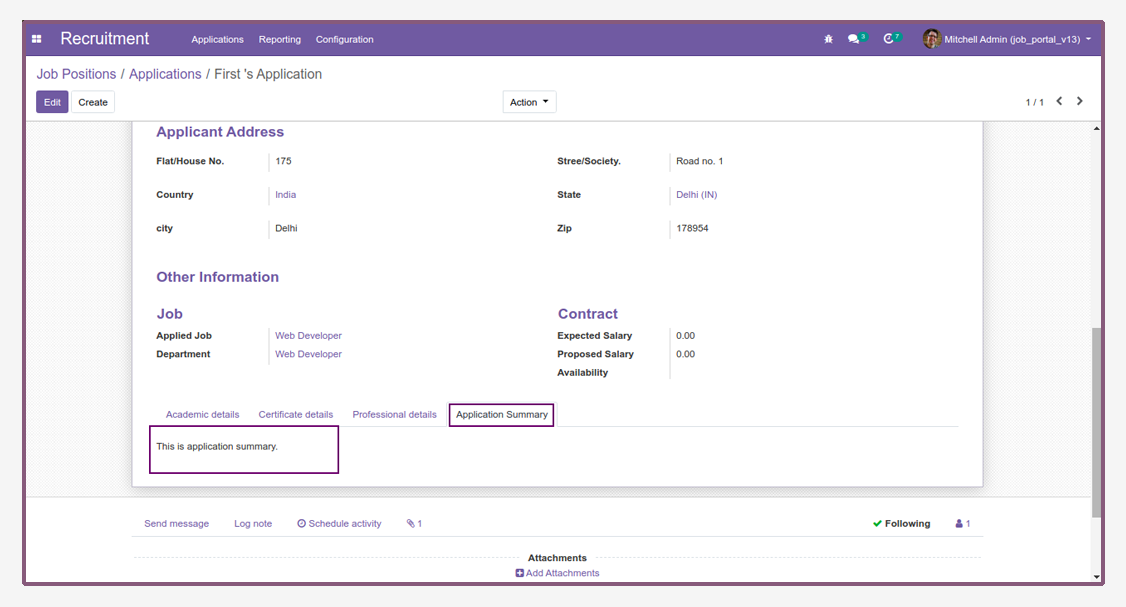
  • Now, open backend and check application details.
Job Application - This module allows to user/candidate and employee to fill the job application in details from portal. | Job Applicant | Job Portal | Submit Job Application | HR Job Application | HR Recruitment | Job Recruitment
Application Details

Job Application - This module allows to user/candidate and employee to fill the job application in details from portal. | Job Applicant | Job Portal | Submit Job Application | HR Job Application | HR Recruitment | Job Recruitment
Academic Details

Job Application - This module allows to user/candidate and employee to fill the job application in details from portal. | Job Applicant | Job Portal | Submit Job Application | HR Job Application | HR Recruitment | Job Recruitment
Certificate Details

Job Application - This module allows to user/candidate and employee to fill the job application in details from portal. | Job Applicant | Job Portal | Submit Job Application | HR Job Application | HR Recruitment | Job Recruitment
Professional Details

Job Application - This module allows to user/candidate and employee to fill the job application in details from portal. | Job Applicant | Job Portal | Submit Job Application | HR Job Application | HR Recruitment | Job Recruitment
Application Summary

Job Application - This module allows to user/candidate and employee to fill the job application in details from portal. | Job Applicant | Job Portal | Submit Job Application | HR Job Application | HR Recruitment | Job Recruitment

3rd July, 2020

Latest Release 1.0

First version to release.


Frequently Asked Question:-

Is this app compatible with Odoo Enterprise?
Yes, our app works with Odoo Enterprise as well as Community.
Is this app compatible with Windows or Ubuntu?
Yes, our app works with Windows or Ununtu operating system.
Is this app required any additional configuration?
No, install module and use this features.

FREE 3 MONTHS SUPPORT

Kanak Infosystem will provide free 3 months support for bug fixes, any doubts or queries, installation, configuration support or any types of issues related to this module.


NOTE: This module do not required extra configuration.
kanakinfosystems
+91 9818108884
SUGGESTED APPS App Link
Odoo Proprietary License v1.0

This software and associated files (the "Software") may only be used (executed,
modified, executed after modifications) if you have purchased a valid license
from the authors, typically via Odoo Apps, or if you have received a written
agreement from the authors of the Software (see the COPYRIGHT file).

You may develop Odoo modules that use the Software as a library (typically
by depending on it, importing it and using its resources), but without copying
any source code or material from the Software. You may distribute those
modules under the license of your choice, provided that this license is
compatible with the terms of the Odoo Proprietary License (For example:
LGPL, MIT, or proprietary licenses similar to this one).

It is forbidden to publish, distribute, sublicense, or sell copies of the Software
or modified copies of the Software.

The above copyright notice and this permission notice must be included in all
copies or substantial portions of the Software.

THE SOFTWARE IS PROVIDED "AS IS", WITHOUT WARRANTY OF ANY KIND, EXPRESS OR
IMPLIED, INCLUDING BUT NOT LIMITED TO THE WARRANTIES OF MERCHANTABILITY,
FITNESS FOR A PARTICULAR PURPOSE AND NONINFRINGEMENT.
IN NO EVENT SHALL THE AUTHORS OR COPYRIGHT HOLDERS BE LIABLE FOR ANY CLAIM,
DAMAGES OR OTHER LIABILITY, WHETHER IN AN ACTION OF CONTRACT, TORT OR OTHERWISE,
ARISING FROM, OUT OF OR IN CONNECTION WITH THE SOFTWARE OR THE USE OR OTHER
DEALINGS IN THE SOFTWARE.

Comment on this module. Please Login