Skip to Content
Yard Management

Yard Management

249.03   249.03
v 19.0 0
Required Apps base
project
documents
quality
quality_control
fleet
stock
stock_fleet
purchase
sale_management
Technical Name yard_management_knk
License OPL-1
You bought this module and need support? Click here!
Technical Name yard_management_knk
License OPL-1
Yard Management - Yard Management automates warehouse gate operations, dock scheduling, and vehicle tracking from entry to exit. The module integrates weighbridge operations, security checkpoints, quality controls, and real-time inventory tracking with automated notifications at every stage. | Yard Management | Gate Transactions | Dock Scheduling | Weighbridge Integration | Security Checkpoints | Inventory Tracking | Warehouse Operations | Vehicle Management | SLA Monitoring | Quality Control | Real-time Notifications.
Kanak Infosystems LLP.
Enterprise
Odoo.sh
Yard Management - Yard Management automates warehouse gate operations, dock scheduling, and vehicle tracking from entry to exit. The module integrates weighbridge operations, security checkpoints, quality controls, and real-time inventory tracking with automated notifications at every stage. | Yard Management | Gate Transactions | Dock Scheduling | Weighbridge Integration | Security Checkpoints | Inventory Tracking | Warehouse Operations | Vehicle Management | SLA Monitoring | Quality Control | Real-time Notifications.

Yard Management

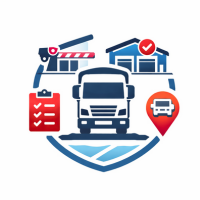
The Yard Management module streamlines warehouse operations by automating vehicle gate processing, dock scheduling, and inventory workflows from arrival to exit. It tracks inbound/outbound shipments in real-time with integrated weighbridge, security checkpoints, quality controls, and SLA monitoring-complete with automated email notifications at every operational stage.
Yard Management
Yard Management - Yard Management automates warehouse gate operations, dock scheduling, and vehicle tracking from entry to exit. The module integrates weighbridge operations, security checkpoints, quality controls, and real-time inventory tracking with automated notifications at every stage. | Yard Management | Gate Transactions | Dock Scheduling | Weighbridge Integration | Security Checkpoints | Inventory Tracking | Warehouse Operations | Vehicle Management | SLA Monitoring | Quality Control | Real-time Notifications.
Configure Yard Management User Role

To assign a Yard Management role to a user in Odoo, follow the steps below:

  1. Go to Settings > Users & Companies > Users.
  2. Open your current user record from the list.
  3. Scroll to the Other section.
  4. In the Yard Management field, select the role for the user.
  5. Choose Manager for full access or User for limited access.
  6. Click Save to apply the changes.

Note: Managers have full access rights, while Users have limited permissions.
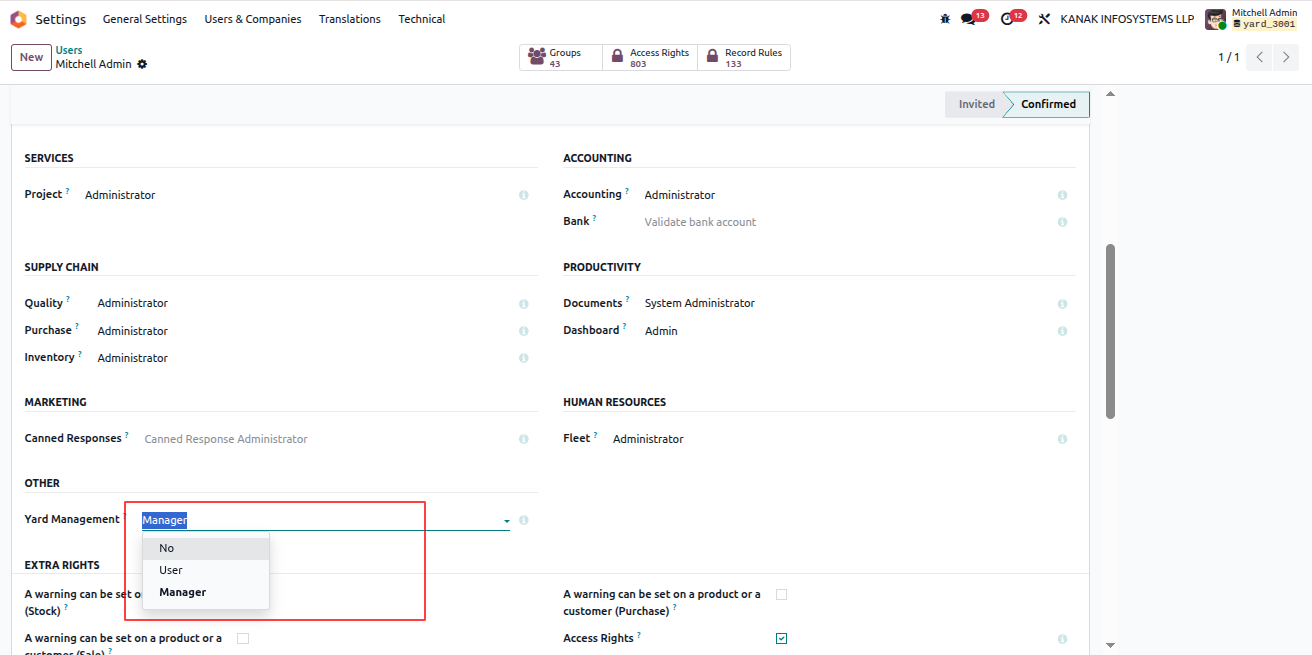
Yard Management User Role Configuration
Yard Management - Yard Management automates warehouse gate operations, dock scheduling, and vehicle tracking from entry to exit. The module integrates weighbridge operations, security checkpoints, quality controls, and real-time inventory tracking with automated notifications at every stage. | Yard Management | Gate Transactions | Dock Scheduling | Weighbridge Integration | Security Checkpoints | Inventory Tracking | Warehouse Operations | Vehicle Management | SLA Monitoring | Quality Control | Real-time Notifications.
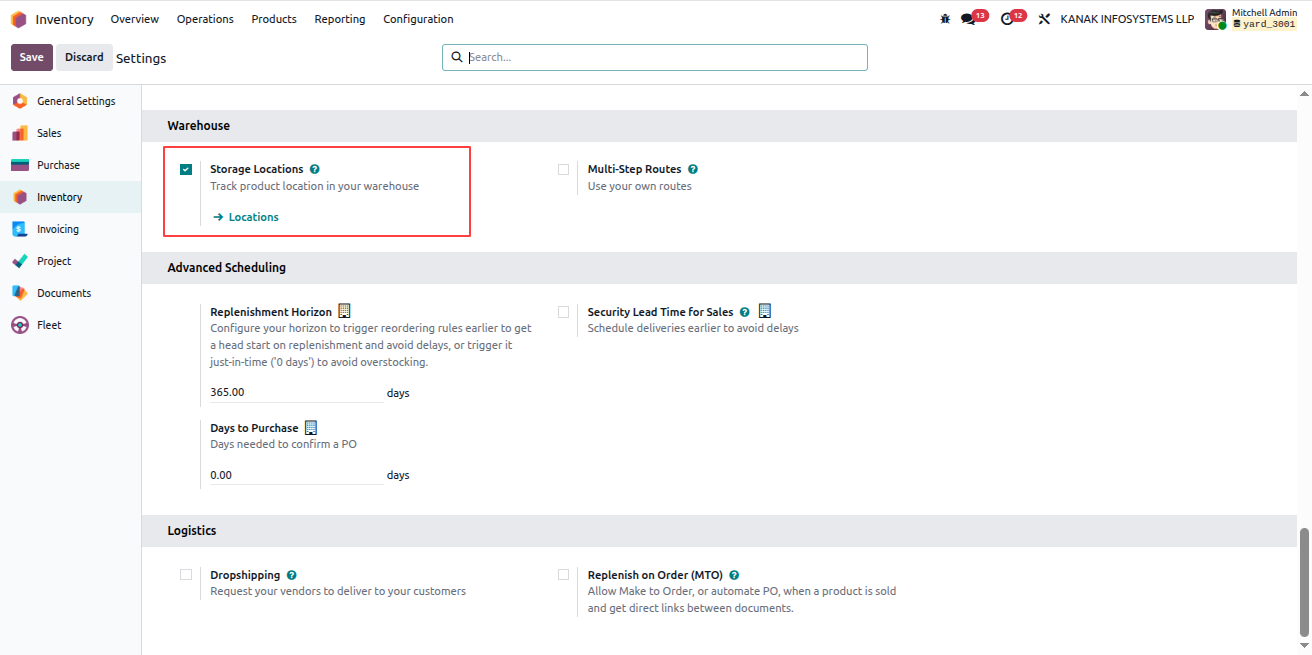
Enable Storage Locations in Inventory

To enable Storage Locations in the Inventory module, follow these steps:

  1. Go to the Inventory app.
  2. Navigate to Configuration > Settings.
  3. Scroll down to the Warehouse section.
  4. Enable the Storage Locations option.
  5. Click Save to apply the changes.

Enable Storage Locations
Yard Management - Yard Management automates warehouse gate operations, dock scheduling, and vehicle tracking from entry to exit. The module integrates weighbridge operations, security checkpoints, quality controls, and real-time inventory tracking with automated notifications at every stage. | Yard Management | Gate Transactions | Dock Scheduling | Weighbridge Integration | Security Checkpoints | Inventory Tracking | Warehouse Operations | Vehicle Management | SLA Monitoring | Quality Control | Real-time Notifications.
Access Inventory Locations

To view and manage Inventory Locations in Odoo, follow the steps below:

  1. Go to the Inventory app.
  2. Navigate to Configuration > Locations.
  3. The list of all storage and internal locations will be displayed.
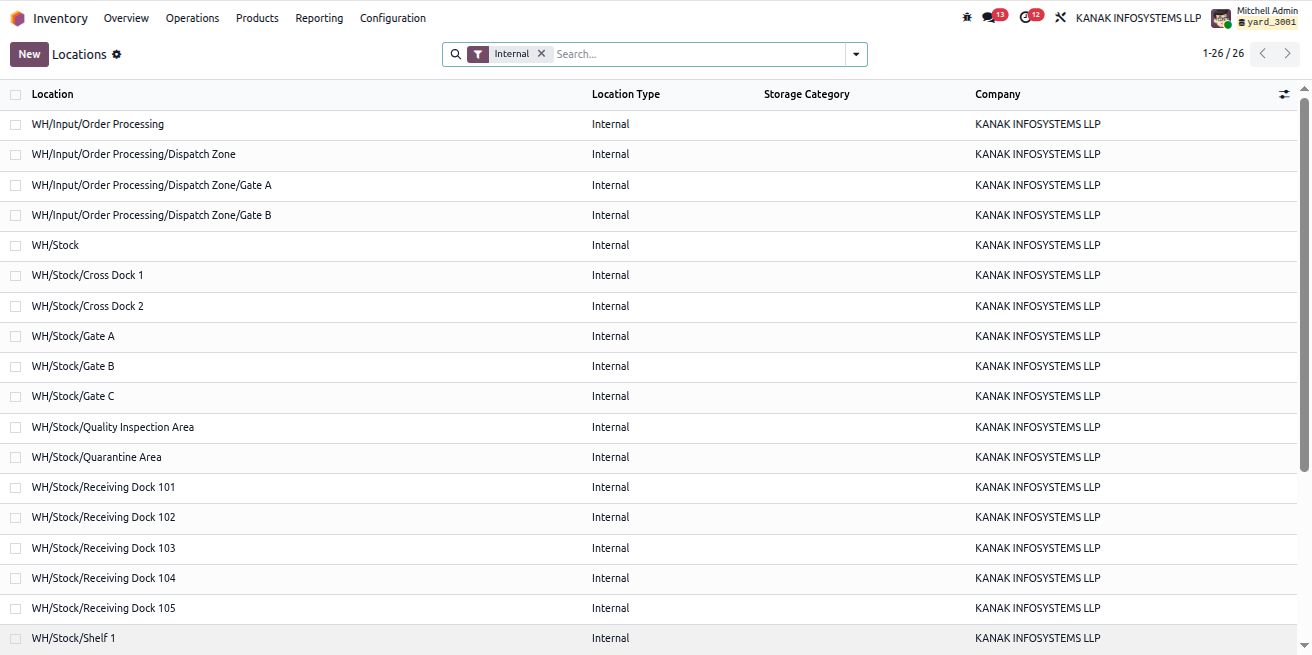
Inventory Locations
Yard Management - Yard Management automates warehouse gate operations, dock scheduling, and vehicle tracking from entry to exit. The module integrates weighbridge operations, security checkpoints, quality controls, and real-time inventory tracking with automated notifications at every stage. | Yard Management | Gate Transactions | Dock Scheduling | Weighbridge Integration | Security Checkpoints | Inventory Tracking | Warehouse Operations | Vehicle Management | SLA Monitoring | Quality Control | Real-time Notifications.
Create a New Inventory Location

To create a new Inventory Location, follow the steps below:

  1. Click the New button on the Locations screen.
  2. Enter the Location Name.
  3. Select the appropriate Parent Location.
  4. Choose an Assigned Manager for this location.
  5. The assigned manager will receive email notifications for loading, unloading, picking, and stock transfers occurring at this location.
  6. Select the required Location Type.
  7. Optionally, set the Vehicle Capacity and Storage Capacity for the location.
  8. The system will prevent operations that exceed the defined capacity limits.
  9. Click Save to create the location.

Important: The required location types are Gate and Dock Door, which are used for Shipping, Receiving, Cross Docking, and Yard Staging Areas.
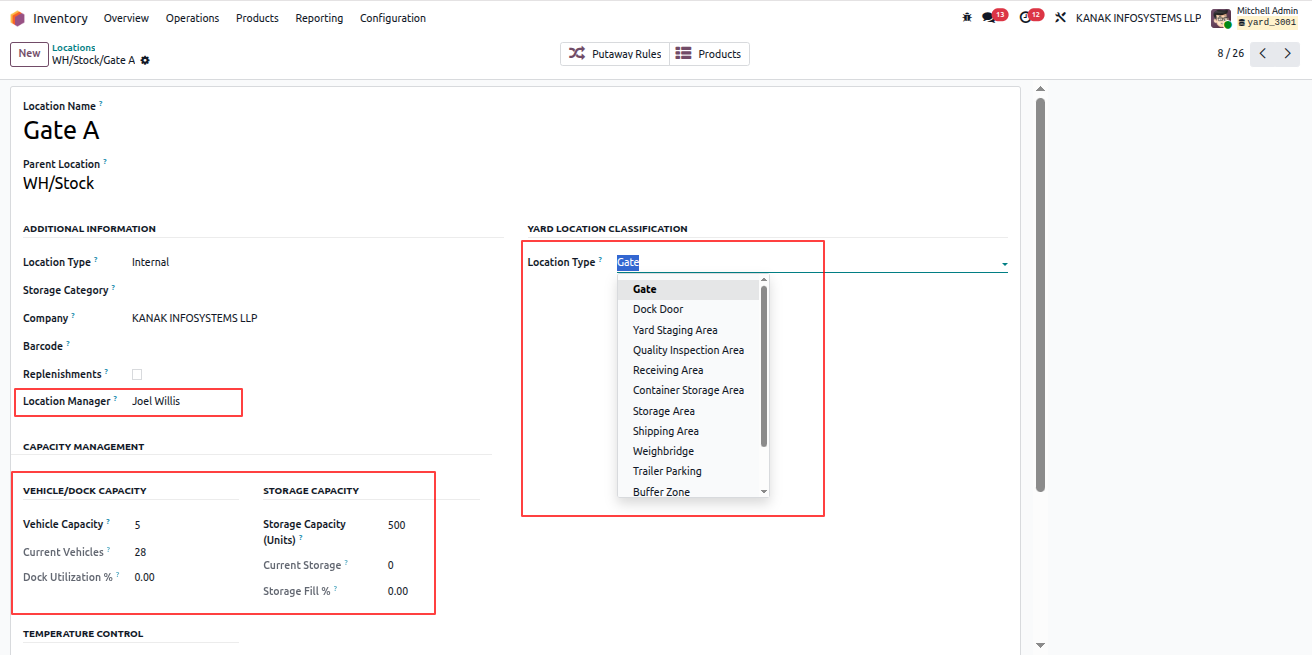
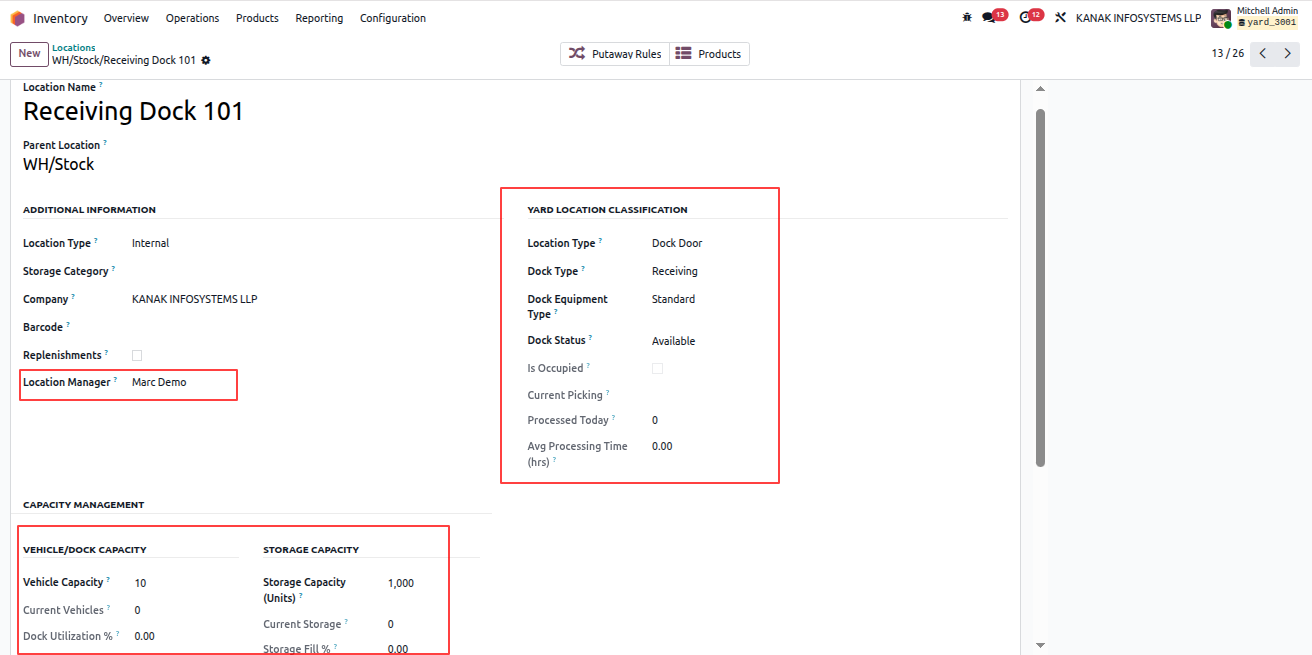
Create Inventory Location

Location Capacity and Type Settings
Yard Management - Yard Management automates warehouse gate operations, dock scheduling, and vehicle tracking from entry to exit. The module integrates weighbridge operations, security checkpoints, quality controls, and real-time inventory tracking with automated notifications at every stage. | Yard Management | Gate Transactions | Dock Scheduling | Weighbridge Integration | Security Checkpoints | Inventory Tracking | Warehouse Operations | Vehicle Management | SLA Monitoring | Quality Control | Real-time Notifications.
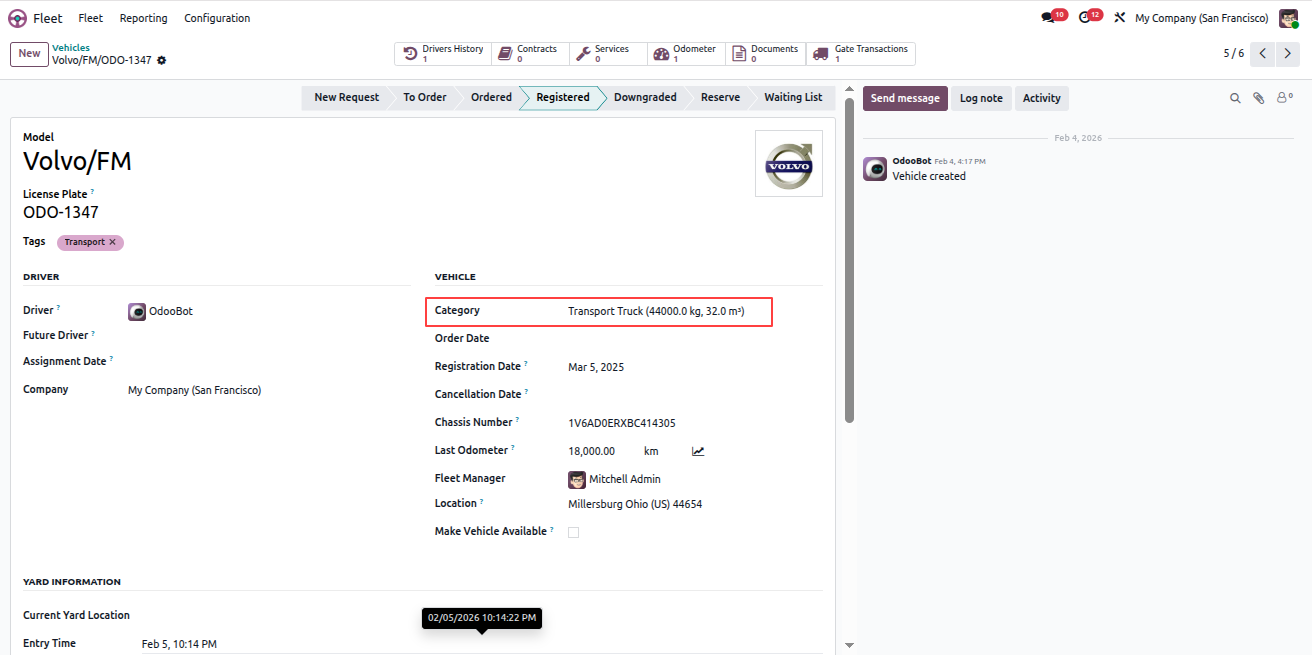
Configure Vehicle Categories in Fleet

To configure Vehicle Categories and assign them to vehicles, follow the steps below:

  1. Go to the Fleet app.
  2. Navigate to Configuration > Categories.
  3. Open an existing category or click New to create one.
  4. Set the Maximum Weight and Maximum Volume for the category.
  5. Click Save to apply the category limits.
  6. Next, go to Fleet > Fleet.
  7. Open any vehicle record.
  8. Select the appropriate Category for the vehicle.
  9. Click Save to update the vehicle details.

Note: The category limits help control loading based on vehicle weight and volume.
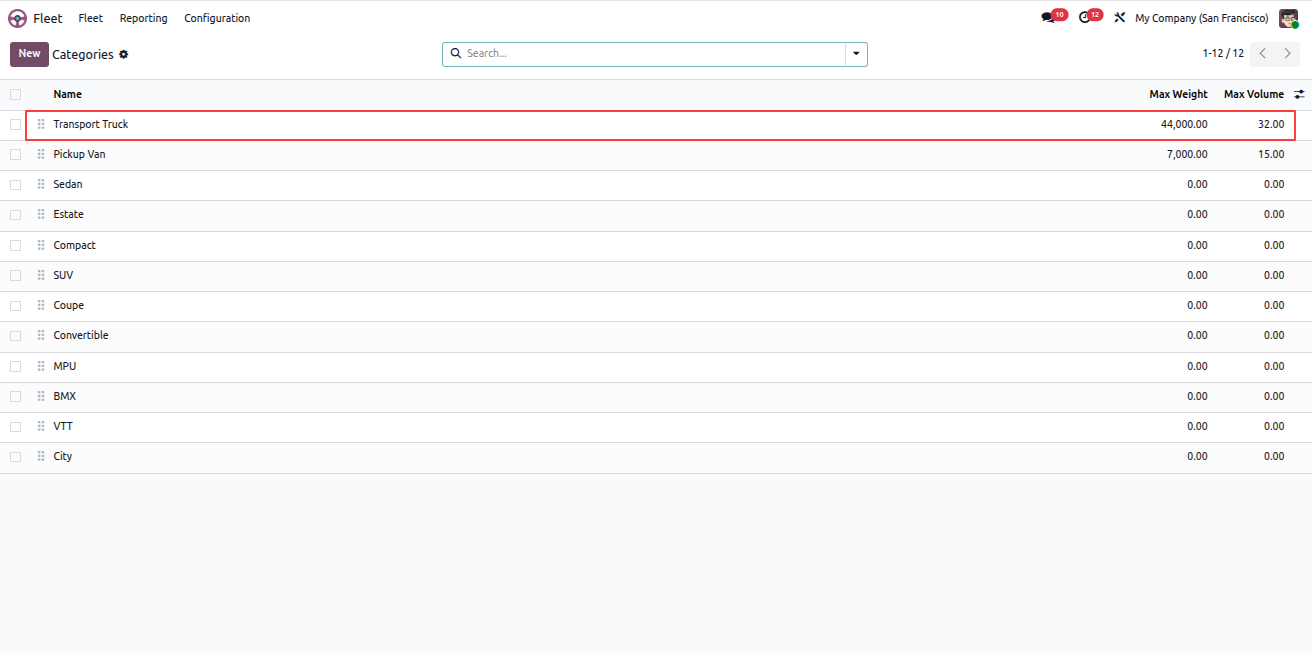
Vehicle Category Configuration

Assign Category to Vehicle
Yard Management - Yard Management automates warehouse gate operations, dock scheduling, and vehicle tracking from entry to exit. The module integrates weighbridge operations, security checkpoints, quality controls, and real-time inventory tracking with automated notifications at every stage. | Yard Management | Gate Transactions | Dock Scheduling | Weighbridge Integration | Security Checkpoints | Inventory Tracking | Warehouse Operations | Vehicle Management | SLA Monitoring | Quality Control | Real-time Notifications.
Configure Yard State Escalation Rules

To configure Escalation Settings for Yard States, follow the steps below:

  1. Go to Yard Management > Configuration > Yard States.
  2. Open any yard state record.
  3. Locate the Escalation Settings section.
  4. Set the Threshold Time Period for the selected state.
  5. If a vehicle remains in the same state longer than the defined threshold, an alert email will be sent automatically.
  6. The alert email is sent to the assigned manager.
  7. Click Save to apply the escalation rule.

Note: Escalation rules help monitor vehicle delays and ensure timely action when thresholds are exceeded.
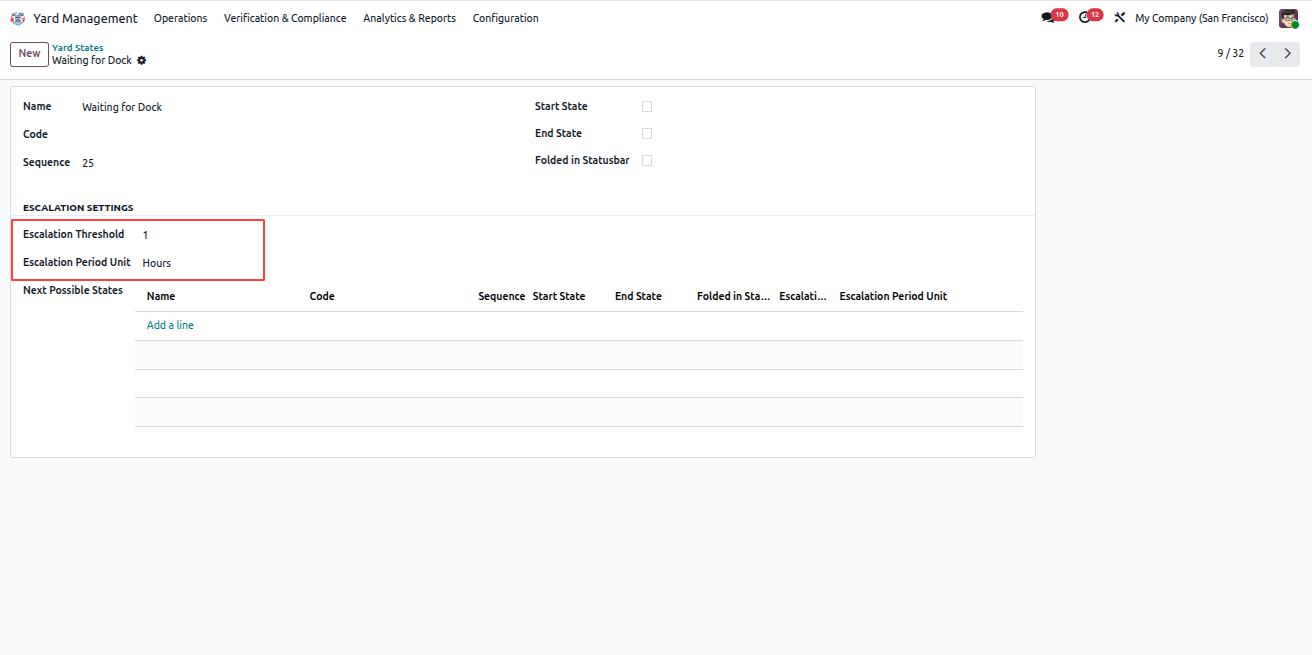
Yard State Escalation Settings
Yard Management - Yard Management automates warehouse gate operations, dock scheduling, and vehicle tracking from entry to exit. The module integrates weighbridge operations, security checkpoints, quality controls, and real-time inventory tracking with automated notifications at every stage. | Yard Management | Gate Transactions | Dock Scheduling | Weighbridge Integration | Security Checkpoints | Inventory Tracking | Warehouse Operations | Vehicle Management | SLA Monitoring | Quality Control | Real-time Notifications.
Create and Confirm a Purchase Order

To create a new Request for Quotation (RFQ) and confirm the purchase order, follow the steps below:

  1. Go to the Purchase app.
  2. Click New to create a new request for quotation.
  3. Fill in the required purchase information.
  4. Add the products to be purchased.
  5. Review the details and click Confirm Order.
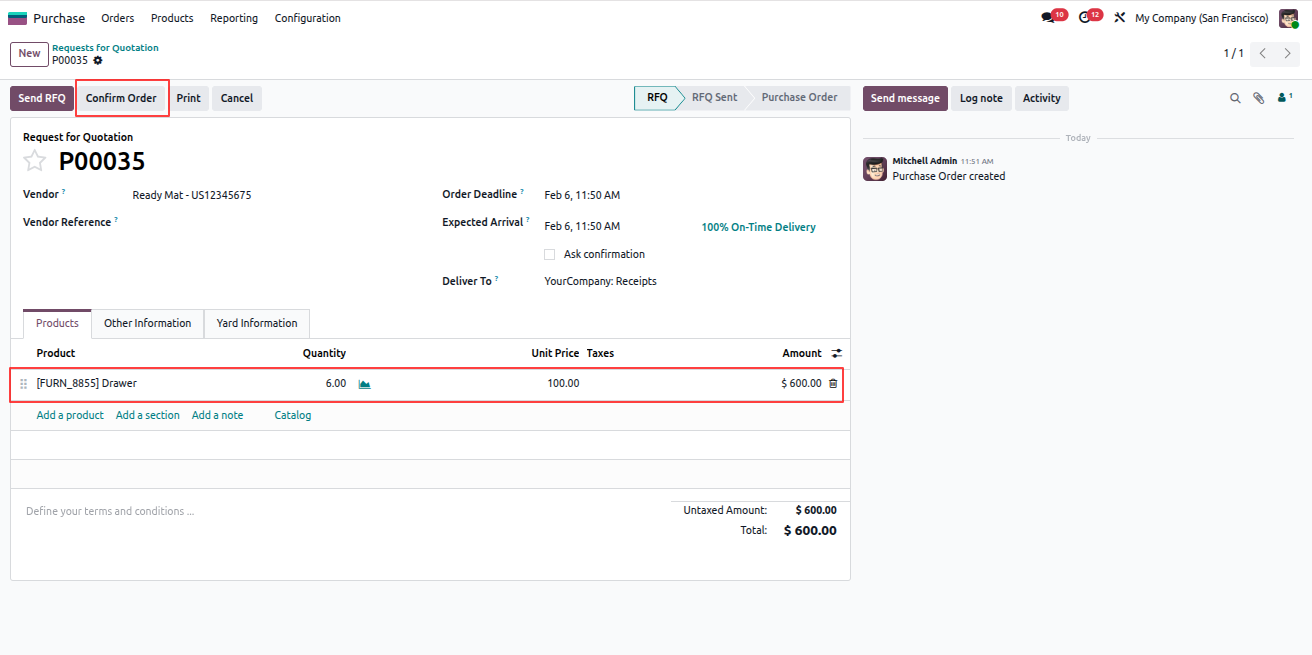
Create Purchase Request for Quotation
Yard Management - Yard Management automates warehouse gate operations, dock scheduling, and vehicle tracking from entry to exit. The module integrates weighbridge operations, security checkpoints, quality controls, and real-time inventory tracking with automated notifications at every stage. | Yard Management | Gate Transactions | Dock Scheduling | Weighbridge Integration | Security Checkpoints | Inventory Tracking | Warehouse Operations | Vehicle Management | SLA Monitoring | Quality Control | Real-time Notifications.
Create Gate Transaction from Purchase Order

To create a Gate Transaction for a purchase order, follow the steps below:

  1. Open the confirmed purchase order.
  2. Go to the Yard Information tab.
  3. Enter the required Vehicle Information.
  4. Click Create Gate Transaction.
  5. A gate transaction will be created and linked to the selected purchase order.

Note: Gate transactions help track vehicle entry and yard operations related to this purchase.
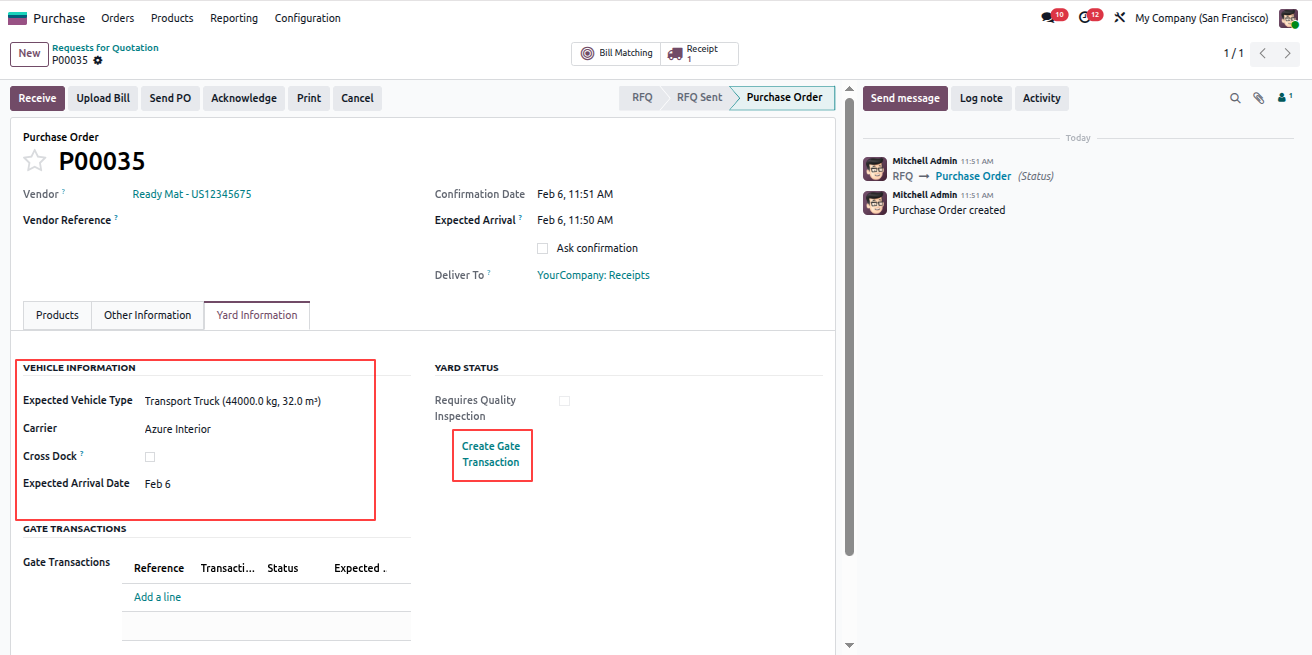
Create Gate Transaction from Purchase Order
Yard Management - Yard Management automates warehouse gate operations, dock scheduling, and vehicle tracking from entry to exit. The module integrates weighbridge operations, security checkpoints, quality controls, and real-time inventory tracking with automated notifications at every stage. | Yard Management | Gate Transactions | Dock Scheduling | Weighbridge Integration | Security Checkpoints | Inventory Tracking | Warehouse Operations | Vehicle Management | SLA Monitoring | Quality Control | Real-time Notifications.
Create Gate Transaction from Purchase Order

To create a Gate Transaction from a Purchase Order, follow the steps below:

  1. Open the confirmed Purchase Order.
  2. Go to the Yard Information tab.
  3. Fill in the required Vehicle Information.
  4. Click Create Gate Transaction.
  5. A new gate transaction is created for the related purchase.
  6. The system automatically opens the newly created Gate Transaction record.

Note: This gate transaction links the vehicle entry directly to the corresponding purchase order.
Purchase Order Yard Information

Created Gate Transaction Record
Yard Management - Yard Management automates warehouse gate operations, dock scheduling, and vehicle tracking from entry to exit. The module integrates weighbridge operations, security checkpoints, quality controls, and real-time inventory tracking with automated notifications at every stage. | Yard Management | Gate Transactions | Dock Scheduling | Weighbridge Integration | Security Checkpoints | Inventory Tracking | Warehouse Operations | Vehicle Management | SLA Monitoring | Quality Control | Real-time Notifications.
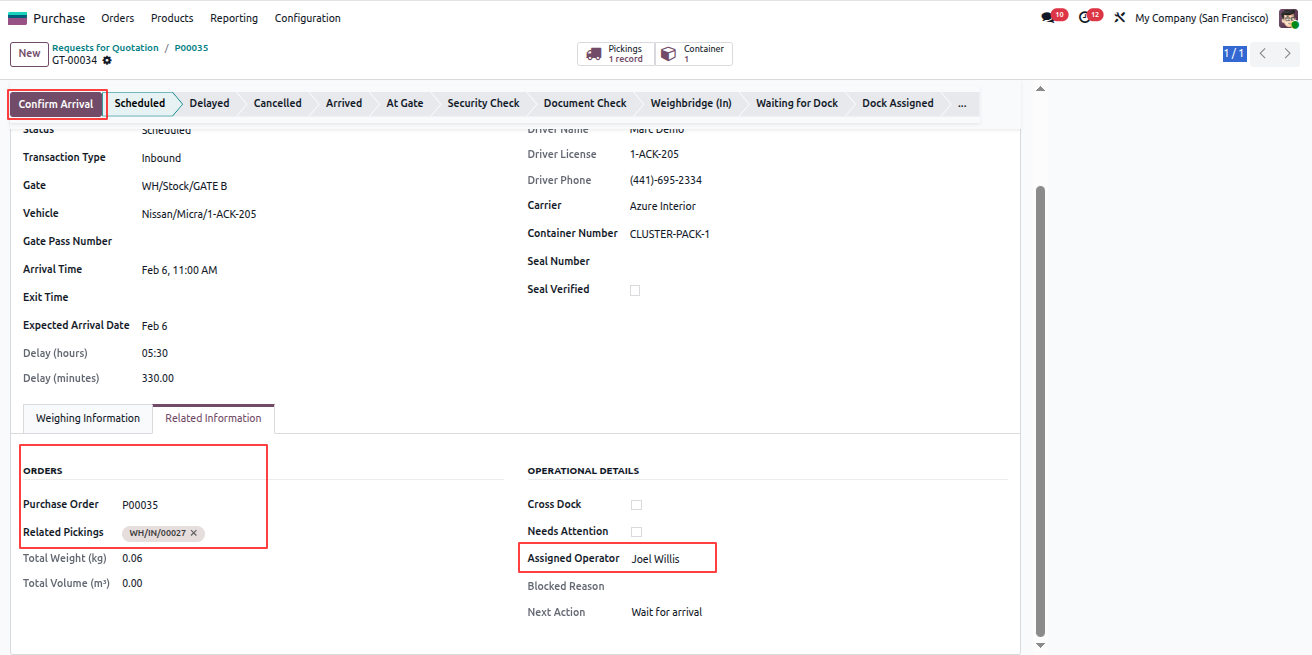
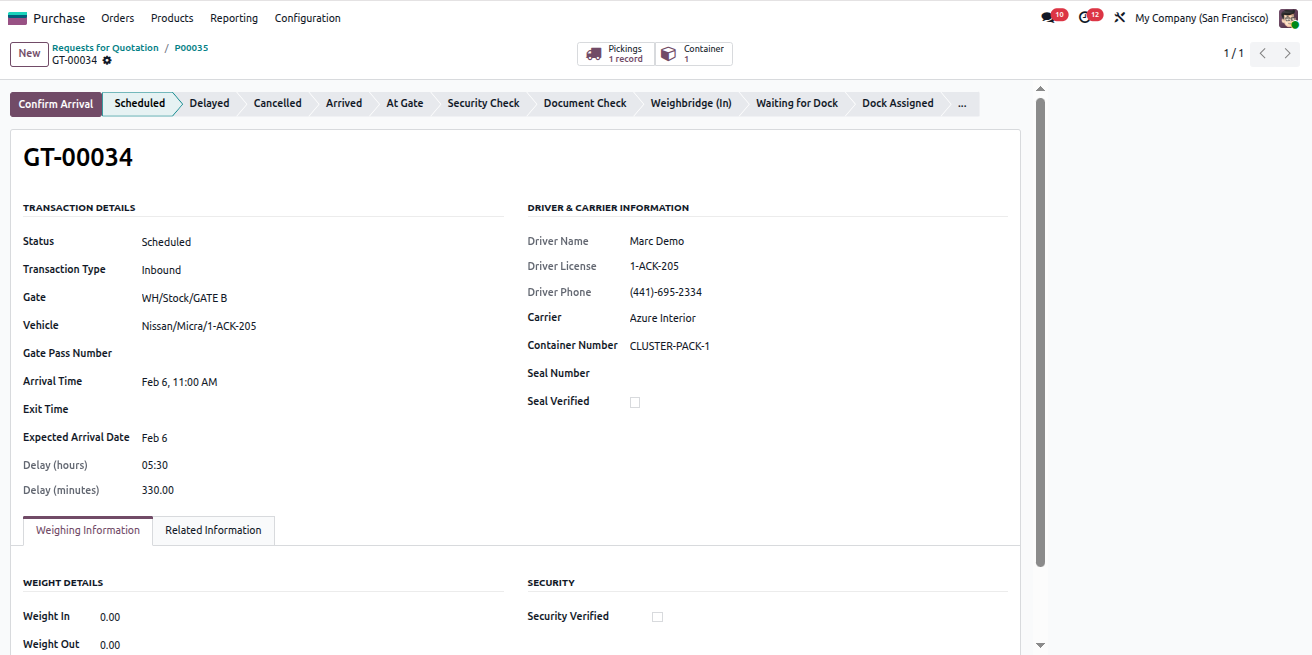
Confirm Vehicle Arrival

To confirm the arrival of a vehicle in the gate transaction, follow the steps below:

  1. Open the Gate Transaction record.
  2. Go to the Related Information tab.
  3. View the linked Purchase Order and its related Stock Picking.
  4. Select the Assigned Operator.
  5. The assigned operator will receive email notifications related to this transaction and vehicle exit.
  6. Click Confirm Arrival to proceed.

Confirm Arrival and Assign Operator
Yard Management - Yard Management automates warehouse gate operations, dock scheduling, and vehicle tracking from entry to exit. The module integrates weighbridge operations, security checkpoints, quality controls, and real-time inventory tracking with automated notifications at every stage. | Yard Management | Gate Transactions | Dock Scheduling | Weighbridge Integration | Security Checkpoints | Inventory Tracking | Warehouse Operations | Vehicle Management | SLA Monitoring | Quality Control | Real-time Notifications.
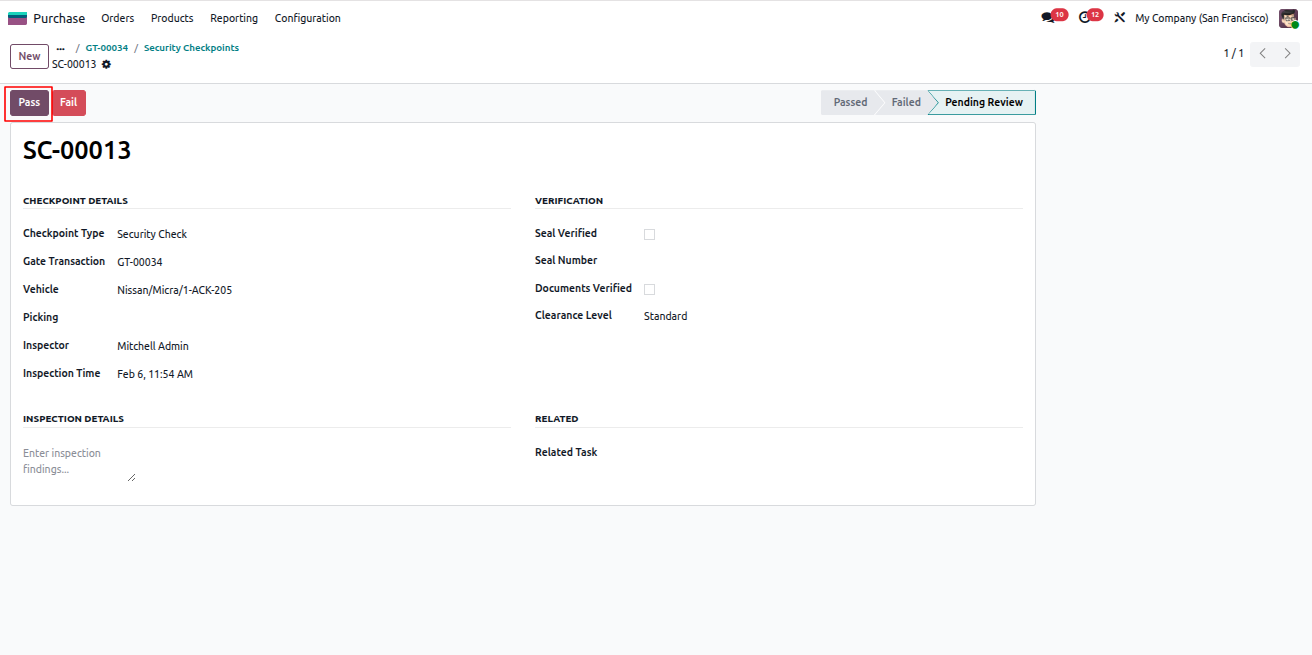
Complete Security Verification

Before continuing further operations, the vehicle must pass security verification.

  1. Open the Gate Transaction record.
  2. Use the Security smart button at the top.
  3. An automatically created Security Record will open.
  4. Click Pass to approve the security check.
  5. If the security check fails, further operations will not be allowed.
  6. In case of failure, notification emails are sent to the Manager and Inspector.
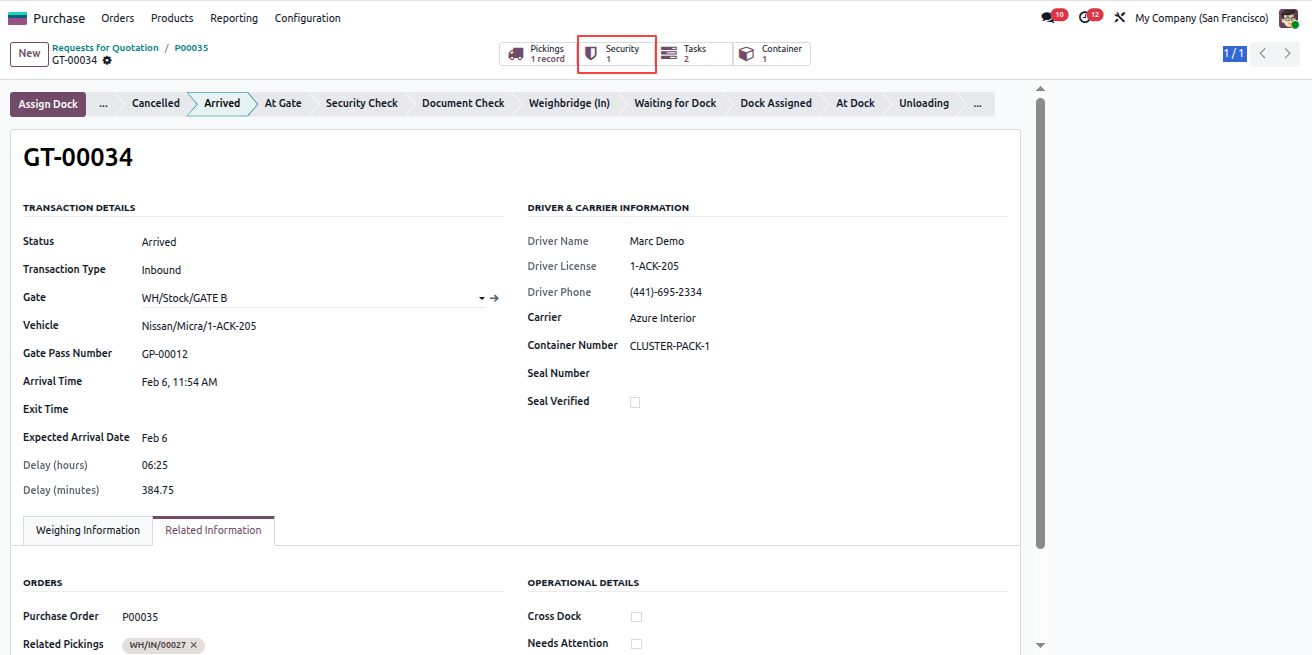
Security Smart Button

Security Verification Record
Yard Management - Yard Management automates warehouse gate operations, dock scheduling, and vehicle tracking from entry to exit. The module integrates weighbridge operations, security checkpoints, quality controls, and real-time inventory tracking with automated notifications at every stage. | Yard Management | Gate Transactions | Dock Scheduling | Weighbridge Integration | Security Checkpoints | Inventory Tracking | Warehouse Operations | Vehicle Management | SLA Monitoring | Quality Control | Real-time Notifications.
Complete Document Verification

To complete document verification for the gate transaction, follow the steps below:

  1. Open the Gate Transaction record again.
  2. Click the Tasks smart button.
  3. Remove any active filters to view all tasks.
  4. Open the Document Verification task.
  5. In the Documents tab, fill in the required details.
  6. Upload the necessary documents.
  7. Click Complete Task.
  8. On completion, a document verification email is sent to the assigned operator.

Note: Uploaded documents are securely stored in the Documents module for future reference.
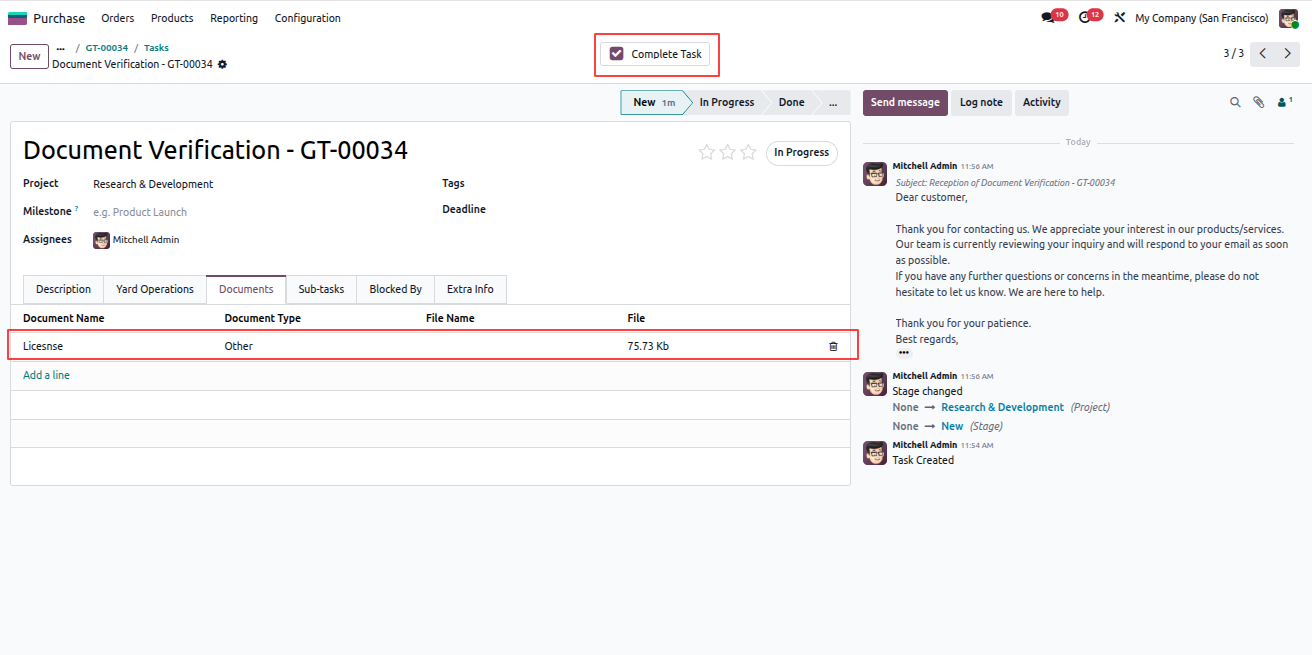
Document Verification Task
Yard Management - Yard Management automates warehouse gate operations, dock scheduling, and vehicle tracking from entry to exit. The module integrates weighbridge operations, security checkpoints, quality controls, and real-time inventory tracking with automated notifications at every stage. | Yard Management | Gate Transactions | Dock Scheduling | Weighbridge Integration | Security Checkpoints | Inventory Tracking | Warehouse Operations | Vehicle Management | SLA Monitoring | Quality Control | Real-time Notifications.
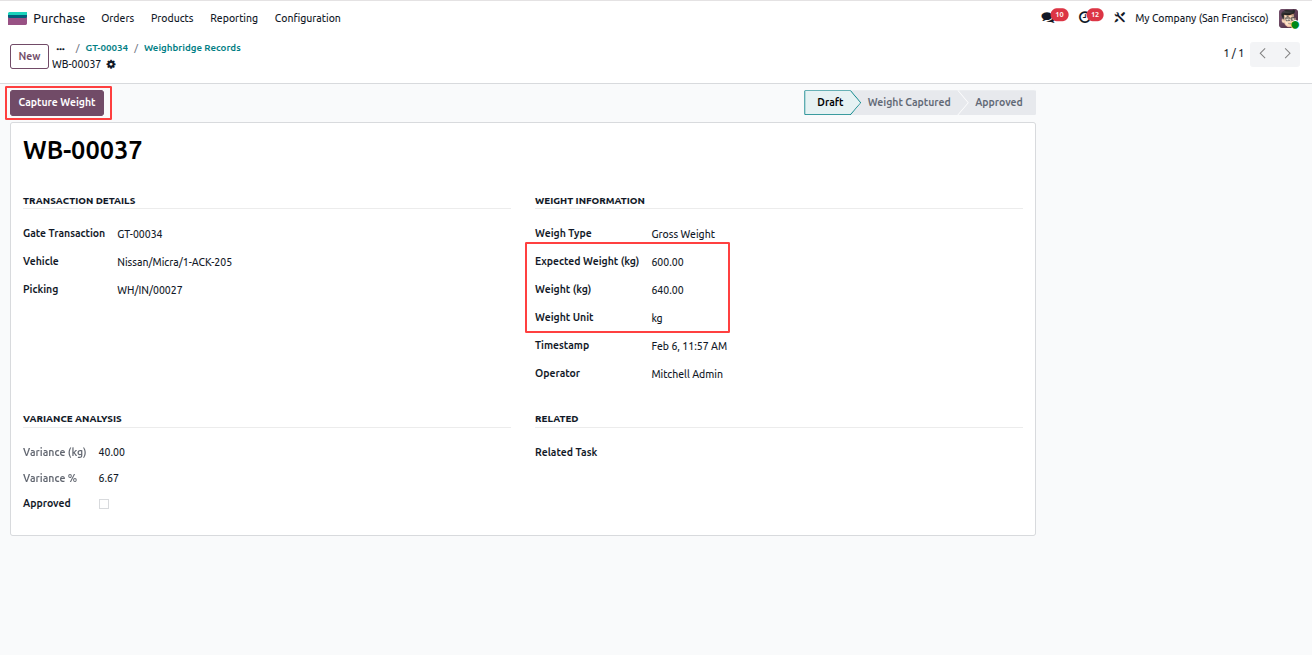
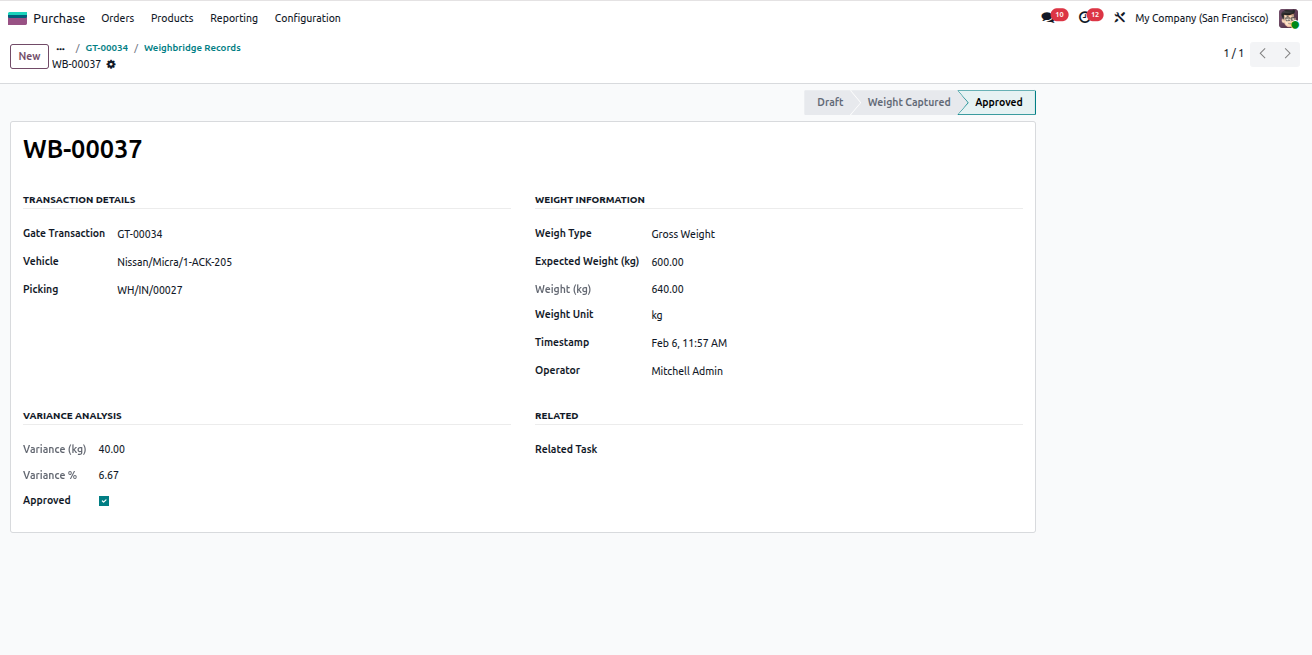
Capture Weighbridge (In) – Gross Weight

To record the incoming vehicle weight, follow the steps below:

  1. Open the Gate Transaction record.
  2. Click the Weighbridge (In) state.
  3. A Weighbridge smart button is created automatically.
  4. Open the Weighbridge record using the smart button.
  5. The Record Type will be Gross Weight, as this is a purchase and the vehicle arrives with products.
  6. Enter the required weight information.
  7. Click Capture Weight.
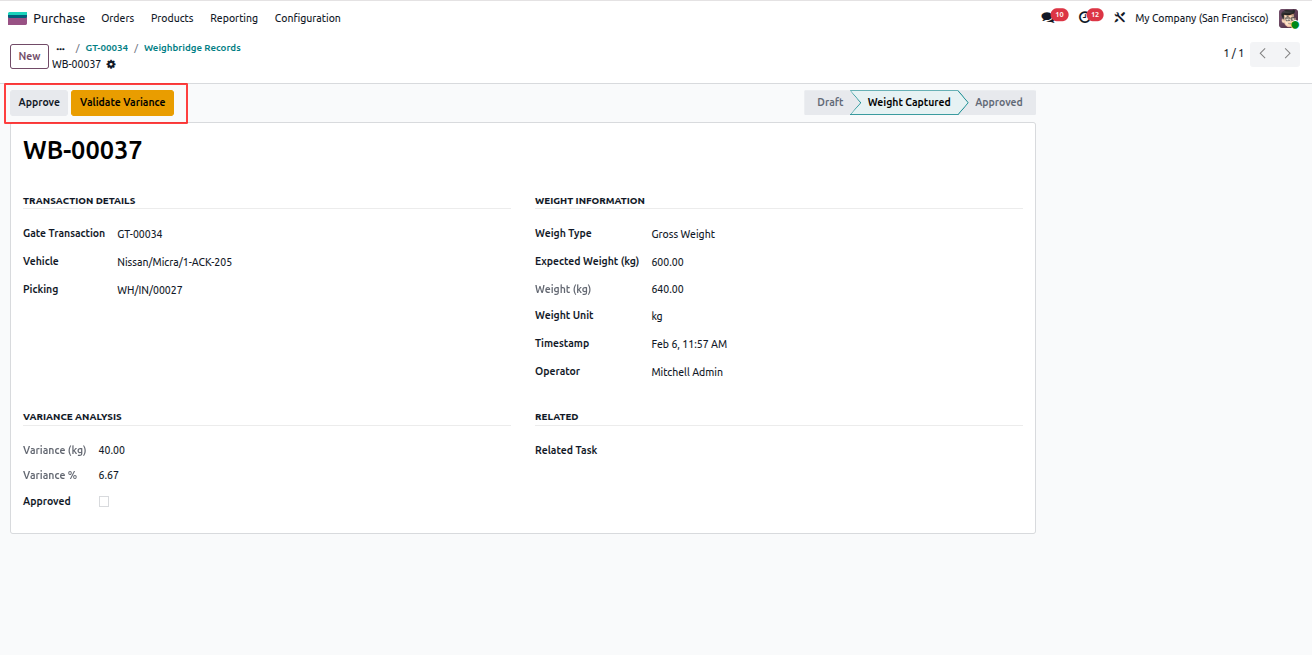
  8. If there is a variance between expected and actual weight, validate and approve it.
  9. On approval, an email notification is sent to the assigned operator.
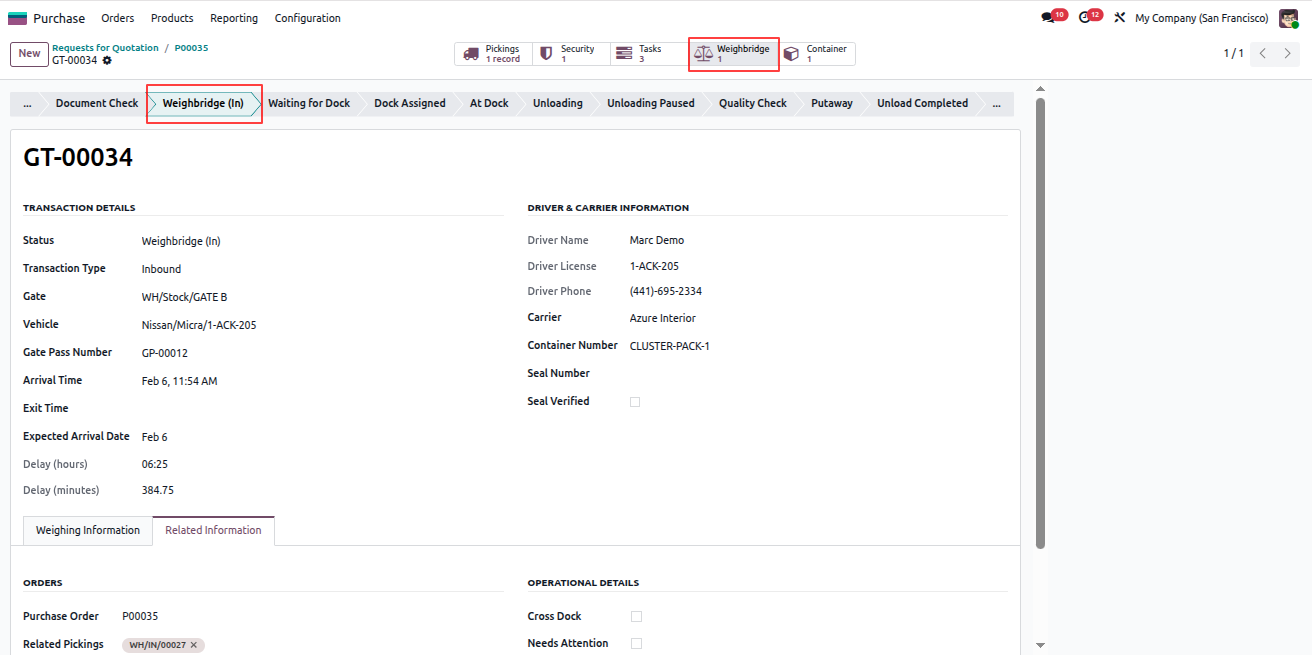
Weighbridge In State

Weighbridge Smart Button

Capture Gross Weight

Weight Variance Approval
Yard Management - Yard Management automates warehouse gate operations, dock scheduling, and vehicle tracking from entry to exit. The module integrates weighbridge operations, security checkpoints, quality controls, and real-time inventory tracking with automated notifications at every stage. | Yard Management | Gate Transactions | Dock Scheduling | Weighbridge Integration | Security Checkpoints | Inventory Tracking | Warehouse Operations | Vehicle Management | SLA Monitoring | Quality Control | Real-time Notifications.
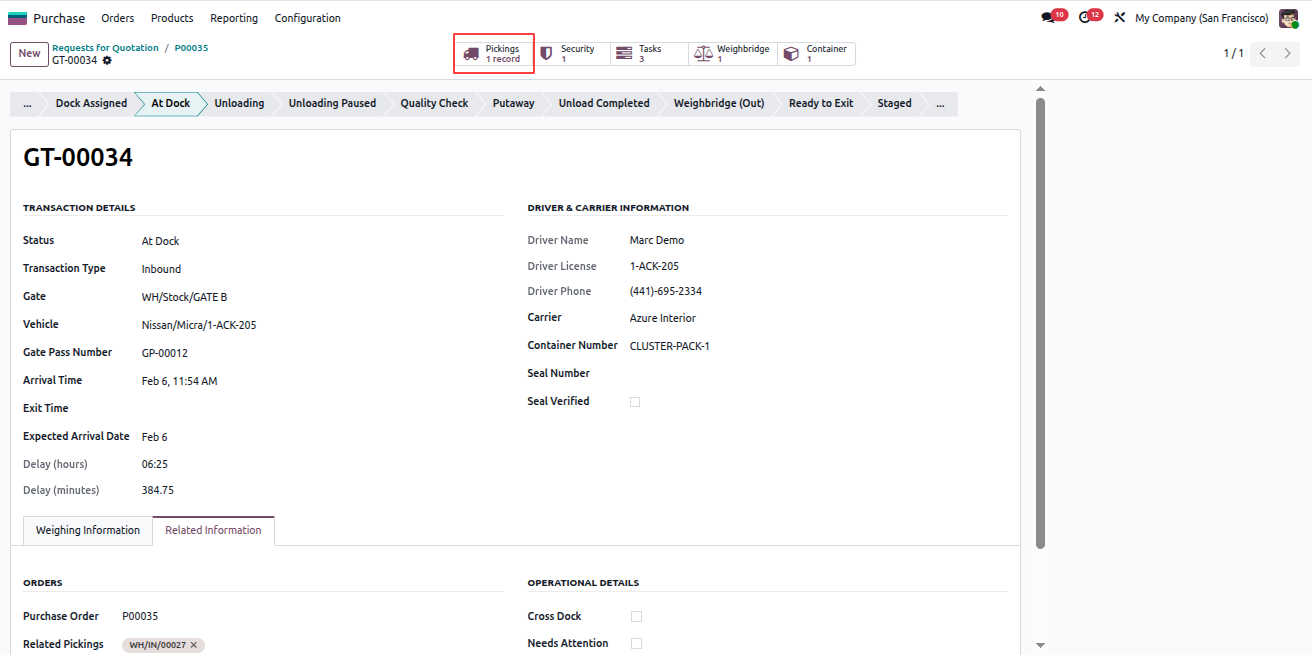
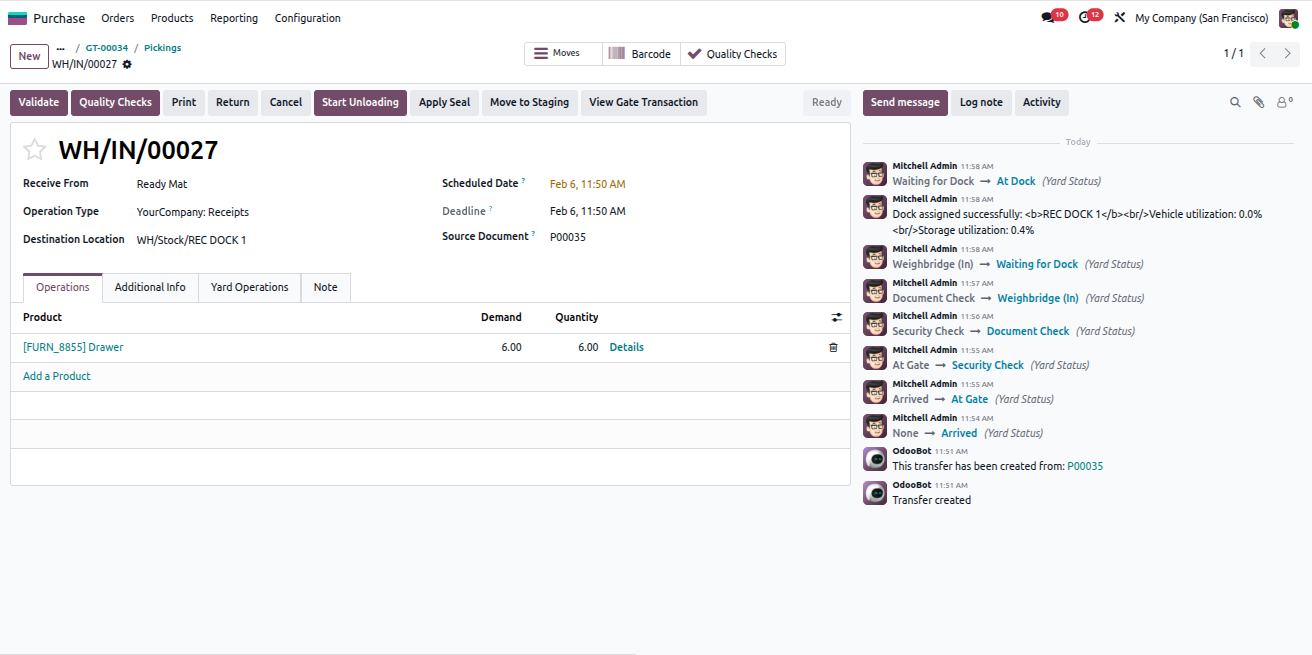
Assign Dock for Receiving

Dock assignment is allowed only after all previous stages are completed successfully.

  1. Open the Gate Transaction record.
  2. Click Assign Dock.
  3. The system assigns a dock only from available Receiving-type Dock Doors.
  4. If no suitable dock is available, a validation error is shown.
  5. Open the Pickings smart button.
  6. Open the related delivery record.
  7. Verify that the Destination Location is set to the assigned dock.
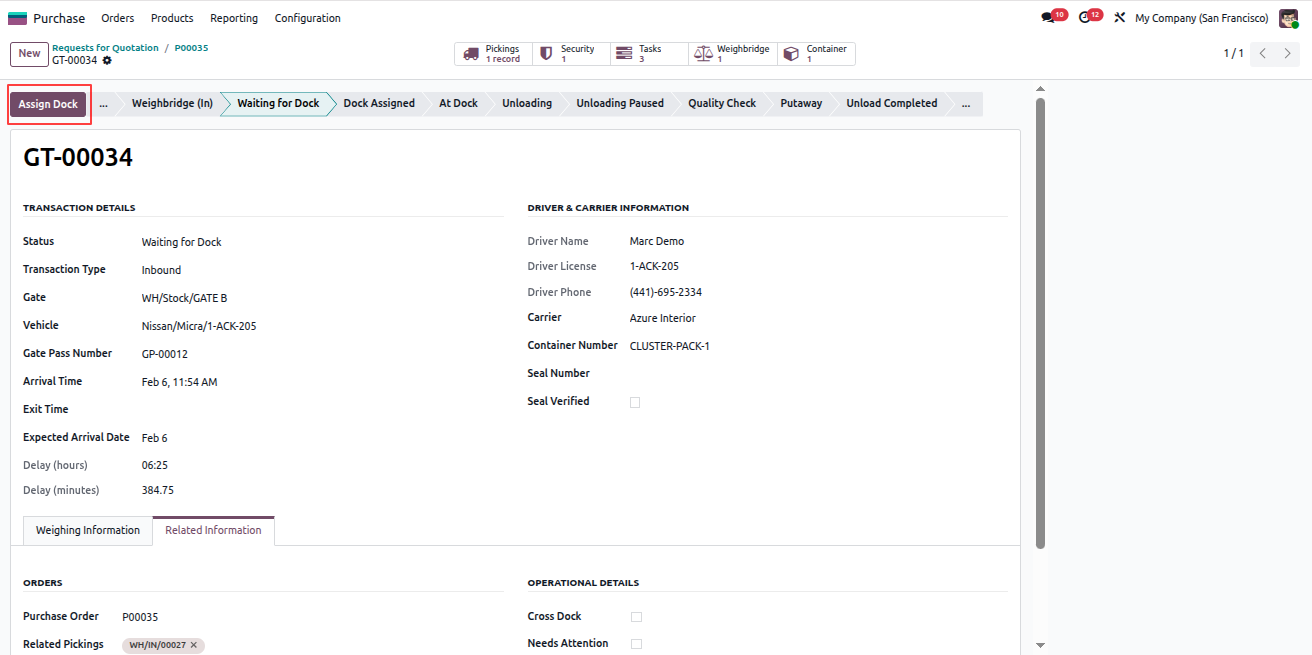
Assign Dock

Pickings Smart Button

Dock as Destination Location
Yard Management - Yard Management automates warehouse gate operations, dock scheduling, and vehicle tracking from entry to exit. The module integrates weighbridge operations, security checkpoints, quality controls, and real-time inventory tracking with automated notifications at every stage. | Yard Management | Gate Transactions | Dock Scheduling | Weighbridge Integration | Security Checkpoints | Inventory Tracking | Warehouse Operations | Vehicle Management | SLA Monitoring | Quality Control | Real-time Notifications.
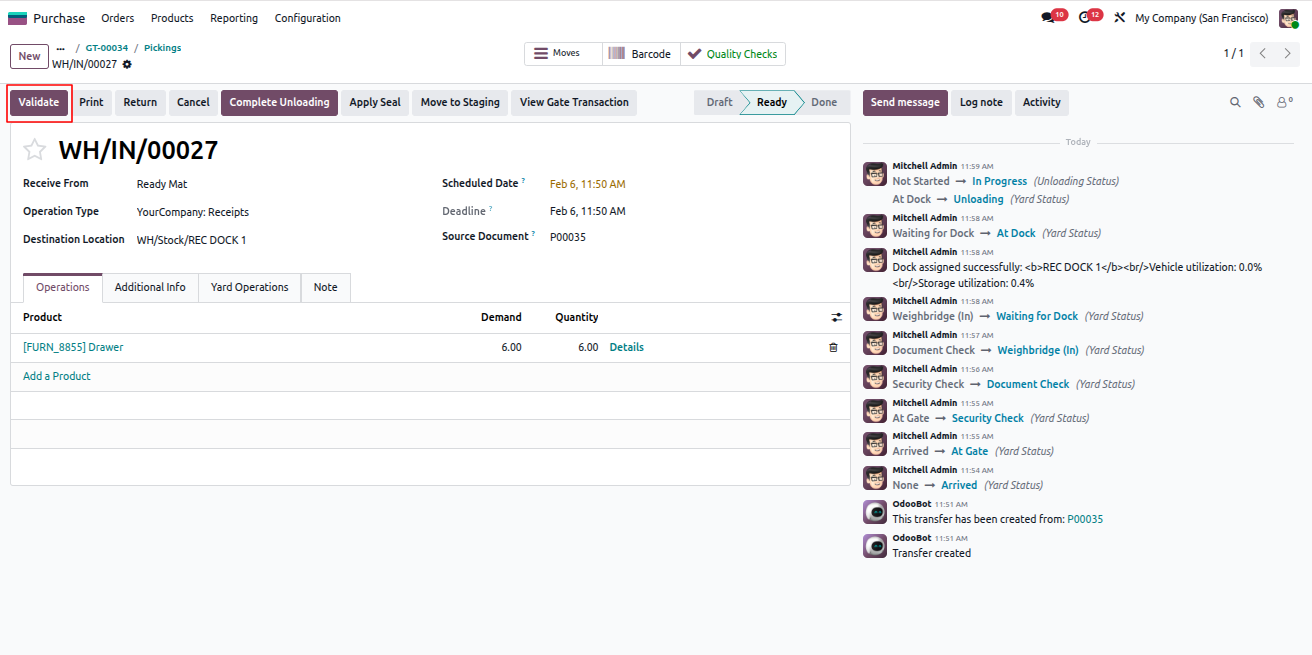
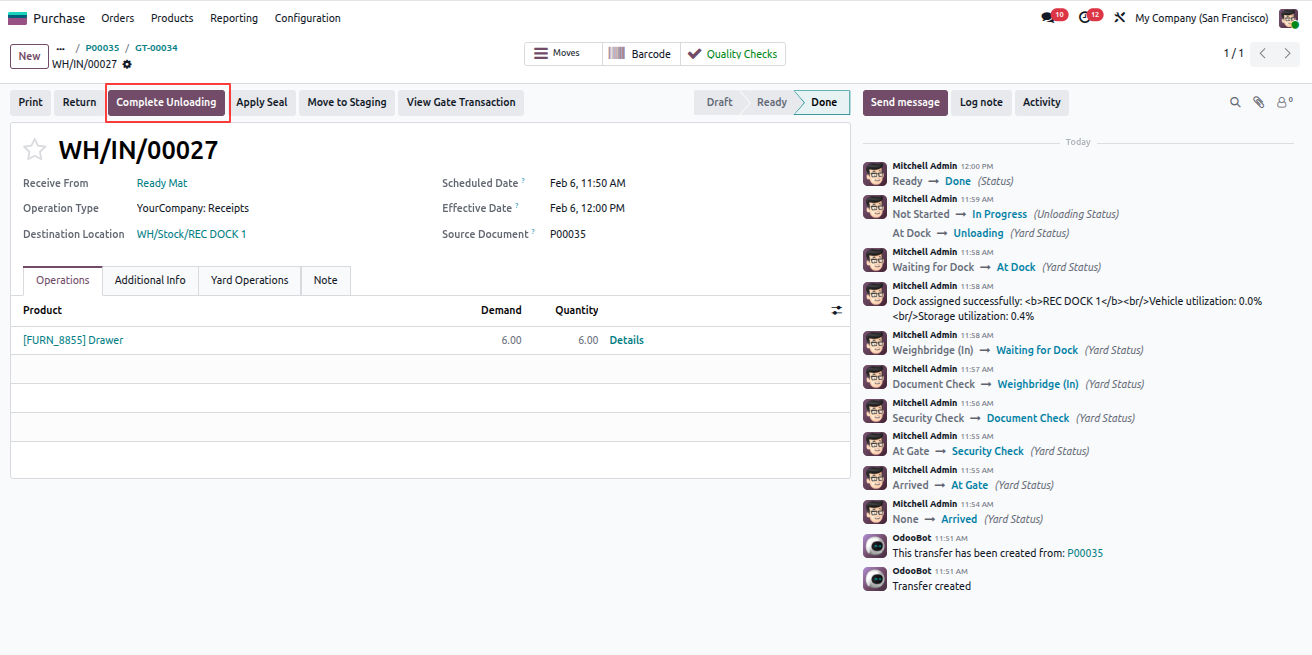
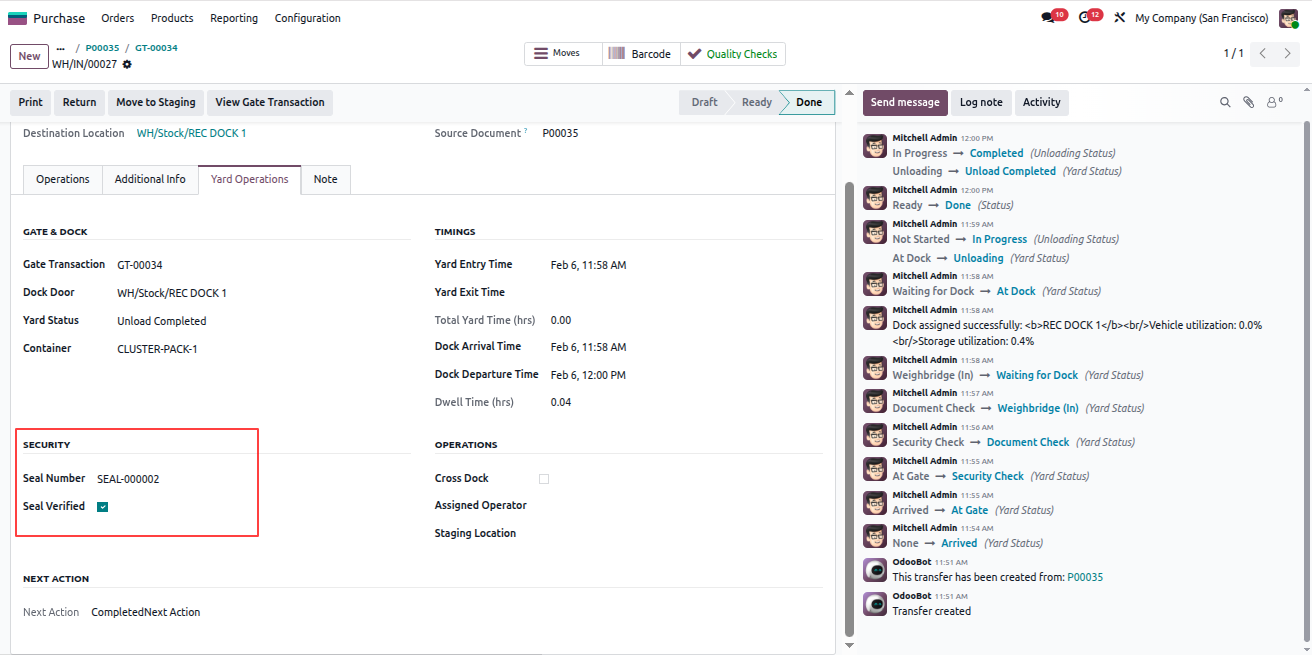
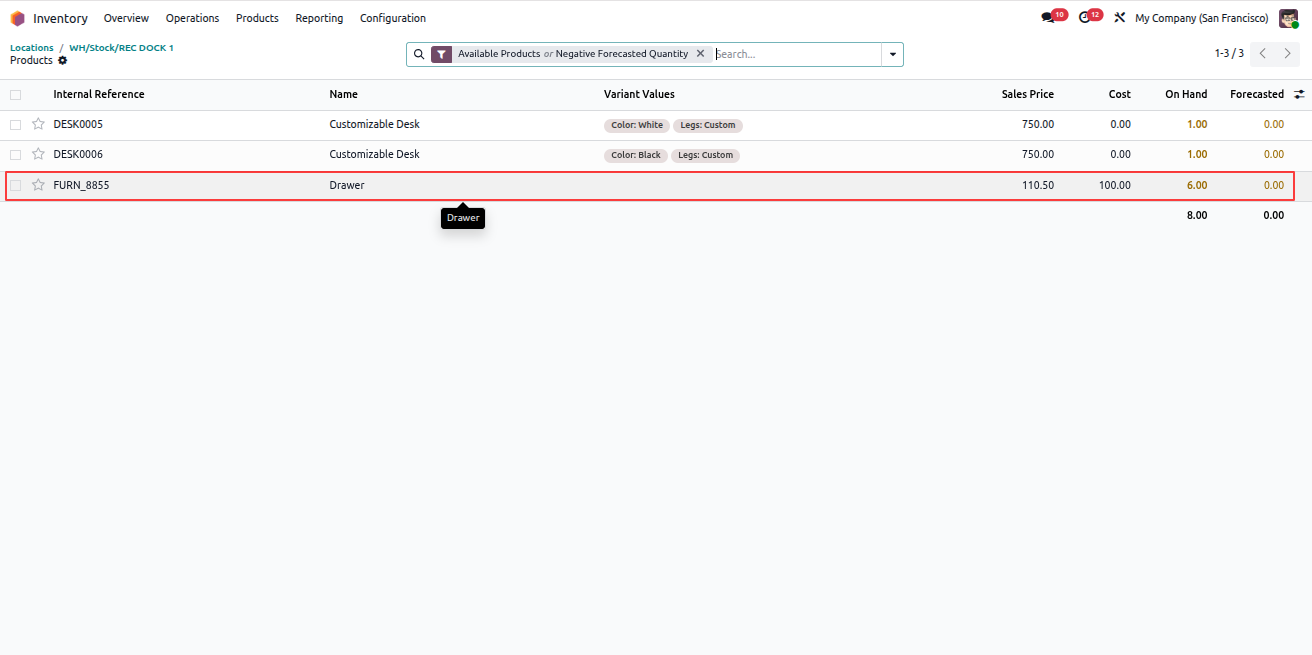
Perform Quality Check and Complete Unloading

If quality checks are configured for the product, they must be completed before unloading.

  1. If the product has Quality Points configured, a Quality Checks button will be available.
  2. Open the quality check and Pass it.
  3. Click Start Unloading.
  4. Validate the unloading process.
  5. Click Complete Unloading.
  6. Apply the seal and click Verify Seal.
  7. Seal details can be viewed in the Yard Operations tab.
  8. Open the destination Location.
  9. Click the Products smart button to view stock.
  10. The received product and quantity will be visible in that location.

Note: All the above operations automatically send email notifications to the Location Manager and the Assigned Operator of the related delivery record.
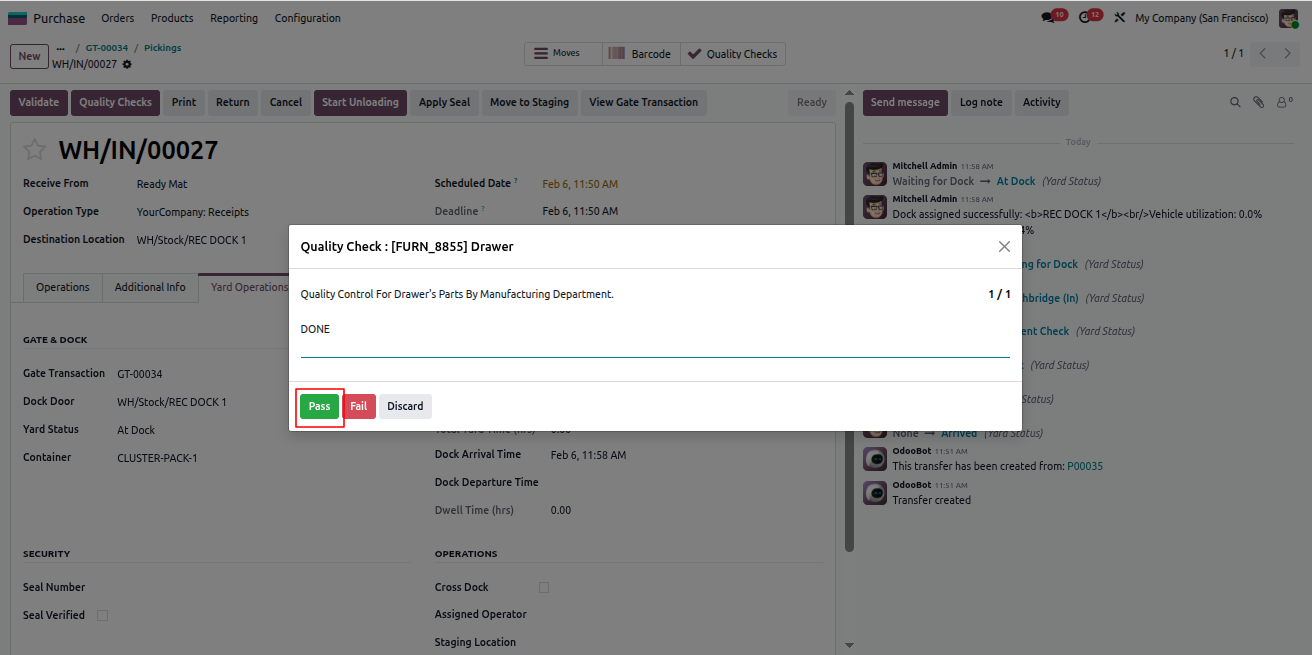
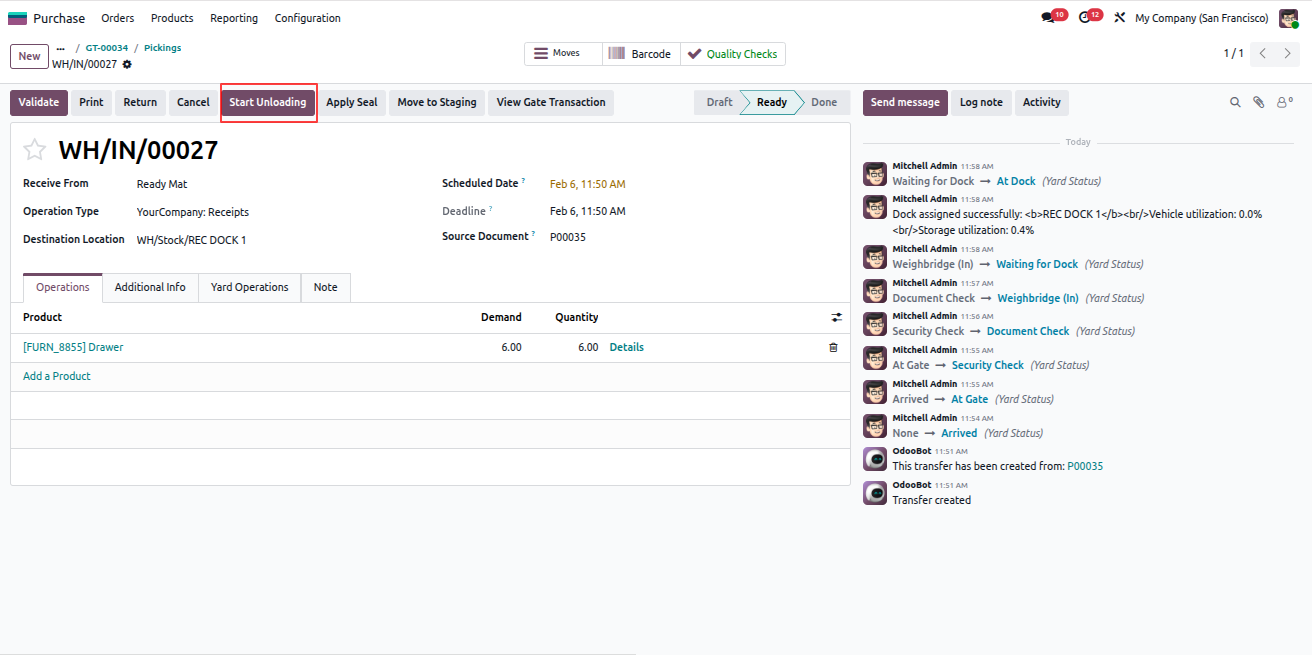
Quality Check

Start Unloading

Complete Unloading

Seal Verification

Location Products Smart Button

Product Quantity in Location
Yard Management - Yard Management automates warehouse gate operations, dock scheduling, and vehicle tracking from entry to exit. The module integrates weighbridge operations, security checkpoints, quality controls, and real-time inventory tracking with automated notifications at every stage. | Yard Management | Gate Transactions | Dock Scheduling | Weighbridge Integration | Security Checkpoints | Inventory Tracking | Warehouse Operations | Vehicle Management | SLA Monitoring | Quality Control | Real-time Notifications.
Move Products to Staging Location

After unloading, products can be moved to a staging area and tracked in inventory.

  1. Open the related Delivery record.
  2. Click Move to Staging.
  3. To verify the movement, go to Inventory > Reporting > Moves History.
  4. The stock move record created for this action will be displayed.
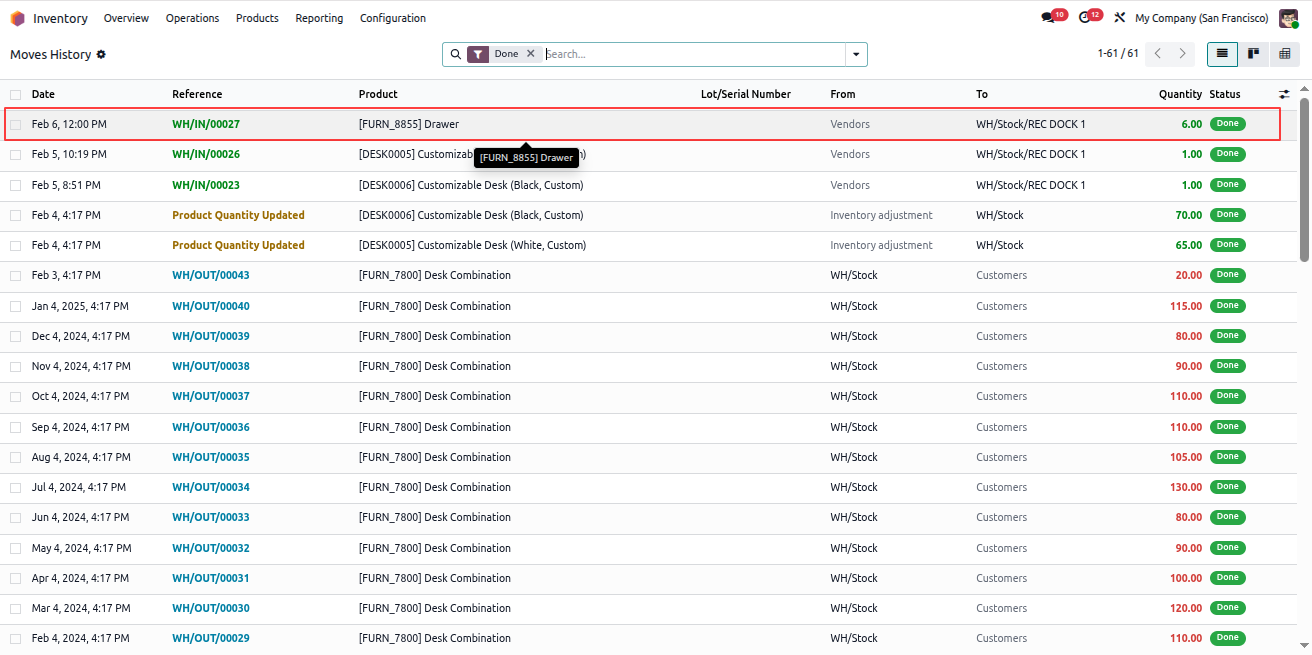
Inventory Move History
Yard Management - Yard Management automates warehouse gate operations, dock scheduling, and vehicle tracking from entry to exit. The module integrates weighbridge operations, security checkpoints, quality controls, and real-time inventory tracking with automated notifications at every stage. | Yard Management | Gate Transactions | Dock Scheduling | Weighbridge Integration | Security Checkpoints | Inventory Tracking | Warehouse Operations | Vehicle Management | SLA Monitoring | Quality Control | Real-time Notifications.
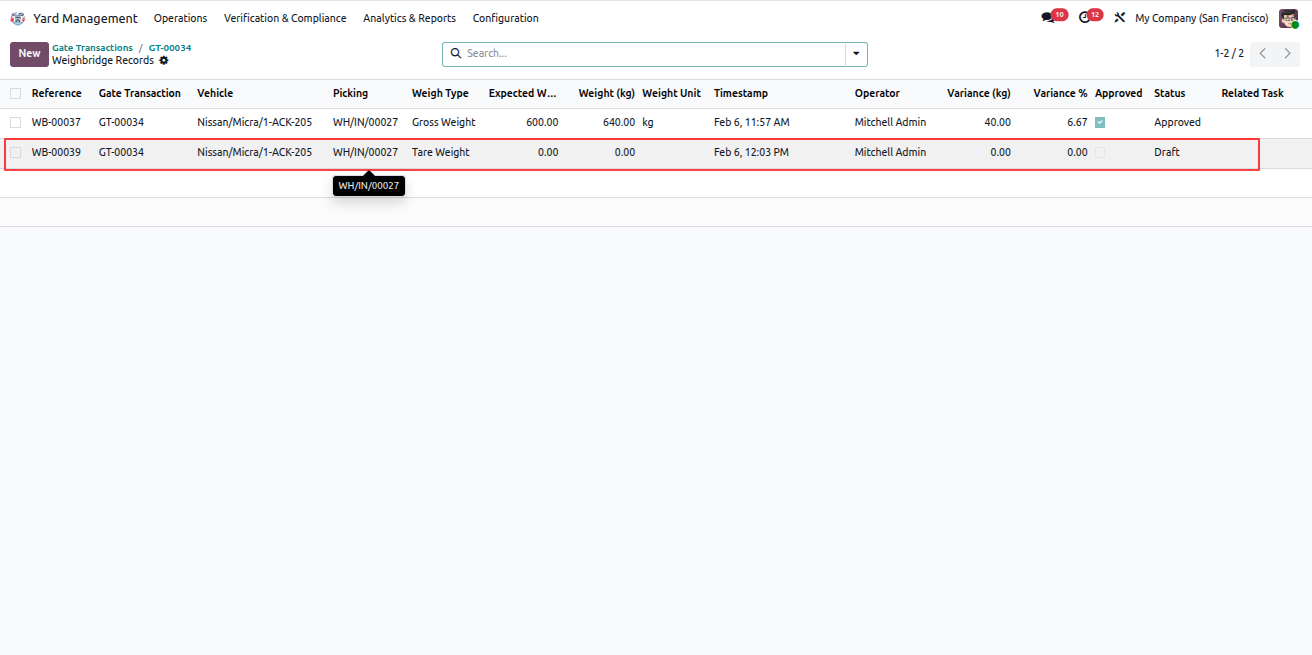
Capture Weighbridge (Out) – Tare Weight

To record the exit weight of the vehicle, follow the steps below:

  1. Open the related Gate Transaction record.
  2. Select the Weighbridge (Out) state.
  3. A Weighbridge smart button is created automatically.
  4. Open the Weighbridge record using the smart button.
  5. The Record Type will be Tare Weight, indicating the vehicle has completed unloading.
  6. Enter the required weight details.
  7. Click Capture Weight and Approve the record.
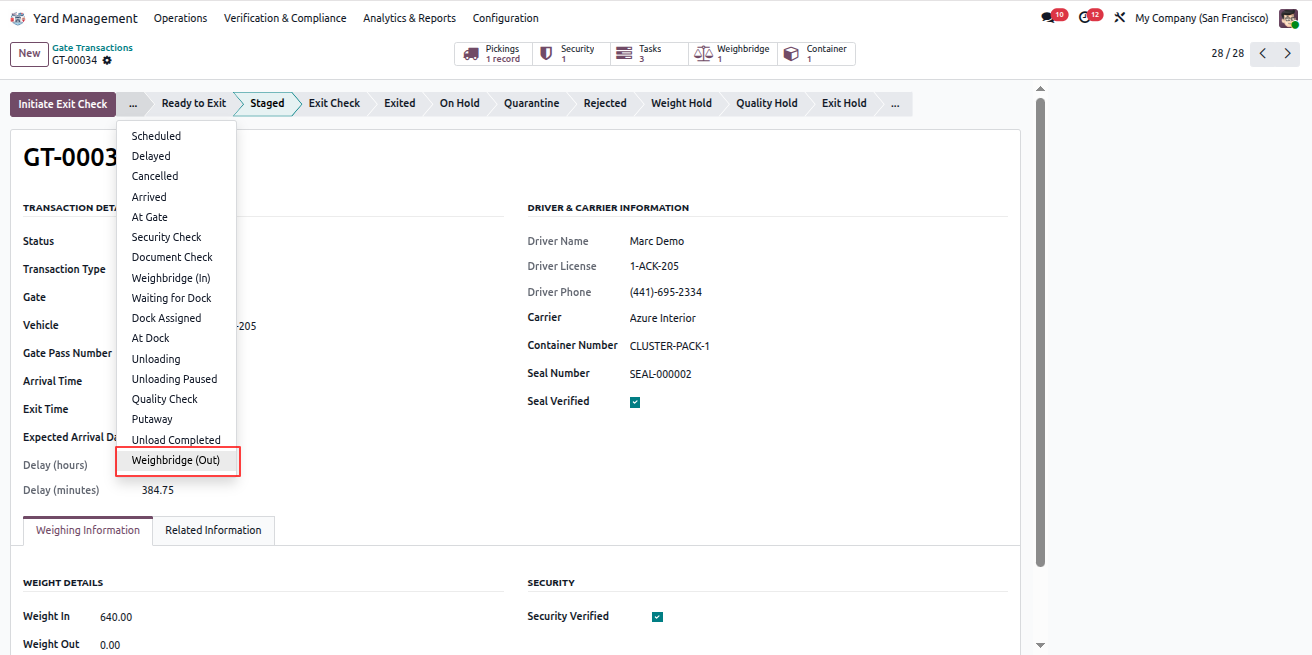
Weighbridge Out Tare Weight Weighbridge Out Tare Weight
Yard Management - Yard Management automates warehouse gate operations, dock scheduling, and vehicle tracking from entry to exit. The module integrates weighbridge operations, security checkpoints, quality controls, and real-time inventory tracking with automated notifications at every stage. | Yard Management | Gate Transactions | Dock Scheduling | Weighbridge Integration | Security Checkpoints | Inventory Tracking | Warehouse Operations | Vehicle Management | SLA Monitoring | Quality Control | Real-time Notifications.
Complete Exit Security Check

Exit security verification is mandatory before allowing the vehicle to leave.

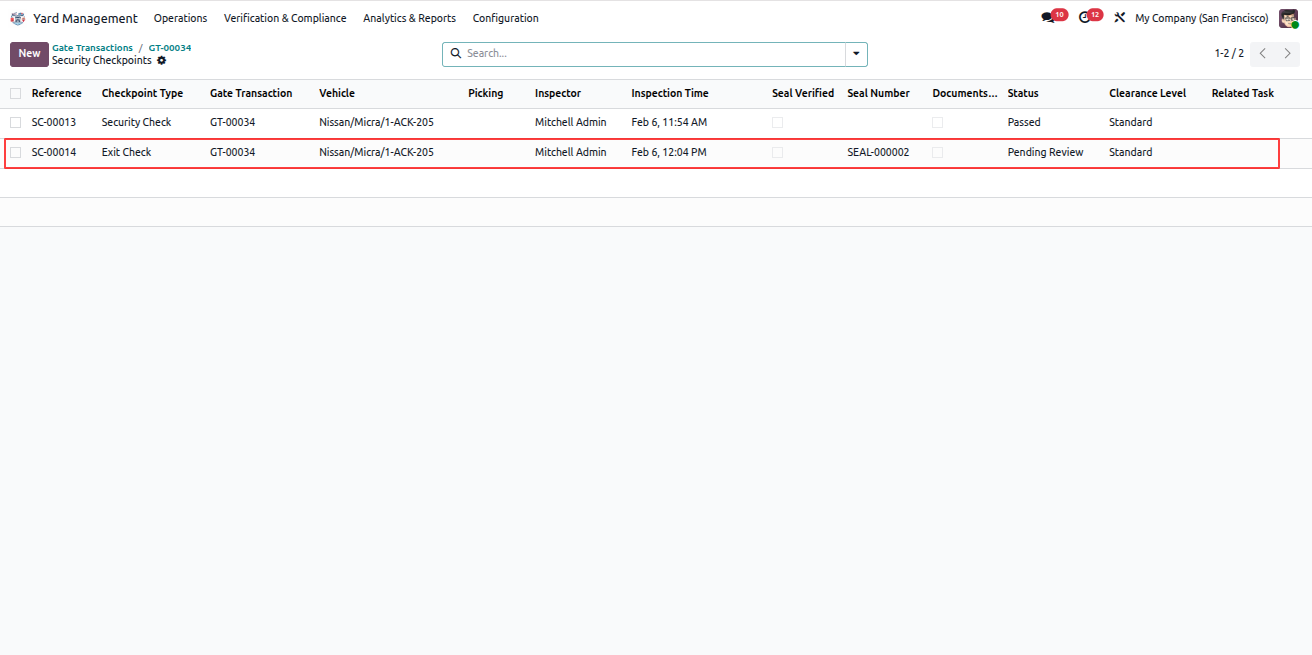
  1. From the Gate Transaction, click Initiate Exit Check.
  2. An Exit Security record is created in the smart button.
  3. Open the Security smart button.
  4. Open the exit security check record.
  5. Review the details and click Pass.
  6. On initiation, an email notification is sent to the Security Inspector and the Assigned Operator.
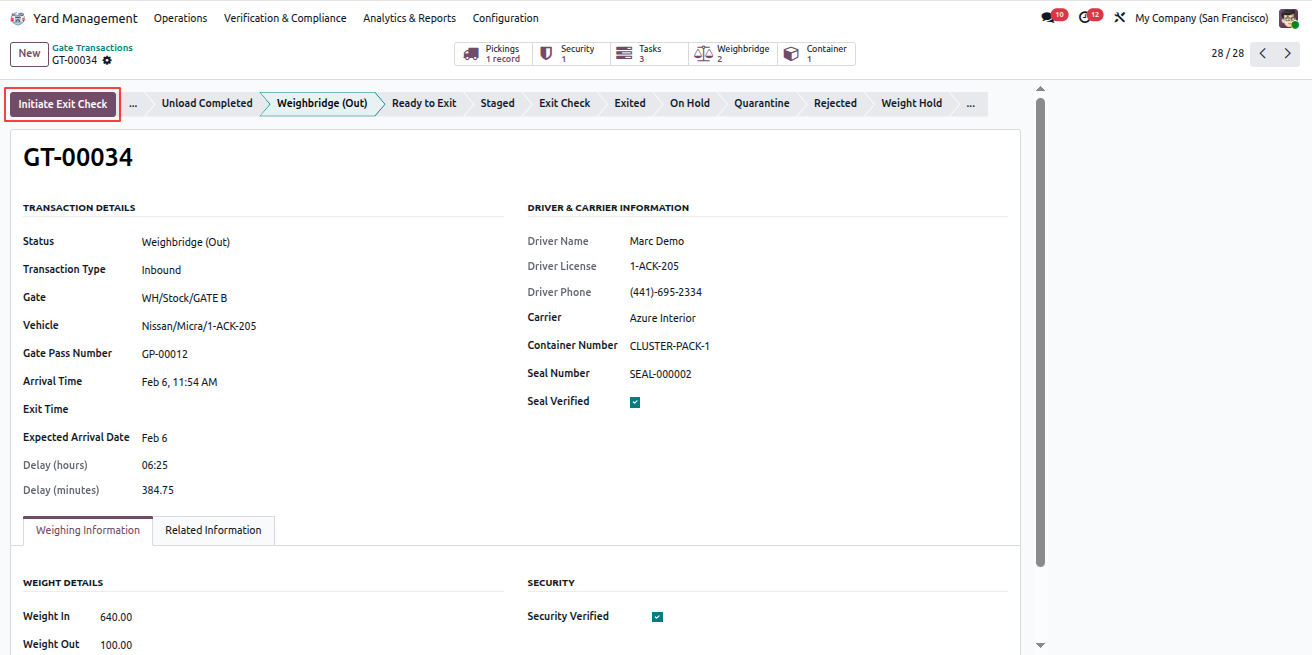
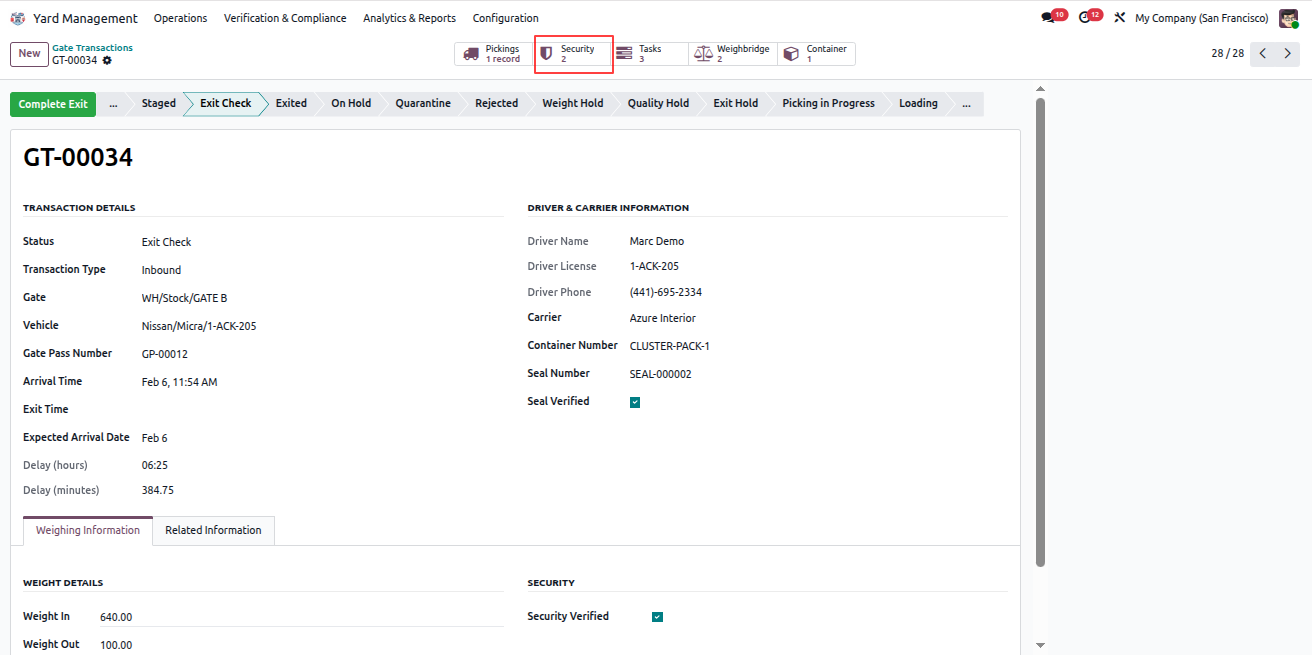
Initiate Exit Check

Exit Security Smart Button

Exit Security Pass
Yard Management - Yard Management automates warehouse gate operations, dock scheduling, and vehicle tracking from entry to exit. The module integrates weighbridge operations, security checkpoints, quality controls, and real-time inventory tracking with automated notifications at every stage. | Yard Management | Gate Transactions | Dock Scheduling | Weighbridge Integration | Security Checkpoints | Inventory Tracking | Warehouse Operations | Vehicle Management | SLA Monitoring | Quality Control | Real-time Notifications.
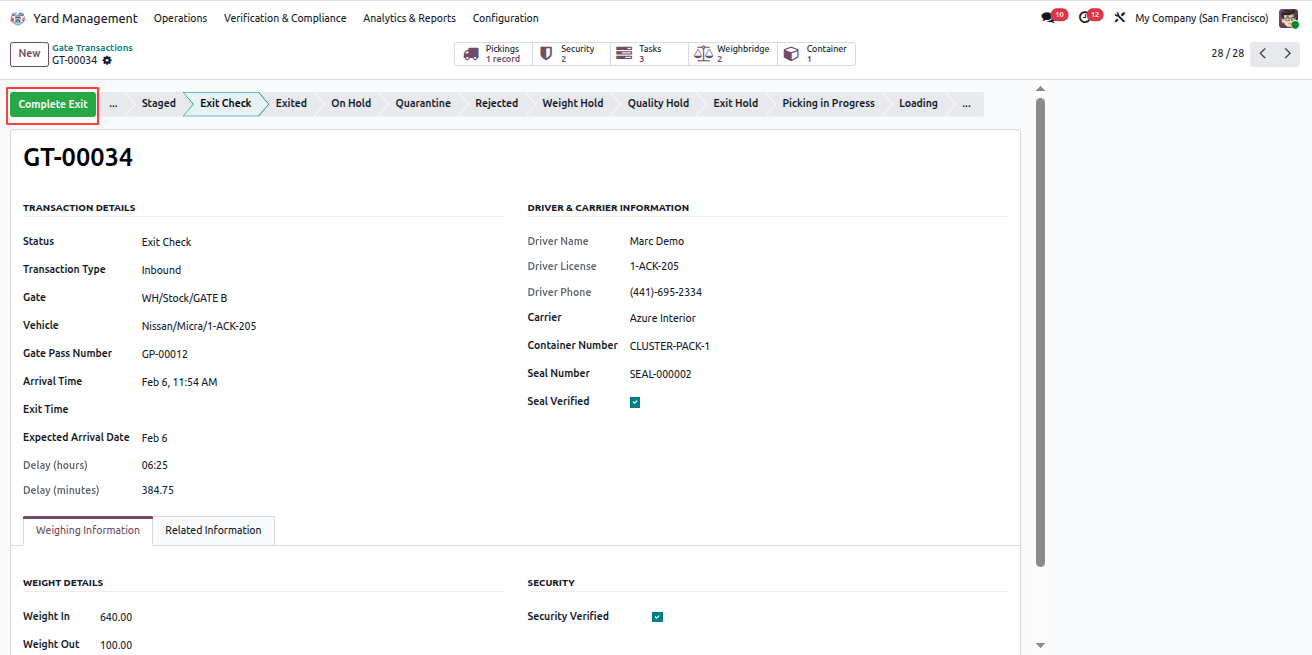
Complete Gate Exit

After successful exit checks, complete the gate exit process.

  1. Open the Gate Transaction record.
  2. Click Complete Exit.
  3. Email notifications are sent automatically to:
  • Assigned Operator
  • Security Inspector
  • Managers

Complete Gate Exit
Yard Management - Yard Management automates warehouse gate operations, dock scheduling, and vehicle tracking from entry to exit. The module integrates weighbridge operations, security checkpoints, quality controls, and real-time inventory tracking with automated notifications at every stage. | Yard Management | Gate Transactions | Dock Scheduling | Weighbridge Integration | Security Checkpoints | Inventory Tracking | Warehouse Operations | Vehicle Management | SLA Monitoring | Quality Control | Real-time Notifications.
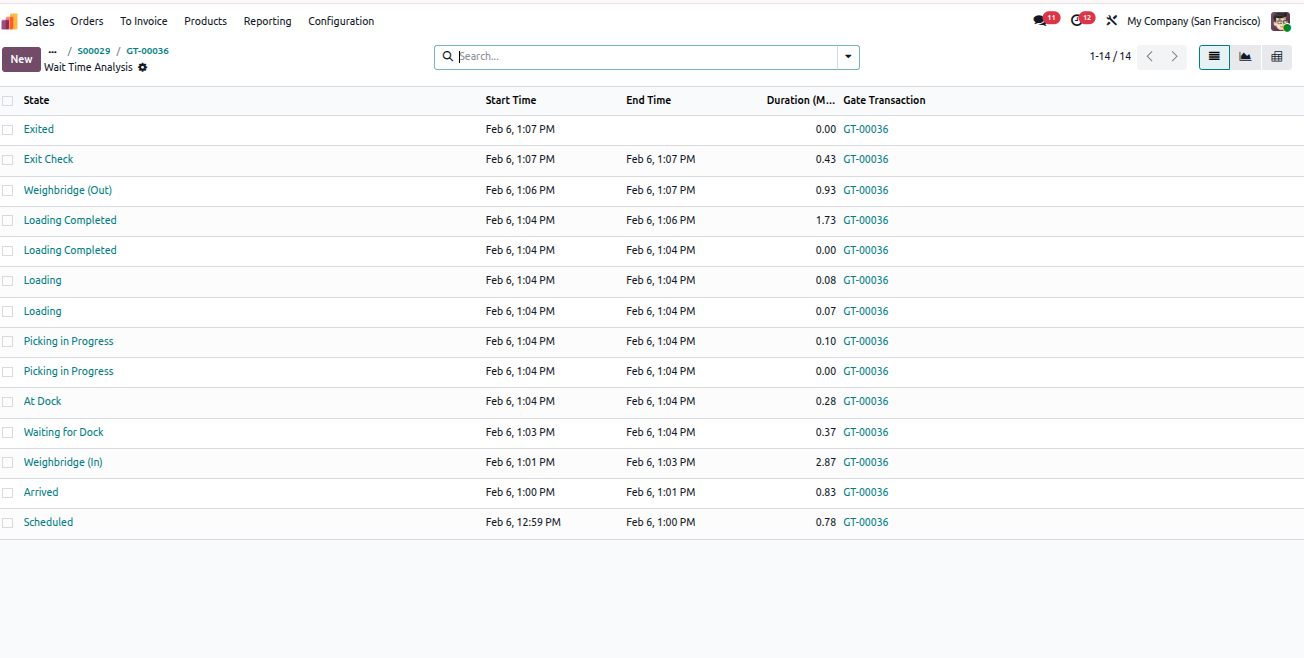
Analyze Vehicle Waiting Time

After completing the exit process, you can review the vehicle waiting analysis.

  1. Open the completed Gate Transaction record.
  2. Click Wait Analysis.
  3. The system displays a detailed list showing:
  • Each Yard State
  • Start Time and End Time
  • Duration spent in each state

Note: This analysis helps identify delays and improve yard efficiency.
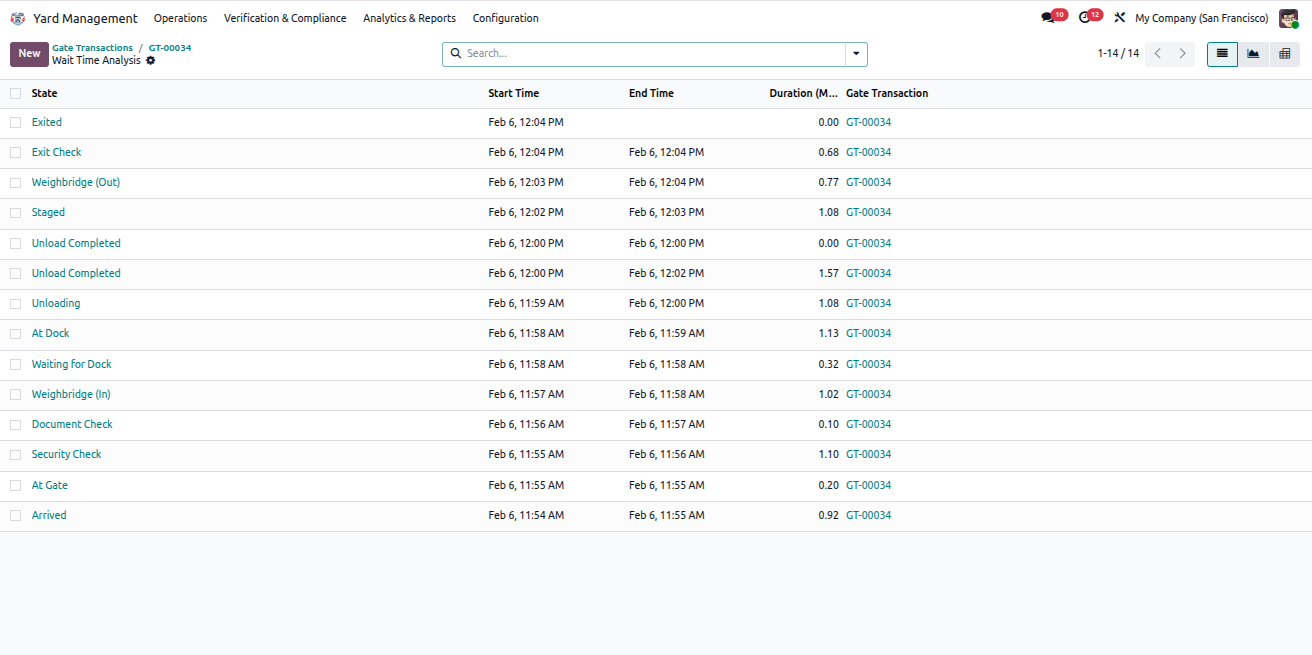
Wait Analysis Report
Yard Management - Yard Management automates warehouse gate operations, dock scheduling, and vehicle tracking from entry to exit. The module integrates weighbridge operations, security checkpoints, quality controls, and real-time inventory tracking with automated notifications at every stage. | Yard Management | Gate Transactions | Dock Scheduling | Weighbridge Integration | Security Checkpoints | Inventory Tracking | Warehouse Operations | Vehicle Management | SLA Monitoring | Quality Control | Real-time Notifications.
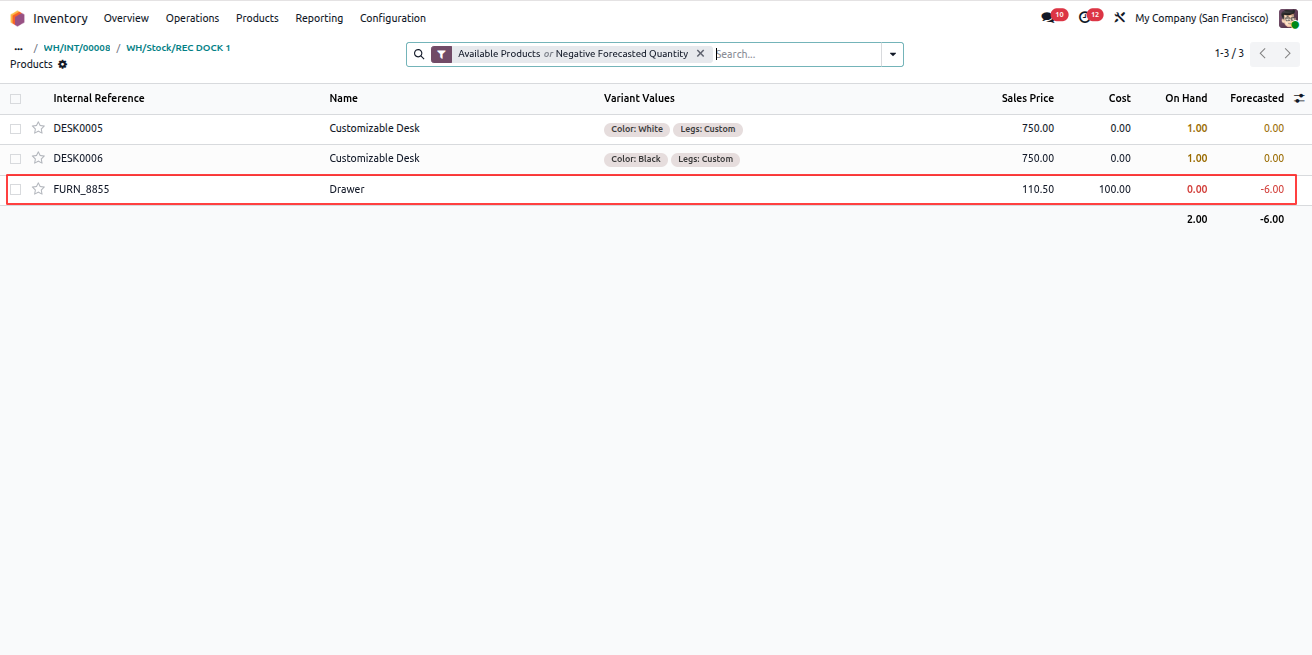
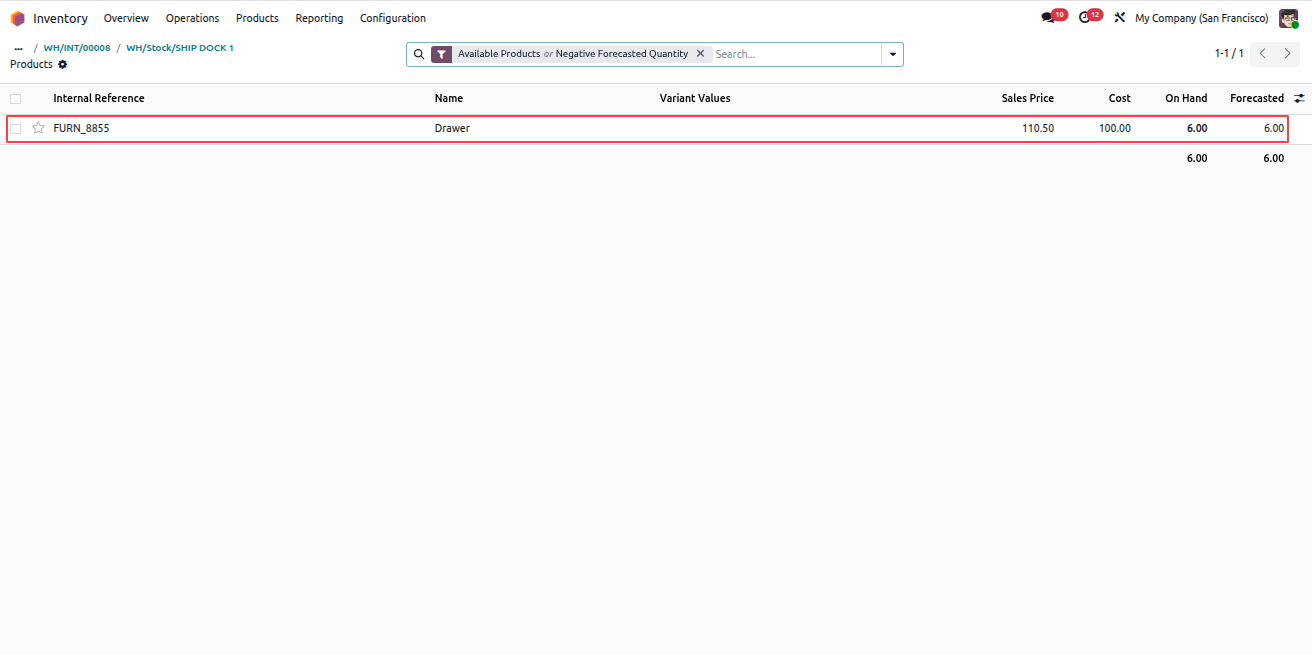
Internal Delivery Transfers

Internal Transfers allow products to be moved securely between locations within the warehouse.

  1. Go to Inventory > Operations > Deliveries.
  2. Click New to create a delivery.
  3. Select Operation Type as Internal Transfers.
  4. Select the Source Location and Destination Location.
  5. Add product lines with the required quantities.
  6. Make sure the selected source location has sufficient product availability. Otherwise, the system will throw a validation error.
  7. From the header, click Apply Seal.
  8. Click Verify Seal to confirm the seal.
  9. Seal details can be viewed in the Yard Operations tab.
  10. Open the selected Source Location and Destination Location.
  11. Click the Products smart button on both locations.
  12. The product quantity will be reduced from the source location and added to the destination location.

Note: All internal transfer operations trigger email notifications to the Location Manager, Assigned Operator, and Managers.
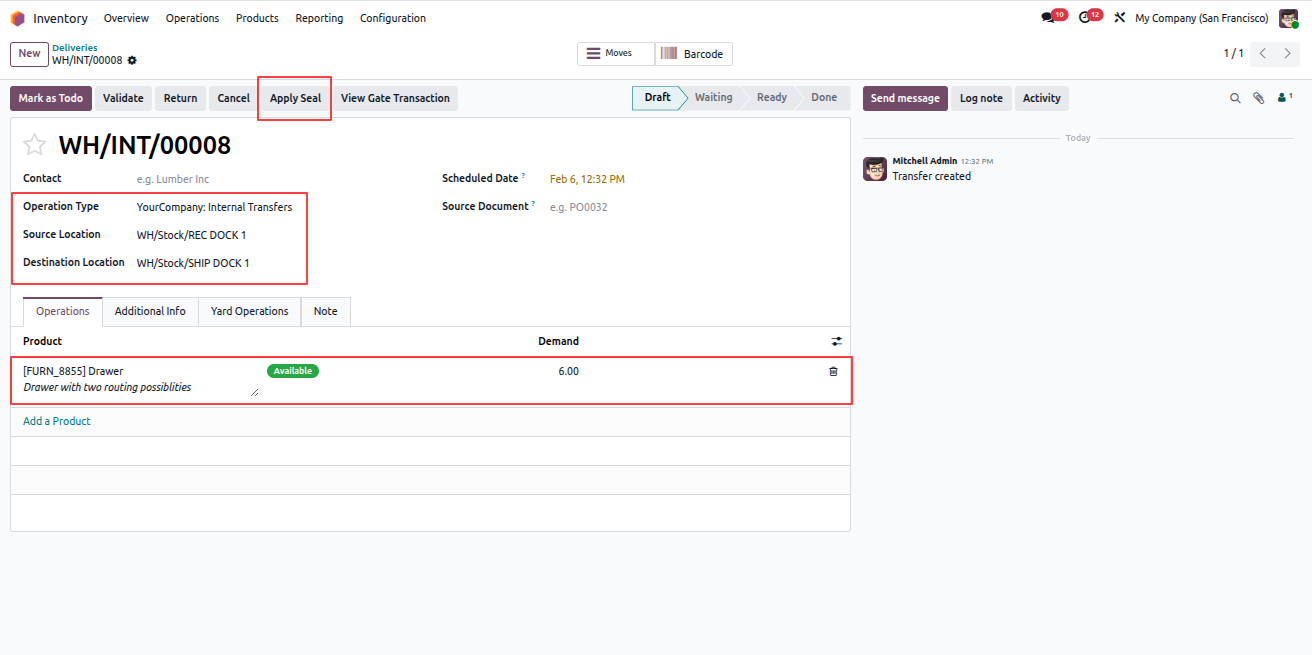
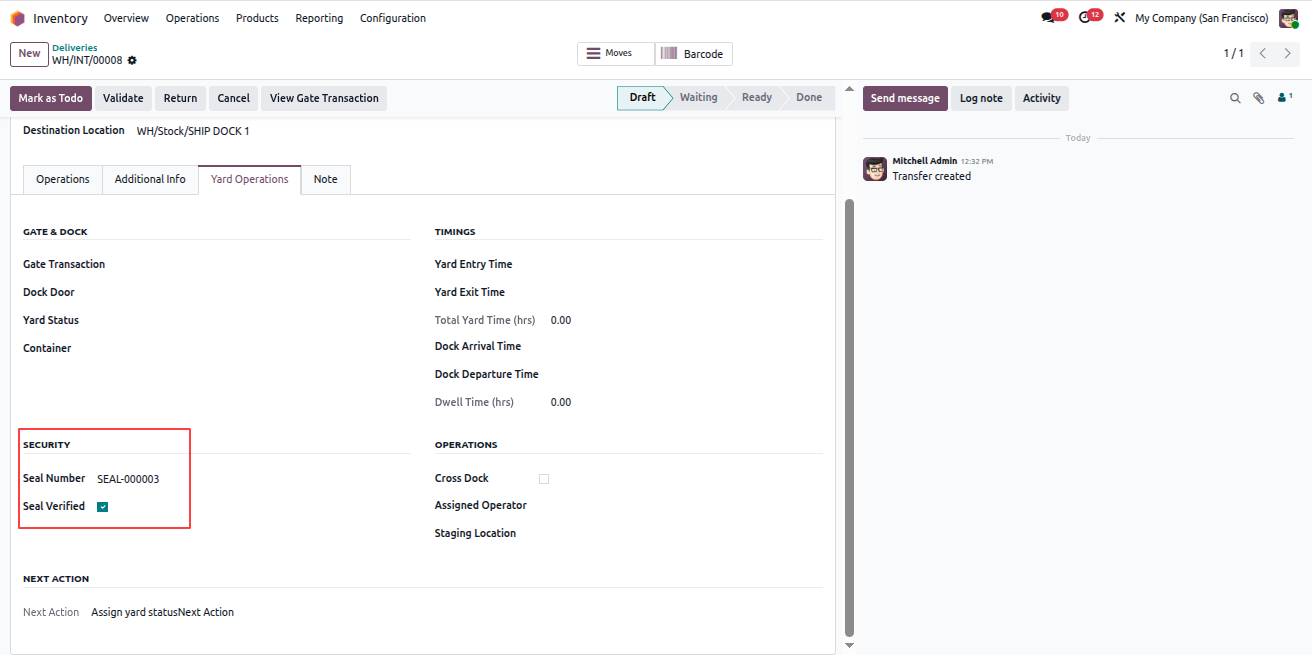
Create Internal Transfer

Apply Seal

Source Location Product Quantity

Destination Location Product Quantity
Yard Management - Yard Management automates warehouse gate operations, dock scheduling, and vehicle tracking from entry to exit. The module integrates weighbridge operations, security checkpoints, quality controls, and real-time inventory tracking with automated notifications at every stage. | Yard Management | Gate Transactions | Dock Scheduling | Weighbridge Integration | Security Checkpoints | Inventory Tracking | Warehouse Operations | Vehicle Management | SLA Monitoring | Quality Control | Real-time Notifications.
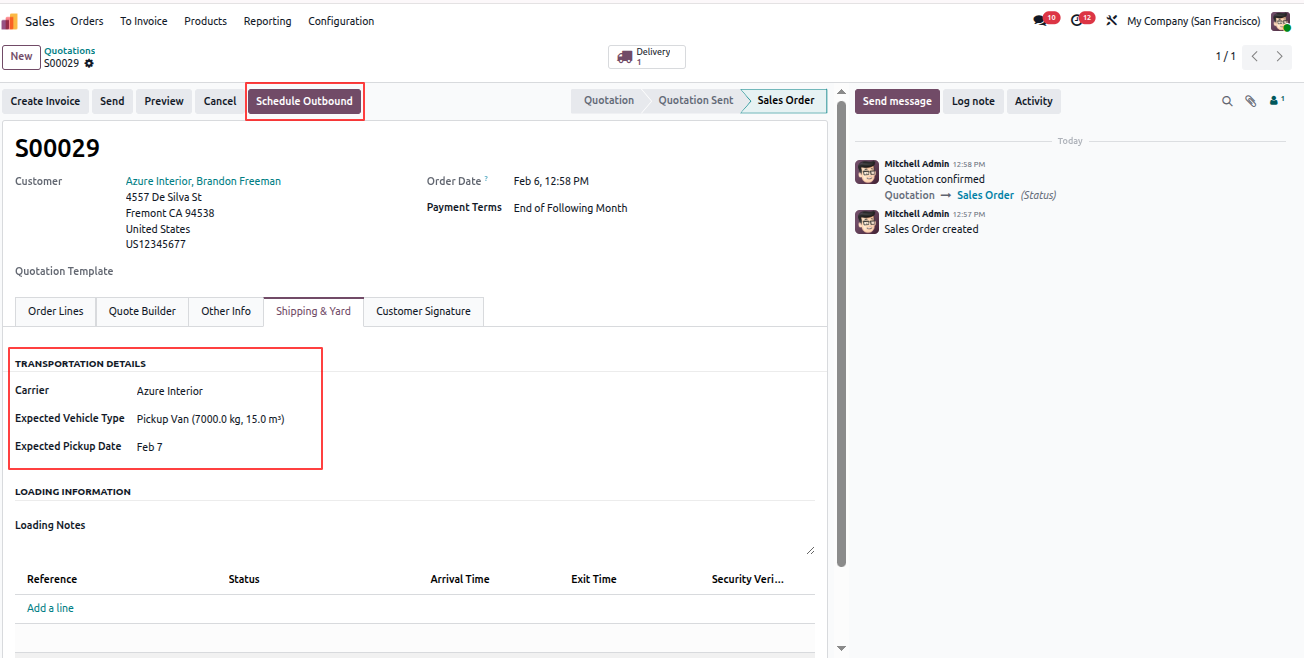
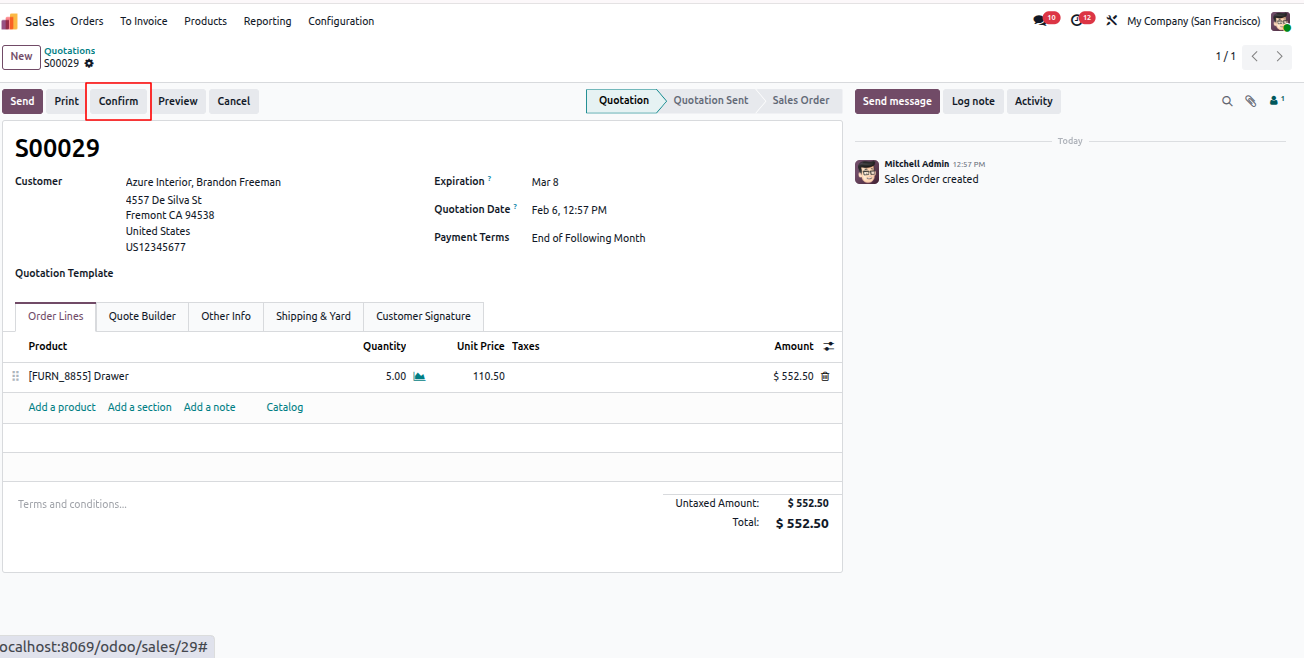
Outbound Transaction (Sales Delivery)

Outbound transactions handle sales deliveries where products move out of inventory.

  1. Go to the Sales module.
  2. Click New to create a quotation.
  3. Fill customer details and add product order lines.
  4. Confirm the sales order.
  5. Go to the Shipping & Yard tab.
  6. Fill transportation details.
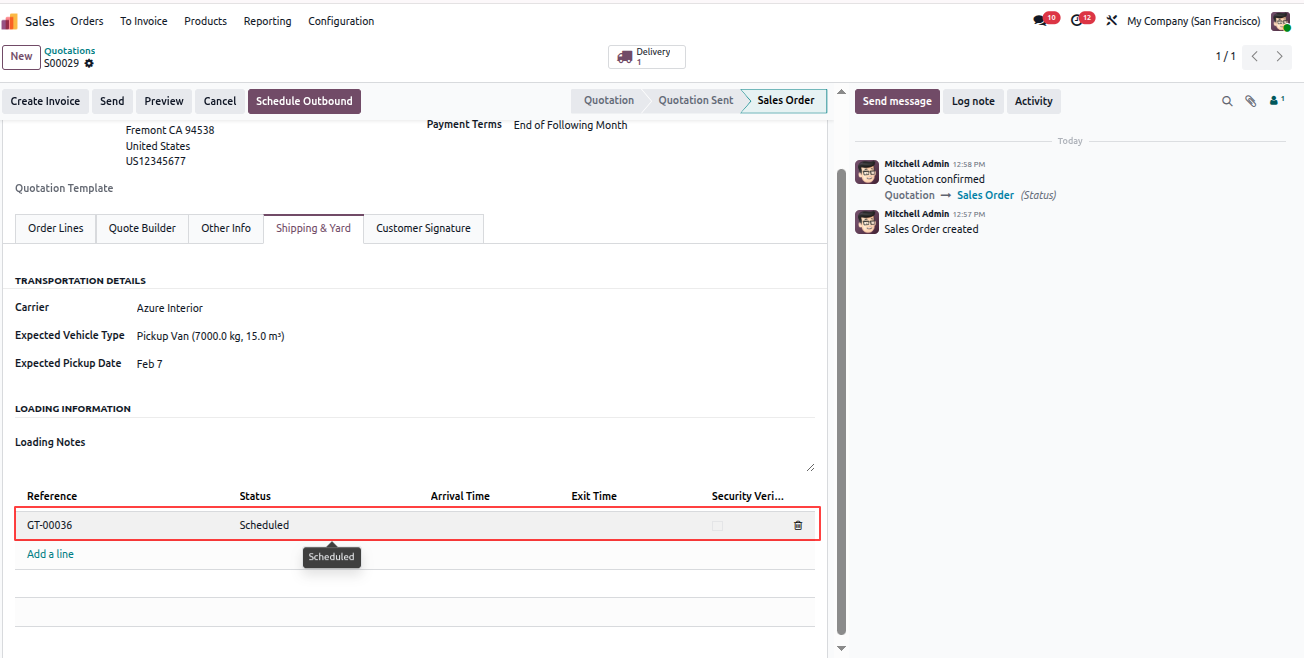
  7. From the header, click Schedule Outbound.
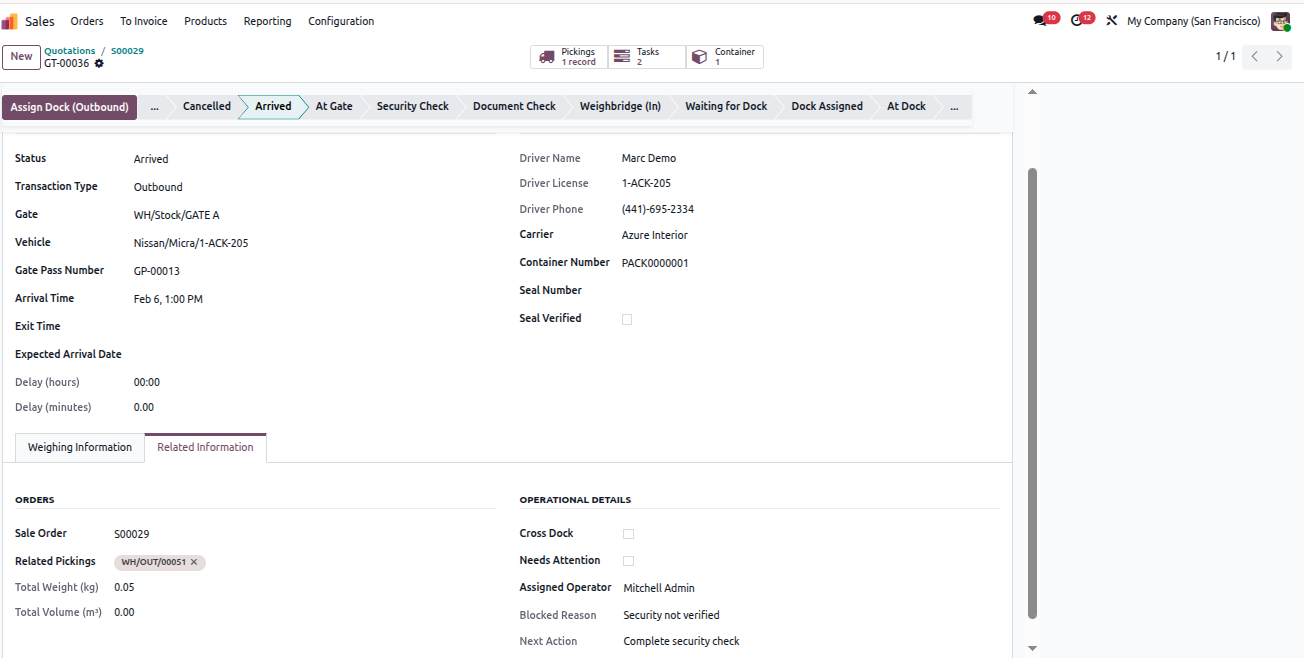
  8. An outbound gate transaction record will be created.
  9. Open the outbound record and maximize the view.

Note: On scheduling outbound, an email notification is sent to the Manager.
Yard Management - Yard Management automates warehouse gate operations, dock scheduling, and vehicle tracking from entry to exit. The module integrates weighbridge operations, security checkpoints, quality controls, and real-time inventory tracking with automated notifications at every stage. | Yard Management | Gate Transactions | Dock Scheduling | Weighbridge Integration | Security Checkpoints | Inventory Tracking | Warehouse Operations | Vehicle Management | SLA Monitoring | Quality Control | Real-time Notifications.

Yard Management - Yard Management automates warehouse gate operations, dock scheduling, and vehicle tracking from entry to exit. The module integrates weighbridge operations, security checkpoints, quality controls, and real-time inventory tracking with automated notifications at every stage. | Yard Management | Gate Transactions | Dock Scheduling | Weighbridge Integration | Security Checkpoints | Inventory Tracking | Warehouse Operations | Vehicle Management | SLA Monitoring | Quality Control | Real-time Notifications.

Yard Management - Yard Management automates warehouse gate operations, dock scheduling, and vehicle tracking from entry to exit. The module integrates weighbridge operations, security checkpoints, quality controls, and real-time inventory tracking with automated notifications at every stage. | Yard Management | Gate Transactions | Dock Scheduling | Weighbridge Integration | Security Checkpoints | Inventory Tracking | Warehouse Operations | Vehicle Management | SLA Monitoring | Quality Control | Real-time Notifications.

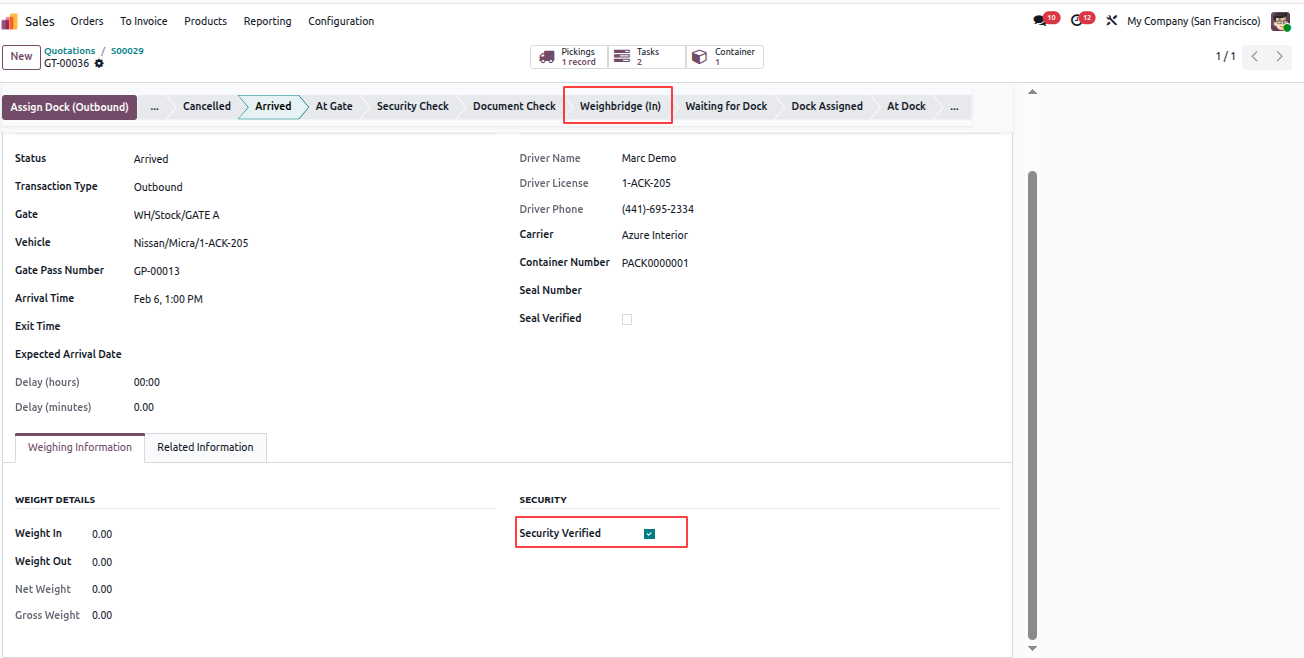
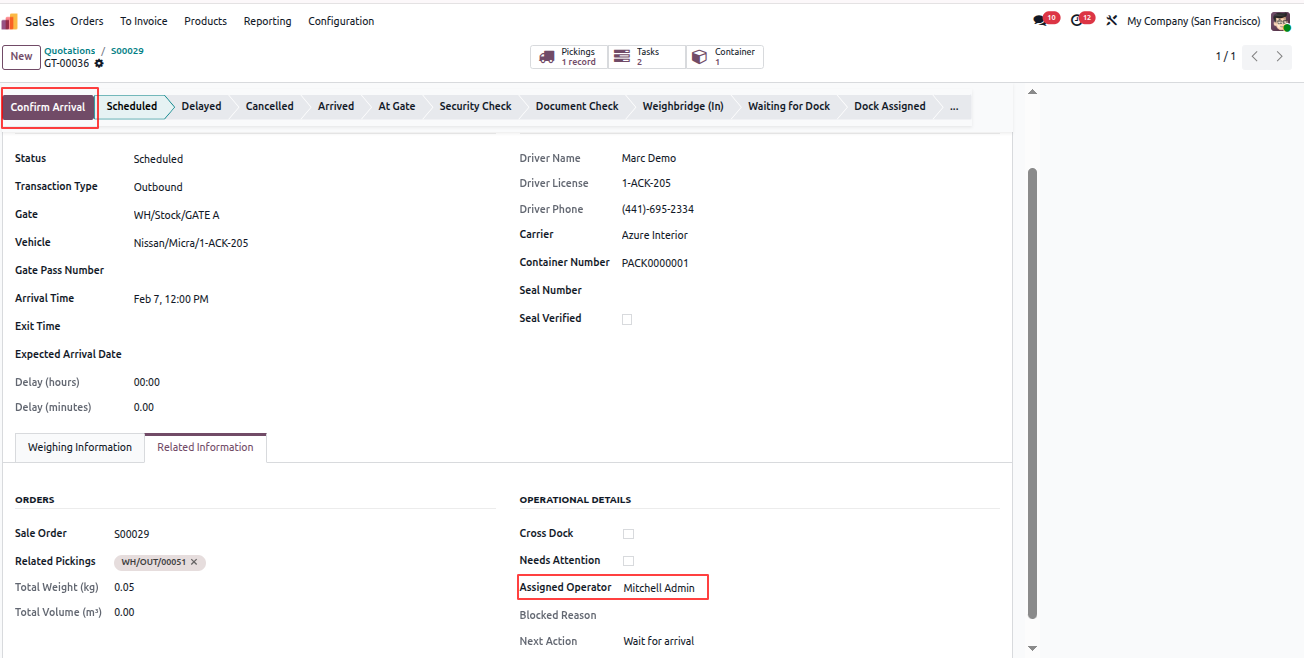
Fill required information and click Confirm Arrival. Perform Security Check and Weighbridge (In) operations similar to the inbound purchase flow.

All validations, approvals, and email notifications work the same way as inbound transactions.
Yard Management - Yard Management automates warehouse gate operations, dock scheduling, and vehicle tracking from entry to exit. The module integrates weighbridge operations, security checkpoints, quality controls, and real-time inventory tracking with automated notifications at every stage. | Yard Management | Gate Transactions | Dock Scheduling | Weighbridge Integration | Security Checkpoints | Inventory Tracking | Warehouse Operations | Vehicle Management | SLA Monitoring | Quality Control | Real-time Notifications.

Yard Management - Yard Management automates warehouse gate operations, dock scheduling, and vehicle tracking from entry to exit. The module integrates weighbridge operations, security checkpoints, quality controls, and real-time inventory tracking with automated notifications at every stage. | Yard Management | Gate Transactions | Dock Scheduling | Weighbridge Integration | Security Checkpoints | Inventory Tracking | Warehouse Operations | Vehicle Management | SLA Monitoring | Quality Control | Real-time Notifications.

Yard Management - Yard Management automates warehouse gate operations, dock scheduling, and vehicle tracking from entry to exit. The module integrates weighbridge operations, security checkpoints, quality controls, and real-time inventory tracking with automated notifications at every stage. | Yard Management | Gate Transactions | Dock Scheduling | Weighbridge Integration | Security Checkpoints | Inventory Tracking | Warehouse Operations | Vehicle Management | SLA Monitoring | Quality Control | Real-time Notifications.

Yard Management - Yard Management automates warehouse gate operations, dock scheduling, and vehicle tracking from entry to exit. The module integrates weighbridge operations, security checkpoints, quality controls, and real-time inventory tracking with automated notifications at every stage. | Yard Management | Gate Transactions | Dock Scheduling | Weighbridge Integration | Security Checkpoints | Inventory Tracking | Warehouse Operations | Vehicle Management | SLA Monitoring | Quality Control | Real-time Notifications.

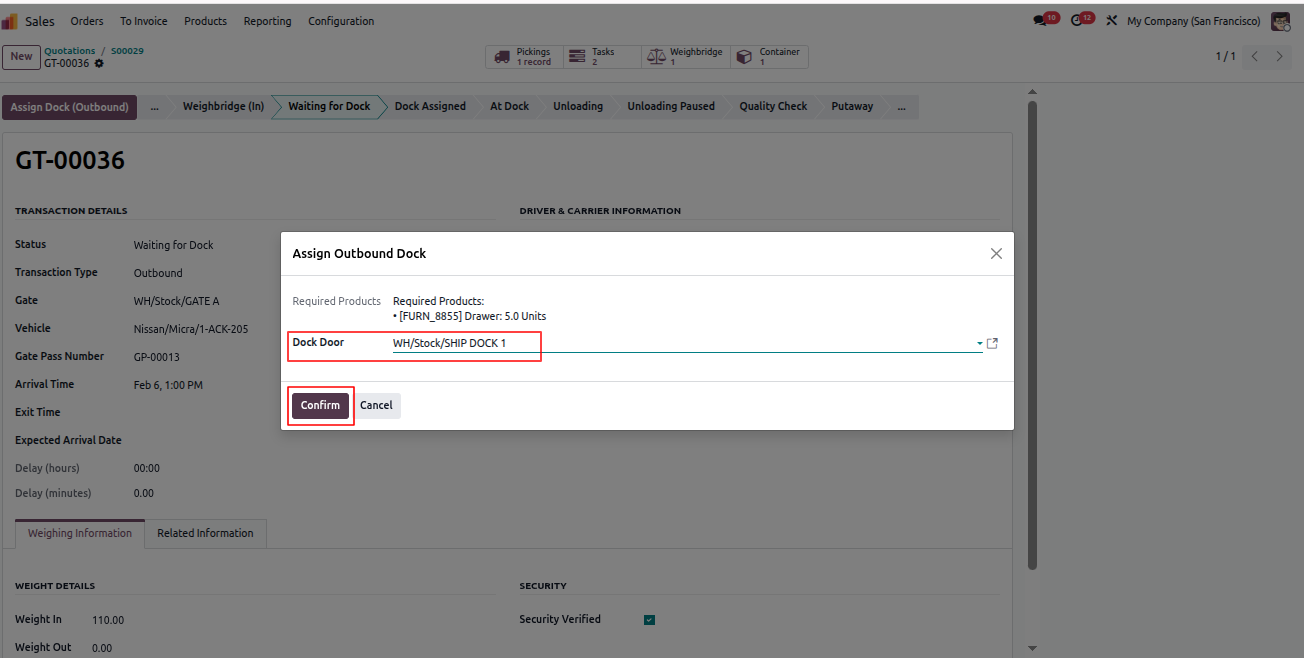
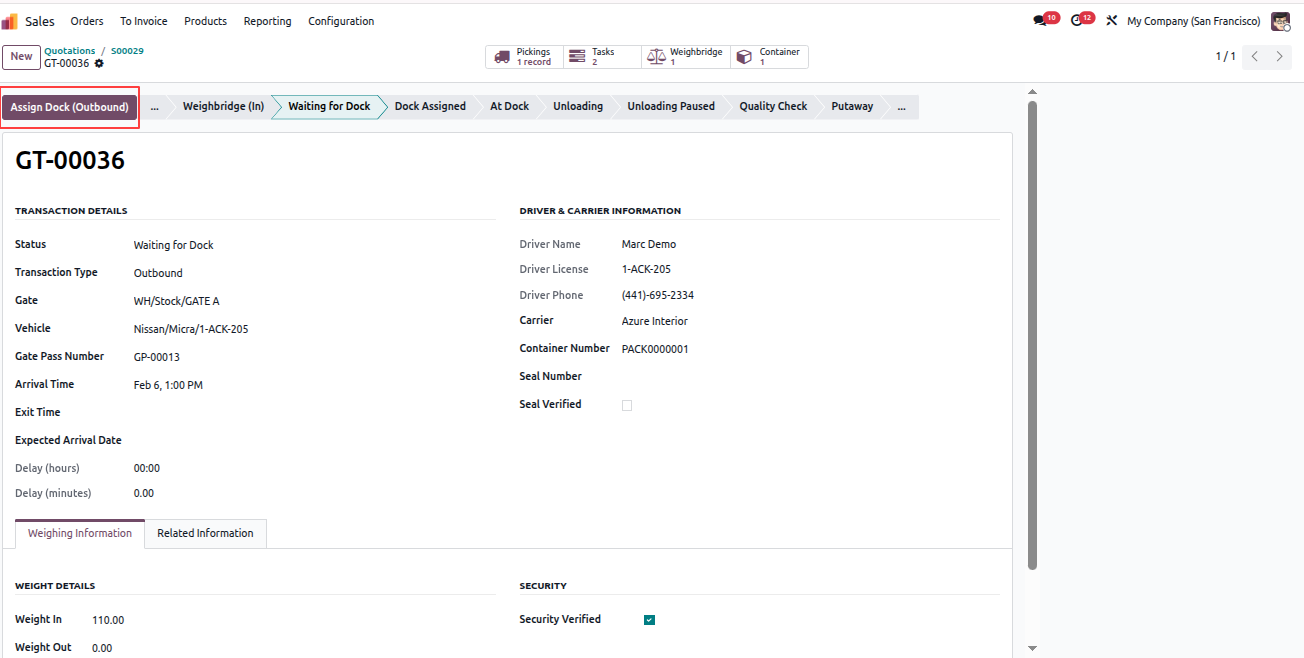
Click Assign Dock (Outbound). A wizard popup opens.

  1. Select a Shipping Type Dock Door.
  2. Only docks with available required products and quantities will be listed.
  3. If no dock matches, a validation error is shown.
  4. Select the dock door and click Confirm.
Yard Management - Yard Management automates warehouse gate operations, dock scheduling, and vehicle tracking from entry to exit. The module integrates weighbridge operations, security checkpoints, quality controls, and real-time inventory tracking with automated notifications at every stage. | Yard Management | Gate Transactions | Dock Scheduling | Weighbridge Integration | Security Checkpoints | Inventory Tracking | Warehouse Operations | Vehicle Management | SLA Monitoring | Quality Control | Real-time Notifications.

Yard Management - Yard Management automates warehouse gate operations, dock scheduling, and vehicle tracking from entry to exit. The module integrates weighbridge operations, security checkpoints, quality controls, and real-time inventory tracking with automated notifications at every stage. | Yard Management | Gate Transactions | Dock Scheduling | Weighbridge Integration | Security Checkpoints | Inventory Tracking | Warehouse Operations | Vehicle Management | SLA Monitoring | Quality Control | Real-time Notifications.
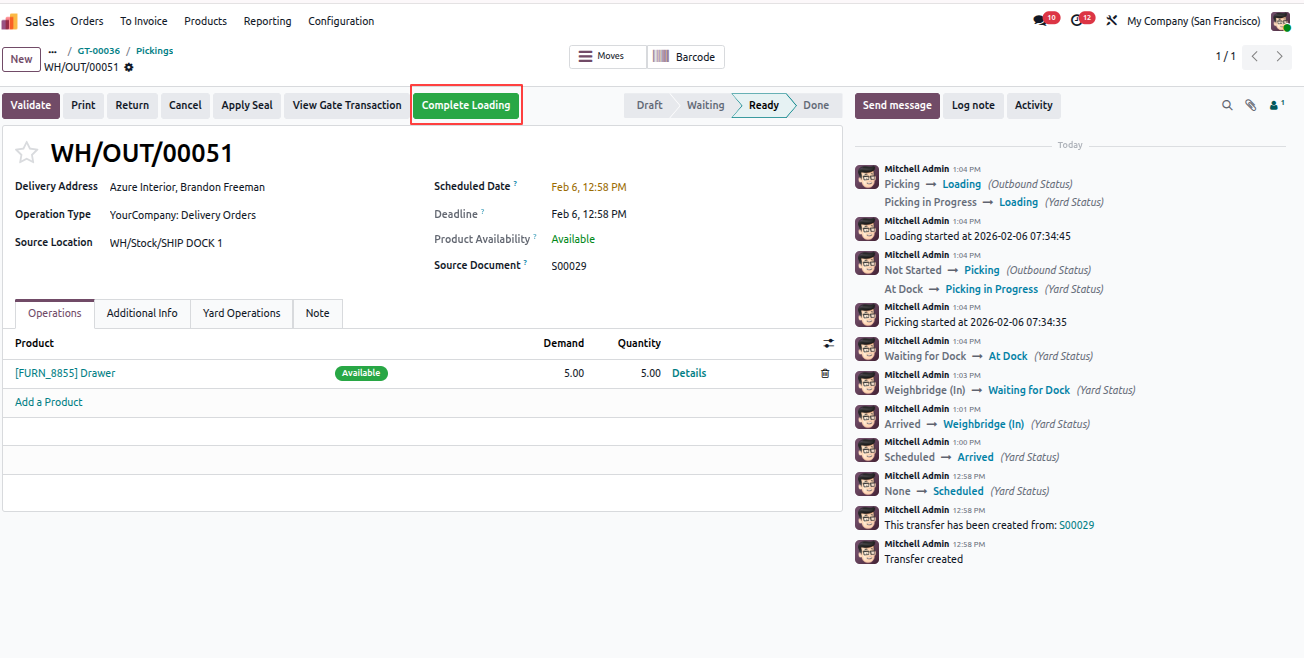
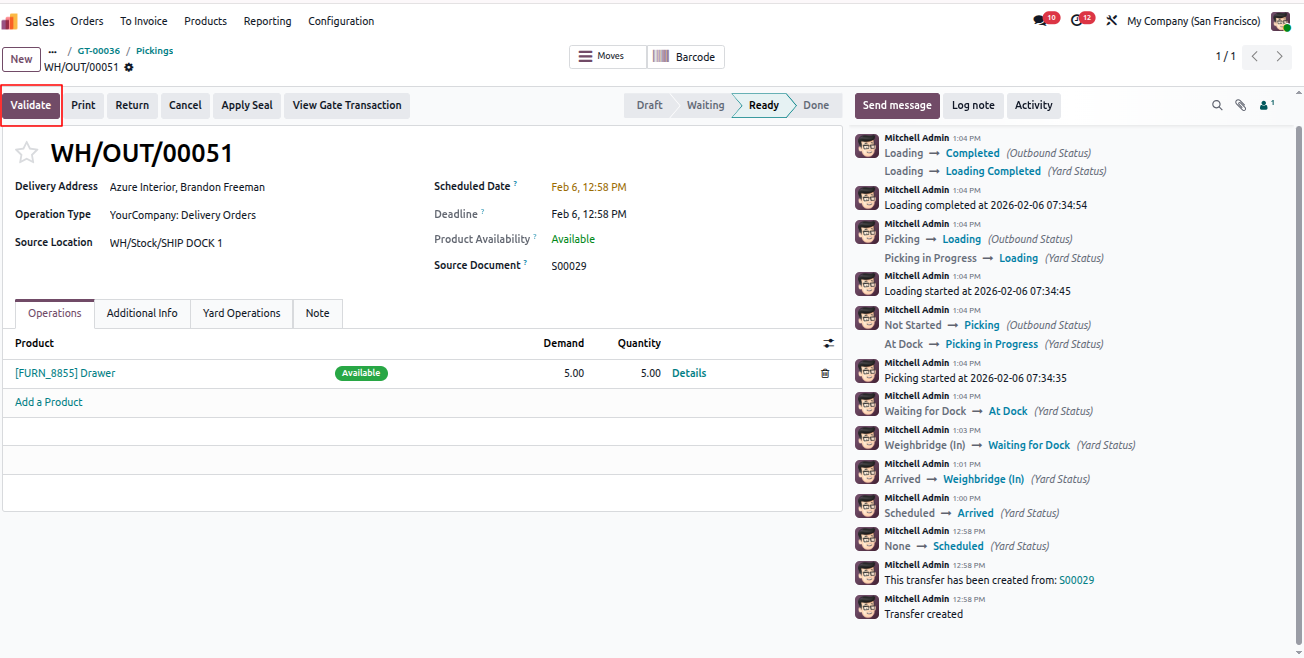
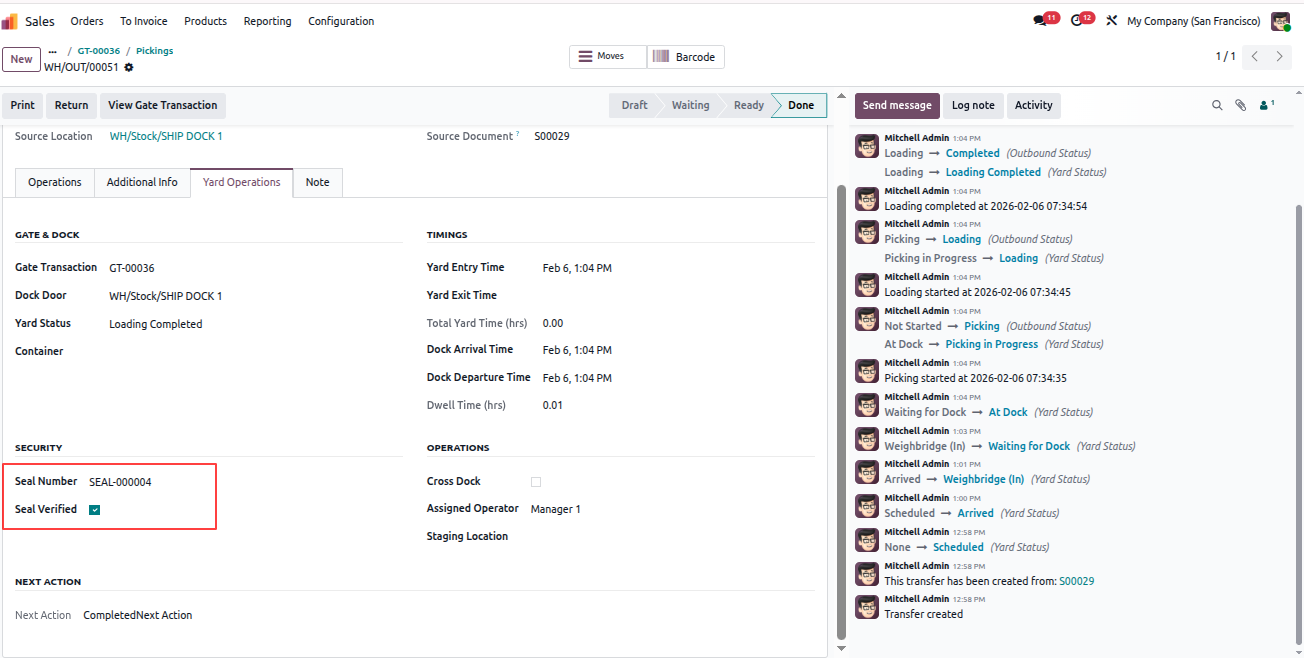
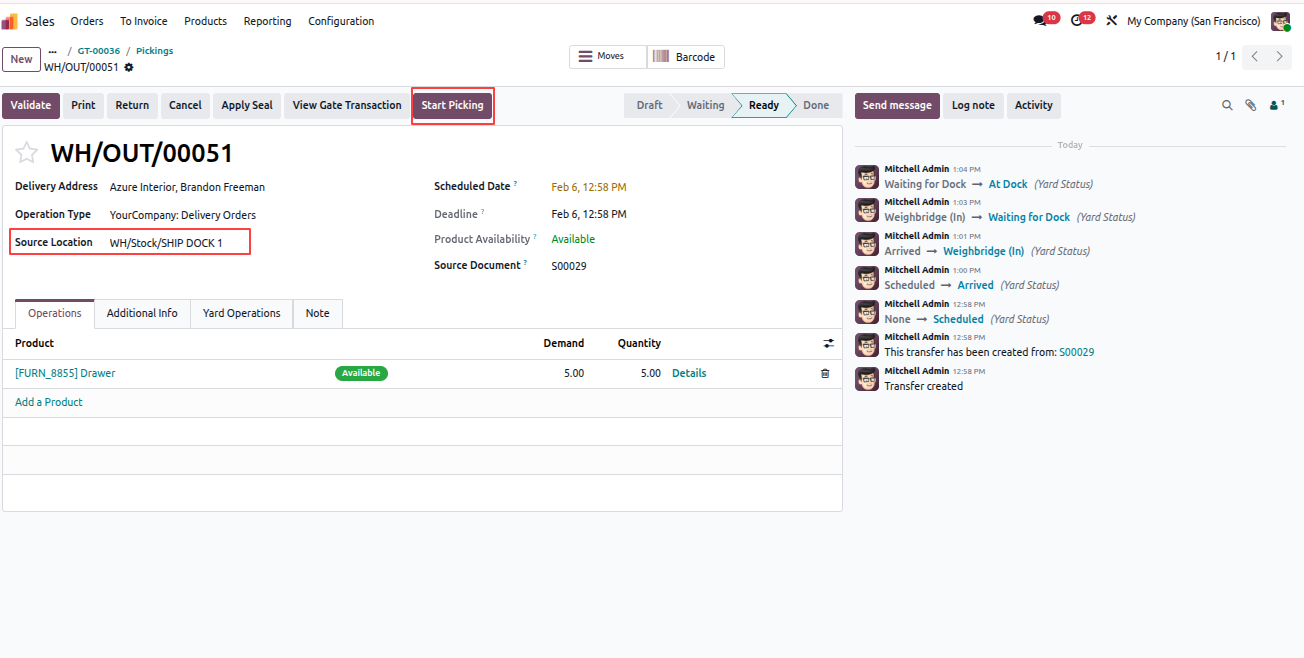
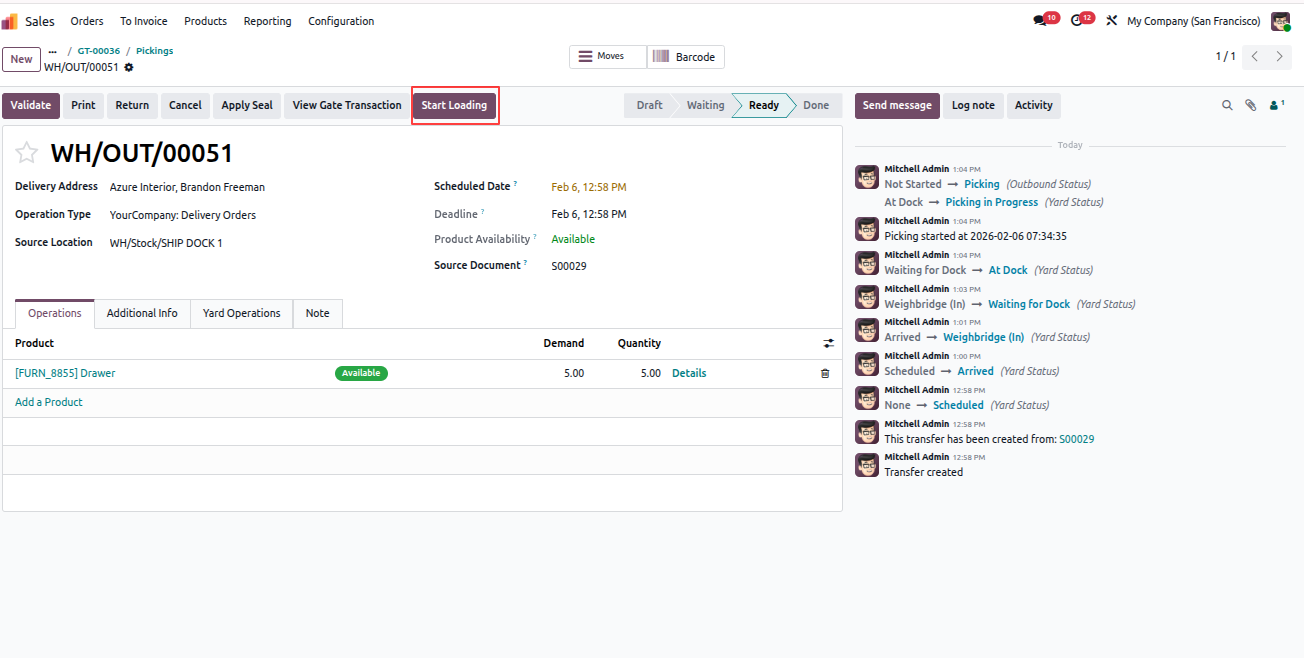
  1. Open the Pickings smart button.
  2. Open the delivery record.
  3. Source location will be the assigned dock door.
  4. Click Start Picking.
  5. Click Start Loading.
  6. Click Complete Loading.
  7. Validate the delivery.
  8. Apply the seal and click Verify Seal.
  9. Seal details are visible in the Yard Operations tab.

All above operations automatically send email notifications to the Location Manager and the Assigned Operator.
Yard Management - Yard Management automates warehouse gate operations, dock scheduling, and vehicle tracking from entry to exit. The module integrates weighbridge operations, security checkpoints, quality controls, and real-time inventory tracking with automated notifications at every stage. | Yard Management | Gate Transactions | Dock Scheduling | Weighbridge Integration | Security Checkpoints | Inventory Tracking | Warehouse Operations | Vehicle Management | SLA Monitoring | Quality Control | Real-time Notifications.

Yard Management - Yard Management automates warehouse gate operations, dock scheduling, and vehicle tracking from entry to exit. The module integrates weighbridge operations, security checkpoints, quality controls, and real-time inventory tracking with automated notifications at every stage. | Yard Management | Gate Transactions | Dock Scheduling | Weighbridge Integration | Security Checkpoints | Inventory Tracking | Warehouse Operations | Vehicle Management | SLA Monitoring | Quality Control | Real-time Notifications.

Yard Management - Yard Management automates warehouse gate operations, dock scheduling, and vehicle tracking from entry to exit. The module integrates weighbridge operations, security checkpoints, quality controls, and real-time inventory tracking with automated notifications at every stage. | Yard Management | Gate Transactions | Dock Scheduling | Weighbridge Integration | Security Checkpoints | Inventory Tracking | Warehouse Operations | Vehicle Management | SLA Monitoring | Quality Control | Real-time Notifications.

Yard Management - Yard Management automates warehouse gate operations, dock scheduling, and vehicle tracking from entry to exit. The module integrates weighbridge operations, security checkpoints, quality controls, and real-time inventory tracking with automated notifications at every stage. | Yard Management | Gate Transactions | Dock Scheduling | Weighbridge Integration | Security Checkpoints | Inventory Tracking | Warehouse Operations | Vehicle Management | SLA Monitoring | Quality Control | Real-time Notifications.

Yard Management - Yard Management automates warehouse gate operations, dock scheduling, and vehicle tracking from entry to exit. The module integrates weighbridge operations, security checkpoints, quality controls, and real-time inventory tracking with automated notifications at every stage. | Yard Management | Gate Transactions | Dock Scheduling | Weighbridge Integration | Security Checkpoints | Inventory Tracking | Warehouse Operations | Vehicle Management | SLA Monitoring | Quality Control | Real-time Notifications.

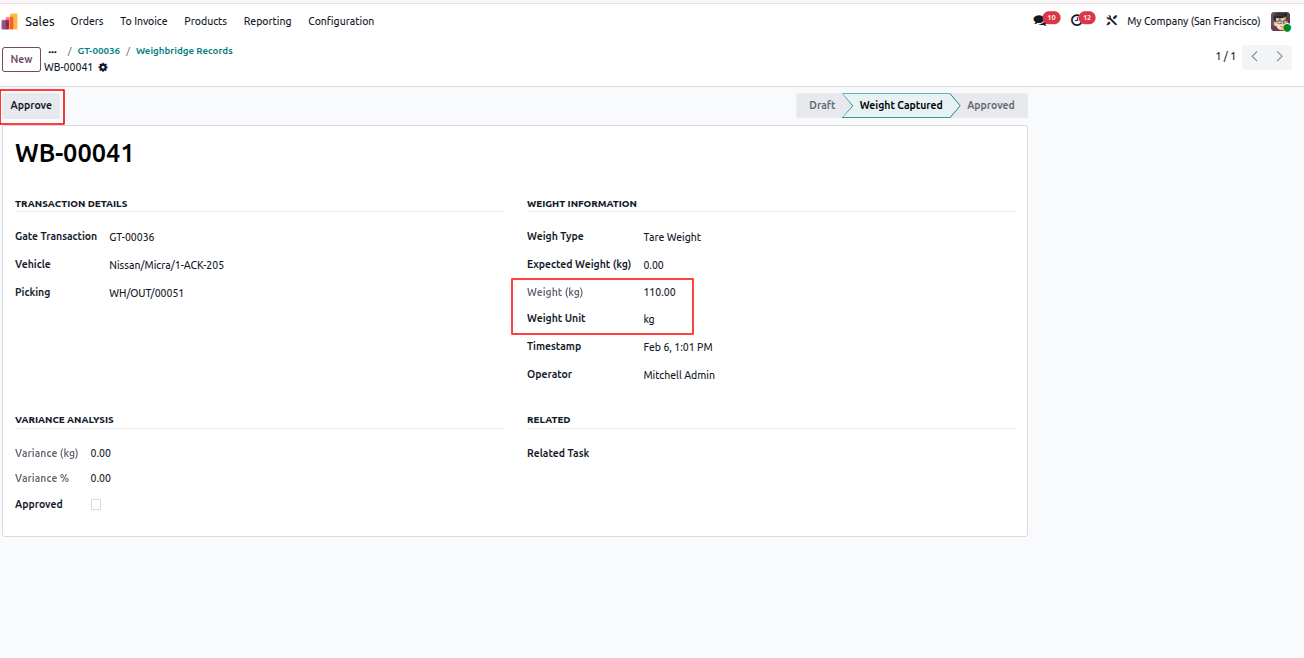
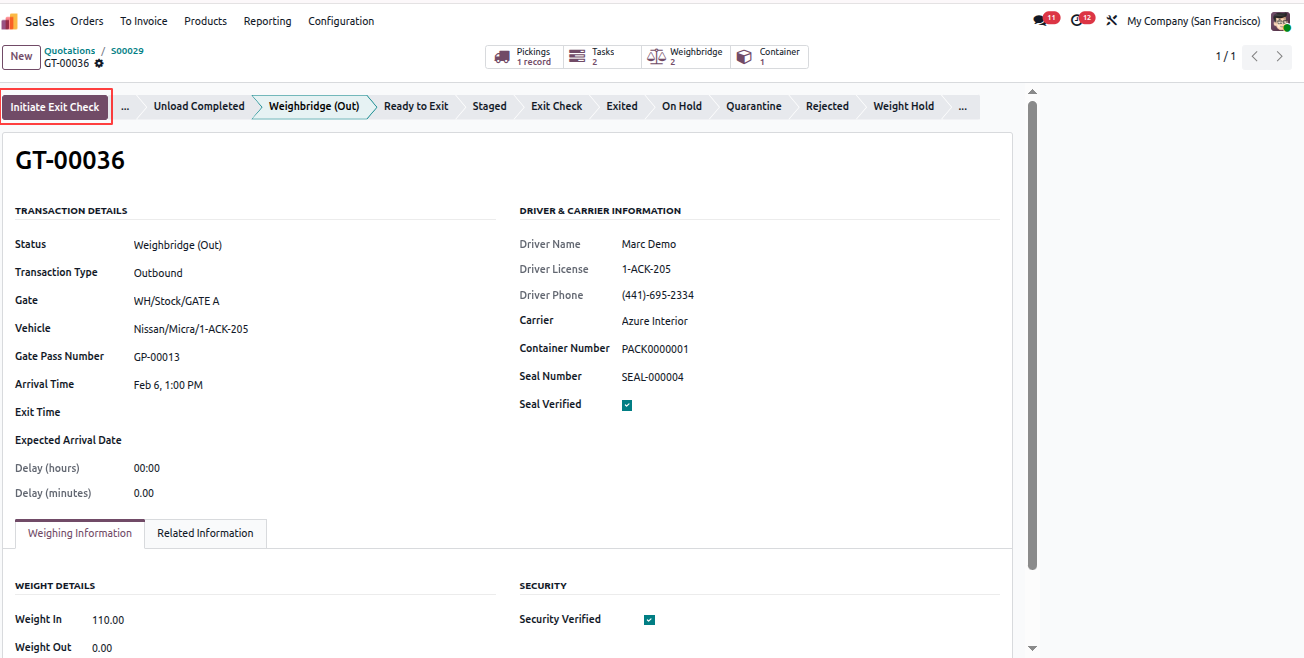
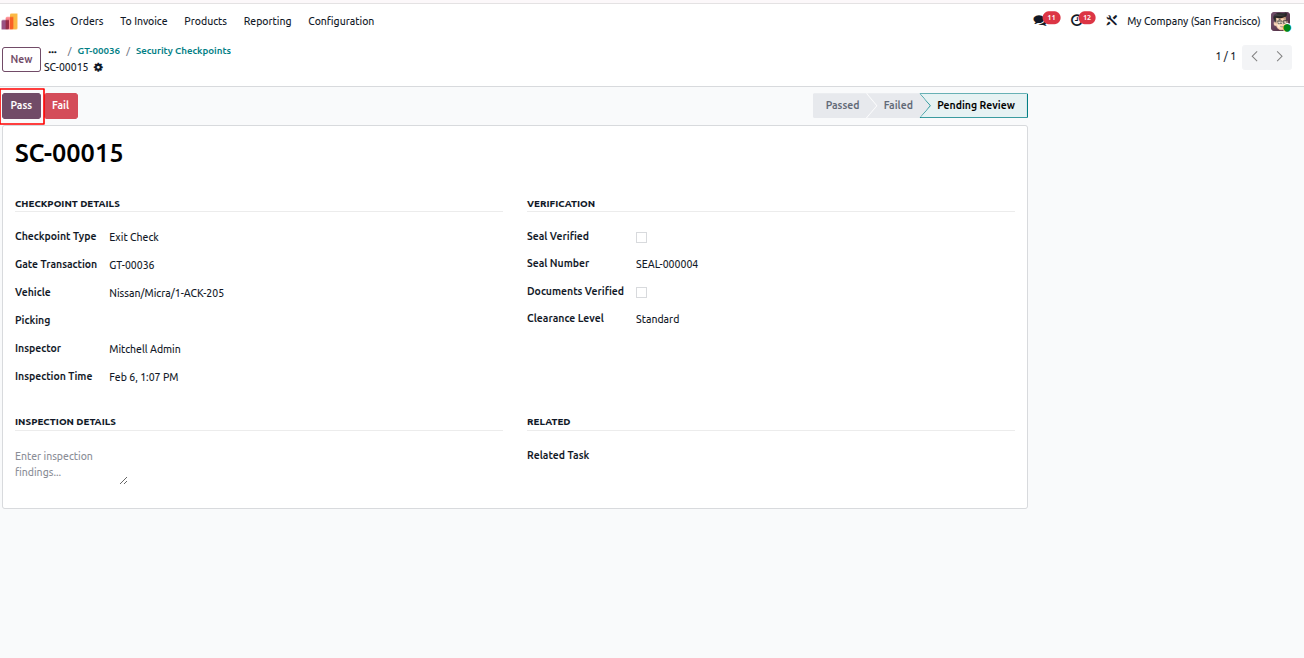
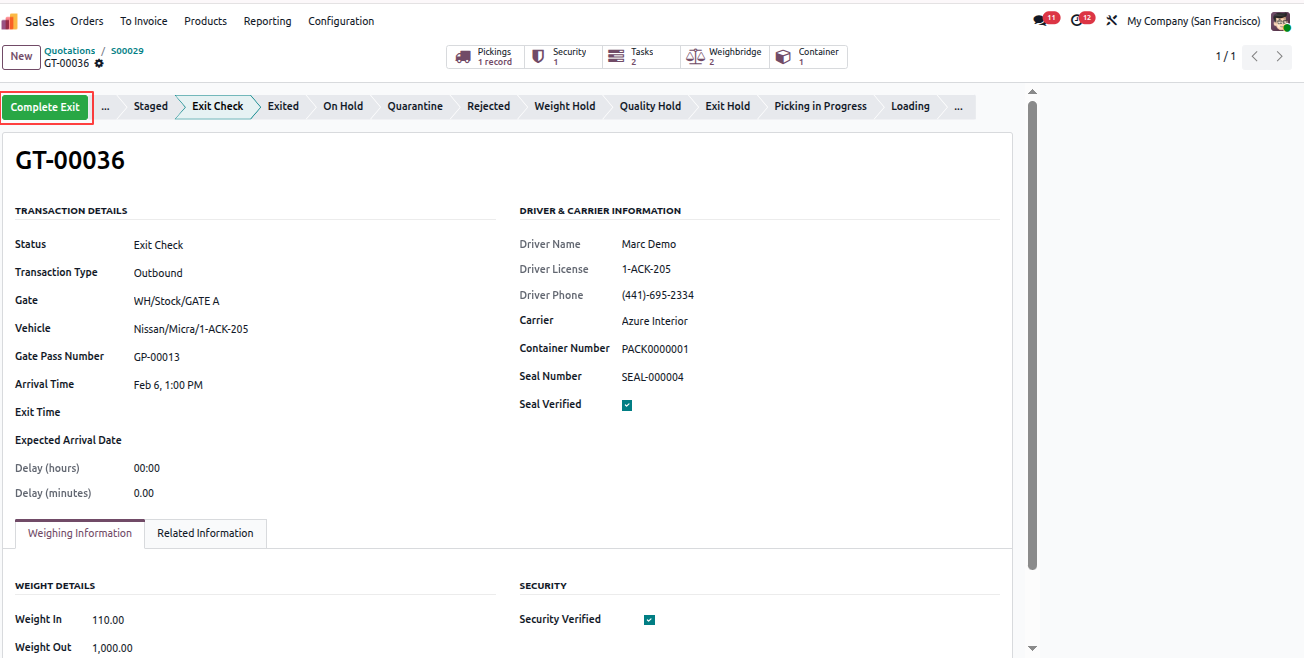
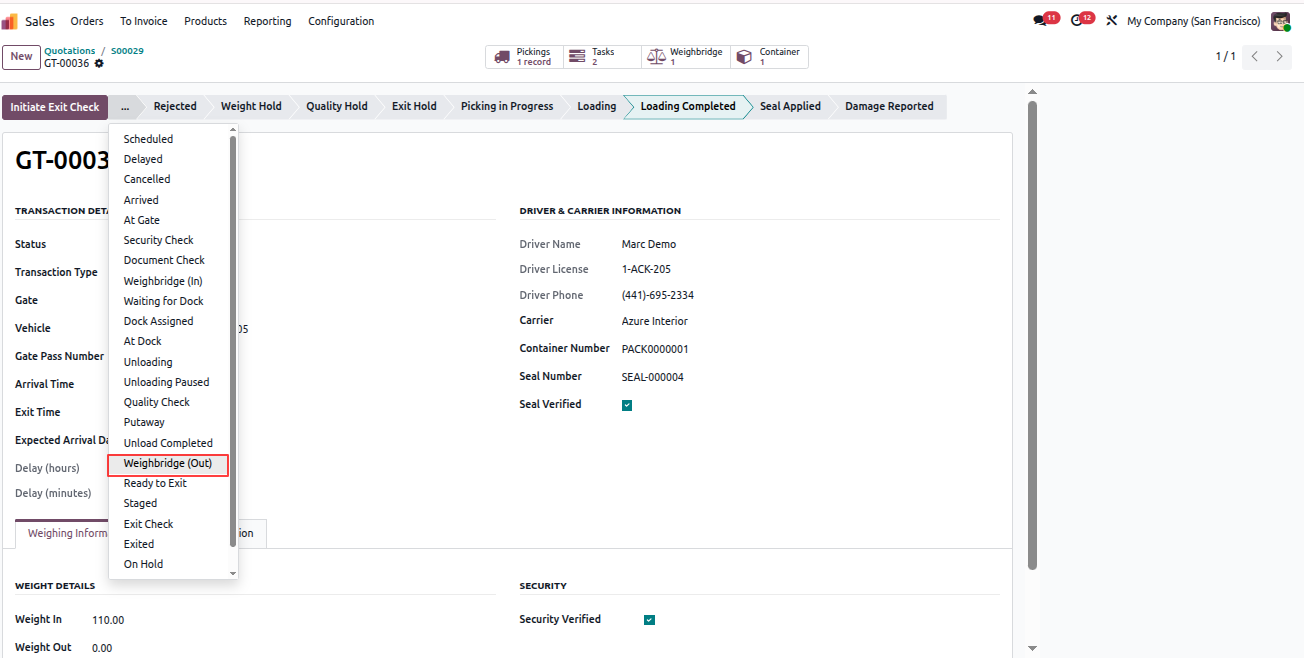
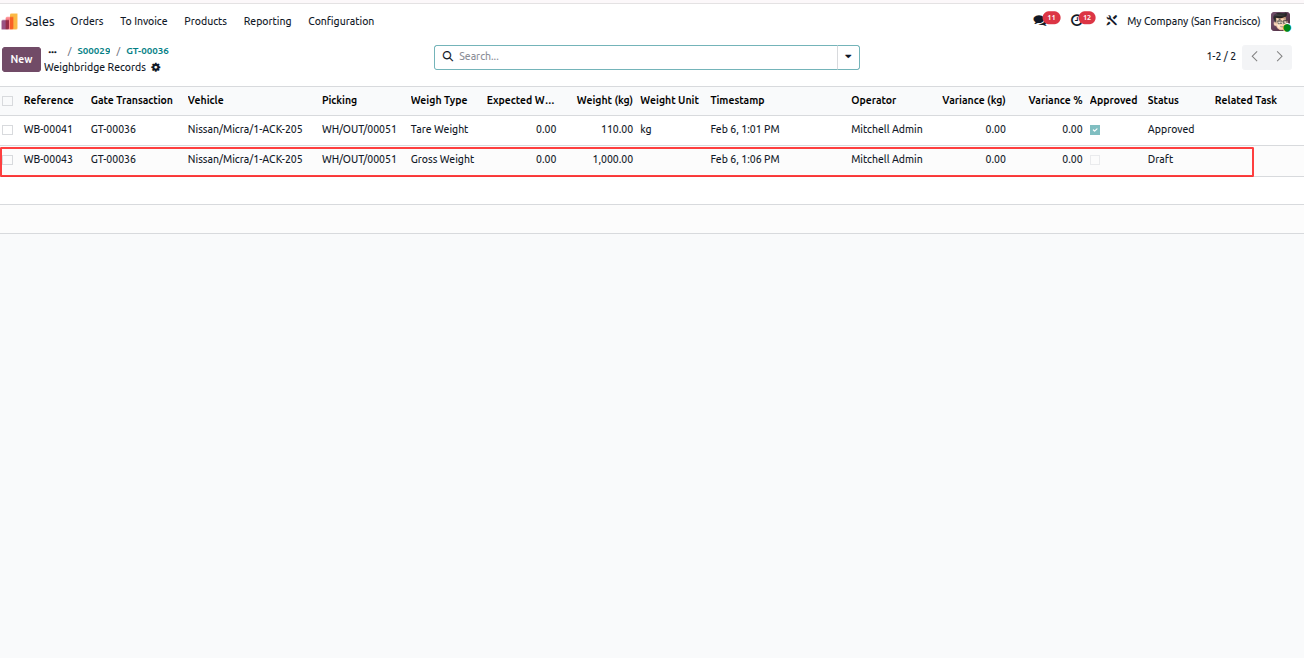
Go to the respective Gate Transaction record and perform:

  • Weighbridge (Out)
  • Initiate Exit Check
  • Security Checkpoints
  • Complete Exit

Email notifications work the same as the purchase inbound flow. After completing exit, click Wait Analysis to analyze vehicle state durations.
Yard Management - Yard Management automates warehouse gate operations, dock scheduling, and vehicle tracking from entry to exit. The module integrates weighbridge operations, security checkpoints, quality controls, and real-time inventory tracking with automated notifications at every stage. | Yard Management | Gate Transactions | Dock Scheduling | Weighbridge Integration | Security Checkpoints | Inventory Tracking | Warehouse Operations | Vehicle Management | SLA Monitoring | Quality Control | Real-time Notifications.

Yard Management - Yard Management automates warehouse gate operations, dock scheduling, and vehicle tracking from entry to exit. The module integrates weighbridge operations, security checkpoints, quality controls, and real-time inventory tracking with automated notifications at every stage. | Yard Management | Gate Transactions | Dock Scheduling | Weighbridge Integration | Security Checkpoints | Inventory Tracking | Warehouse Operations | Vehicle Management | SLA Monitoring | Quality Control | Real-time Notifications.

Yard Management - Yard Management automates warehouse gate operations, dock scheduling, and vehicle tracking from entry to exit. The module integrates weighbridge operations, security checkpoints, quality controls, and real-time inventory tracking with automated notifications at every stage. | Yard Management | Gate Transactions | Dock Scheduling | Weighbridge Integration | Security Checkpoints | Inventory Tracking | Warehouse Operations | Vehicle Management | SLA Monitoring | Quality Control | Real-time Notifications.

Yard Management - Yard Management automates warehouse gate operations, dock scheduling, and vehicle tracking from entry to exit. The module integrates weighbridge operations, security checkpoints, quality controls, and real-time inventory tracking with automated notifications at every stage. | Yard Management | Gate Transactions | Dock Scheduling | Weighbridge Integration | Security Checkpoints | Inventory Tracking | Warehouse Operations | Vehicle Management | SLA Monitoring | Quality Control | Real-time Notifications.

Yard Management - Yard Management automates warehouse gate operations, dock scheduling, and vehicle tracking from entry to exit. The module integrates weighbridge operations, security checkpoints, quality controls, and real-time inventory tracking with automated notifications at every stage. | Yard Management | Gate Transactions | Dock Scheduling | Weighbridge Integration | Security Checkpoints | Inventory Tracking | Warehouse Operations | Vehicle Management | SLA Monitoring | Quality Control | Real-time Notifications.

Yard Management - Yard Management automates warehouse gate operations, dock scheduling, and vehicle tracking from entry to exit. The module integrates weighbridge operations, security checkpoints, quality controls, and real-time inventory tracking with automated notifications at every stage. | Yard Management | Gate Transactions | Dock Scheduling | Weighbridge Integration | Security Checkpoints | Inventory Tracking | Warehouse Operations | Vehicle Management | SLA Monitoring | Quality Control | Real-time Notifications.
Combined Transaction Flow

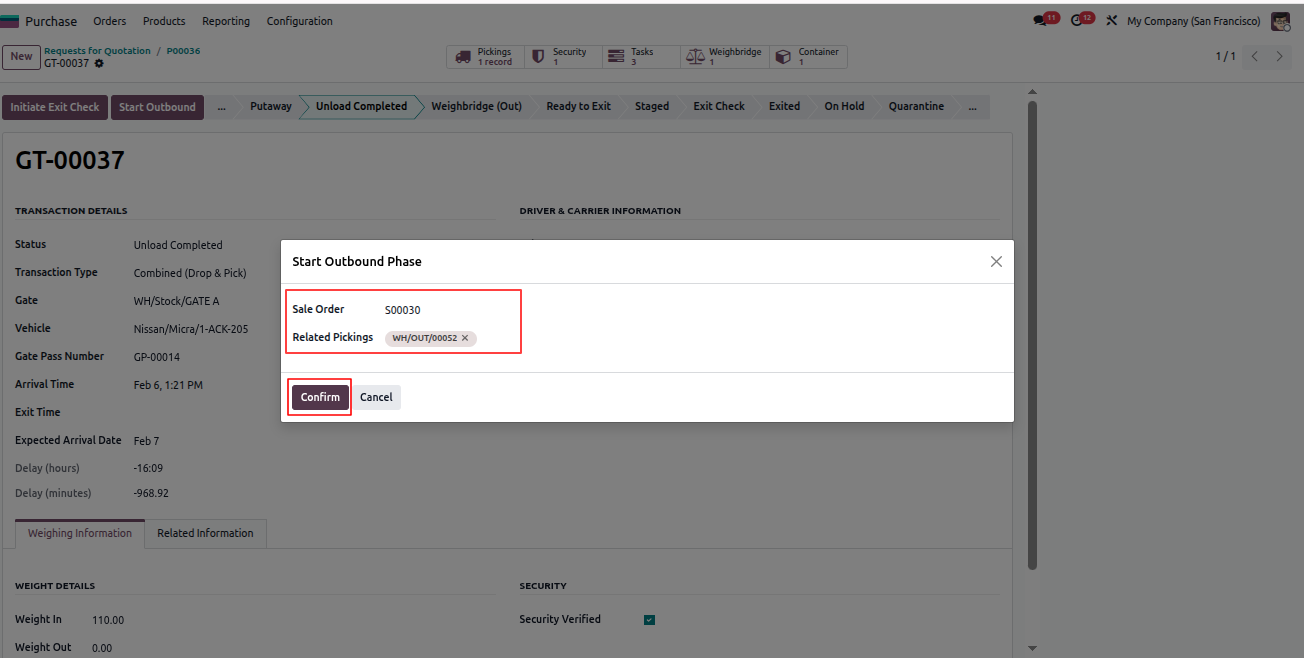
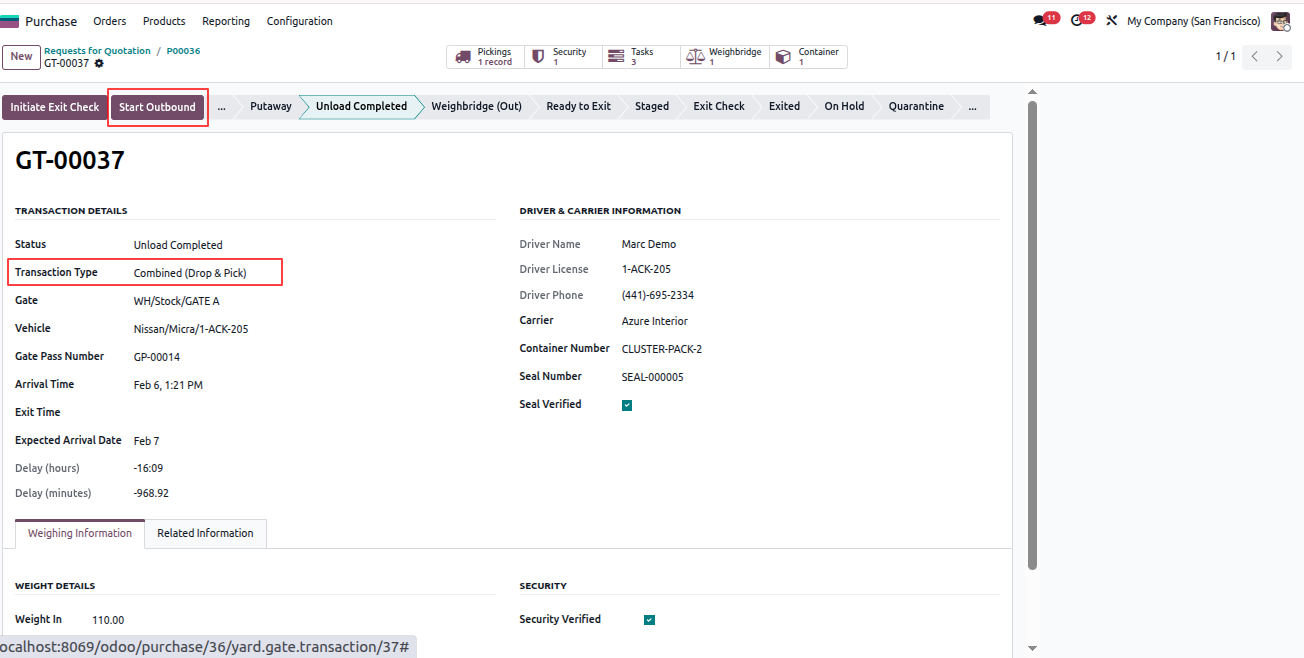
In a combined flow, the same vehicle performs both purchase inbound and sales outbound operations.

  1. Follow the complete Purchase Inbound flow until unloading is completed.
  2. Open the related Gate Transaction record.
  3. Change the Transaction Type to Combined.
  4. The Start Outbound button becomes visible.
  5. Click Start Outbound to link the sales order.
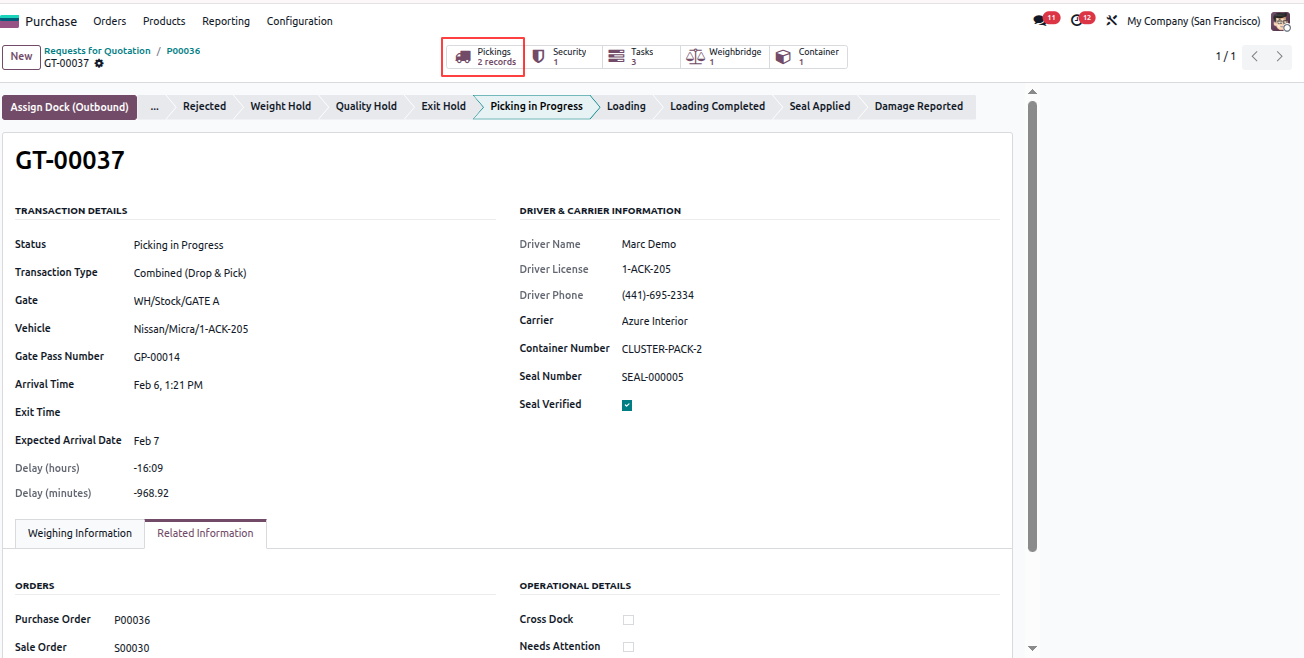
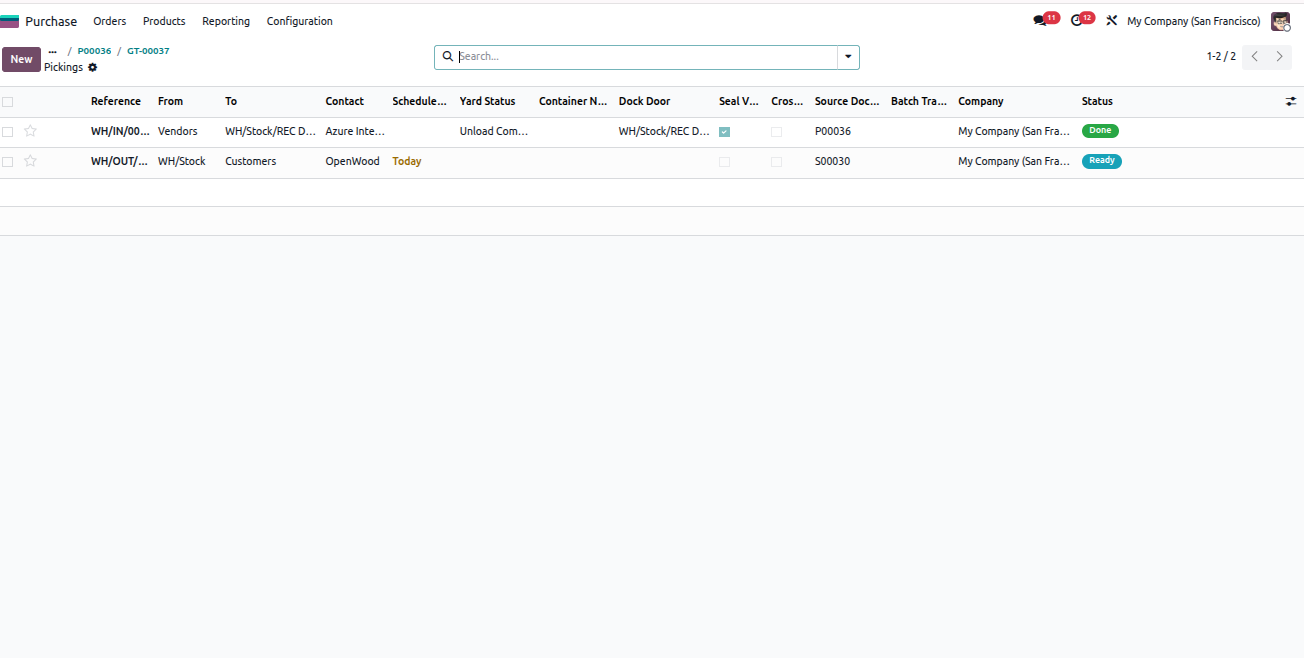
  6. Picking and delivery records are created automatically.
  7. You can see two picking records in the Pickings smart button.
  8. Continue outbound processing the same way as a normal sales delivery.

All email notifications and validations work the same as individual inbound and outbound flows.
Yard Management - Yard Management automates warehouse gate operations, dock scheduling, and vehicle tracking from entry to exit. The module integrates weighbridge operations, security checkpoints, quality controls, and real-time inventory tracking with automated notifications at every stage. | Yard Management | Gate Transactions | Dock Scheduling | Weighbridge Integration | Security Checkpoints | Inventory Tracking | Warehouse Operations | Vehicle Management | SLA Monitoring | Quality Control | Real-time Notifications.

Yard Management - Yard Management automates warehouse gate operations, dock scheduling, and vehicle tracking from entry to exit. The module integrates weighbridge operations, security checkpoints, quality controls, and real-time inventory tracking with automated notifications at every stage. | Yard Management | Gate Transactions | Dock Scheduling | Weighbridge Integration | Security Checkpoints | Inventory Tracking | Warehouse Operations | Vehicle Management | SLA Monitoring | Quality Control | Real-time Notifications.

Yard Management - Yard Management automates warehouse gate operations, dock scheduling, and vehicle tracking from entry to exit. The module integrates weighbridge operations, security checkpoints, quality controls, and real-time inventory tracking with automated notifications at every stage. | Yard Management | Gate Transactions | Dock Scheduling | Weighbridge Integration | Security Checkpoints | Inventory Tracking | Warehouse Operations | Vehicle Management | SLA Monitoring | Quality Control | Real-time Notifications.

Yard Management - Yard Management automates warehouse gate operations, dock scheduling, and vehicle tracking from entry to exit. The module integrates weighbridge operations, security checkpoints, quality controls, and real-time inventory tracking with automated notifications at every stage. | Yard Management | Gate Transactions | Dock Scheduling | Weighbridge Integration | Security Checkpoints | Inventory Tracking | Warehouse Operations | Vehicle Management | SLA Monitoring | Quality Control | Real-time Notifications.
Quick Overview, Monitoring & Reports

Yard Management provides multiple views and reports to quickly monitor operations, validations, and analytics.

  1. Go to Yard Management > Operations > Gate Transactions to view all inbound, outbound, and combined vehicle transactions.
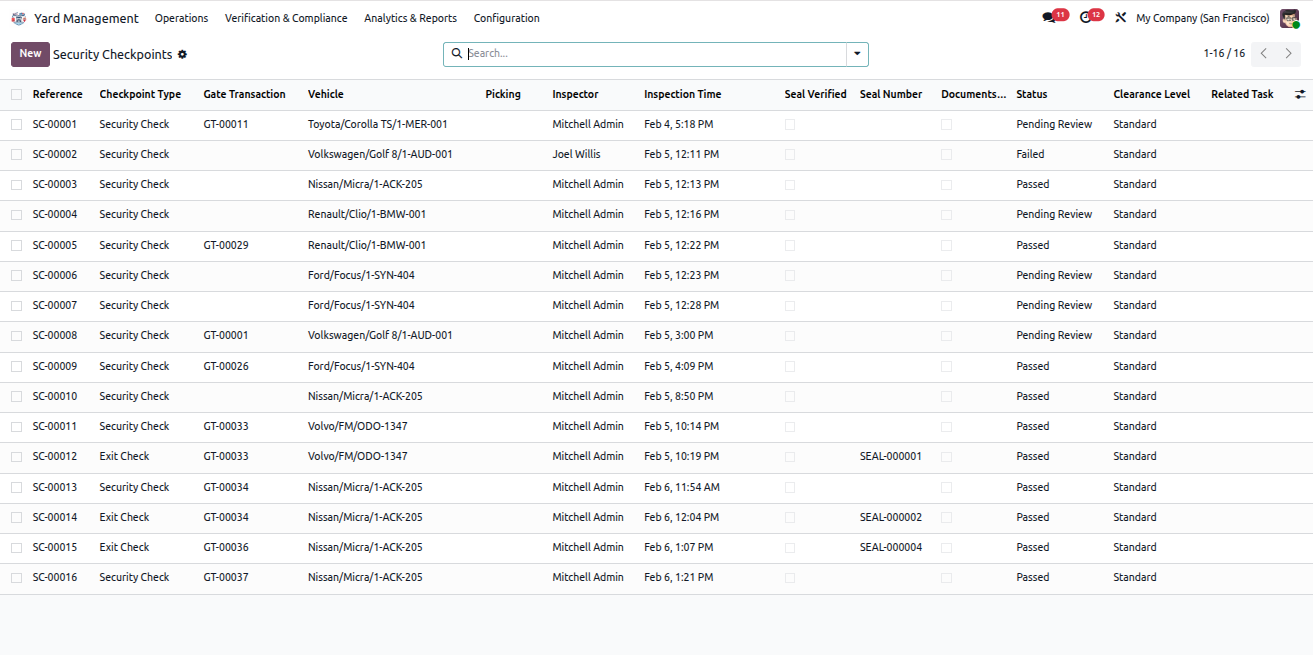
  2. Go to Yard Management > Verification & Compliance > Security Checkpoints to track all security inspections and pass/fail status.
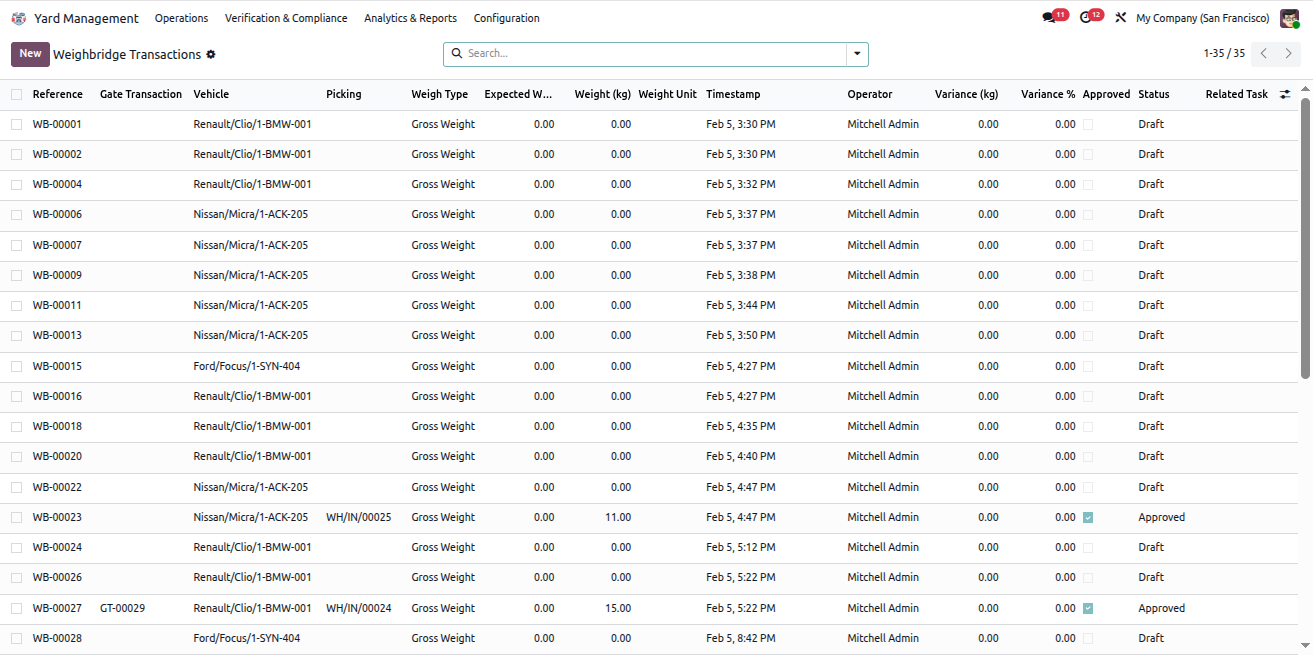
  3. Go to Yard Management > Verification & Compliance > Weighbridge to view all gross and tare weight records.
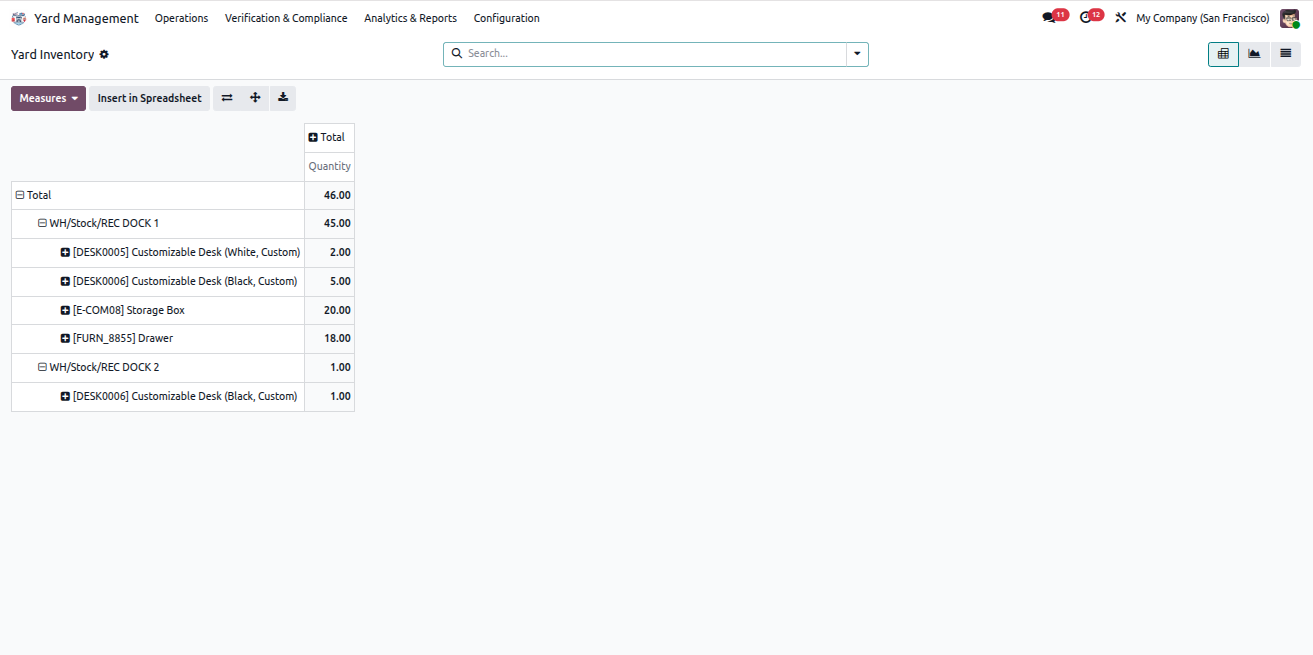
  4. Go to Yard Management > Analytics & Reports > Inventory Tracking to analyze product movements across locations.
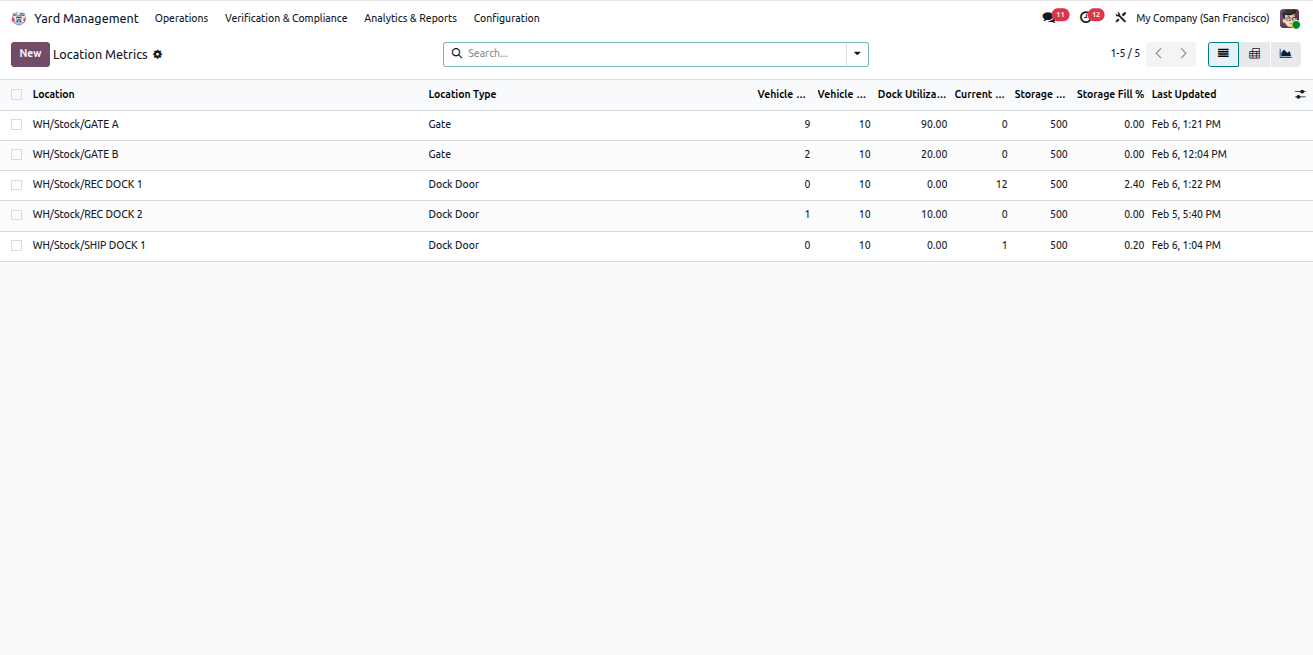
  5. Go to Yard Management > Analytics & Reports > Location Metrics to monitor location utilization, capacity, and operational performance.
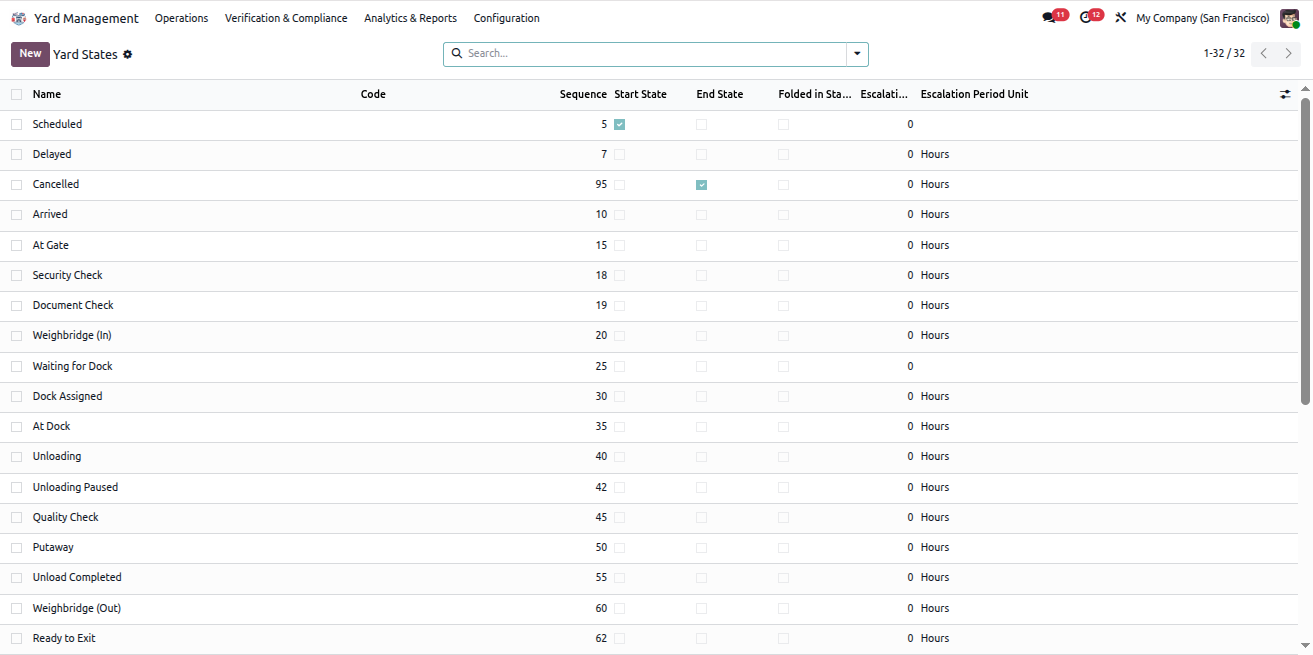
  6. Go to Yard Management > Configuration > States to manage yard states, escalation rules, and SLA thresholds.
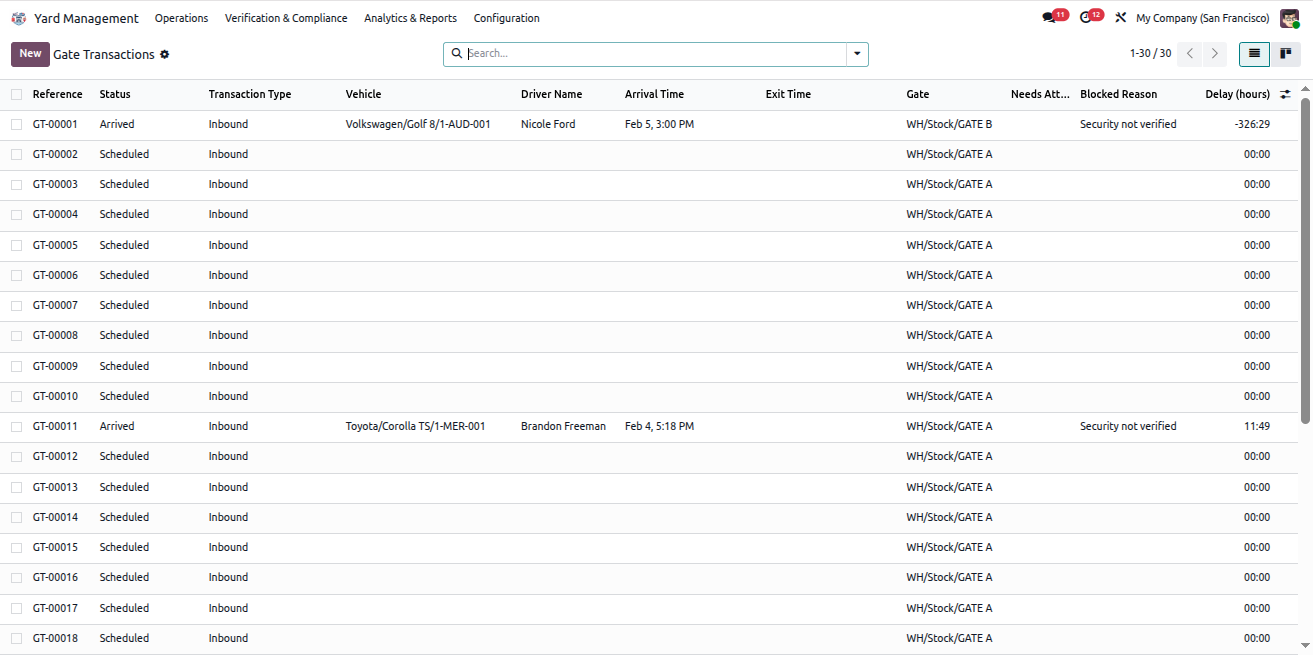
Gate Transactions

Security Checkpoints

Weighbridge Records

Inventory Tracking

Location Metrics

Yard States Configuration
Yard Management - Yard Management automates warehouse gate operations, dock scheduling, and vehicle tracking from entry to exit. The module integrates weighbridge operations, security checkpoints, quality controls, and real-time inventory tracking with automated notifications at every stage. | Yard Management | Gate Transactions | Dock Scheduling | Weighbridge Integration | Security Checkpoints | Inventory Tracking | Warehouse Operations | Vehicle Management | SLA Monitoring | Quality Control | Real-time Notifications.
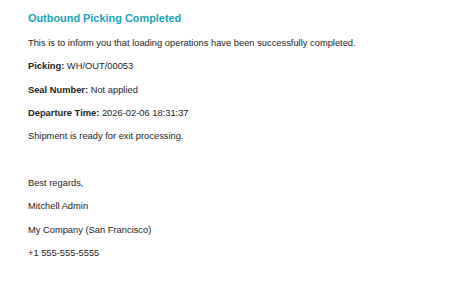
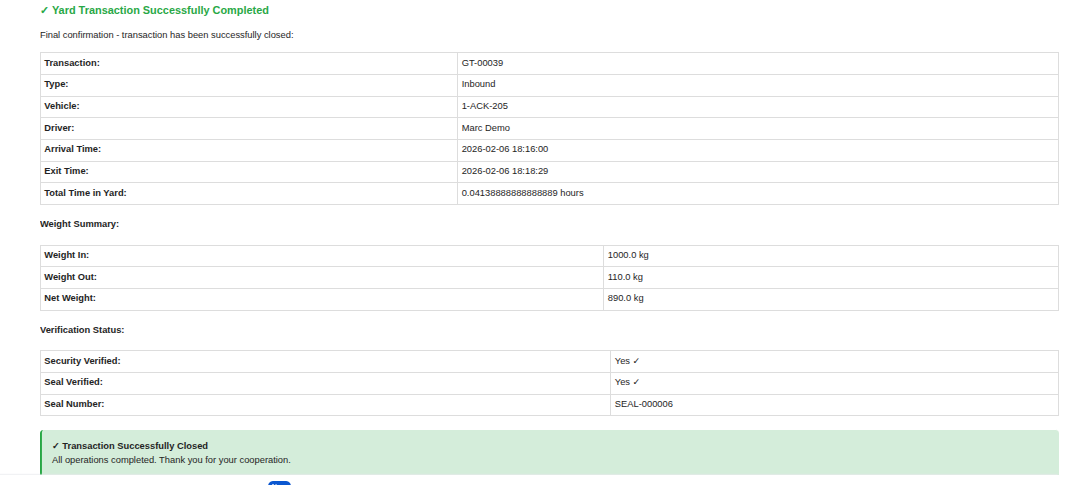
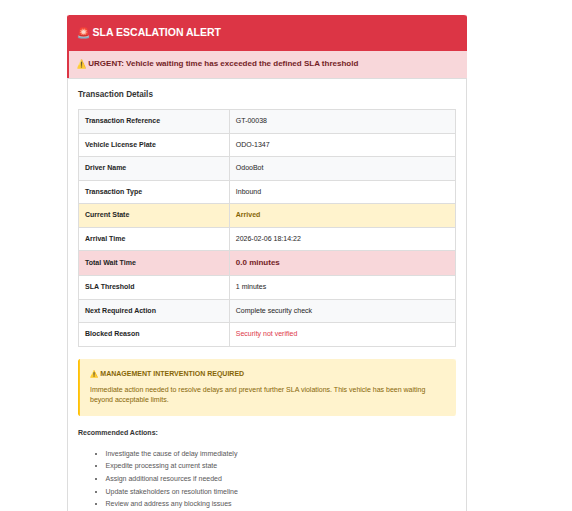
Email Notifications

The Yard Management system automatically sends email notifications at each important operational stage.
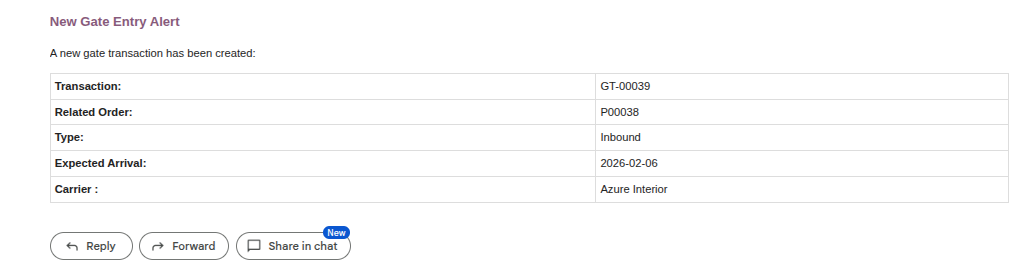
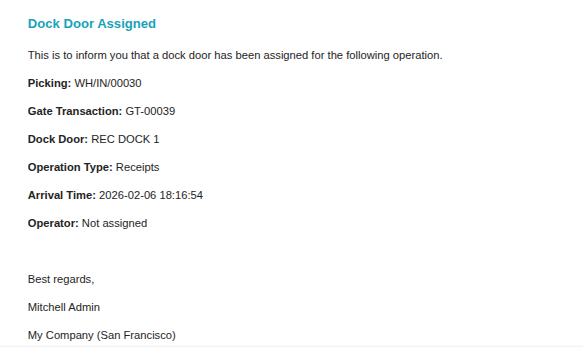
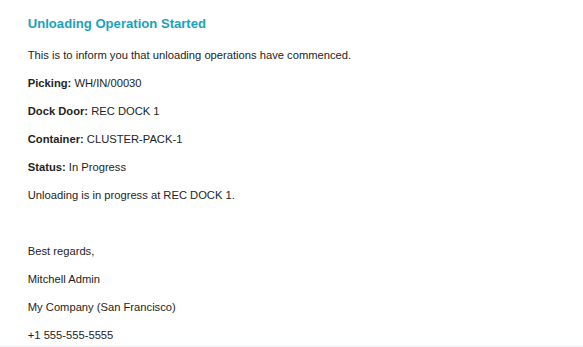
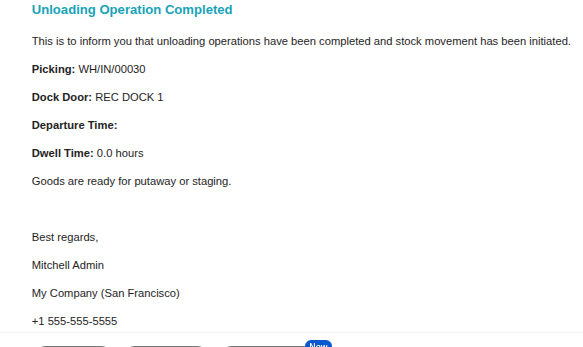
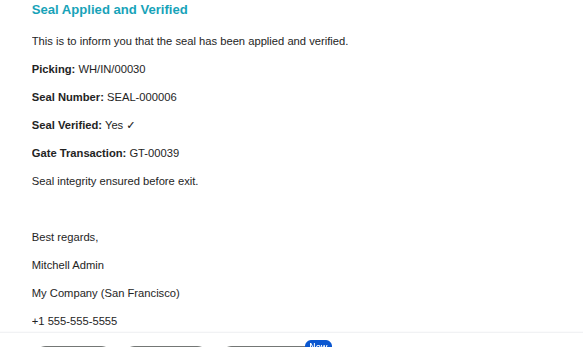
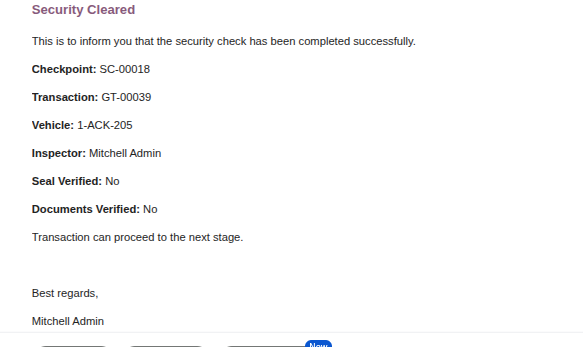
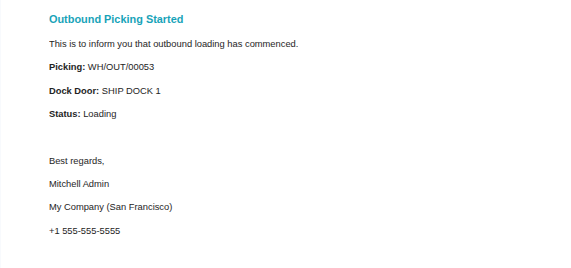
Email Notification Sample

Gate Transaction Email

Security Check Email

Weighbridge Email

Dock Assignment Email

Unloading Email

Exit Initiated Email

Exit Completed Email

SLA Escalation Email

Notification Summary Email

Key Features

Manages inbound, outbound, internal, and combined yard transactions in one place.
Controls vehicle movement through gate, dock, weighbridge, and exit stages.
Assigns docks automatically based on availability and operation type.
Tracks security checks, document verification, and weighbridge operations.
Sends automatic email notifications to operators, managers, and inspectors.
Provides reports and analytics for gate transactions, inventory, and locations.

Free 3 Months Support

Need help or any technical support ?

Kanak Infosystem will provide free 3 months support for bug fixes, any doubts or queries, installation, configuration support or any types of issues related to this module.

At our company, we take pride in providing exceptional help and technical support to our valued customers.

Our team of dedicated experts is well-versed in the intricacies of the Odoo platform.

Yard Management
Version 19.0.1.0 (9th February 2026)
  • Initial Release for the 19.0

Suggested Apps

Yard Management - Yard Management automates warehouse gate operations, dock scheduling, and vehicle tracking from entry to exit. The module integrates weighbridge operations, security checkpoints, quality controls, and real-time inventory tracking with automated notifications at every stage. | Yard Management | Gate Transactions | Dock Scheduling | Weighbridge Integration | Security Checkpoints | Inventory Tracking | Warehouse Operations | Vehicle Management | SLA Monitoring | Quality Control | Real-time Notifications.

Our Services

Yard Management - Yard Management automates warehouse gate operations, dock scheduling, and vehicle tracking from entry to exit. The module integrates weighbridge operations, security checkpoints, quality controls, and real-time inventory tracking with automated notifications at every stage. | Yard Management | Gate Transactions | Dock Scheduling | Weighbridge Integration | Security Checkpoints | Inventory Tracking | Warehouse Operations | Vehicle Management | SLA Monitoring | Quality Control | Real-time Notifications.

Hire Odoo Developer

Yard Management - Yard Management automates warehouse gate operations, dock scheduling, and vehicle tracking from entry to exit. The module integrates weighbridge operations, security checkpoints, quality controls, and real-time inventory tracking with automated notifications at every stage. | Yard Management | Gate Transactions | Dock Scheduling | Weighbridge Integration | Security Checkpoints | Inventory Tracking | Warehouse Operations | Vehicle Management | SLA Monitoring | Quality Control | Real-time Notifications.

Odoo Customization

Yard Management - Yard Management automates warehouse gate operations, dock scheduling, and vehicle tracking from entry to exit. The module integrates weighbridge operations, security checkpoints, quality controls, and real-time inventory tracking with automated notifications at every stage. | Yard Management | Gate Transactions | Dock Scheduling | Weighbridge Integration | Security Checkpoints | Inventory Tracking | Warehouse Operations | Vehicle Management | SLA Monitoring | Quality Control | Real-time Notifications.

Odoo Development

Yard Management - Yard Management automates warehouse gate operations, dock scheduling, and vehicle tracking from entry to exit. The module integrates weighbridge operations, security checkpoints, quality controls, and real-time inventory tracking with automated notifications at every stage. | Yard Management | Gate Transactions | Dock Scheduling | Weighbridge Integration | Security Checkpoints | Inventory Tracking | Warehouse Operations | Vehicle Management | SLA Monitoring | Quality Control | Real-time Notifications.

Odoo Installation

Yard Management - Yard Management automates warehouse gate operations, dock scheduling, and vehicle tracking from entry to exit. The module integrates weighbridge operations, security checkpoints, quality controls, and real-time inventory tracking with automated notifications at every stage. | Yard Management | Gate Transactions | Dock Scheduling | Weighbridge Integration | Security Checkpoints | Inventory Tracking | Warehouse Operations | Vehicle Management | SLA Monitoring | Quality Control | Real-time Notifications.

Odoo Integration

Yard Management - Yard Management automates warehouse gate operations, dock scheduling, and vehicle tracking from entry to exit. The module integrates weighbridge operations, security checkpoints, quality controls, and real-time inventory tracking with automated notifications at every stage. | Yard Management | Gate Transactions | Dock Scheduling | Weighbridge Integration | Security Checkpoints | Inventory Tracking | Warehouse Operations | Vehicle Management | SLA Monitoring | Quality Control | Real-time Notifications.

Odoo Resource

Yard Management - Yard Management automates warehouse gate operations, dock scheduling, and vehicle tracking from entry to exit. The module integrates weighbridge operations, security checkpoints, quality controls, and real-time inventory tracking with automated notifications at every stage. | Yard Management | Gate Transactions | Dock Scheduling | Weighbridge Integration | Security Checkpoints | Inventory Tracking | Warehouse Operations | Vehicle Management | SLA Monitoring | Quality Control | Real-time Notifications.

Odoo Themes

Yard Management - Yard Management automates warehouse gate operations, dock scheduling, and vehicle tracking from entry to exit. The module integrates weighbridge operations, security checkpoints, quality controls, and real-time inventory tracking with automated notifications at every stage. | Yard Management | Gate Transactions | Dock Scheduling | Weighbridge Integration | Security Checkpoints | Inventory Tracking | Warehouse Operations | Vehicle Management | SLA Monitoring | Quality Control | Real-time Notifications.

Odoo Training

Yard Management - Yard Management automates warehouse gate operations, dock scheduling, and vehicle tracking from entry to exit. The module integrates weighbridge operations, security checkpoints, quality controls, and real-time inventory tracking with automated notifications at every stage. | Yard Management | Gate Transactions | Dock Scheduling | Weighbridge Integration | Security Checkpoints | Inventory Tracking | Warehouse Operations | Vehicle Management | SLA Monitoring | Quality Control | Real-time Notifications.

Important Notice

All applications are developed within the default, up-to-date Odoo environment, and as such, we cannot guarantee flawless compatibility with third-party apps. While we strive to ensure smooth integration, any conflicts or issues that arise due to third-party applications will require additional support services, which can be provided at an extra cost. Kindly contact our support team for more information or to arrange paid support.

Kanak Infosystems LLP.

Reach out to us at our offices for any inquiries or collaboration.

Delhi Office

Unit no. 1017 & 1026, 11th Floor, Westend Mall,

Janak Puri, New Delhi,

Delhi, India - 110058

Gujarat Office

Unit no. 307, The Landmark, Urjanagar 1, Kudasan,

Gandhinagar, Gujarat, India - 382421

Kanak Infosystems LLP. Proprietary License v1.0

This software and associated files (the "Software") may only be used (executed,
modified, executed after modifications) if you have purchased a valid license
from the authors, typically via Odoo Apps, or if you have received a written
agreement from the authors of the Software (see the COPYRIGHT file).

You may develop Odoo modules that use the Software as a library (typically
by depending on it, importing it and using its resources), but without copying
any source code or material from the Software. You may distribute those
modules under the license of your choice, provided that this license is
compatible with the terms of the Kanak Infosystems LLP. Proprietary License (For example:
LGPL, MIT, or proprietary licenses similar to this one).

It is forbidden to publish, distribute, sublicense, or sell copies of the Software
or modified copies of the Software.

The above copyright notice and this permission notice must be included in all
copies or substantial portions of the Software.

THE SOFTWARE IS PROVIDED "AS IS", WITHOUT WARRANTY OF ANY KIND, EXPRESS OR
IMPLIED, INCLUDING BUT NOT LIMITED TO THE WARRANTIES OF MERCHANTABILITY,
FITNESS FOR A PARTICULAR PURPOSE AND NONINFRINGEMENT.
IN NO EVENT SHALL THE AUTHORS OR COPYRIGHT HOLDERS BE LIABLE FOR ANY CLAIM,
DAMAGES OR OTHER LIABILITY, WHETHER IN AN ACTION OF CONTRACT, TORT OR OTHERWISE,
ARISING FROM, OUT OF OR IN CONNECTION WITH THE SOFTWARE OR THE USE OR OTHER
DEALINGS IN THE SOFTWARE.

Comment on this module. Please Login