Skip to Content
Warehouse Capacity Validator

Warehouse Capacity Validator

51.88   51.88
v 19.0 0
Required Apps sale
stock
purchase
mail
Technical Name warehouse_capacity_validator_knk
License OPL-1
You bought this module and need support? Click here!
Technical Name warehouse_capacity_validator_knk
License OPL-1
Warehouse Capacity Validator - Comprehensive warehouse location capacity management with validation rules, smart suggestions, alerts, overrides, aggregation, and reporting | Warehouse Capacity Control | Location Capacity Limits | Storage Optimization | Weight Volume Quantity Validation | Overload Prevention | Smart Location Suggestions | Capacity Alerts | Real-time Utilization Tracking | Parent Child Aggregation | Capacity Override Management | Warehouse Space Optimization | Inventory Capacity Monitoring | Odoo Warehouse Management
Kanak Infosystems LLP.
Community
Enterprise
Odoo.sh
Warehouse Capacity Validator - Comprehensive warehouse location capacity management with validation rules, smart suggestions, alerts, overrides, aggregation, and reporting | Warehouse Capacity Control | Location Capacity Limits | Storage Optimization | Weight Volume Quantity Validation | Overload Prevention | Smart Location Suggestions | Capacity Alerts | Real-time Utilization Tracking | Parent Child Aggregation | Capacity Override Management | Warehouse Space Optimization | Inventory Capacity Monitoring | Odoo Warehouse Management

Warehouse Capacity Validator

Warehouse Capacity Validator helps you control storage locations using weight, volume, and quantity limits to prevent overloading and optimize space usage. It provides smart validations, alerts, utilization tracking, and alternative location suggestions for efficient warehouse management.
Warehouse Capacity Validator
Warehouse Capacity Validator - Comprehensive warehouse location capacity management with validation rules, smart suggestions, alerts, overrides, aggregation, and reporting | Warehouse Capacity Control | Location Capacity Limits | Storage Optimization | Weight Volume Quantity Validation | Overload Prevention | Smart Location Suggestions | Capacity Alerts | Real-time Utilization Tracking | Parent Child Aggregation | Capacity Override Management | Warehouse Space Optimization | Inventory Capacity Monitoring | Odoo Warehouse Management
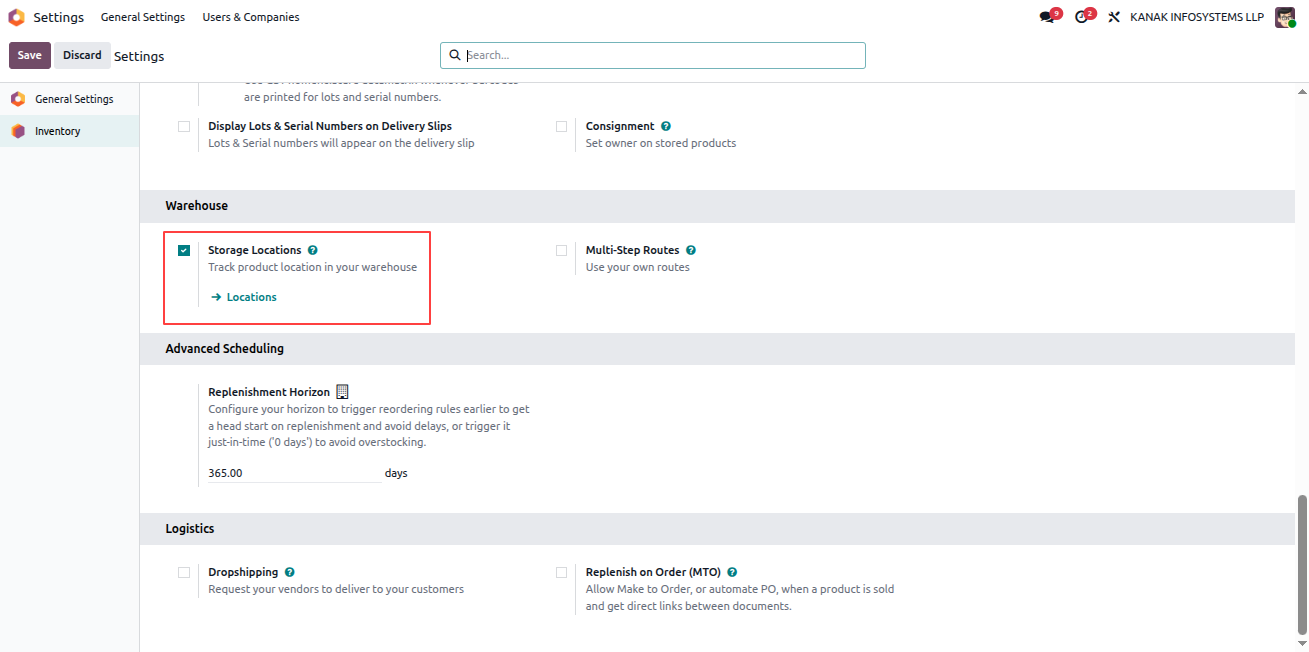
Enable Storage Locations

To enable Storage Locations in Odoo, follow these steps:

  1. Go to the Inventory application.
  2. Navigate to Configuration > Settings.
  3. Under the Warehouse section, enable the Storage Locations option.
  4. Click Save to apply the changes.

Enable Storage Locations
Warehouse Capacity Validator - Comprehensive warehouse location capacity management with validation rules, smart suggestions, alerts, overrides, aggregation, and reporting | Warehouse Capacity Control | Location Capacity Limits | Storage Optimization | Weight Volume Quantity Validation | Overload Prevention | Smart Location Suggestions | Capacity Alerts | Real-time Utilization Tracking | Parent Child Aggregation | Capacity Override Management | Warehouse Space Optimization | Inventory Capacity Monitoring | Odoo Warehouse Management
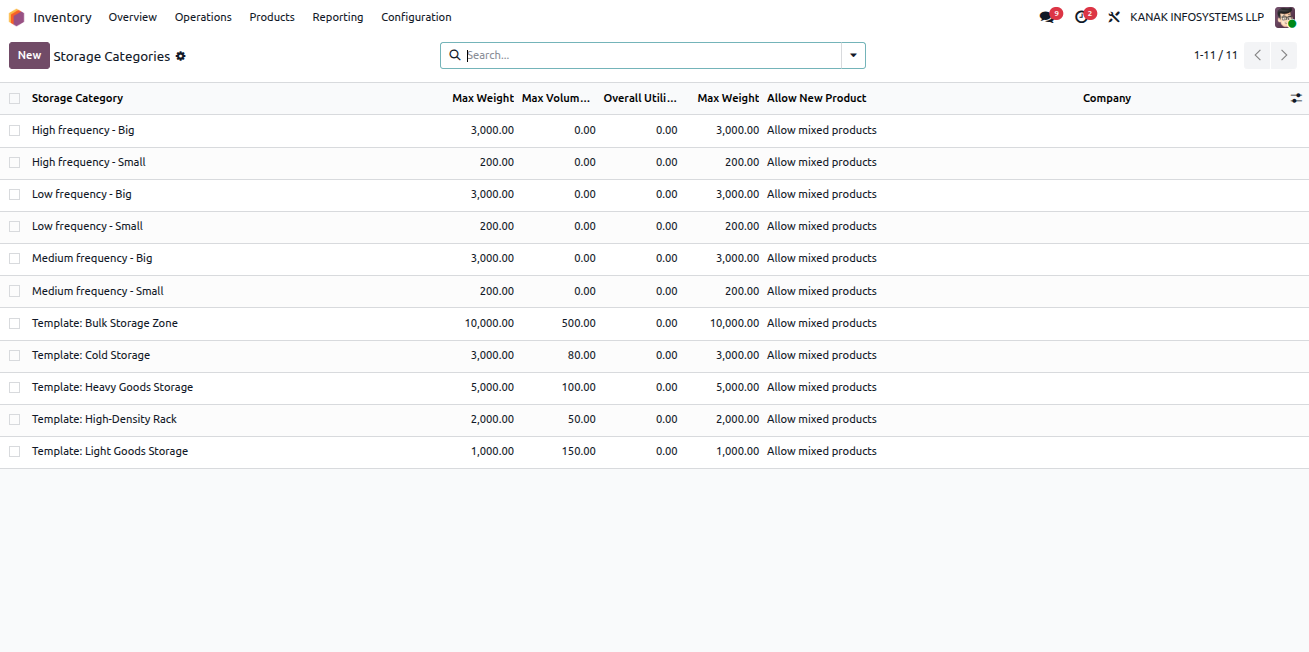
Access Storage Categories

To view the list of Storage Categories, follow these steps:

  1. Go to the Inventory application.
  2. Navigate to Configuration > Storage Categories.
  3. Here, you will find the list of available storage categories.
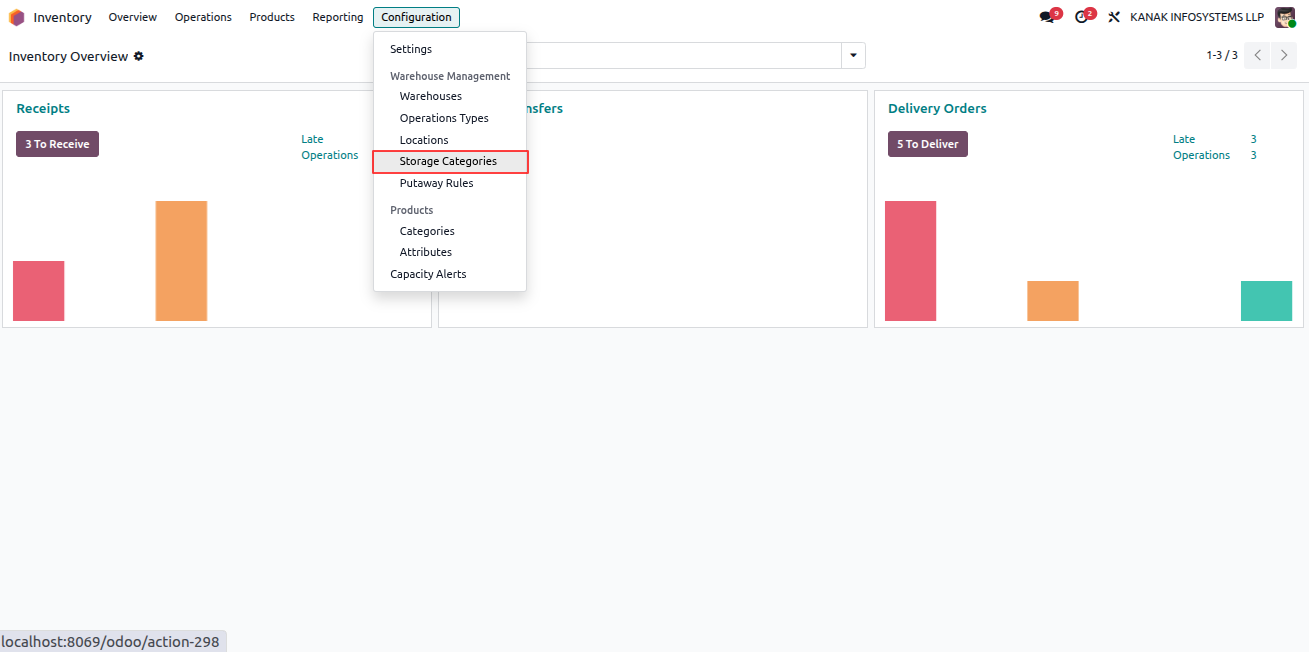
Storage Categories List

Storage Categories View
Warehouse Capacity Validator - Comprehensive warehouse location capacity management with validation rules, smart suggestions, alerts, overrides, aggregation, and reporting | Warehouse Capacity Control | Location Capacity Limits | Storage Optimization | Weight Volume Quantity Validation | Overload Prevention | Smart Location Suggestions | Capacity Alerts | Real-time Utilization Tracking | Parent Child Aggregation | Capacity Override Management | Warehouse Space Optimization | Inventory Capacity Monitoring | Odoo Warehouse Management
Configure Storage Category Capacity

Open any Storage Category or create a new one as per your requirement. You can define Maximum Weight, Maximum Volume, Maximum Quantity, along with Warning Threshold (%) to trigger alerts and Block Threshold (%) to prevent further product intake once the limit is reached.

You can also set product-specific capacity limits, allowing particular products to be stored only up to a defined quantity.
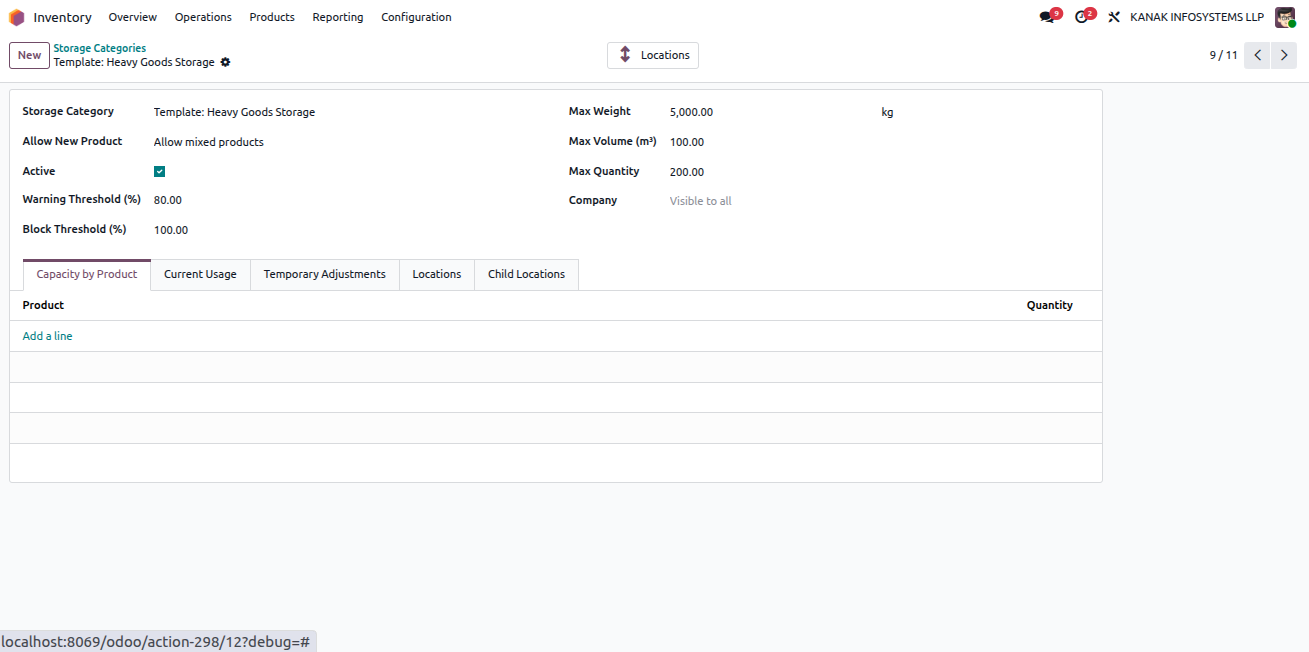

Storage Category Configuration
Warehouse Capacity Validator - Comprehensive warehouse location capacity management with validation rules, smart suggestions, alerts, overrides, aggregation, and reporting | Warehouse Capacity Control | Location Capacity Limits | Storage Optimization | Weight Volume Quantity Validation | Overload Prevention | Smart Location Suggestions | Capacity Alerts | Real-time Utilization Tracking | Parent Child Aggregation | Capacity Override Management | Warehouse Space Optimization | Inventory Capacity Monitoring | Odoo Warehouse Management
Configure Warehouse Locations

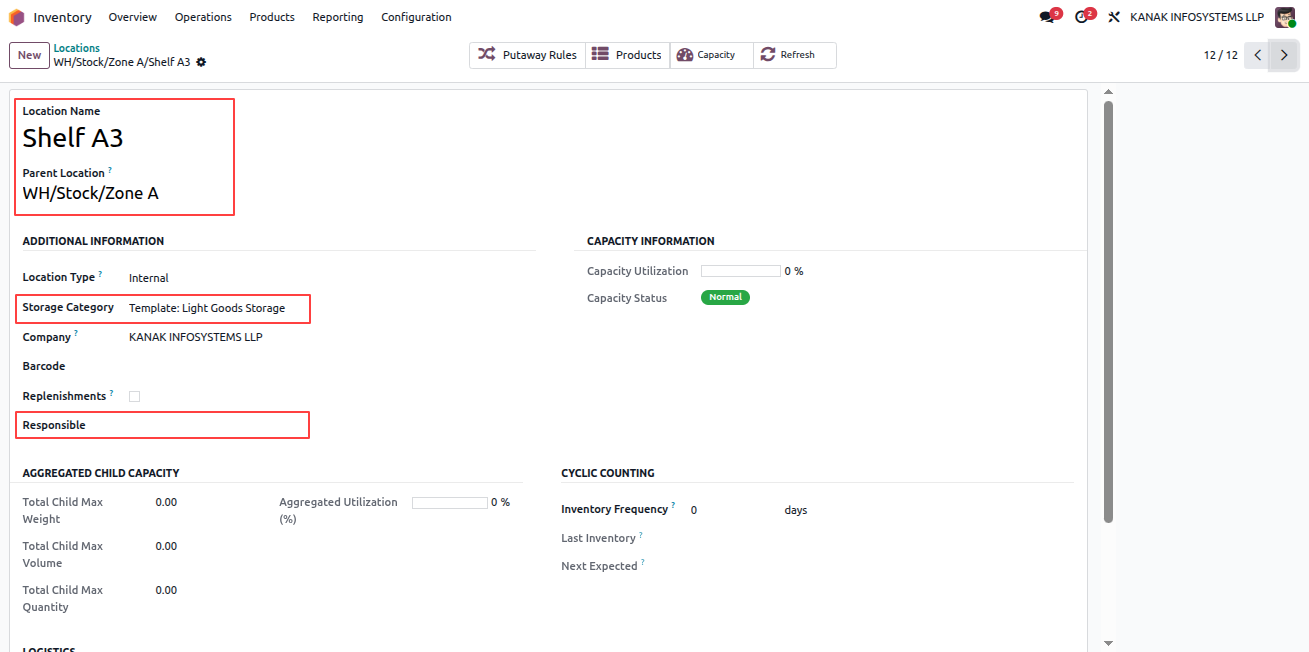
Go to Inventory > Configuration > Locations and click New to create a location. Select the appropriate Storage Category and assign a Responsible Person.

When the location reaches its defined Warning or Block capacity threshold, automatic email notifications will be sent to the selected responsible person.
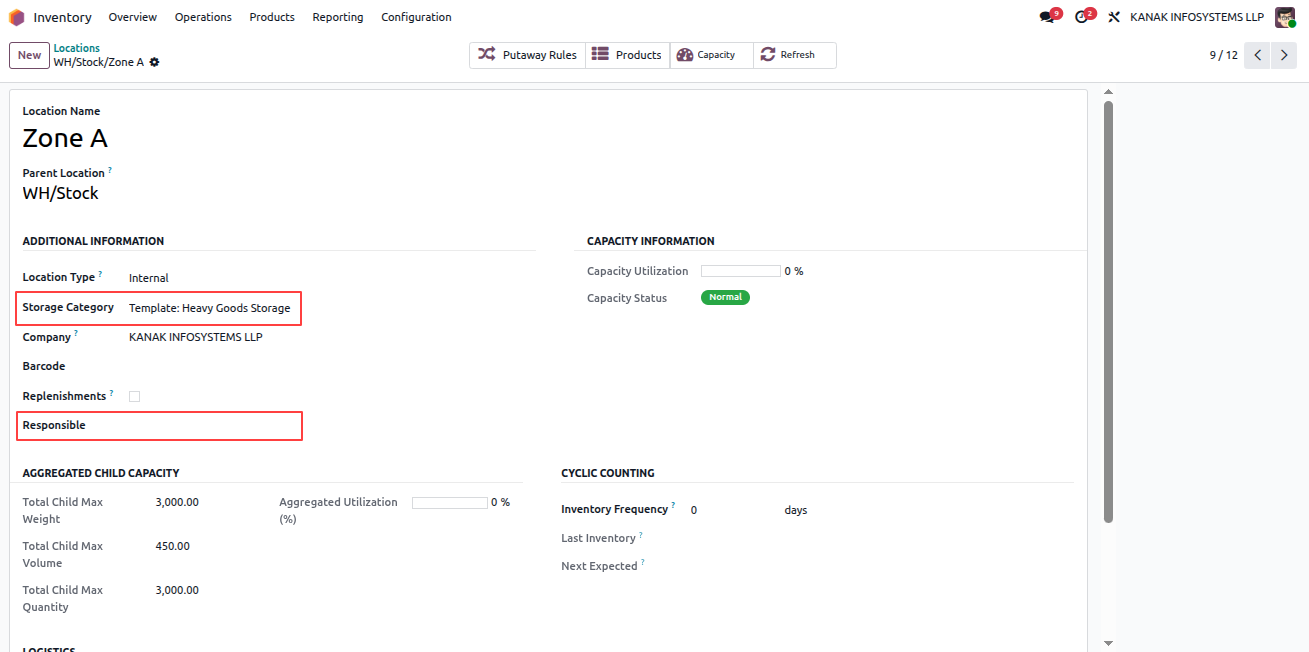
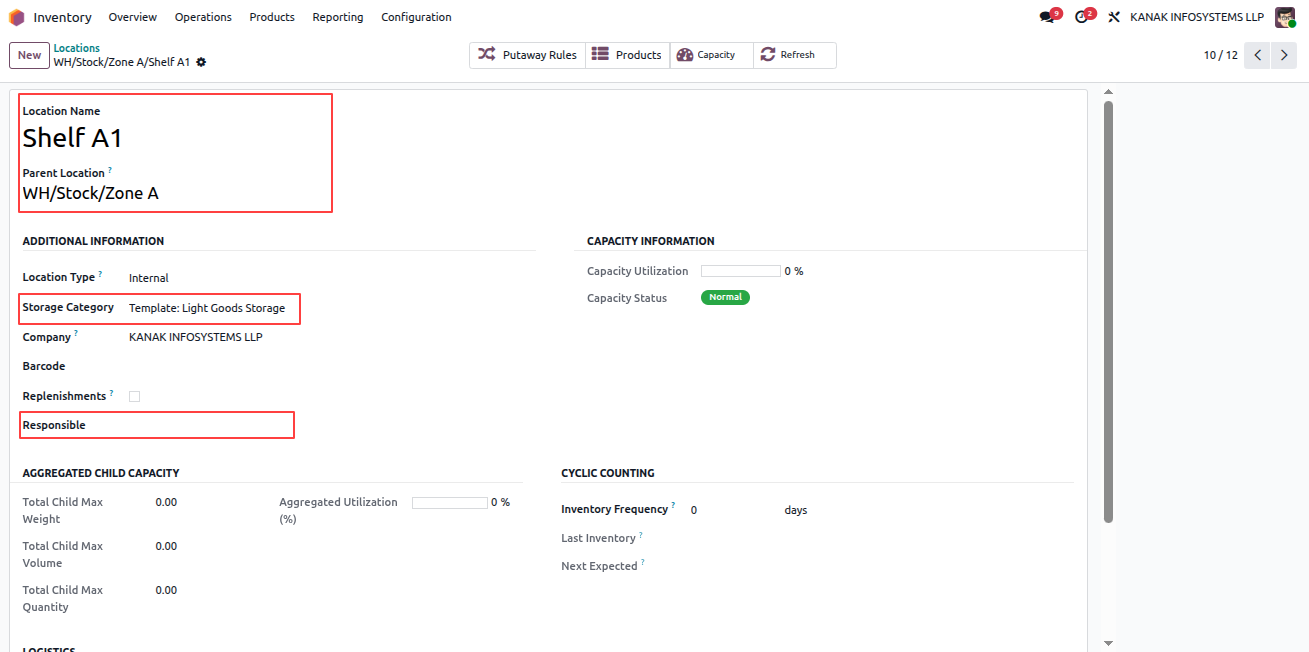
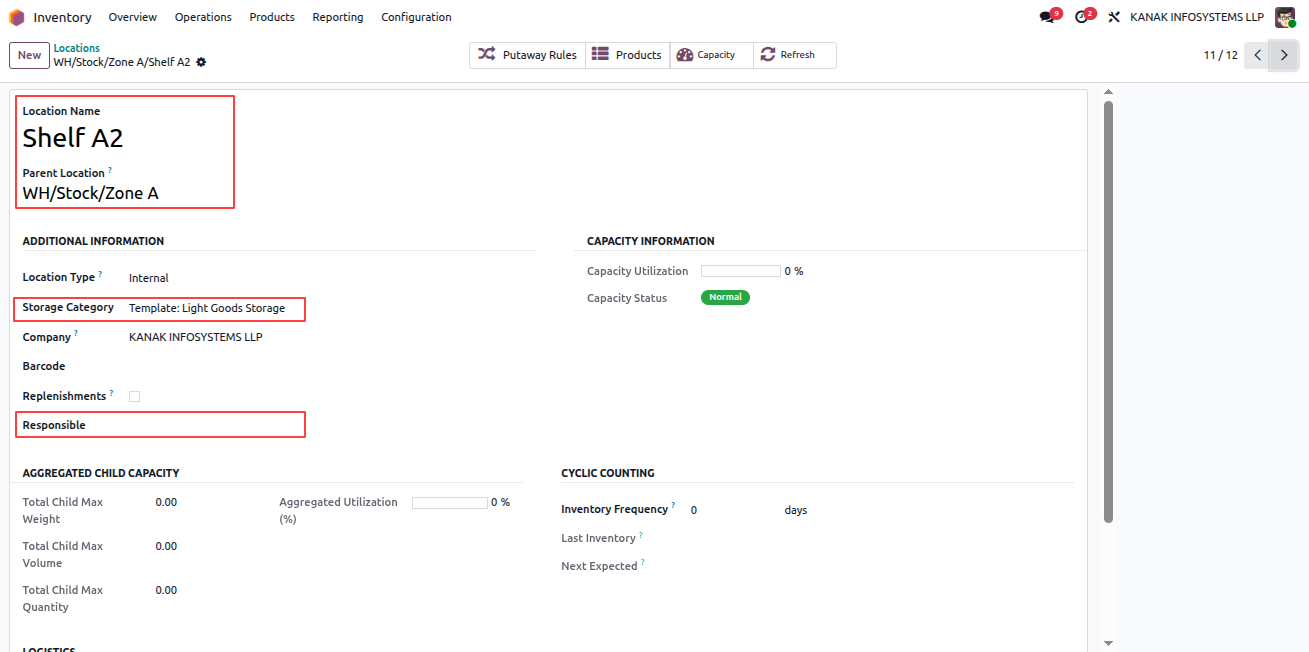
Create Location

Location Configuration

Responsible Person Field

Capacity Alert Email
Warehouse Capacity Validator - Comprehensive warehouse location capacity management with validation rules, smart suggestions, alerts, overrides, aggregation, and reporting | Warehouse Capacity Control | Location Capacity Limits | Storage Optimization | Weight Volume Quantity Validation | Overload Prevention | Smart Location Suggestions | Capacity Alerts | Real-time Utilization Tracking | Parent Child Aggregation | Capacity Override Management | Warehouse Space Optimization | Inventory Capacity Monitoring | Odoo Warehouse Management
Create and Configure Products

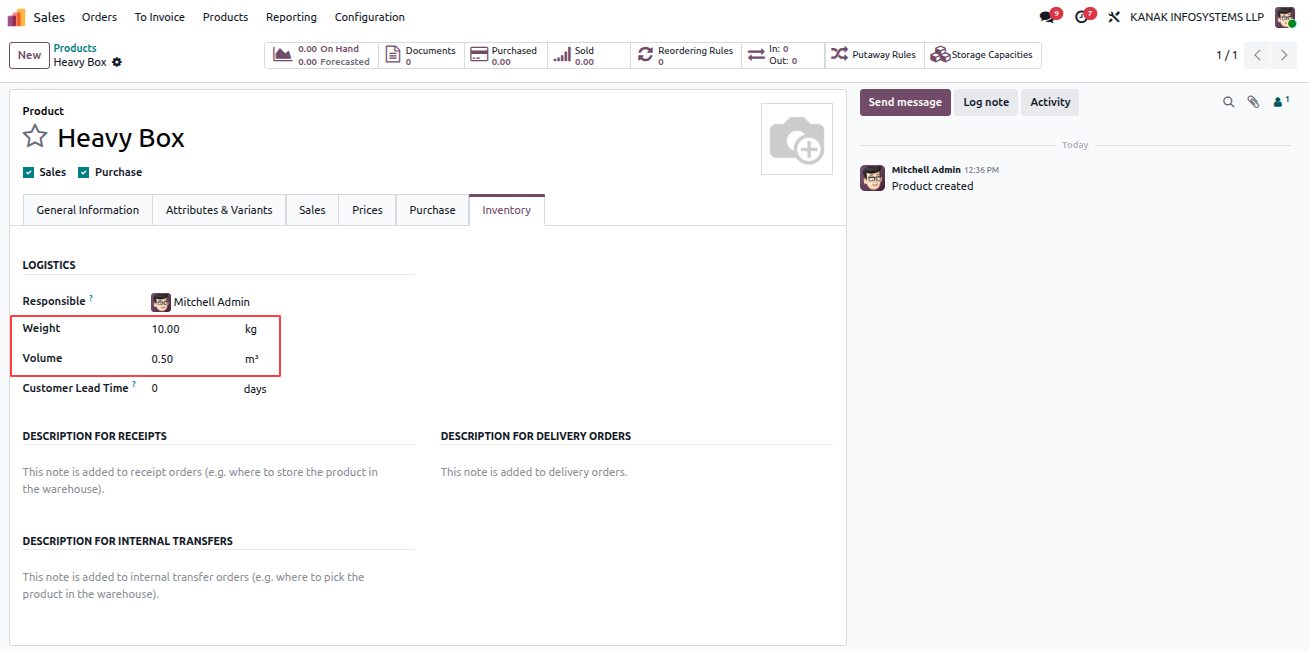
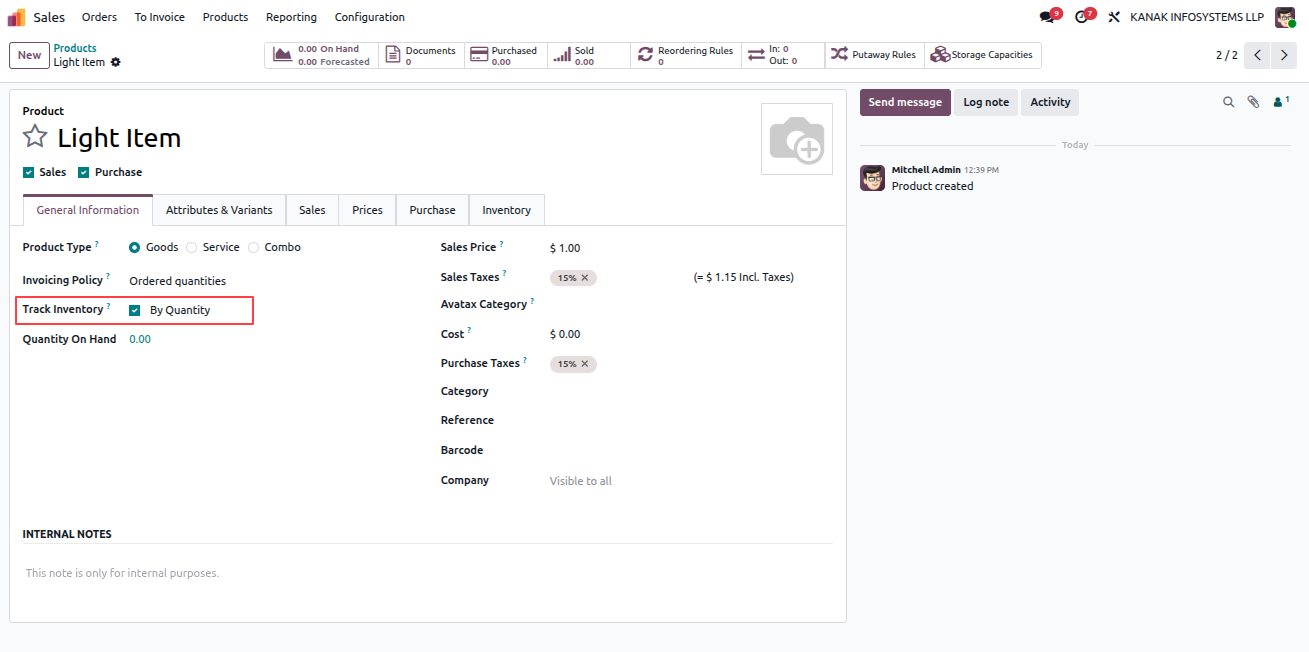
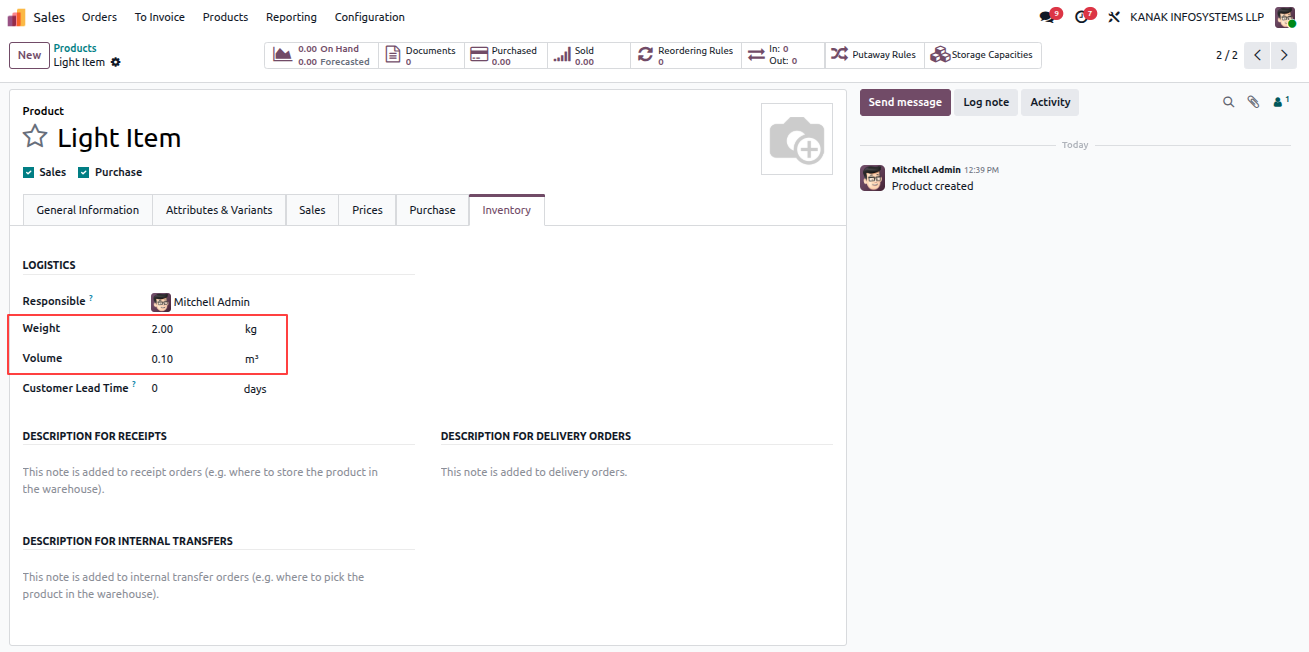
Go to Sales > Products > Products and click New to create a product. Enter the Product Name, enable Track Inventory under the General Information tab, and then specify the product's Weight and Volume under the Inventory section.

After entering all required details, click Save to confirm the product configuration.
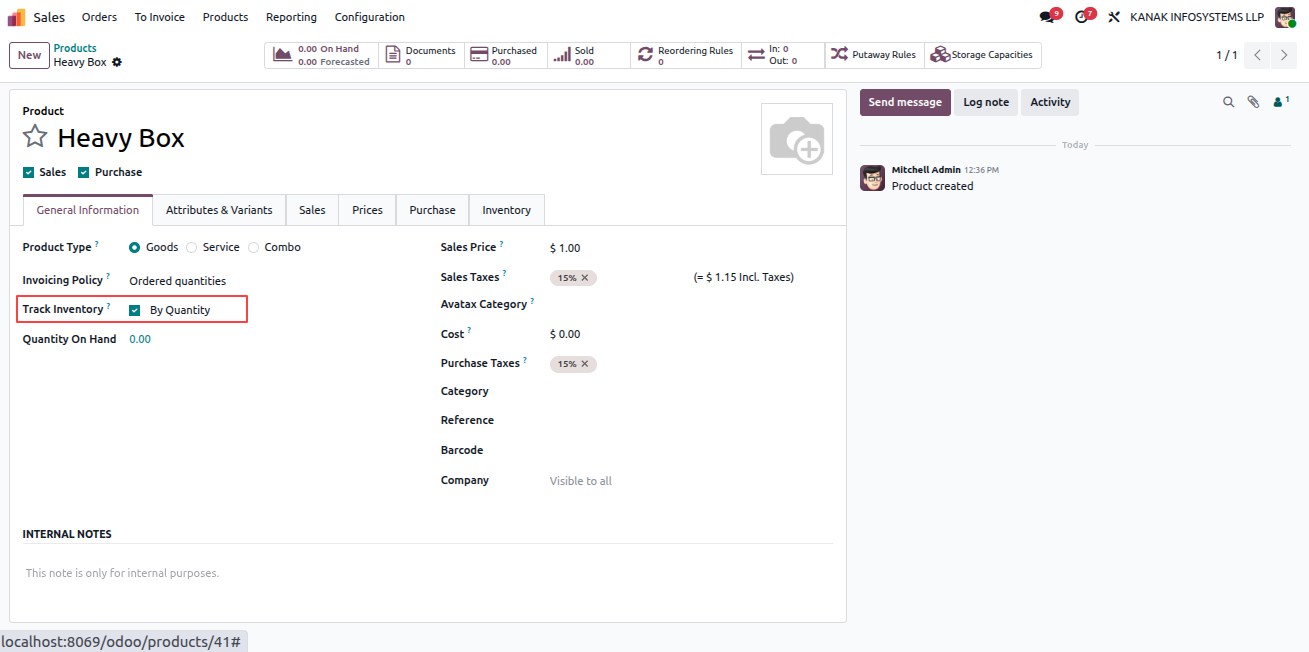

Create Product

General Information Tab

Inventory Details

Save Product
Warehouse Capacity Validator - Comprehensive warehouse location capacity management with validation rules, smart suggestions, alerts, overrides, aggregation, and reporting | Warehouse Capacity Control | Location Capacity Limits | Storage Optimization | Weight Volume Quantity Validation | Overload Prevention | Smart Location Suggestions | Capacity Alerts | Real-time Utilization Tracking | Parent Child Aggregation | Capacity Override Management | Warehouse Space Optimization | Inventory Capacity Monitoring | Odoo Warehouse Management
Validate Receipt and Check Capacity Utilization

Go to Inventory > Operations > Deliveries and click New. Select the Operation Type as Receipt and choose the Destination Location where the storage category is configured. Add the required products under the Operations tab and click Validate.

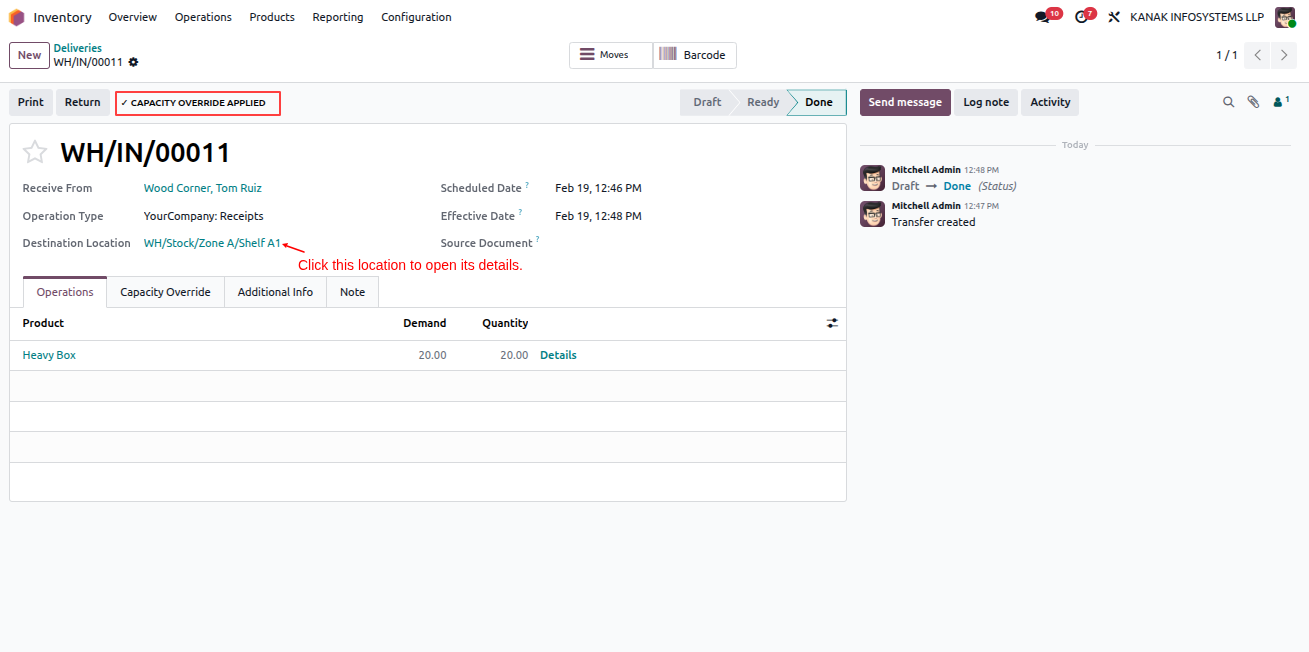
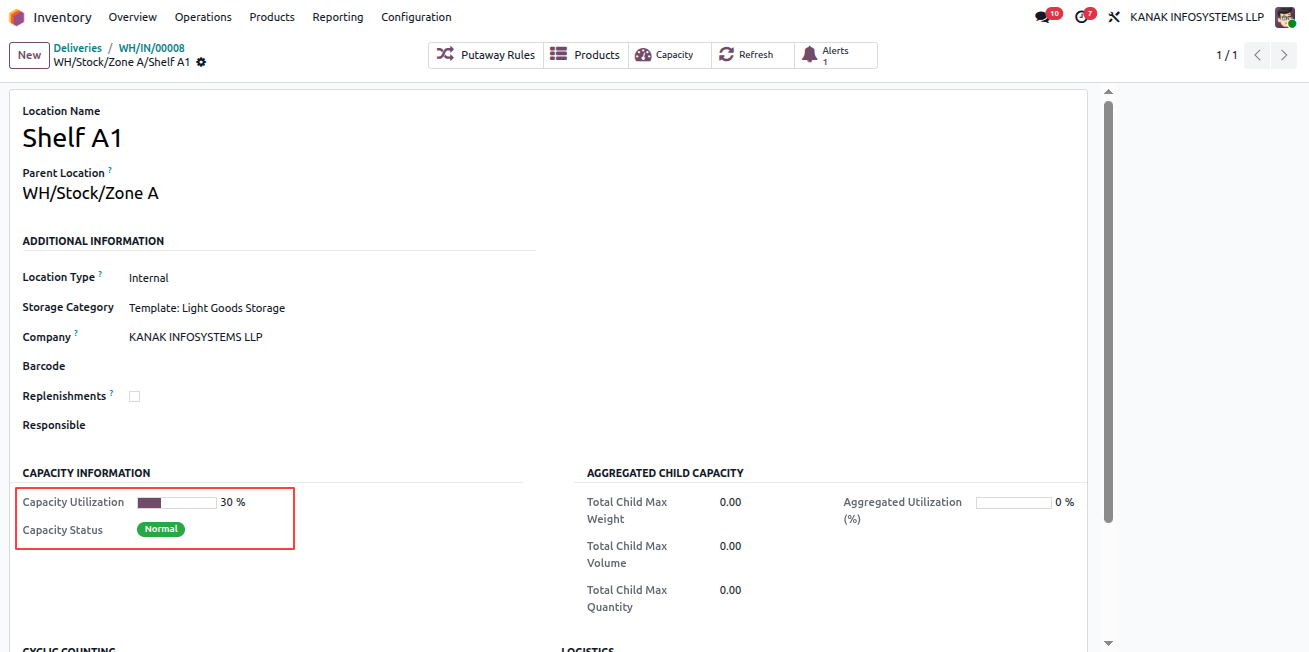
After validation, click on the Destination Location to open its details. There you can view the updated Capacity Utilization and Capacity Status.
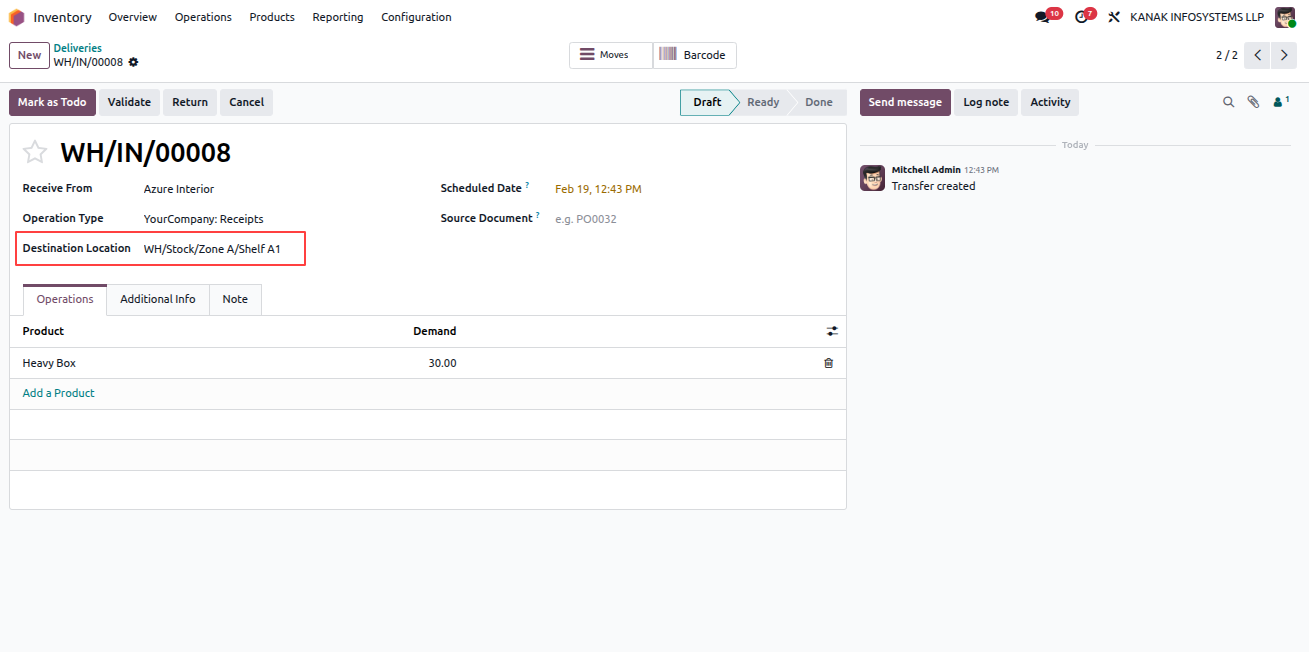
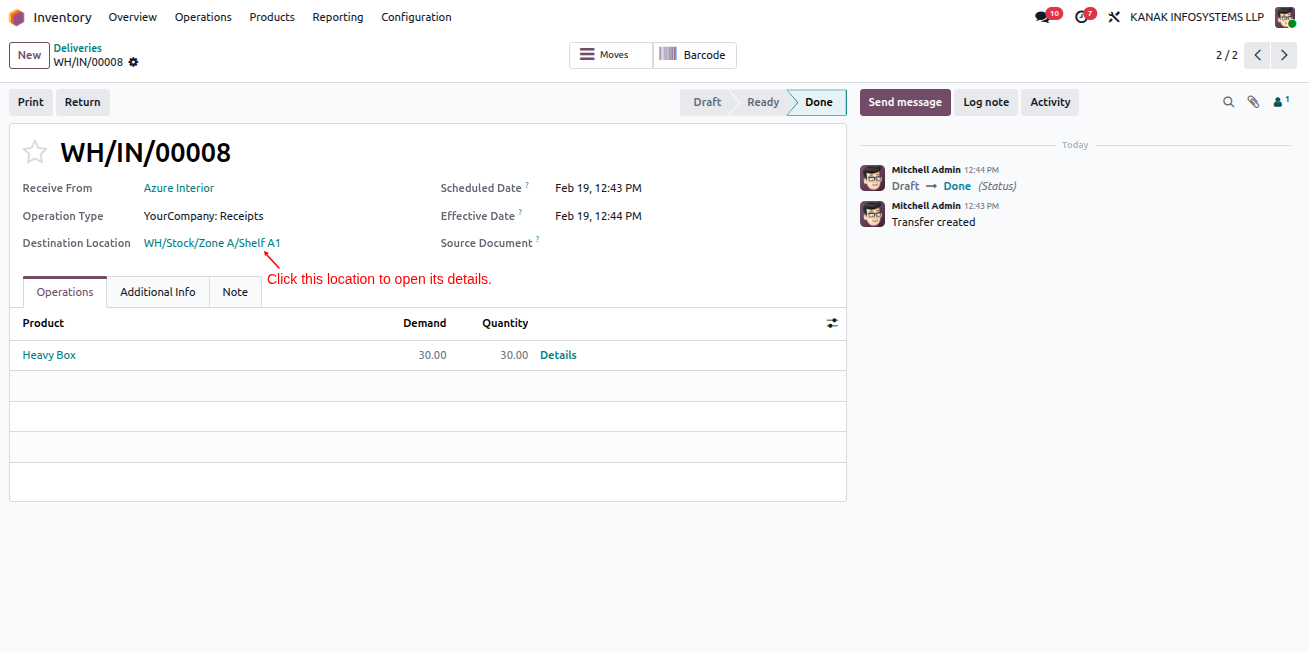
Create Receipt

Validate Operation

Capacity Utilization
Warehouse Capacity Validator - Comprehensive warehouse location capacity management with validation rules, smart suggestions, alerts, overrides, aggregation, and reporting | Warehouse Capacity Control | Location Capacity Limits | Storage Optimization | Weight Volume Quantity Validation | Overload Prevention | Smart Location Suggestions | Capacity Alerts | Real-time Utilization Tracking | Parent Child Aggregation | Capacity Override Management | Warehouse Space Optimization | Inventory Capacity Monitoring | Odoo Warehouse Management
Warning Threshold and Smart Location Suggestions

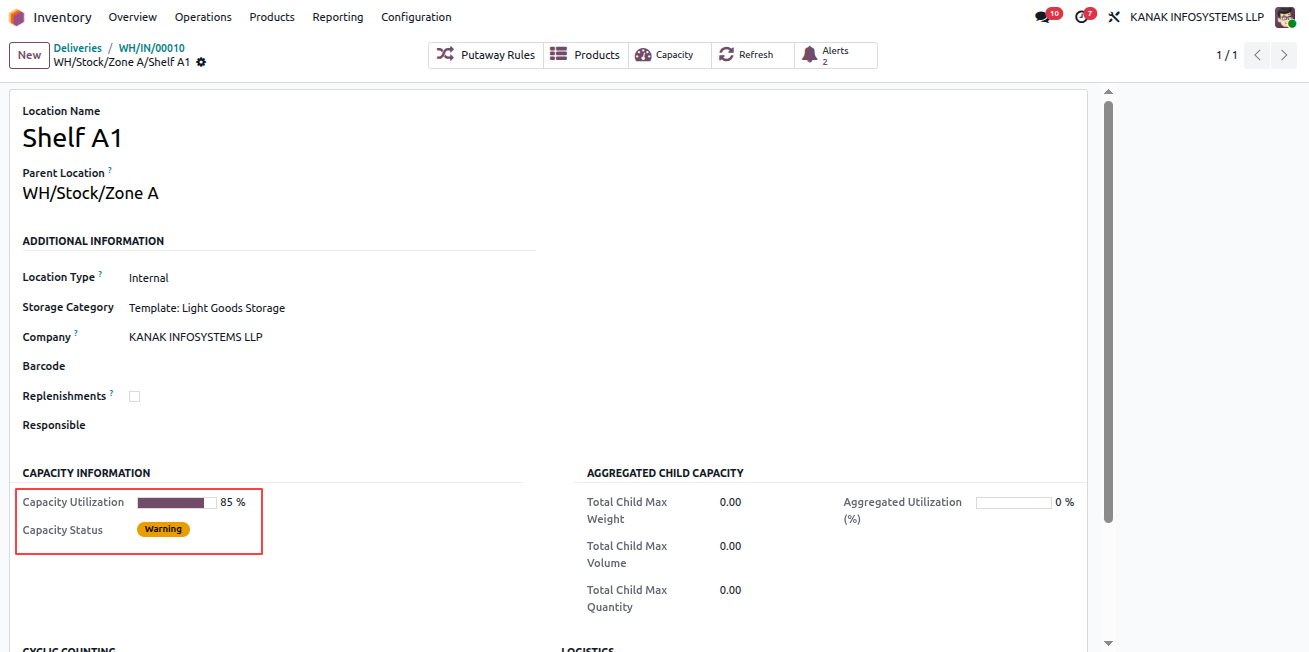
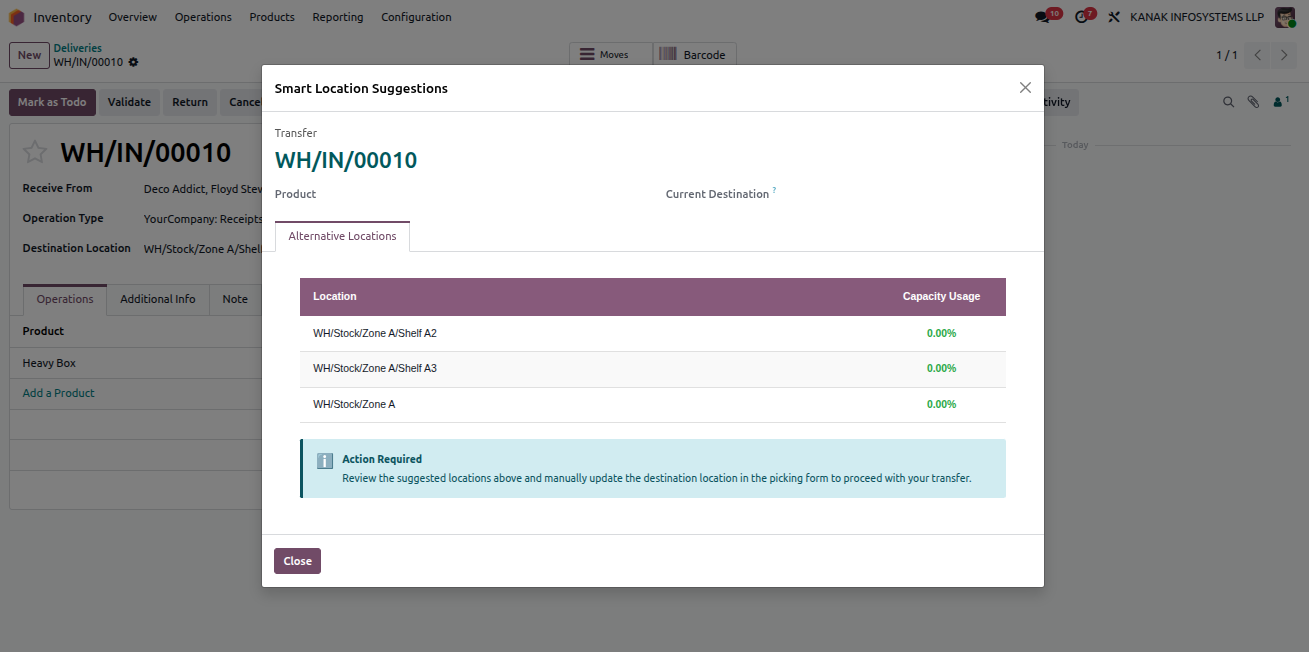
Create another delivery using the same Destination Location and add products with a quantity that exceeds the configured Warning Threshold. When the threshold is reached, a "View Alternate Locations" button appears in the header, providing smart location suggestions. The delivery can still be validated at this stage.

Upon validation, a warning email is automatically sent to the assigned Responsible Person. After validation, open the destination location to view the updated Capacity Utilization and confirm that the Capacity Status is marked as Warning.
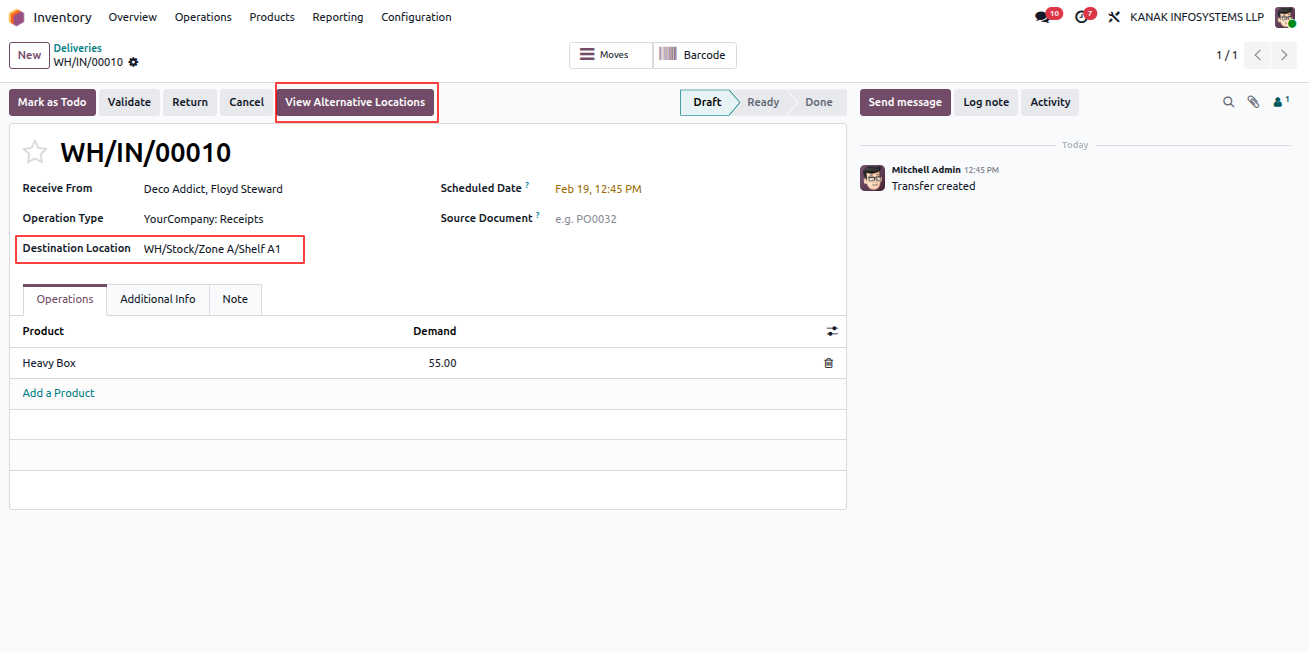
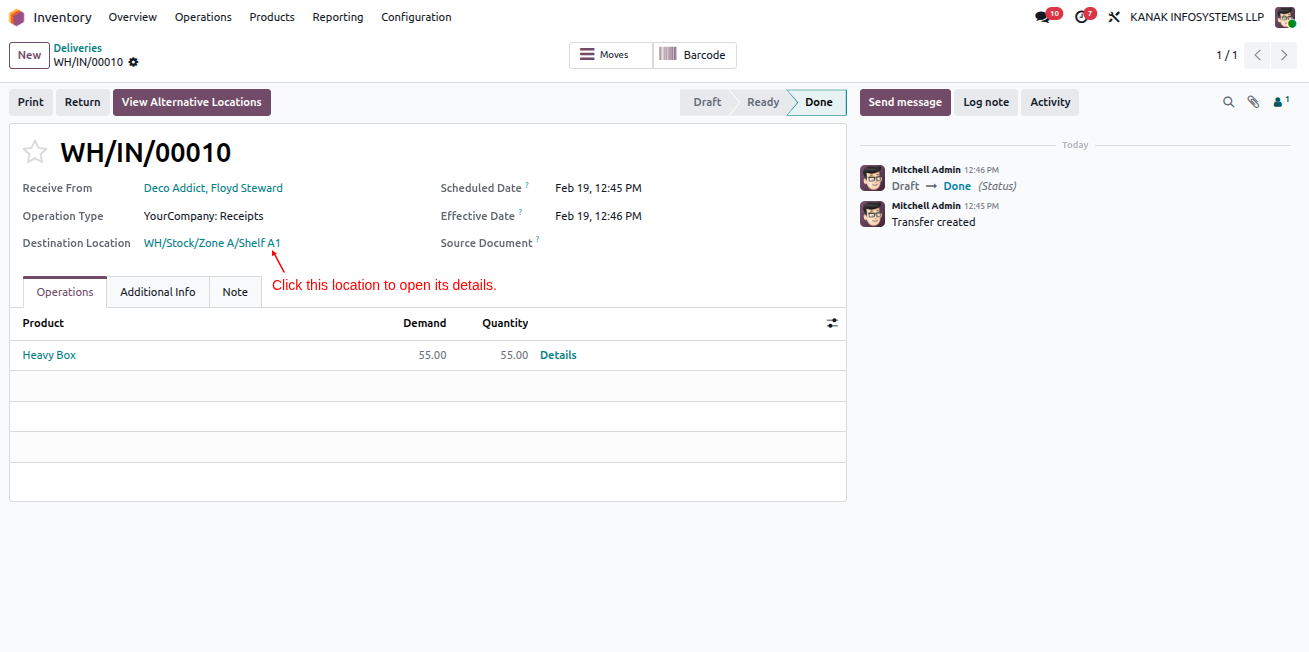
Warning Threshold Triggered

Alternate Location Suggestions

Warning Email Sent

Location Status Warning
Warehouse Capacity Validator - Comprehensive warehouse location capacity management with validation rules, smart suggestions, alerts, overrides, aggregation, and reporting | Warehouse Capacity Control | Location Capacity Limits | Storage Optimization | Weight Volume Quantity Validation | Overload Prevention | Smart Location Suggestions | Capacity Alerts | Real-time Utilization Tracking | Parent Child Aggregation | Capacity Override Management | Warehouse Space Optimization | Inventory Capacity Monitoring | Odoo Warehouse Management
Block Threshold, Override, and Critical Status

Create another delivery using the same Destination Location and add products with a quantity that exceeds the configured Block Threshold. When attempting to validate, the system will display a Capacity Exceeded validation error.

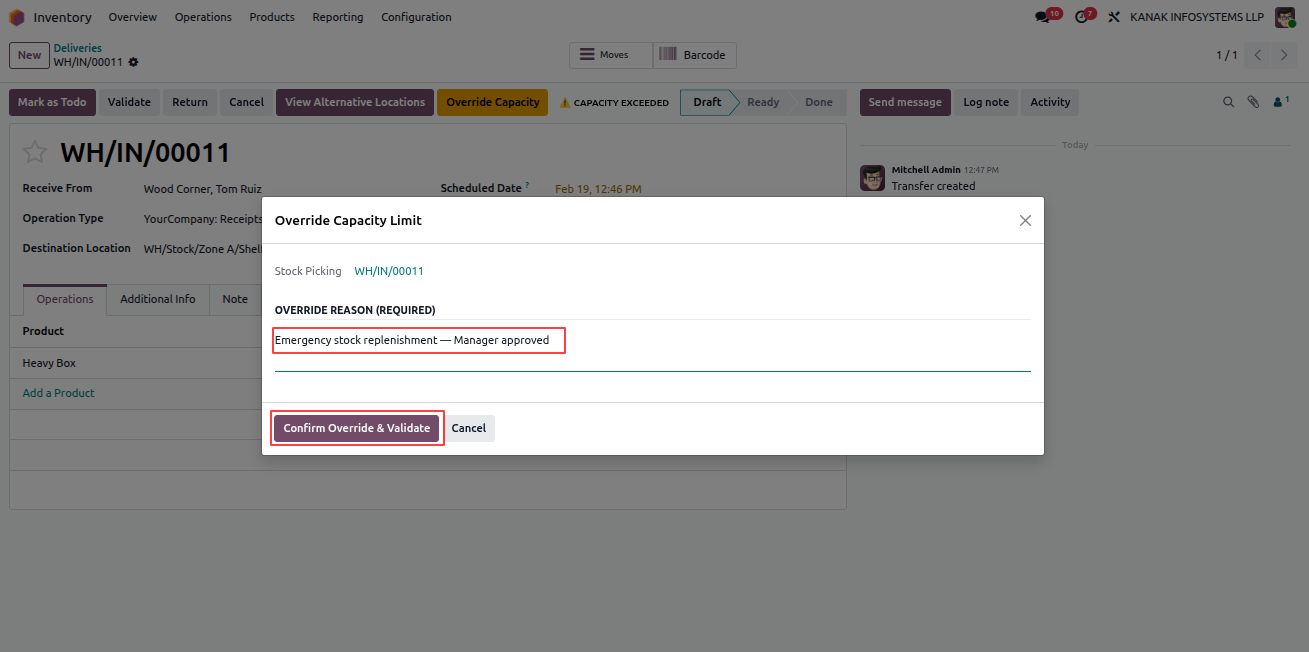
You can click View Alternate Locations to receive smart location suggestions, change the destination location, or use the Override Capacity option. After providing a reason and clicking Confirm Override & Validate, the override is applied and a notification email is sent to the responsible person.

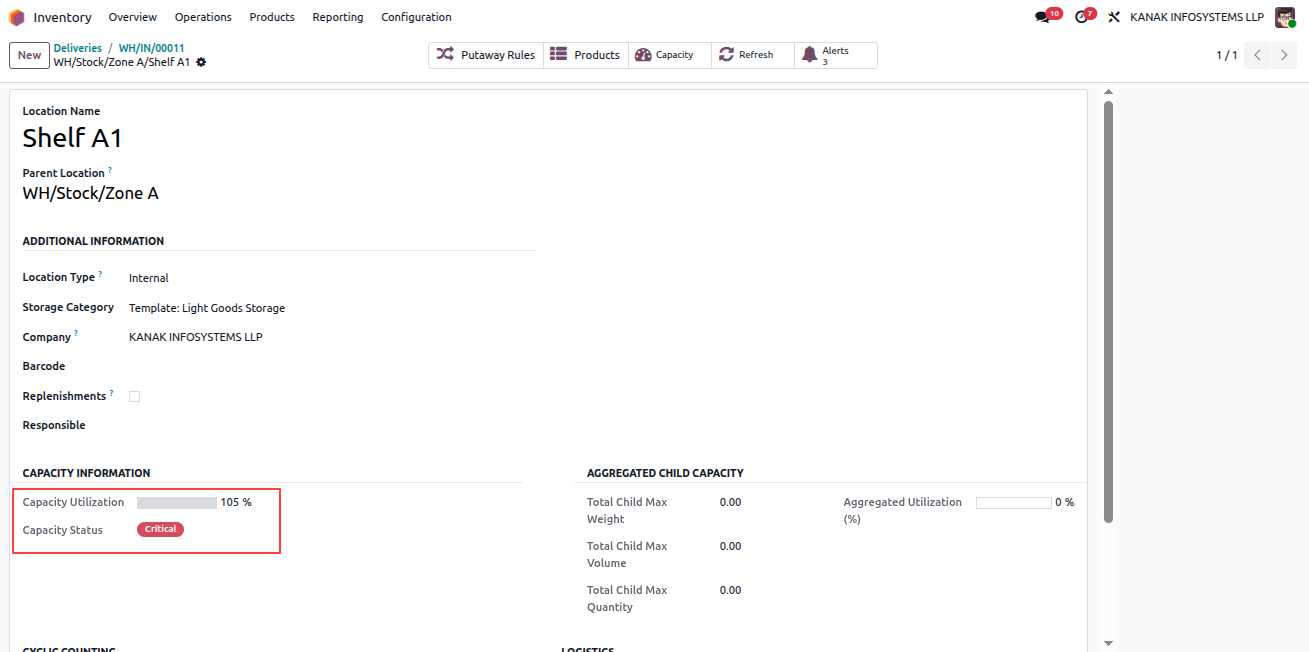
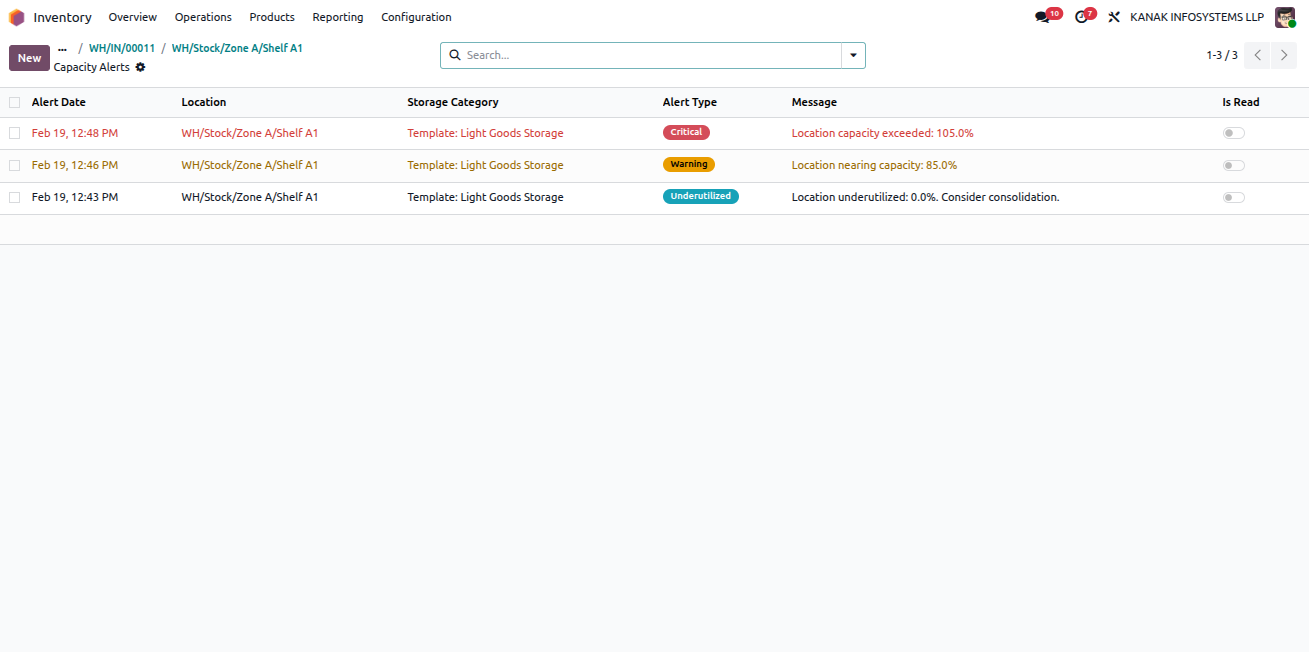
Once validated, open the destination location to review the details. Due to the override, the Capacity Utilization may exceed 100% and the Capacity Status will be marked as Critical. You can also use the Alerts smart button to view related alerts for that location.
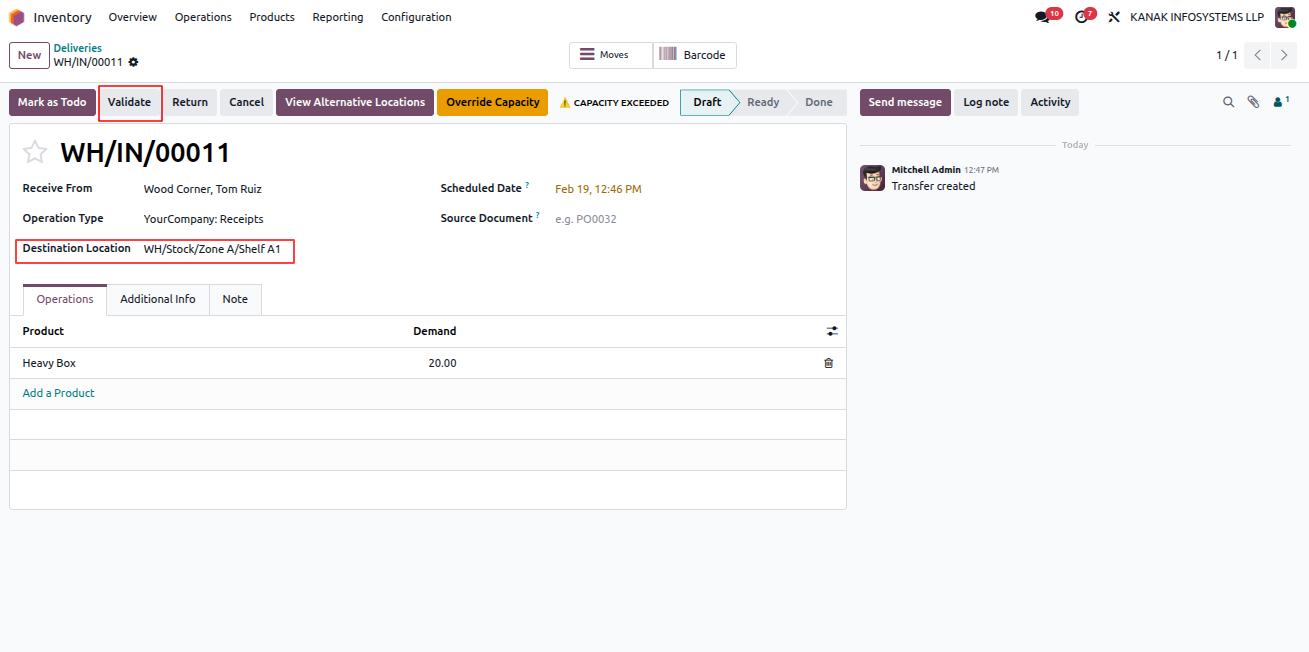
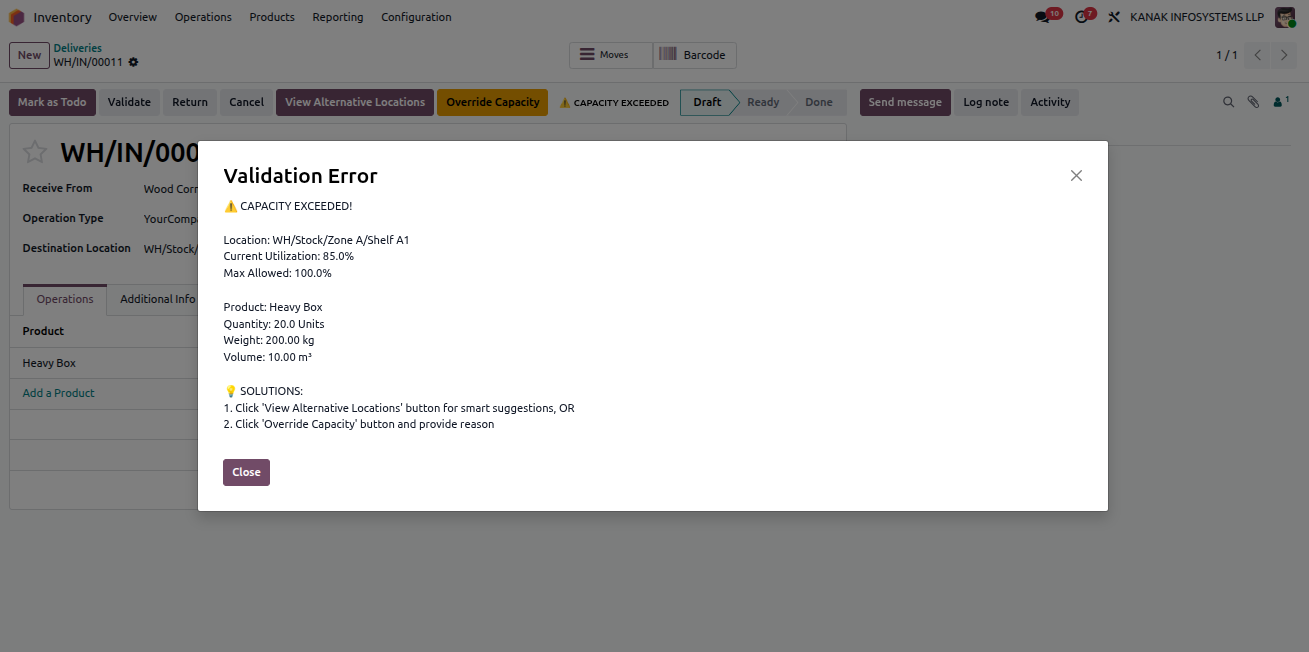
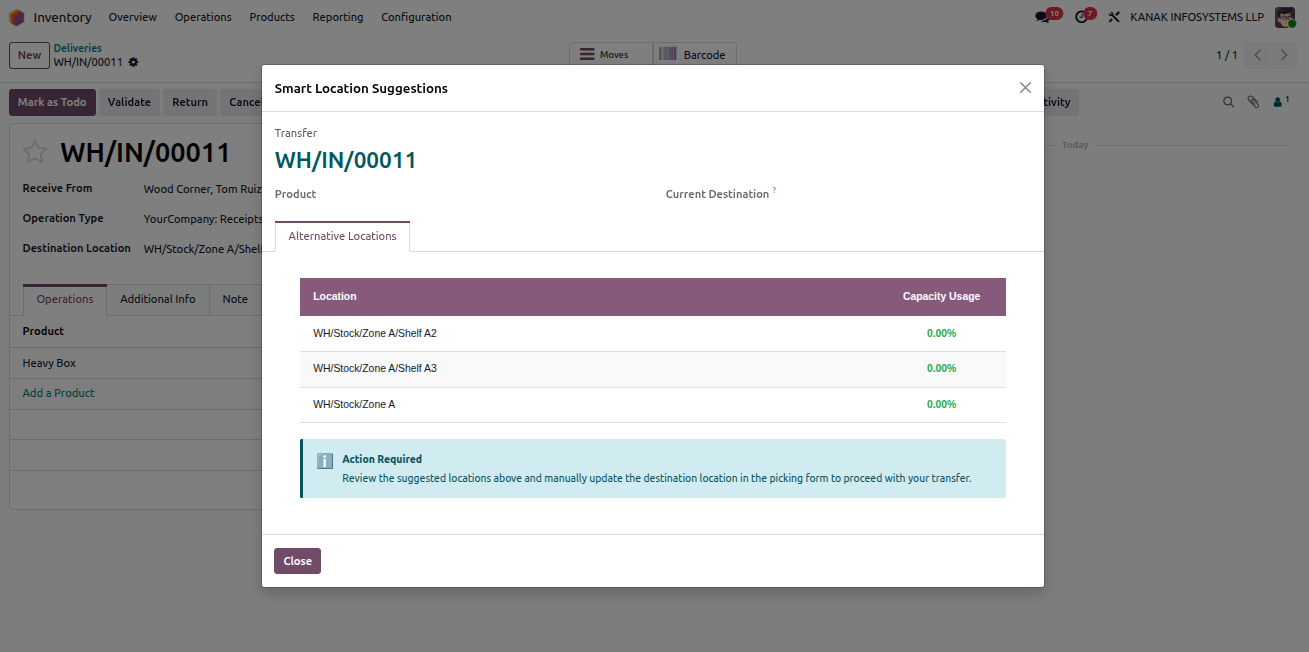
Block Threshold Error

Validation Error Capacity Exceeded

Alternate Location Suggestions

Override Capacity Option

Critical Capacity Status

Capacity Utilization Over 100 Percent

Location Alerts Smart Button
Warehouse Capacity Validator - Comprehensive warehouse location capacity management with validation rules, smart suggestions, alerts, overrides, aggregation, and reporting | Warehouse Capacity Control | Location Capacity Limits | Storage Optimization | Weight Volume Quantity Validation | Overload Prevention | Smart Location Suggestions | Capacity Alerts | Real-time Utilization Tracking | Parent Child Aggregation | Capacity Override Management | Warehouse Space Optimization | Inventory Capacity Monitoring | Odoo Warehouse Management
Storage Category Insights and Temporary Adjustments

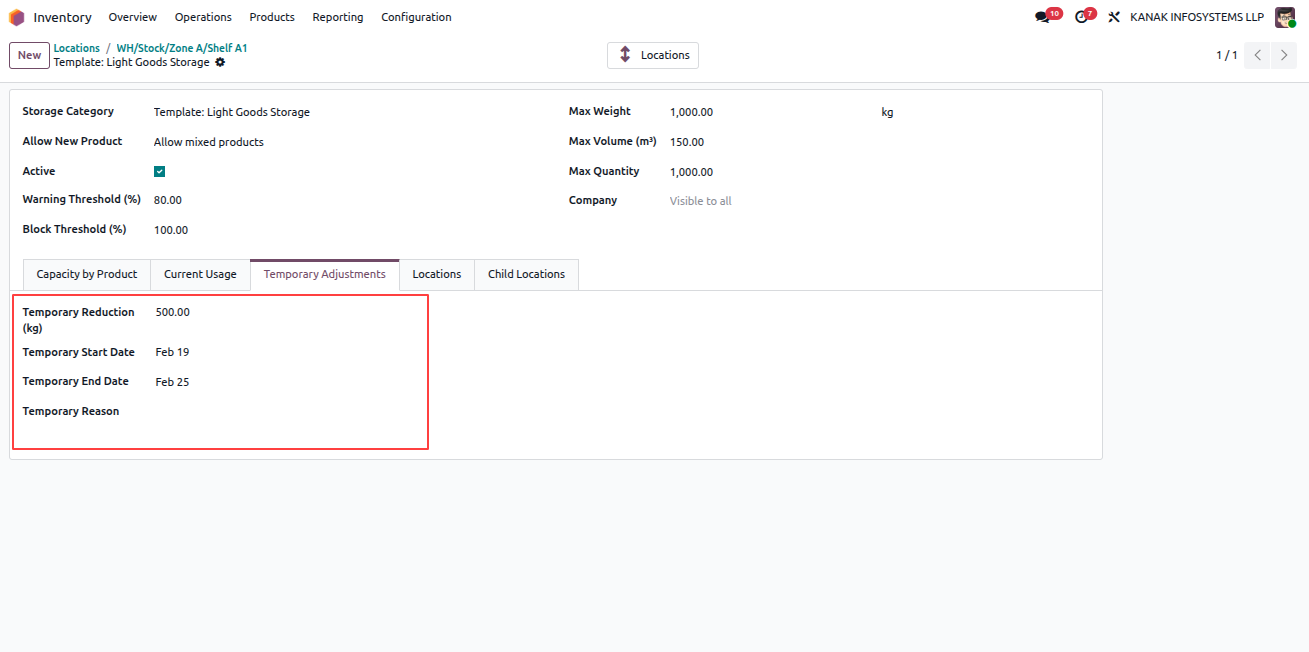
Open the related Storage Category record to view detailed information. Under the Current Usage tab, you can see the category's current weight, volume, and quantity utilization.

In the Temporary Adjustments tab, you can configure a temporary capacity reduction by defining the reduction value (in %), start date, end date, and reason. This allows controlled reduction of capacity efficiency for a specific time period.

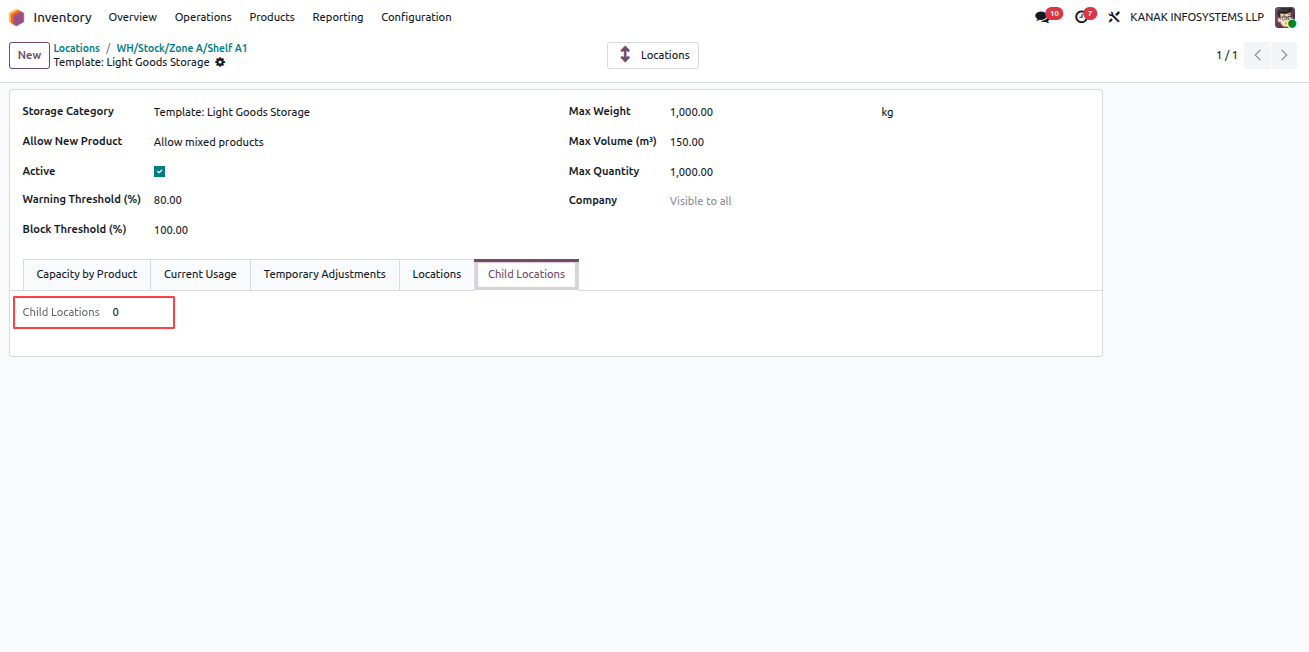
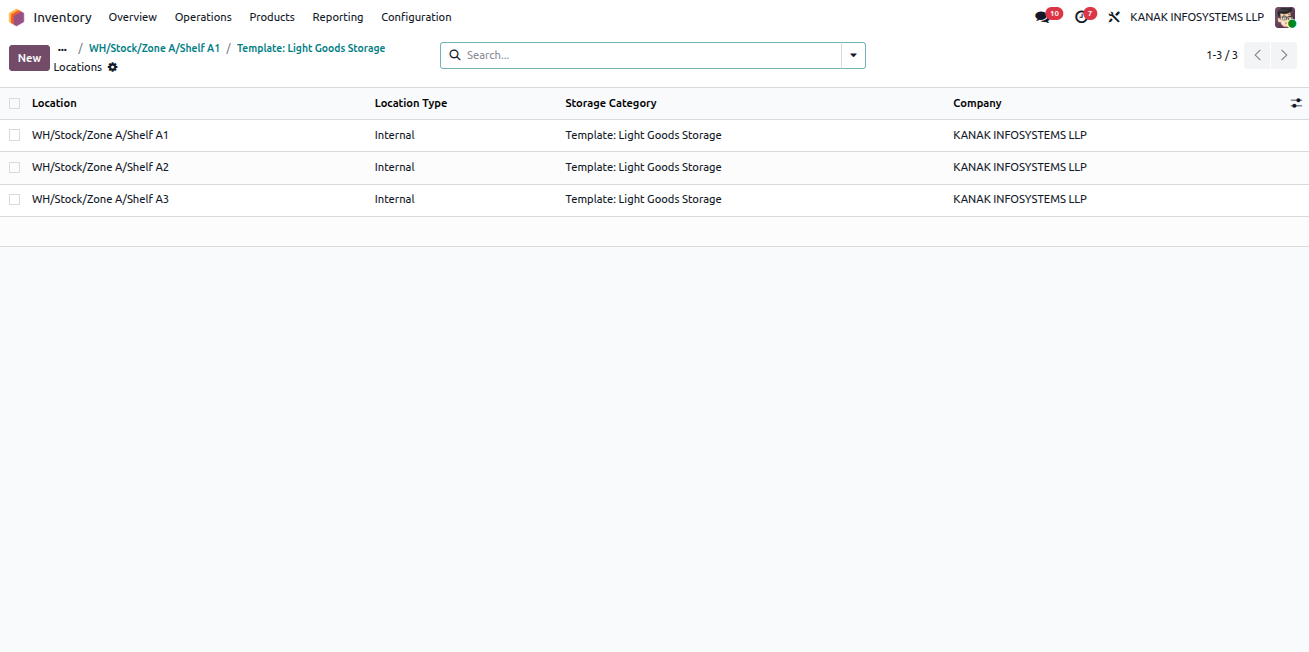
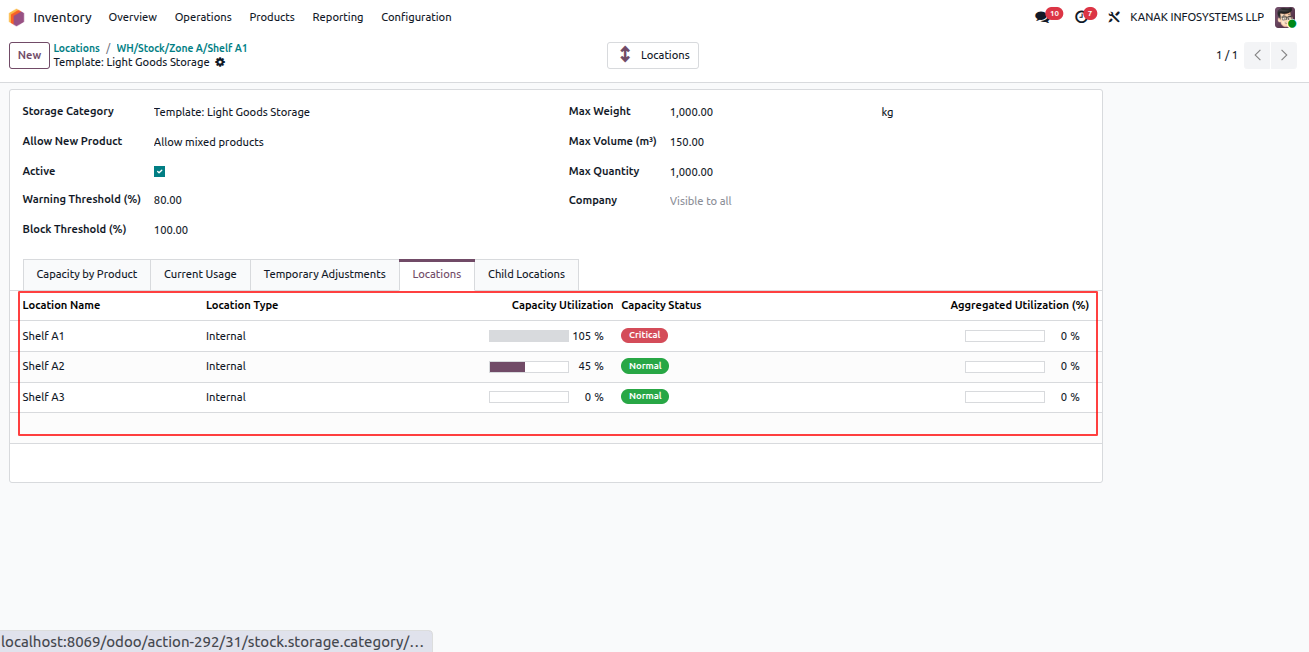
The Locations tab displays all locations using this category along with their utilization and capacity status. The Child Locations tab shows the number of sub-locations under this category. Additionally, a Locations smart button at the top provides quick access to all related locations.
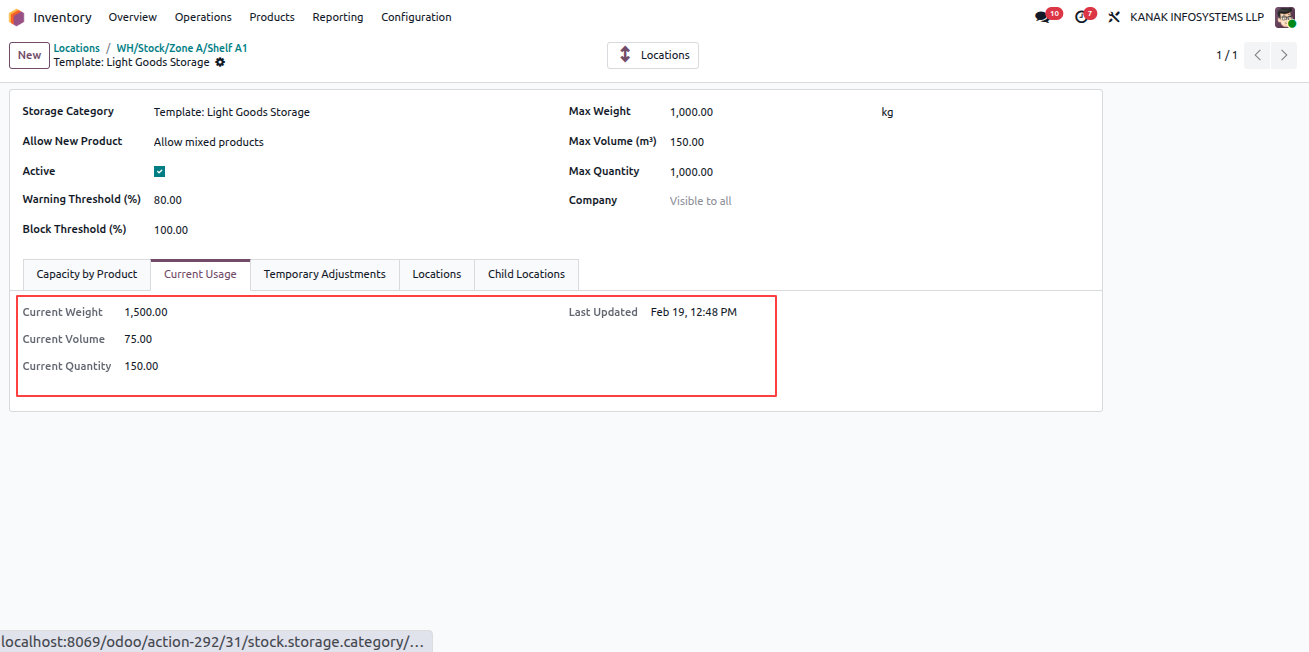
Current Usage Tab

Temporary Adjustments Tab

Locations Tab

Child Locations Tab

Locations Smart Button
Warehouse Capacity Validator - Comprehensive warehouse location capacity management with validation rules, smart suggestions, alerts, overrides, aggregation, and reporting | Warehouse Capacity Control | Location Capacity Limits | Storage Optimization | Weight Volume Quantity Validation | Overload Prevention | Smart Location Suggestions | Capacity Alerts | Real-time Utilization Tracking | Parent Child Aggregation | Capacity Override Management | Warehouse Space Optimization | Inventory Capacity Monitoring | Odoo Warehouse Management
Parent Location Aggregated Capacity View

Open any Parent Location whose child locations are actively used. In the location record, you can view the aggregated capacity details of all child locations.

The system displays the combined capacity limits along with the current Aggregated Utilization Percentage, providing a clear overview of overall space usage across the hierarchy.
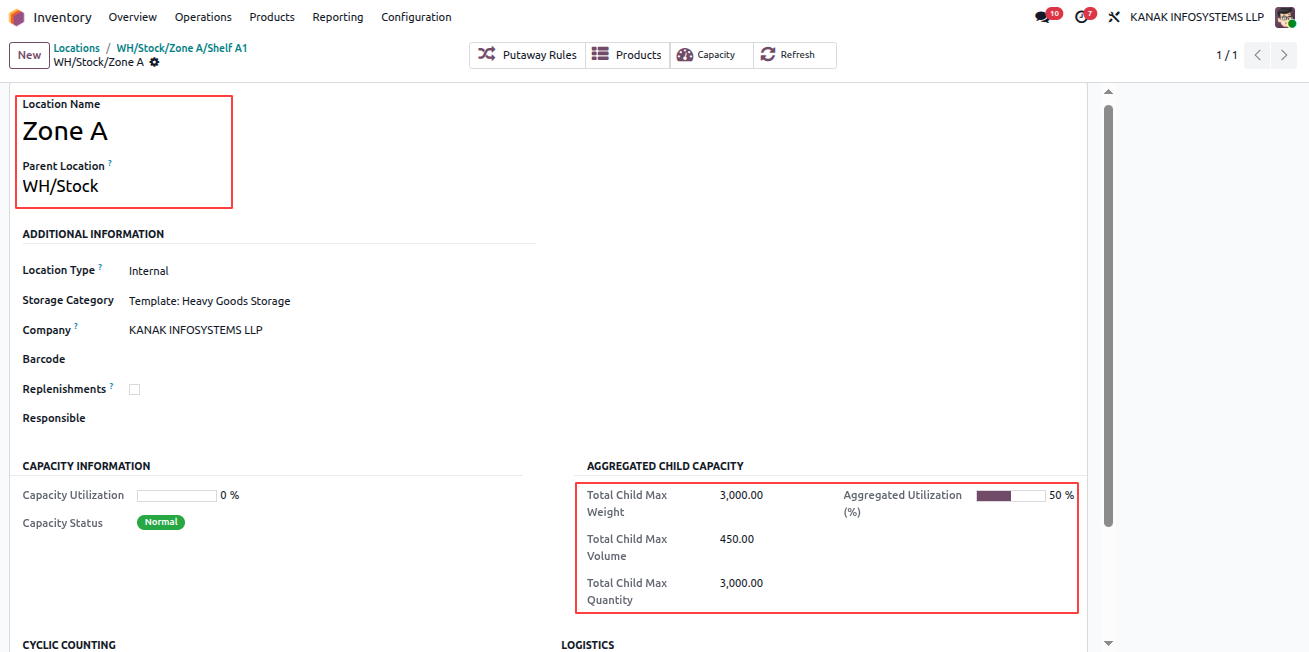

Parent Location Aggregated Capacity
Warehouse Capacity Validator - Comprehensive warehouse location capacity management with validation rules, smart suggestions, alerts, overrides, aggregation, and reporting | Warehouse Capacity Control | Location Capacity Limits | Storage Optimization | Weight Volume Quantity Validation | Overload Prevention | Smart Location Suggestions | Capacity Alerts | Real-time Utilization Tracking | Parent Child Aggregation | Capacity Override Management | Warehouse Space Optimization | Inventory Capacity Monitoring | Odoo Warehouse Management
Email Notifications for Warning and Overcapacity

When a location reaches its Warning Threshold or exceeds its defined capacity, automated email notifications are sent to the assigned Responsible Person.

These emails provide detailed information about the location status, utilization level, and required action, ensuring timely monitoring and effective warehouse capacity management.
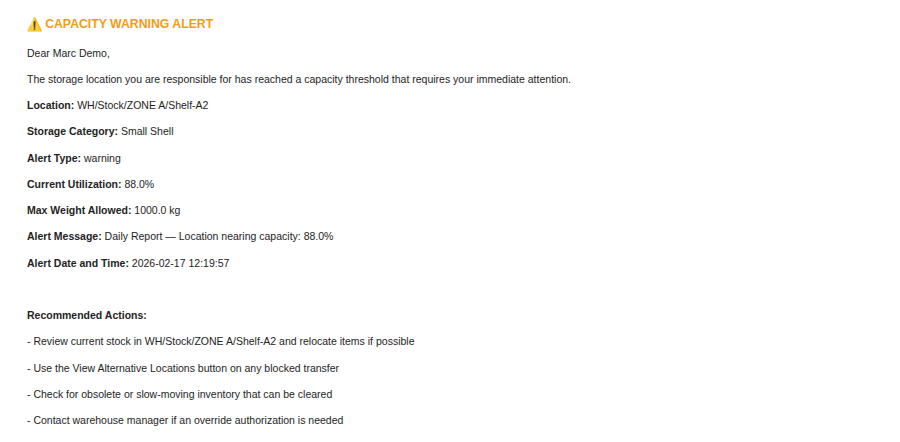
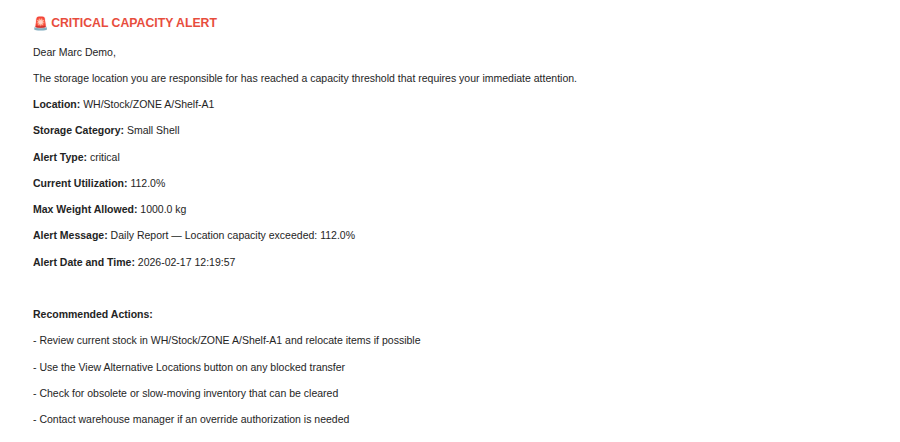
Warning Email Notification

Overcapacity Email Notification
Warehouse Capacity Validator - Comprehensive warehouse location capacity management with validation rules, smart suggestions, alerts, overrides, aggregation, and reporting | Warehouse Capacity Control | Location Capacity Limits | Storage Optimization | Weight Volume Quantity Validation | Overload Prevention | Smart Location Suggestions | Capacity Alerts | Real-time Utilization Tracking | Parent Child Aggregation | Capacity Override Management | Warehouse Space Optimization | Inventory Capacity Monitoring | Odoo Warehouse Management
Download Capacity Summary Report

Open any configured and utilized Storage Category record. Click on the Gear (⚙) icon available at the top-left corner of the screen.

From the available options, select the download action to generate and download the Capacity Summary Report for that category.
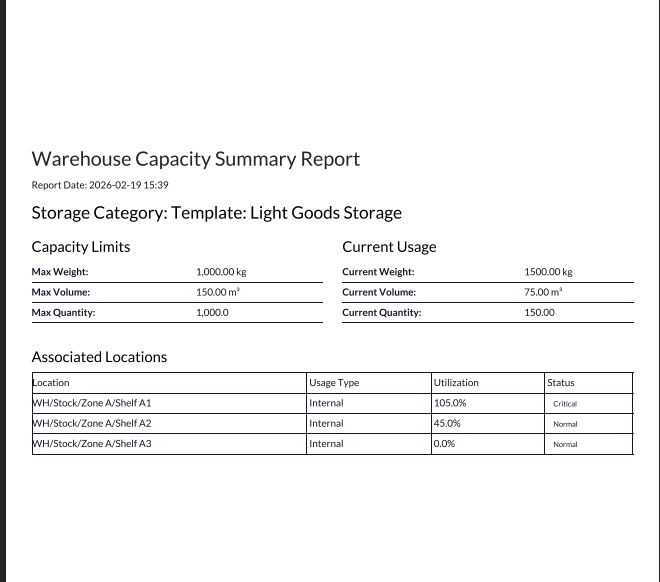

Download Capacity Summary Report

Key Features

Set multi-dimensional capacity limits (Weight, Volume, Quantity) for storage categories.
Define Warning and Block thresholds with automatic validation control.
Get smart alternate location suggestions during stock operations.
Send automatic email alerts to responsible persons on warning or overcapacity.
Track real-time capacity utilization and status (Normal, Warning, Critical).
Apply temporary capacity reductions for specific time periods.
View aggregated capacity for parent and child locations.
Download Capacity Summary and Top Utilized Locations reports.

Free 3 Months Support

Need help or any technical support ?

Kanak Infosystem will provide free 3 months support for bug fixes, any doubts or queries, installation, configuration support or any types of issues related to this module.

At our company, we take pride in providing exceptional help and technical support to our valued customers.

Our team of dedicated experts is well-versed in the intricacies of the Odoo platform.

Warehouse Capacity Validator
Version 19.0.1.0 (19th February 2026)
  • Initial Release for the 19.0

Suggested Apps

Warehouse Capacity Validator - Comprehensive warehouse location capacity management with validation rules, smart suggestions, alerts, overrides, aggregation, and reporting | Warehouse Capacity Control | Location Capacity Limits | Storage Optimization | Weight Volume Quantity Validation | Overload Prevention | Smart Location Suggestions | Capacity Alerts | Real-time Utilization Tracking | Parent Child Aggregation | Capacity Override Management | Warehouse Space Optimization | Inventory Capacity Monitoring | Odoo Warehouse Management

Our Services

Warehouse Capacity Validator - Comprehensive warehouse location capacity management with validation rules, smart suggestions, alerts, overrides, aggregation, and reporting | Warehouse Capacity Control | Location Capacity Limits | Storage Optimization | Weight Volume Quantity Validation | Overload Prevention | Smart Location Suggestions | Capacity Alerts | Real-time Utilization Tracking | Parent Child Aggregation | Capacity Override Management | Warehouse Space Optimization | Inventory Capacity Monitoring | Odoo Warehouse Management

Hire Odoo Developer

Warehouse Capacity Validator - Comprehensive warehouse location capacity management with validation rules, smart suggestions, alerts, overrides, aggregation, and reporting | Warehouse Capacity Control | Location Capacity Limits | Storage Optimization | Weight Volume Quantity Validation | Overload Prevention | Smart Location Suggestions | Capacity Alerts | Real-time Utilization Tracking | Parent Child Aggregation | Capacity Override Management | Warehouse Space Optimization | Inventory Capacity Monitoring | Odoo Warehouse Management

Odoo Customization

Warehouse Capacity Validator - Comprehensive warehouse location capacity management with validation rules, smart suggestions, alerts, overrides, aggregation, and reporting | Warehouse Capacity Control | Location Capacity Limits | Storage Optimization | Weight Volume Quantity Validation | Overload Prevention | Smart Location Suggestions | Capacity Alerts | Real-time Utilization Tracking | Parent Child Aggregation | Capacity Override Management | Warehouse Space Optimization | Inventory Capacity Monitoring | Odoo Warehouse Management

Odoo Development

Warehouse Capacity Validator - Comprehensive warehouse location capacity management with validation rules, smart suggestions, alerts, overrides, aggregation, and reporting | Warehouse Capacity Control | Location Capacity Limits | Storage Optimization | Weight Volume Quantity Validation | Overload Prevention | Smart Location Suggestions | Capacity Alerts | Real-time Utilization Tracking | Parent Child Aggregation | Capacity Override Management | Warehouse Space Optimization | Inventory Capacity Monitoring | Odoo Warehouse Management

Odoo Installation

Warehouse Capacity Validator - Comprehensive warehouse location capacity management with validation rules, smart suggestions, alerts, overrides, aggregation, and reporting | Warehouse Capacity Control | Location Capacity Limits | Storage Optimization | Weight Volume Quantity Validation | Overload Prevention | Smart Location Suggestions | Capacity Alerts | Real-time Utilization Tracking | Parent Child Aggregation | Capacity Override Management | Warehouse Space Optimization | Inventory Capacity Monitoring | Odoo Warehouse Management

Odoo Integration

Warehouse Capacity Validator - Comprehensive warehouse location capacity management with validation rules, smart suggestions, alerts, overrides, aggregation, and reporting | Warehouse Capacity Control | Location Capacity Limits | Storage Optimization | Weight Volume Quantity Validation | Overload Prevention | Smart Location Suggestions | Capacity Alerts | Real-time Utilization Tracking | Parent Child Aggregation | Capacity Override Management | Warehouse Space Optimization | Inventory Capacity Monitoring | Odoo Warehouse Management

Odoo Resource

Warehouse Capacity Validator - Comprehensive warehouse location capacity management with validation rules, smart suggestions, alerts, overrides, aggregation, and reporting | Warehouse Capacity Control | Location Capacity Limits | Storage Optimization | Weight Volume Quantity Validation | Overload Prevention | Smart Location Suggestions | Capacity Alerts | Real-time Utilization Tracking | Parent Child Aggregation | Capacity Override Management | Warehouse Space Optimization | Inventory Capacity Monitoring | Odoo Warehouse Management

Odoo Themes

Warehouse Capacity Validator - Comprehensive warehouse location capacity management with validation rules, smart suggestions, alerts, overrides, aggregation, and reporting | Warehouse Capacity Control | Location Capacity Limits | Storage Optimization | Weight Volume Quantity Validation | Overload Prevention | Smart Location Suggestions | Capacity Alerts | Real-time Utilization Tracking | Parent Child Aggregation | Capacity Override Management | Warehouse Space Optimization | Inventory Capacity Monitoring | Odoo Warehouse Management

Odoo Training

Warehouse Capacity Validator - Comprehensive warehouse location capacity management with validation rules, smart suggestions, alerts, overrides, aggregation, and reporting | Warehouse Capacity Control | Location Capacity Limits | Storage Optimization | Weight Volume Quantity Validation | Overload Prevention | Smart Location Suggestions | Capacity Alerts | Real-time Utilization Tracking | Parent Child Aggregation | Capacity Override Management | Warehouse Space Optimization | Inventory Capacity Monitoring | Odoo Warehouse Management

Important Notice

All applications are developed within the default, up-to-date Odoo environment, and as such, we cannot guarantee flawless compatibility with third-party apps. While we strive to ensure smooth integration, any conflicts or issues that arise due to third-party applications will require additional support services, which can be provided at an extra cost. Kindly contact our support team for more information or to arrange paid support.

Kanak Infosystems LLP.

Reach out to us at our offices for any inquiries or collaboration.

Delhi Office

Unit no. 1017 & 1026, 11th Floor, Westend Mall,

Janak Puri, New Delhi,

Delhi, India - 110058

Gujarat Office

Unit no. 307, The Landmark, Urjanagar 1, Kudasan,

Gandhinagar, Gujarat, India - 382421

Kanak Infosystems LLP. Proprietary License v1.0

This software and associated files (the "Software") may only be used (executed,
modified, executed after modifications) if you have purchased a valid license
from the authors, typically via Odoo Apps, or if you have received a written
agreement from the authors of the Software (see the COPYRIGHT file).

You may develop Odoo modules that use the Software as a library (typically
by depending on it, importing it and using its resources), but without copying
any source code or material from the Software. You may distribute those
modules under the license of your choice, provided that this license is
compatible with the terms of the Kanak Infosystems LLP. Proprietary License (For example:
LGPL, MIT, or proprietary licenses similar to this one).

It is forbidden to publish, distribute, sublicense, or sell copies of the Software
or modified copies of the Software.

The above copyright notice and this permission notice must be included in all
copies or substantial portions of the Software.

THE SOFTWARE IS PROVIDED "AS IS", WITHOUT WARRANTY OF ANY KIND, EXPRESS OR
IMPLIED, INCLUDING BUT NOT LIMITED TO THE WARRANTIES OF MERCHANTABILITY,
FITNESS FOR A PARTICULAR PURPOSE AND NONINFRINGEMENT.
IN NO EVENT SHALL THE AUTHORS OR COPYRIGHT HOLDERS BE LIABLE FOR ANY CLAIM,
DAMAGES OR OTHER LIABILITY, WHETHER IN AN ACTION OF CONTRACT, TORT OR OTHERWISE,
ARISING FROM, OUT OF OR IN CONNECTION WITH THE SOFTWARE OR THE USE OR OTHER
DEALINGS IN THE SOFTWARE.

Comment on this module. Please Login